
What marketing mistakes keep restoration companies from leads?

- Which marketing mistakes cost restoration companies the most water damage leads?
- Which marketing mistakes cost restoration companies the most leads?
- Mistake 1: Letting emergency calls go unanswered
- Mistake 2: A Google profile that doesn't match your work or hours
- Mistake 3: Too few recent reviews
- Mistake 4: Showing ads to people outside the area you can reach
- Mistake 5: One website page trying to cover every service
- Mistake 6: No tracking from lead to signed job
- Mistake 7: Leaning on a single source of work
- Mistake 8: Stopping marketing between storms
- Mistake 9: Taking shortcuts that break Google's rules
- Which mistake should I fix first?
- What's different for restoration companies
- A worked example: what missed calls do to cost per signed job
- Frequently asked questions
- Key takeaways
- More in this section
- Sources
The short version
- Unanswered emergency calls waste every other marketing dollar.
- Your Google profile, reviews and service pages decide whether you show up at all.
- Ads shown outside your reachable area buy calls you can't take.
- Without tracking to signed jobs, you can't tell which mistake is costing you.
For restoration owners whose phones have gone quiet, or who spend on marketing and can’t say what it’s producing.
Get a free visibility audit · Book a growth call
Which marketing mistakes cost restoration companies the most water damage leads?
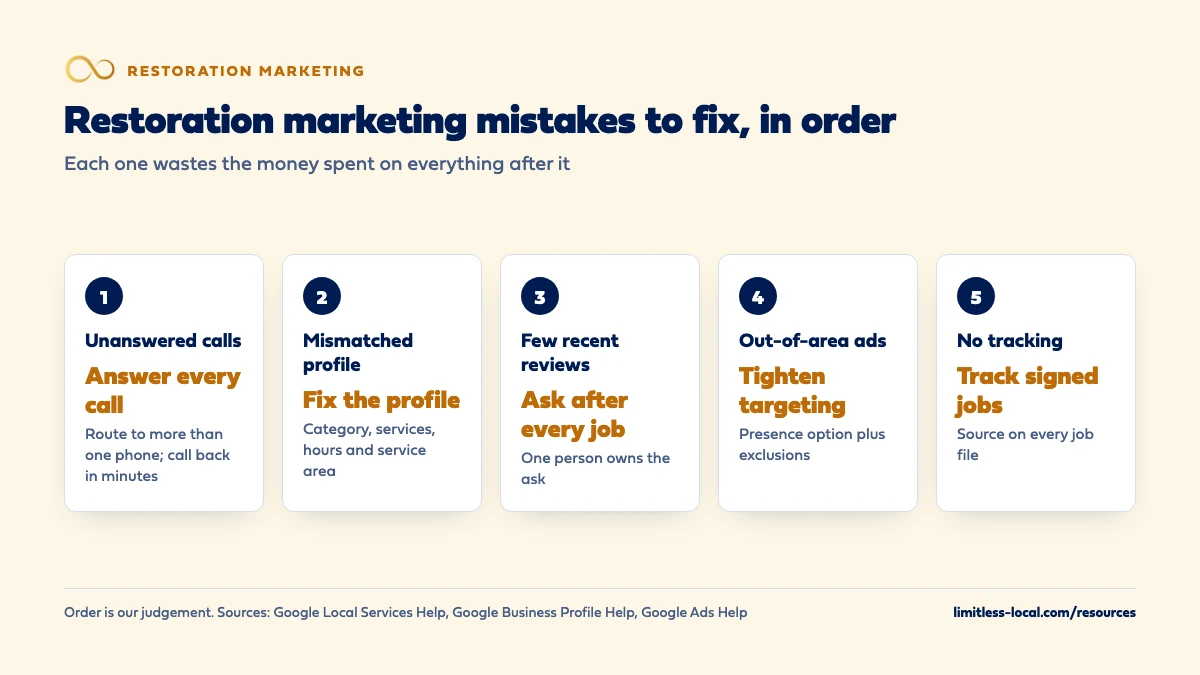
The mistakes that cost restoration companies the most leads are usually not about which channel they picked. They are emergency calls that go unanswered, a Google profile that doesn’t match the work or the hours, too few recent reviews, ads that show to people outside the area the crews can reach, and no tracking from lead to signed job. Fix them roughly in that order, because each one wastes the money and effort spent on everything after it.
Most of the fixes on this list are setup and habit, not spend, which is why we start every engagement with the foundation (tracking, follow-up and a clean online presence) before turning up lead flow. Our restoration marketing page covers how we work with water, fire and mold companies, and the packages page lists what each tier includes. For every channel side by side, the restoration marketing guide is the place to start, and the restoration marketing questions library takes each fix one question at a time.
Which marketing mistakes cost restoration companies the most leads?
The ranking below is our judgement, ordered by how much each mistake tends to cost and how much it drags down everything after it. It is not drawn from a study of restoration companies; it’s the order in which a problem early in the list wastes the effort spent fixing problems later in it.
- Letting emergency calls go unanswered.
- A Google profile that doesn’t match your work or hours.
- Too few recent reviews.
- Showing ads to people outside the area you can reach.
- One website page trying to cover every service.
- No tracking from lead to signed job.
- Leaning on a single source of work.
- Stopping marketing between storms.
- Taking shortcuts that break Google’s rules.
Notice what’s missing: “picking the wrong channel” isn’t near the top. In our judgement, most restoration companies that say their ads or SEO don’t work have a problem on this list that would sink any channel.
Mistake 1: Letting emergency calls go unanswered
Someone with water on the floor doesn’t leave a message and wait. The EPA’s guide to mold and moisture says it’s important to dry water-damaged areas and items within 24-48 hours to prevent mold growth, so in our judgement a homeowner who reaches voicemail usually calls the next company on the list.
If you run Local Services Ads, a missed call can cost you twice. Google’s page on how leads work counts a missed call during your business hours as a valid lead when the caller stays on the line for more than 20 seconds, and its page on ad rankings says missed calls may negatively affect your responsiveness, one of the factors in where your ad shows.
The fix is routing that rings more than one phone, a person on call every night, and a callback within minutes for anything that slips through. How fast you need to answer emergency calls covers the standard to hold your team to.
Mistake 2: A Google profile that doesn't match your work or hours
Your Google Business Profile is often the first thing a homeowner sees, and Google uses it to decide which searches you match. Google’s local ranking help says businesses with complete and accurate information are more likely to show up in local search results, and that if your information isn’t accurate, your profile might not show up for relevant searches in your area.
The restoration versions of this mistake are specific: a primary category that doesn’t match the work you most want, water, mold, fire and sewage services missing from the services list, hours that say “closed” at night when you answer around the clock, and a service area drawn wider than your crews can reach. Each one quietly removes you from searches you could have won. Which categories a restoration company should pick is the first thing to check.
Mistake 3: Too few recent reviews
Reviews count in two places. In the map results, Google’s local ranking help says prominence is based partly on how many reviews you have, and that more reviews and positive ratings can help your local ranking. In Local Services Ads, Google lists your rating and number of reviews among the profile quality factors that affect where your ad shows.
The mistake is rarely bad reviews. It’s not asking. A restoration crew finishes a stressful job, the homeowner is relieved and grateful, and nobody sends a review link because everyone is already on the way to the next call. Months later the profile shows a handful of reviews, the newest from last year. In our judgement, the companies that build reviews steadily treat the ask as part of closing out every job, with one person responsible for it. Getting more five-star Google reviews covers who asks, when and how.
Mistake 4: Showing ads to people outside the area you can reach
Google Ads location targeting reaches further than many owners realize. Google’s page on advanced location options says the default, recommended setting reaches people who are likely to be in or regularly in your targeted locations, as well as people who have shown interest in them. The Presence option limits ads to people likely to be located, or regularly located, in the places you target.
For a restoration company, in our judgement, Presence is usually the safer start, because the lead that matters is someone standing in a wet house you can drive to tonight. Out-of-area calls still cost money, still take time to screen, and still make a lead report look busier than the job board. Add exclusions for the places you won’t drive to, and check the locations report monthly. How tight to draw your ad service area covers the settings in more detail.
Curious what your marketing is actually booking?
Get a free visibility audit — no obligation, no sales pitch.
Mistake 5: One website page trying to cover every service
Water extraction, mold remediation, fire and smoke cleanup and sewage cleanup are different searches from different people in different situations. A single “Services” page that lists all of them in a paragraph gives Google little to match each search to, and gives the homeowner little reason to believe you handle their problem.
In our judgement, each service you want calls for deserves its own page that says what you do, how fast you arrive, what happens on the first visit and how to reach you at any hour, with real photos from your own jobs. The same pages also give your ads somewhere better to send people than the homepage. This is a one-time build with light upkeep, which makes it one of the cheaper fixes on the list.
Mistake 6: No tracking from lead to signed job
Without tracking, every other mistake on this list is invisible. You see the total number of jobs drop, but not whether it’s the ads, the profile, the reviews or the phones. Google’s page on conversion measurement says conversions help you learn which keywords, ads and campaigns are best at driving valuable customer activity and help you understand return on investment, but Google can only measure what you tell it counts.
The restoration version of the fix: a tracking number or tagged link for each channel, a lead source recorded on the job file the day the call comes in, and a monthly count of signed jobs and money collected by source. Tracking which marketing brings booked restoration jobs walks through the setup, including insurance-paid work that pays out weeks later.
Mistake 7: Leaning on a single source of work
Plenty of restoration companies grow on one source: an insurance program, a single referral partner, or Local Services Ads alone. That works until it doesn’t. A program changes its rules, a partner retires, or your ad account has a problem, and the phone goes quiet overnight. The SBA’s marketing budget guide puts it bluntly: don’t put all your eggs in one marketing basket.
In our judgement, a healthy mix for most restoration companies has at least one channel you own (your Google profile, website and reviews), at least one you pay for (ads or Local Services Ads), and at least one relationship channel (plumbers, property managers or agents). You don’t need all of them at full strength; you need enough that losing one doesn’t stop the work.
Mistake 8: Stopping marketing between storms
When a storm brings more calls than the crews can handle, it’s tempting to switch everything off, and once things quiet down, to leave it off to save money. The SBA’s budget guide describes the trap: sales drop, so you cut marketing, and sales decline further.
Pausing ads during a surge is reasonable; they can generate leads again within days of switching back on. Stopping SEO and review work is the costly part, because SEO typically takes 3-6 months to show meaningful organic growth, and in our judgement much of that ramp has to be rebuilt if the work stops. Keeping restoration work coming in between storms covers what to keep running in the quiet months.
Mistake 9: Taking shortcuts that break Google's rules
Some fixes look faster than they are. Google’s guidelines for representing your business say your profile name should reflect your real-world business name, and that including unnecessary information in it isn’t permitted and could result in suspension of your profile. The same guidelines say a rented mailing address you don’t operate from, known as a virtual office, isn’t eligible for a Business Profile, and that categories shouldn’t be used solely as keywords.
So adding “Emergency Water Damage” or a city name to your business name, or setting up a profile at a mailbox to reach a new town, risks the profile that brings in your calls. In our judgement, a suspended profile costs far more leads than the shortcut could ever win.
Which mistake should I fix first?
Work down the list in order, and check each one against your own records rather than guessing:
- Phones. Pull a month of call logs and count missed calls that weren’t returned within minutes.
- Google profile. Check the category, services, hours and service area against the work you actually do.
- Reviews. Count how many came in during the last 90 days, and decide who asks after every job.
- Ad targeting. Check the locations report and the location option on every campaign.
- Service pages and tracking. Build what’s missing, then let a few months of data tell you where to spend next.
Only after those does the channel question deserve a real answer. In our judgement, owners who fix the first few often find the channel they were about to drop starts working.
Not sure which of these is costing you jobs?
A free visibility audit checks the Google profile, reviews, site and tracking, and shows what to fix first.
What's different for restoration companies
The emergency window is short. In our judgement, many trades can call a lead back tomorrow. With active water damage, the homeowner usually can’t wait that long, so a call-handling mistake costs a restoration company more than the same mistake costs most other home-service businesses.
Program and referral work can hide the problem. Insurance programs and referral partners may keep the crews busy while the company’s own marketing quietly fails. If those sources drop, the gap appears all at once. Track your own channels separately so you see it coming.
Storms distort the numbers. A surge month can make weak marketing look strong, and the month after a storm can make good marketing look broken. Compare like with like: the same months last year, or months without a weather event.
A worked example: what missed calls do to cost per signed job
These numbers are made up to show the math, not a benchmark for your market. Say a restoration company spends $3,000 a month on ads and gets 40 leads, so each lead costs $75. About one in four answered leads becomes a signed job.
If every lead is answered, 40 leads at one in four gives 10 signed jobs, and each signed job costs $3,000 divided by 10, or $300 in ad spend.
Now say 8 of those calls ring out and aren’t called back in time. Only 32 leads get answered, and one in four of 32 is 8 signed jobs. The ad spend hasn’t changed, so each signed job now costs $3,000 divided by 8, or $375. The 8 missed calls cost $600 in ad spend (8 times $75) and two jobs the company had already paid to find. No change to the ads would fix that; answering the phone would.
Frequently asked questions
Is it my marketing or my market that's slow?
Check your own numbers before blaming the market. If calls are steady but signed jobs dropped, the problem is likely call handling or follow-up; if calls dropped too, look at your profile, reviews and ad settings first.
Should I switch agencies if my leads dried up?
Not before you’ve checked the phones, profile and tracking yourself. Several mistakes on this list sit with the company, not the agency, and a new agency would inherit them.
Do bad reviews cost more leads than few reviews?
In our judgement, a thin or stale review history is the more common problem. A few bad reviews with calm, specific replies tend to matter less to a homeowner than a profile with almost no recent reviews at all.
Is it a mistake to buy shared leads?
Not always, but shared leads go to several companies at once, so speed decides who gets the job. They work best for companies that already answer every call within minutes.
How often should I check for these mistakes?
Monthly for calls, reviews and ad locations; every few months for the profile and service pages, and any time you add a service or town.
Key takeaways
- In our judgement, unanswered emergency calls are the most expensive mistake, because they waste every dollar spent bringing the call in.
- Google says complete, accurate profile information makes you more likely to show in local results.
- Review counts and ratings play a part in both map rankings and Local Services Ads.
- Google Ads’ default location setting can reach people outside your area; Presence limits it.
- Track every lead to a signed job, then fix mistakes in order before changing channels.
Want a second set of eyes on your setup?
We'll look at how you show up locally and where calls are leaking, then send you a plain-English breakdown.
More in this section
- How should a restoration company follow up on leads that don't book?
- What marketing does a brand-new restoration company need first?
- How should a restoration company market to real estate agents?
- How fast do restoration marketing channels produce leads?
- How should a restoration company market to commercial properties?
Sources
- How leads work — Google Local Services Help
- About ad rankings — Google Local Services Help
- Tips to improve your local ranking on Google — Google Business Profile Help
- Guidelines for representing your business on Google — Google Business Profile Help
- About advanced location options — Google Ads Help
- About conversion measurement — Google Ads Help
- How to Get the Most From Your Marketing Budget — U.S. Small Business Administration
- A Brief Guide to Mold, Moisture and Your Home — U.S. Environmental Protection Agency