
How do I use my Google reviews in my electrical marketing?

- Where should an electrician put existing Google reviews to win more jobs?
- Why use reviews outside your Google profile at all?
- Do I need permission to put Google reviews on my website or in ads?
- How do I show my star rating the right way?
- Where should reviews go on my electrical website?
- How do I pick which reviews to use?
- What rules apply when reviews become advertising?
- How do I use reviews in quote follow-ups?
- Can I use reviews in my Google Ads and social ads?
- Should I ever use negative reviews?
- How do I keep fresh reviews coming so there's something to use?
- What's different about using reviews for electricians
- A worked example: one month of putting reviews to work
- Frequently asked questions
- Key takeaways
- More in this section
- Sources
The short version
- Match reviews to jobs: panel upgrade reviews on the panel upgrade page.
- Ask the reviewer before quoting their words in marketing.
- Describe your rating as being on Google, with an as-of date.
- Add a relevant review or two to quote follow-ups.
- Quote word for word, and keep replying to every review.
For electrical contractors who’ve built up good Google reviews and want them working on the website, in ads and in quote follow-ups, not just sitting on the profile.
Get a free visibility audit · Book a growth call
Where should an electrician put existing Google reviews to win more jobs?
Put your reviews where homeowners decide: on the service page for the job they mention, next to your quote form and phone number, in follow-up emails on open quotes, and in your ads as your star rating described as being on Google with an as-of date. Google says reviews belong to the people who wrote them, so ask each reviewer for consent before you quote their words on your website or in ads; you can ask by replying to the review. Quote reviews exactly, never edit them to say more than the customer did, and keep replying to every review, good and bad, on the profile itself.
Review response and review generation are part of every Limitless Engine package, starting with Essentials at $3,500 a month, alongside Google Business Profile management and our local SEO work. Our electrical contractor marketing page explains how we work with electrical shops, and the rest of the electrical marketing questions library goes question by question.
Why use reviews outside your Google profile at all?
Most homeowners see your reviews once, on Google, then go to your website, read an estimate or see an ad, and the reviews are gone. They’re still deciding at each of those steps, and an electrical job asks a lot of trust: a stranger in the house, working on something that can start a fire if it’s done wrong.
Research on online shopping from Northwestern’s Medill Spiegel Research Center, first published in 2017, found that reviews had a bigger effect on purchase likelihood for higher-priced products than cheaper ones, and that purchase likelihood typically peaked at ratings between 4.0 and 4.7, then began to fall as ratings approached 5.0. That was retail product shopping, not electrical work. The practical lesson still fits a panel upgrade or a generator: the bigger the ticket, the more a homeowner looks for proof, and a believable mix of reviews beats a wall of perfect ones.
Do I need permission to put Google reviews on my website or in ads?
Google says yes. Its guidelines for referring to customer reviews say reviews belong to the person who wrote them, even on your listing, and that you must get the reviewer’s consent to use their review in your own marketing, such as on your website or in print or digital ads. Google can’t give you their contact details, but you can ask by replying to the review.
A simple reply works: thank them for the review, then ask whether you can share it on your website. Keep a note of who said yes, with the date.
Two easier routes need no quote at all:
- Link to your reviews. Google’s page on managing customer reviews shows how to copy a direct link to any single review from Google Maps, and calls positive reviews helpful testimonials for your business.
- Ask at the job. When a happy customer tells your tech how glad they are, the office can follow up and ask if you can quote them. That’s a testimonial you collected yourself.
How do I show my star rating the right way?
There are rules for how you talk about your rating, too:
- Describe it as your rating on Google, as in “4.8 stars on Google.”
- Don’t call it a “Google rating” or say you’re “Google-rated,” which implies Google rated you.
- Include an as-of date whenever you show your overall rating or number of reviews.
- Don’t add stars next to Google’s name or logo, and don’t use unofficial Google badges.
The as-of date also keeps you honest with yourself. A truck wrap or mailer that says “200 reviews” ages badly when the real count has moved on, so put dated numbers on things you reprint often, like the website, quote templates and social posts, and keep long-life items like truck graphics to a QR code that opens your reviews.
Where should reviews go on my electrical website?
Put each review where it answers the question the visitor has right then:
- Service pages. A review that mentions a panel upgrade belongs on the panel upgrade page. One about an EV charger install goes on that page. Matching the job does far more than a generic “great service” quote on the home page.
- Next to the phone number and quote form. That’s the moment of decision. A short review about showing up on time or explaining the price clearly can be the nudge.
- Town pages, if you have them, with reviews from customers in that town. Use only the first name and town if the customer agreed to that.
- The home page, with your rating on Google, the as-of date and a link to read them all.
Keep them as text on the page, not just screenshots, so they’re readable on a phone. What an electrician’s website needs to get more calls covers the rest of the page around them.
Curious what your marketing is actually booking?
Get a free visibility audit — no obligation, no sales pitch.
How do I pick which reviews to use?
Read your reviews like a homeowner who’s about to call. The best ones to feature:
- Name the job, such as a panel upgrade, a generator, an EV charger or a rewire. When customers review a service business, Google may ask them to choose the service they hired you for, so many of yours may already show it.
- Name a worry and how it went, such as “they found the problem the last electrician missed” or “pulled the permit and handled the inspection.”
- Mention the people, like a tech by name or a helpful office. It shows real people did the work.
- Are recent. A review from years ago next to a current price feels stale.
Skip reviews that make promises you can’t repeat for everyone, such as a price or a same-day result you can’t always deliver. If a review claims a specific result, featuring it can suggest every customer should expect the same.
What rules apply when reviews become advertising?
Once you put a customer’s review in your own ad or on your website, it’s a testimonial, not just a review. The FTC’s questions and answers on its Consumer Reviews and Testimonials Rule say that when a business features consumer reviews in its advertising or marketing materials, they become testimonials, and a business that puts fake or false testimonials on its own website could be liable. Its Endorsement Guides questions and answers add a few points that matter here:
- You can ask customers about their experience and feature their comments in your ads.
- If customers were told in advance their comments might be used in advertising, that should be disclosed, because the chance to be featured can be seen as having value.
- A customer whose review a business changed in a misleading way isn’t liable for the change, and can complain and report it.
- Endorsements that claim specific results are usually read as what others can expect, and “results may vary” doesn’t change that.
In practice: quote word for word, trim only in ways that don’t change the meaning, never add words, never write reviews yourself or have staff pose as customers, and keep the reviewer’s consent on file.
How do I use reviews in quote follow-ups?
This is where reviews earn the most for an electrician. A homeowner with a quote for a panel upgrade, a service change or a whole-home generator is comparing you with other bids, often for days. A short follow-up with one review from a customer who had the same job done gives them a reason to pick you that isn’t price.
- In the first follow-up, include one review about the same job type, with the customer’s consent.
- In a later follow-up, include a review that speaks to a common worry: cleanliness, permits, or the crew explaining what they found.
- Add a link to all your reviews on Google so they can read the rest.
Most field software can hold this in a saved template. How to follow up on electrical quotes automatically covers the timing and setup.
Can I use reviews in my Google Ads and social ads?
Yes, within the same rules. Your rating on Google, described the right way and dated, can go in ad text, and a consented customer quote can go in a Facebook or Instagram ad, ideally with a photo of the actual job, as long as it doesn’t promise a result most customers won’t get.
Local Services Ads use your reviews automatically. Google’s page on how Local Services Ads rank lists your rating and number of reviews among the profile-quality factors, along with your average response time, and says higher quality profiles may rank higher and pay lower costs per lead. How reviews and response time change your electrical ad results goes further into that.
Should I ever use negative reviews?
Don’t feature them in ads, but don’t hide them either. Negative reviews add credibility, and a profile with only perfect reviews can look less believable, not more.
What turns a bad review into marketing is your reply. A calm, specific reply that says what you did about the problem is something every future customer reads. It shows how you handle it when something goes wrong, which is what homeowners worry about with an electrician they’ve never met. How an electrician should respond to a negative Google review walks through what to write.
If you put a full reviews feed on your own site, show it in date order, not with every 5-star review pushed to the top.
How do I keep fresh reviews coming so there's something to use?
Using reviews only works if new ones keep arriving. Ask every customer at a set moment, such as when the power is back on or the invoice is paid, with your review link or QR code, and send the request from your field software so it doesn’t depend on a tech remembering. Google’s help page on review links and QR codes says offering incentives for reviews is fake engagement and strictly prohibited, so ask everyone, offer nothing, and let the reviews be what they are.
How to get more Google reviews for your electrical business goes step by step through the asking. Once a month, skim what came in, pick the ones that name a job, and ask those reviewers if you can share them.
Want to see where your company stands?
A free visibility audit shows where you show up on Google, Maps and AI answers, and what it's costing you in calls.
What's different about using reviews for electricians
Safety is the hidden worry. Homeowners rarely say it, but they’re trusting you with wiring inside their walls. Reviews that mention permits, inspections, clean work and a tech who explained what he found speak to that better than “five stars, great job.”
Job types are far apart. A review about a fast outlet repair won’t sell a panel upgrade. Sort reviews by job type and use each on the matching page and quote.
Commercial buyers read reviews differently. A property manager wants to see reliability and response time. Reviews from businesses, with their consent, belong on your commercial page, not mixed in with residential ones.
Reviews help you hire, too. Reviews that name your techs show good electricians that customers notice good work at your shop.
A worked example: one month of putting reviews to work
These numbers are made up to show the routine, not a benchmark for your shop. Say an electrical contractor got 14 new Google reviews last month.
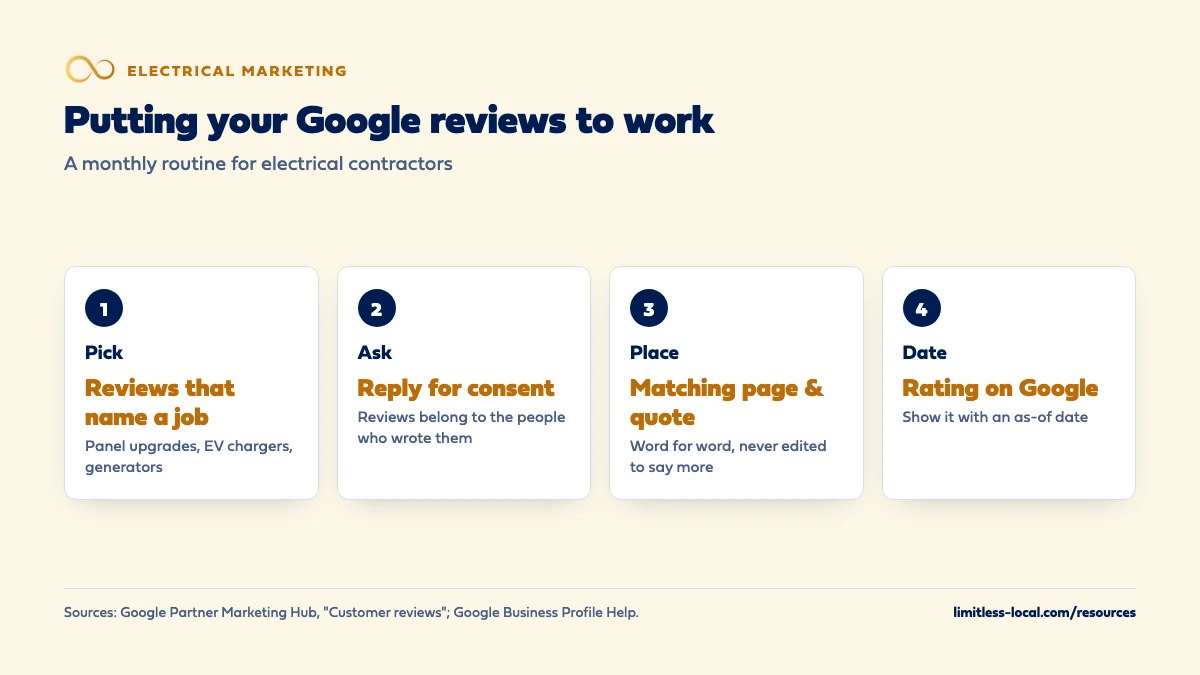
- Sort: 6 name a job, including 3 panel upgrades, 2 EV chargers and 1 generator. The other 8 are short “great service” reviews.
- Ask: the owner replies to the 6, thanks each customer and asks if the shop can share the review on its website. 4 say yes.
- Place: 2 panel upgrade reviews go on the panel upgrade page and into the panel quote follow-up template. The EV charger review goes on the EV charger page. The generator review goes into the generator quote email.
- Update: the home page rating line changes to the new rating on Google with this month’s date.
About an hour of office time, and every main service page now has a recent, consented review from a customer who had that exact job done.
Frequently asked questions
Can I embed my Google reviews on my website with a widget?
Many website tools offer review widgets. Whatever you use, show reviews in date order, link back to your profile on Google, and if a tool lets you hide reviews, don’t use that to show only perfect ones.
Can I put my star rating on my truck wrap?
You can, but the number goes out of date quickly and Google asks for an as-of date with your rating. A QR code that opens your reviews works better on things you won’t reprint for years.
Can I give customers a discount for leaving a review I can use?
No. Incentives for posting, changing or removing reviews count as fake engagement on Google. Ask every customer and offer nothing.
Can I fix a typo in a review before I quote it?
Keep quotes word for word. If a typo makes it hard to read, choose a different review or ask the customer for a short quote you can use, rather than editing their words.
Do I need the customer's full name on a testimonial?
No. A first name and town is common, as long as the customer agreed to how they’ll be shown.
Should I use reviews from Yelp or Facebook too?
The same idea applies: ask for consent, quote exactly, and follow each platform’s own rules for referring to its reviews.
Key takeaways
- Google says reviews belong to the reviewer, so get consent before quoting them on your site or in ads; replying to the review is one way to ask.
- Describe your rating as on Google, with an as-of date, and never as a “Google rating.”
- Match each review to the job it mentions, on that service page and in that quote’s follow-up.
- A featured review is a testimonial: quote it word for word and never invent or alter one.
- Reply to every review; a calm reply to a bad one is marketing too.
Not sure what's working right now?
Start with a free visibility audit: rankings, Google profile, reviews and tracking, checked against your service area.
More in this section
- How do I get more Google reviews for my electrical business?
- What should an electrician do when Google reviews drop?
- How many Google reviews does an electrician need to compete?
- How do I optimize my electrician Google Business Profile?
- How do I know if my electrical marketing agency is getting results?
Sources
- Customer reviews — Google Partner Marketing Hub
- Manage customer reviews — Google Business Profile Help
- The Consumer Reviews and Testimonials Rule: Questions and Answers — Federal Trade Commission
- FTC's Endorsement Guides: What People Are Asking — Federal Trade Commission
- How Online Reviews Influence Sales — Medill Spiegel Research Center, Northwestern University
- About ad rankings — Google Local Services Help
- Create a Google link or QR code to request reviews — Google Business Profile Help