
How do I calculate my HVAC lead-to-booked-call conversion rate?

- What's the formula for an HVAC company's lead-to-booked-call rate, step by step?
- What is a lead-to-booked-call conversion rate?
- What's the formula?
- Where should I count my leads from?
- Which leads should count, and which shouldn't?
- How do I decide whether a lead booked?
- How do I pull the numbers out of my software?
- Should I calculate it by lead source?
- Should missed calls count against the rate?
- How do I use the rate to work out how many leads I need?
- What does a low or falling rate usually point to?
- What mistakes throw the number off?
- What's different about booking rates for HVAC companies
- A worked example: one month of HVAC leads
- Frequently asked questions
- Key takeaways
- More in this section
- Sources
The short version
- Booked leads divided by real leads, times 100, for the same month.
- Count each person once and drop spam, vendors and existing jobs.
- Booked means a date and time on the schedule, not a callback.
- Run it by lead source, then use it to work out how many leads you need.
For HVAC owners who want one honest number for how many real leads turn into appointments, and how to use it to plan how many leads they need.
Get a free visibility audit · Book a growth call
What's the formula for an HVAC company's lead-to-booked-call rate, step by step?
Divide the leads that booked by the real leads you got in the same period, then multiply by 100. Count real leads only: calls, forms and messages from people in your area asking for work you do, each person counted once, and leave out spam, wrong numbers, vendors and existing customers calling about a job already on the schedule. If 120 real leads came in last month and 54 of them ended with a time on the schedule, your lead-to-booked-call conversion rate is 45%.
That number sits at the center of how we report. Every one of our HVAC marketing packages includes call tracking with recording and transcription, form and chat lead tracking, source tagging and a monthly cost-per-lead breakdown, so the leads and the bookings can be counted by channel instead of guessed. The HVAC marketing guide covers every channel, and the HVAC marketing questions library goes question by question.
What is a lead-to-booked-call conversion rate?
It’s the share of real leads that end up on your schedule. A homeowner calls about a furnace that won’t light, fills in a form for a replacement quote, or sends a message from your Google profile. If that conversation ends with a date and time, the lead booked. The rate tells you how good your company is at turning interest into appointments.
It’s not the same as the “conversion rate” in Google Ads. Google Ads defines conversion rate as conversions divided by ad interactions, such as clicks, in the same period. That measures how often clicks become calls or forms. Your lead-to-booked-call rate starts one step later, at the lead, and ends at the schedule.
Keeping the two apart matters. A high ad conversion rate with a low booking rate means the ads bring calls and the office isn’t closing them. The reverse means the office books well and the ads are the weak link.
What's the formula?
One line:
Booked leads ÷ real leads × 100 = lead-to-booked-call conversion rate
Three rules keep it honest:
- Same period on both sides. Count leads that came in during the month, and how many of those leads booked, even if the booking happened a few days into the next month.
- People, not calls. A homeowner who calls three times about the same problem is one lead.
- Real leads only. Spam, wrong numbers and vendors aren’t leads, and leaving them in makes your office look worse than it is.
A month is the right period for most HVAC companies. A week is too few leads for a steady number, and a quarter hides the swings between peak and shoulder seasons.
Where should I count my leads from?
From every place a homeowner can reach you, pulled into one list for the month:
- Phone calls, from your call tracking log or phone system, including calls to tracking numbers on ads and your Google profile.
- Web forms and online booking requests from your website.
- Messages from your Google profile, Local Services Ads, Facebook and website chat.
- Leads entered by hand, like a walk-in or a referral who texted a tech.
A simple spreadsheet works: one row per person, with columns for date, name or number, source, real lead (yes or no), booked (yes or no) and job type. If your call tracking and field software already hold all of it, a report may do the work for you, but it’s worth building the list by hand once so you know what the report is counting.
Which leads should count, and which shouldn't?
Count: homeowners and businesses in your service area asking for work you do, whether they called, filled in a form or sent a message. Count missed calls from real prospects too, because they were leads that didn’t book.
Leave out:
- Spam, robocalls and wrong numbers.
- Vendors, suppliers, job seekers and sales pitches.
- Existing customers calling about a job already on the schedule, like a reschedule or an arrival-time question.
- People outside your service area, or asking for work you don’t do. Note these separately, because a lot of them can mean your ads or listings are pulling the wrong searches.
Count each person once. Call tracking helps, but check how it defines a person. In the CallRail Unique Callers report, callers are identified by their phone number, so the same homeowner calling from a cell phone and a landline shows up as two callers. Merge those by hand when you spot them.
How do I decide whether a lead booked?
Use one plain rule: a lead booked when there’s a date and time on the schedule. That means a service call, a tune-up or a replacement estimate appointment.
These don’t count as booked:
- “We’ll call you back with a time.”
- A quote emailed without an appointment.
- A homeowner who said they’d check with their spouse.
A booking that later cancels still counts as booked for this rate, because the office did its job. Track cancellations as their own number, since a high cancellation rate points to a different problem, like long wait times or price surprises at the door.
Write the rule down and make sure the office, the techs and anyone reporting on your marketing use the same one. When everyone defines “booked” differently, the rate means nothing. The difference between a click, a lead and a booked HVAC job lays out the definitions in full.
Curious what your marketing is actually booking?
Get a free visibility audit — no obligation, no sales pitch.
How do I pull the numbers out of my software?
Most HVAC field and call tracking tools can give you part of this. Know what each one counts:
- Housecall Pro. With Pipeline, its lead conversion reporting shows a conversion rate: leads moved to won, out of all leads, including those still open. Open leads pull that rate down until they’re closed out, so close them out before you read the number.
- Jobber. The Lead Source Report shows leads created in a date range and how many have a request, a quote, a job and an invoice attached. Leads with a job divided by leads gets you close to a booking rate by source.
- ServiceTitan. Its call classifications mark calls as booked, unbooked, abandoned or not a lead. Set up call reasons first: without them, any call longer than 60 seconds is classified as a lead.
- CallRail. You can qualify leads by hand, with keypad scoring as soon as a call ends, or automatically with automation rules, then tag the ones that booked.
Whatever you use, spot-check a sample of calls against recordings each month. Software can only count what people tag.
Should I calculate it by lead source?
Yes, once you have the overall number. The same office can book a referral at a much higher rate than a click from a broad ad, and the blended number hides that.
Common splits for an HVAC company:
- Google Ads
- Local Services Ads
- Google profile and organic search
- Referrals and repeat customers
- Direct mail, TV or anything else with its own number
Be careful with small sources. A source with eight leads in a month can swing from 25% to 50% on two calls. Look at three months together before you decide a source books badly.
Booking rate by source is half of the picture. The other half is what each lead cost, and together they give you cost per booked call, the number that decides where the budget should go. Tracking whether your HVAC marketing is paying off covers the source-tagging setup that makes the split possible.
Should missed calls count against the rate?
For this rate, yes. A real prospect who called and didn’t get through is a lead that didn’t book, and leaving them out flatters the number.
It helps to work out two versions side by side:
- Booking rate on all real leads, missed calls included. This is the one to plan with, because it’s what your marketing actually produces in booked calls.
- Booking rate on answered leads only. This shows how well the office handles the calls it picks up.
If the second is healthy and the first is poor, your problem is answering, not selling. That’s often the cheapest fix in the business. How many missed calls is too many for an HVAC company shows how to find when and why calls are slipping through.

How do I use the rate to work out how many leads I need?
Flip the formula around:
Booked calls you need ÷ booking rate = real leads you need
If you want a certain number of booked calls next month and your rate is 45%, divide that number by 0.45. Then multiply the leads you need by what a lead costs you, by source, to see what the plan should cost.
Two cautions. Use your own rate from the last few months, not a number from an article, because booking rates depend on your market, your prices and your office. And plan with the season’s rate: if you book a lower share of leads in peak weeks because the schedule is full, use that lower number for July.
The worked example below runs the math. For the full chain from a revenue goal back to booked calls and leads, see how many booked calls an HVAC company needs to hit its goal.
What does a low or falling rate usually point to?
A low booking rate has two kinds of causes, and the fix depends on which one you have.
The leads are wrong. Lots of out-of-area calls, price shoppers, people wanting a part or a free quote on work you don’t do. That points back at the marketing: the searches the ads show for, the service area, the offer. Fixing HVAC leads that are mostly junk works through that side.
The handling is wrong. Slow callbacks on forms, missed calls at lunch, a caller who asks for a price and gets no next step. Listen to a handful of unbooked calls each week; you’ll usually hear the pattern quickly.
A sudden drop with the same marketing usually means something changed in the office, like a new hire, a phone system change or a full schedule. A slow slide over months more often means lead quality has drifted.
What mistakes throw the number off?
- Counting calls instead of people. Three calls from one homeowner who booked once count as three leads and one booking, which drags your rate down.
- Leaving existing customers in. Reschedules and arrival-time questions aren’t leads, but they often book something, which inflates the rate.
- Mixing periods. Bookings from March leads counted against April leads.
- Counting open leads as lost too soon. A replacement estimate still being followed up isn’t a no yet.
- Trusting a report you’ve never checked. If your software has never been set up to tell leads from non-leads, it may count every long call as a lead.
- Comparing with someone else’s number. Their definition of a lead is almost never yours.
Want to see where your company stands?
A free visibility audit shows where you show up on Google, Maps and AI answers, and what it's costing you in calls.
What's different about booking rates for HVAC companies
Emergencies and planned work book differently. A no-heat call in January tends to book the moment you offer a time. A homeowner asking about a new system is shopping, may want a price on the phone and often compares several quotes. Split your rate by repair, maintenance and replacement if you can.
Peak season can lower the rate for a good reason. When the schedule is full for days, some callers go elsewhere. That’s a capacity problem, not a sales problem, and it’s worth knowing which one you’re looking at before you change the marketing.
Maintenance plan members aren’t new leads. Calls from members scheduling their included tune-ups belong in their own bucket. Leaving them in makes the rate look better than your marketing really is.
After-hours calls. If nights and weekends go to voicemail, compare the after-hours booking rate with the daytime one. The gap is often the case for an answering setup.
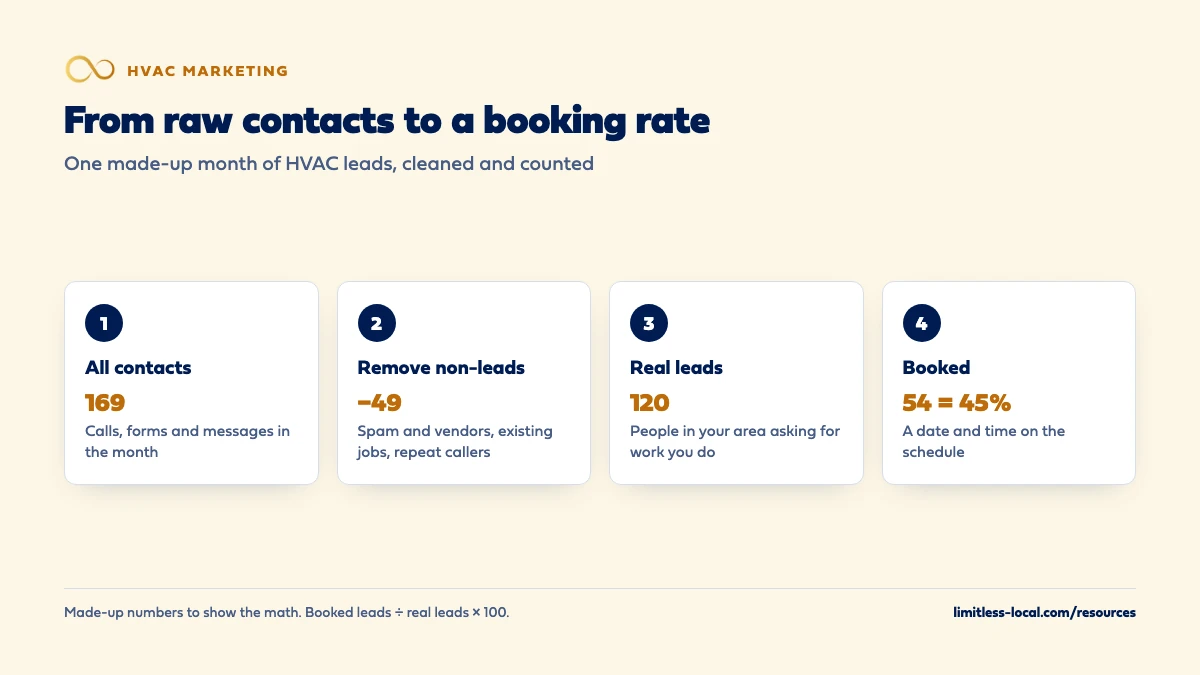
A worked example: one month of HVAC leads
These numbers are made up to show the math, not a benchmark for your market.
Your call tracking, forms and messages show 169 contacts in March. You clean out the 49 that weren’t real leads:
- 22 were spam, wrong numbers or vendors.
- 15 were existing customers calling about jobs already scheduled.
- 12 were repeat calls from people already on the list.
That leaves 120 real leads. Of those, 54 ended with a date and time on the schedule. 54 ÷ 120 × 100 = 45%.
By source:
- Google Ads: 52 leads, 21 booked, about 40%.
- Local Services Ads: 28 leads, 14 booked, 50%.
- Google profile and organic search: 40 leads, 19 booked, about 48%.
Now plan April. You want 72 booked calls. At 45%, that’s 72 ÷ 0.45 = 160 real leads. If you know what a lead costs from each source, multiply it out to see what those 160 leads should cost, and whether moving budget toward the higher-booking sources makes the plan cheaper.
Frequently asked questions
Is booking rate the same as close rate?
No. Booking rate measures leads that get an appointment. Close rate measures appointments, usually estimates, that turn into sold jobs. You need both, because a replacement estimate can book and still not sell.
Should form leads and phone leads be counted together?
Count them together for the overall rate, then look at each separately. Forms often book at a different rate than calls, mostly because of how fast someone follows up.
What if a lead books two months later?
Count it as booked against the month the lead came in, and update last month’s number when it happens. For replacement estimates with long follow-up, recheck the previous month before you finalize it.
Do Local Services Ads leads count the same way?
Yes. A call, message or booking request from an LSA is a lead like any other. Since you pay for each LSA lead, the booking rate on those leads is especially worth knowing.
How do I count a lead that booked a tune-up but called about a replacement?
It booked, so it counts as booked. Tag the job type it booked as, so you can see later whether replacement leads are turning into smaller jobs.
Can my agency calculate this for me?
It can if it has your call recordings or tags and access to which leads booked. Ask how it defines a real lead and a booked call, and check a sample against your own schedule.
Key takeaways
- Lead-to-booked-call rate = booked leads ÷ real leads × 100, for the same month.
- Count people, not calls, and remove spam, vendors and existing customers’ scheduling calls.
- Booked means a date and time on the schedule.
- Work it out by source and by job type, and keep a version with missed calls included.
- Divide the booked calls you need by your rate to see how many real leads you need.
Not sure what's working right now?
Start with a free visibility audit: rankings, Google profile, reviews and tracking, checked against your service area.
More in this section
- What percentage of calls should my HVAC office be booking?
- What cost per booked call should an HVAC company aim for?
- How long does it take an HVAC lead to turn into a booked job?
- How many booked calls does my HVAC company need to hit its goal?
- What is a good ad click to booked call rate for HVAC?
Sources
- Conversion rate: Definition — Google Ads Help
- Conversion Rate Reporting — Housecall Pro Help Center
- Lead Source Report — Jobber Help Center
- Understand call classifications — ServiceTitan Help
- How to qualify leads in CallRail — CallRail Help Center
- Unique Callers report — CallRail Help Center