
What apps and sites can an electrician join to get more bids and jobs?
- Which apps, bid sites and directories are worth an electrician's time in 2026?
- Which apps and sites actually bring electricians work?
- Step 1: Get your Google Business Profile right first
- Step 2: Claim the free neighborhood and review sites
- Step 3: Decide whether pay-per-lead marketplaces are worth it
- Step 4: Get on bid platforms if you want builder and commercial work
- Step 5: Register for public bids if you want government work
- Step 6: Use trade networks and your supply house
- Which should a one-truck shop join first, and which should a bigger shop add?
- How do I keep a handful of profiles from becoming a mess?
- How do I know which platforms are worth keeping?
- Which apps and sites should an electrician skip?
- What's different about these platforms for electricians
- A worked example: one season's platform scorecard
- Frequently asked questions
- Key takeaways
- More in this section
- Sources
The short version
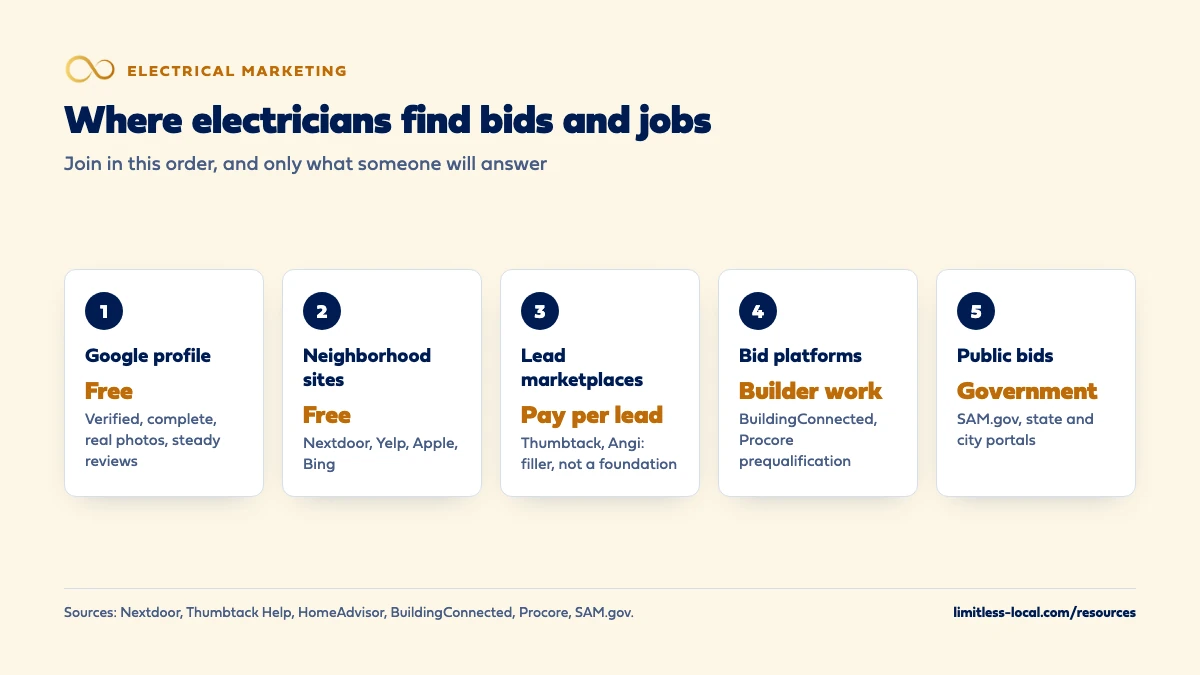
- Free listings first: Google Business Profile, then Nextdoor, Yelp, Apple and Bing.
- Pay-per-lead sites charge per lead, not per job, so use them as filler.
- For builder and commercial work, get on BuildingConnected and answer Procore prequalification requests.
- For government work, register on SAM.gov and your state's procurement site.
For electrical contractors sorting through the sign-up emails and sales calls, who want to know which platforms bring real work and in what order to join them.
Get a free visibility audit · Book a growth call
Which apps, bid sites and directories are worth an electrician's time in 2026?
The platforms worth an electrician’s time fall into a few groups: free listings homeowners already use, starting with your Google Business Profile and then Nextdoor, Yelp, Apple and Bing; pay-per-lead marketplaces like Thumbtack and Angi, where you pay for leads whether or not you win the job; construction bid platforms like BuildingConnected, where general contractors search for subcontractors to invite to bid, and Procore, where they collect prequalification forms; and public bidding, such as registering on SAM.gov for federal contracts. Start with the free listings, add bid platforms if you want builder and commercial work, and treat paid lead sites as filler you judge by cost per booked job. Joining everything at once mostly creates profiles nobody keeps up.
Most of the platforms on this list come back to one thing: whether homeowners can find you and trust you when they look. That’s what our local SEO work covers: your Google Business Profile, your listings synced across 50+ directories, and reviews. Our electrical contractor marketing page explains how that fits an electrical shop, and the rest of the electrical marketing questions library goes question by question.
Which apps and sites actually bring electricians work?
There are dozens of platforms that want your sign-up. Most fit into one of five groups, and each brings a different kind of work:
- Free listings and profiles: Google Business Profile, Nextdoor, Yelp, Apple Business, Bing Places, Facebook. Homeowners use them to find and check you. They cost nothing but time.
- Pay-per-lead marketplaces: Thumbtack, Angi and HomeAdvisor. Homeowners post a job or pick a pro; you pay per lead.
- Construction bid platforms: BuildingConnected, Procore and similar. General contractors use them to invite subcontractors to bid and to prequalify them.
- Public bidding: federal, state, county and city procurement sites, for government electrical work.
- Trade networks: equipment makers’ installer programs, supply houses and trade associations.
The right mix depends on the work you want. A residential service shop lives on the first two. A shop chasing new construction and tenant build-outs lives on the third and fourth. Few shops need all five.
Step 1: Get your Google Business Profile right first
Before any app, make sure your Google Business Profile is verified, complete and accurate. It’s free, it’s often the first place a homeowner searching for an electrician nearby sees you, and it’s what puts you in the map results.
Fill in every section that applies: your primary category, the services you offer, your service area, hours, photos of real jobs, and a steady flow of reviews. Answer the calls and messages it sends you. A half-finished profile undercuts every other platform, because homeowners who find you on Nextdoor or Yelp will often look you up on Google before calling.
If you haven’t done this in a while, optimizing your electrician Google Business Profile goes section by section.
Step 2: Claim the free neighborhood and review sites
Next, claim the free profiles homeowners check. Three are worth real attention for an electrician:
- Nextdoor. Nextdoor’s small business page describes a free Business Page, free Business Posts that show in the neighborhood newsfeed, and recommendations from customers. Its Faves come from verified neighbors who hired or chose you, and it says there’s no way to buy them. For a residential electrician, a few Faves in your own neighborhoods can be worth more than a paid ad.
- Yelp. Claim it and keep the details right, even if it rarely sends you calls directly.
- Apple Business and Bing Places. Claim both so the details iPhone and Bing users see are right. A wrong phone number there costs you calls you’ll never know about.
Then add Facebook, your Better Business Bureau profile and the trade and local directories that fit you. Keep the name, address and phone the same everywhere. Which local citations and directories matter for electricians covers the full list and how to clean up duplicates.
Step 3: Decide whether pay-per-lead marketplaces are worth it
Thumbtack, Angi and HomeAdvisor can fill a schedule fast, but read how they charge before you sign up.
- On Thumbtack, you pay for leads: new customers who reach out to you directly. You set your lead prices, and Thumbtack says prices vary with the type and size of the job, how many pros are available and your market.
- HomeAdvisor’s page for contractors says you’re charged for each lead you receive, whether or not you win the job. It also says its monthly spend target is an estimate, not a hard cap, so you can go over it.
That makes them a good fit when you have open slots to fill, can reply within minutes, and track what every lead turns into. They’re a poor fit as the main source of work, because you’re renting customers instead of building a name homeowners search for.
Whether these sites pencil out for you is the whole subject of whether electricians should pay for leads from Angi or Thumbtack, which goes through how each charges and when to stop.
Step 4: Get on bid platforms if you want builder and commercial work
If you want new construction, remodels or commercial jobs, the work often comes through general contractors’ bid platforms, not homeowner apps.
- BuildingConnected. Its help page on bid invites says general contractors search its network for subcontractors to invite to bid. To show up, it suggests a complete company profile, accurate work performed keywords (adding too many outside your scope can hurt), and a service area set to where you’ll actually work. It also suggests contacting general contractors you’ve worked with to ask about upcoming projects being bid there.
- Procore. General contractors who use it can send you prequalification forms through it. Its Prequalification Portal is where subcontractors view and submit the prequalification forms a general contractor or owner asks for.
These platforms don’t replace relationships. A complete profile gets you found; showing up, bidding accurately and passing inspection gets you invited back. Getting general contractors to send you steady work covers the relationship side step by step.
Curious what your marketing is actually booking?
Get a free visibility audit — no obligation, no sales pitch.
Step 5: Register for public bids if you want government work
Government work is its own world, with its own paperwork. For federal contracts, start at SAM.gov. A registration there lets you bid on government contracts as a prime, and assigns your business a Unique Entity ID. If you’d only report as a subawardee under someone else’s federal award, you may not need a full registration and may only need the ID. Registrations have to be renewed every 365 days to stay active.
State, county, city and school district work is usually bid through each government’s own procurement portal, and the rules vary from place to place. Search your state’s procurement site and your city’s bid page, and sign up for notices in the electrical categories. SAM.gov’s registration page also lists APEX Accelerators, formerly known as PTACs, among its resources.
Public bids are slower, more formal and often lowest-price. They suit shops with an office person who can handle bid documents, insurance certificates and prevailing-wage paperwork where it applies.
Step 6: Use trade networks and your supply house
Some of the best leads for specialty work come from the trade itself:
- Equipment installer programs. Many makers of generators, EV chargers, battery systems and smart-home gear run dealer or certified-installer programs, often with a find-an-installer page on their site. If you want more of that work, ask what it takes to get listed.
- Your supply house. Counter staff hear who’s building, who needs a sub and which builders are switching electricians. Be a familiar face.
- Trade and builder associations. Local electrical contractor associations, home builders associations and chambers of commerce bring introductions to builders, property managers and other trades.
- Other trades. HVAC, solar, pool and remodeling companies regularly need an electrician they can count on.
None of these have a sign-up button that fills your schedule. They pay off slowly, through people who already trust you.
Which should a one-truck shop join first, and which should a bigger shop add?
One truck, residential: Google Business Profile, Nextdoor, Yelp, Apple and Bing. Ask every happy customer for a Google review and a Nextdoor Fave. Try one pay-per-lead site only if you have open days to fill and can answer leads within minutes from the job site.
Two to five trucks, growing: everything above, plus a decision on paid channels like Local Services Ads or search ads. Add BuildingConnected and Procore if you want builder work and have someone to handle bids.
Larger or commercial shops: bid platforms and public procurement become core, alongside a strong Google presence for service work. Assign one person to own each platform’s profile, bids and reviews.
Whatever your size, don’t join a platform unless someone will answer what it sends. An unanswered lead or bid invite is money or goodwill thrown away.
How do I keep a handful of profiles from becoming a mess?
- Write down one official version of your business name, address, phone and website, and use it everywhere.
- Keep the logins in one place, under a company email, not a tech’s personal one.
- Make one person responsible for checking each platform’s messages, bids and reviews every day it’s active.
- Reuse your best material: the same real job photos and short descriptions can go on every profile.
- Turn off what you’re not using. Pause pay-per-lead sites when you’re booked, and close profiles you can’t keep up rather than leaving them stale.
Speed matters on every platform that sends leads. A homeowner who messaged three electricians often goes with whoever gets back first, and how fast your office should answer calls applies just as much to app messages as to phone calls.
How do I know which platforms are worth keeping?
Track every lead and bid by where it came from, and look at a full season before deciding. For each platform, write down:
- What you spent, including subscription fees and lead charges.
- Leads or bid invites received.
- Jobs booked or bids won, and the revenue from them.
- Hours you or your office spent on it.
Then compare cost per booked job and revenue per hour across platforms. Free listings will often win on cost, paid marketplaces on speed, and bid platforms on job size. Keep the ones that book work you want at a cost you can live with, and drop the rest. Tracking which electrical marketing brings real jobs covers the setup, including separate tracking numbers by source.
Which apps and sites should an electrician skip?
- Lead sellers you can’t check. If a company won’t tell you how leads are generated, whether they’re shared, and what happens to bad ones, pass.
- Paid directory packages that promise rankings. No listing service can promise where you’ll show up on Google.
- Anything that sells reviews or followers. Reviews only help because homeowners believe they’re real.
- Platforms in categories you don’t do. Paying for leads on jobs you don’t want just to stay busy rarely pays.
- More profiles than you can answer. Five well-run profiles beat fifteen abandoned ones.
Not sure which of these is costing you jobs?
A free visibility audit checks the Google profile, reviews, site and tracking, and shows what to fix first.
What's different about these platforms for electricians
Licensing shows up everywhere. Bid platforms, prequalification forms, marketplaces and public bids all ask about licenses and insurance, and requirements vary by state and city. Keep current copies of your license, insurance certificates and any certifications in one folder so every profile and bid can use them.
You can sell to homeowners and builders at once. Many electrical shops do both residential service and new construction. That splits your platforms into two sets with different rules: homeowner apps reward speed and reviews, bid platforms reward accurate bids and a track record.
Specialty work has its own channels. Generators, EV chargers, battery backup and solar tie-ins often come through installer programs and other trades, not general marketplaces.
Emergency calls don’t wait for apps. A homeowner with no power calls whoever answers first. Make sure every platform that shows your number routes to a phone someone picks up.
A worked example: one season's platform scorecard
These numbers are made up to show how to compare platforms, not a benchmark for your market. A two-truck electrical shop tracks three platforms for a season:
- Google Business Profile: $0 spent, 31 calls and messages, 17 booked jobs.
- A pay-per-lead marketplace: $360 in lead charges, 12 leads, 3 booked jobs, so $120 per booked job. Several leads went to other electricians who answered faster.
- BuildingConnected: $0 spent, 6 bid invites from two general contractors, 2 bids won. Far fewer jobs, but each one much larger.
What the shop does next: keeps pushing reviews on the Google profile, keeps the marketplace only for slow weeks and replies to its leads within minutes, and puts more time into the two general contractors who sent bids. Nothing here required joining another platform.
Frequently asked questions
Is Angi the same as HomeAdvisor?
HomeAdvisor describes itself as powered by Angi. Check which product and pricing you’re signing up for before you commit.
Do I need to pay for Nextdoor to get work from it?
No. The Business Page and Business Posts are free, and Faves come from neighbors who hired you. Nextdoor also sells ads if you want more reach.
Can I get bid invites on BuildingConnected without knowing any general contractors?
A complete profile helps general contractors find you in searches, but BuildingConnected says it doesn’t have a feature for searching public projects. It suggests reaching out to general contractors directly to request bid invites.
How do I register on SAM.gov?
Through SAM.gov itself, signing in with a Login.gov account. If an outside company offers to register you for a fee, check the official site first.
Should my office manager run these profiles?
Often, yes. Give one person ownership of each platform, the logins and the job of replying fast, and review the results together each month.
Are there apps that send me emergency calls?
Emergency calls mostly come from people searching Google and calling whoever answers. A complete Google profile, an answered phone and, if it fits, Local Services Ads matter more than any app.
Key takeaways
- Start with free listings: a complete Google Business Profile, then Nextdoor, Yelp, Apple and Bing.
- Pay-per-lead sites charge for each lead whether or not you win the job, so treat them as filler.
- For builder and commercial work, complete your BuildingConnected profile, answer Procore prequalification requests and ask general contractors for invites.
- For federal work, register on SAM.gov and renew every 365 days; state and city work runs through their own portals.
- Only join what someone will answer, and judge each platform by cost per booked job after a full season.
Want a second set of eyes on your setup?
We'll look at how you show up locally and where calls are leaking, then send you a plain-English breakdown.
More in this section
- Which social media platforms help an electrician get local leads?
- What should an electrician's website have to get more calls?
- How do electricians get referrals beyond past customers and builders?
- What website content helps electrician customers choose me?
- Which keywords should an electrician bid on in Google Ads?
Sources
- How much do I pay for leads and opportunities? — Thumbtack Help
- How does HomeAdvisor work for contractors? — HomeAdvisor
- Nextdoor Small Business Advertising — Nextdoor
- Nextdoor Faves for Businesses — Nextdoor
- Why am I not getting bid invites and what can I do about it? — BuildingConnected Support
- How to find and access bids — BuildingConnected Support
- Prequalifications Portal — Procore Support
- Get Started with Registration and the Unique Entity ID — SAM.gov