
Should an electrician rebuild the website after a bad agency?
- After a bad agency, should an electrician fix the old website or start over with a new one?
- Should I fix my website or start over after a bad agency?
- Do I actually own my website, domain and accounts?
- What if the agency built my site on a platform I can't take with me?
- How do I tell if the site itself is the problem?
- Did the old agency leave damage I need to clean up?
- When is fixing the existing site the better call?
- When is a rebuild the better call?
- How do I rebuild without losing my Google rankings?
- What should the new or fixed site have that the old one didn't?
- How long does a rebuild take, and what does it cost?
- What should I keep running while the site is fixed or rebuilt?
- What's different for electricians rebuilding after a bad agency
- A worked example: fix or rebuild?
- Frequently asked questions
- Key takeaways
- More in this section
- Sources
The short version
- Get ownership of the domain, site and every account first.
- Fix the site if you own it, can edit it and the problems are fixable.
- Rebuild if you can't take it with you or it's beyond repair.
- Check for spam damage, like a manual action, before deciding.
- If you rebuild, redirect every old page so Google can follow.
For electrical contractors coming off a bad agency, deciding whether the website they were left with is worth fixing or needs to go.
Get a free visibility audit · Book a growth call
After a bad agency, should an electrician fix the old website or start over with a new one?
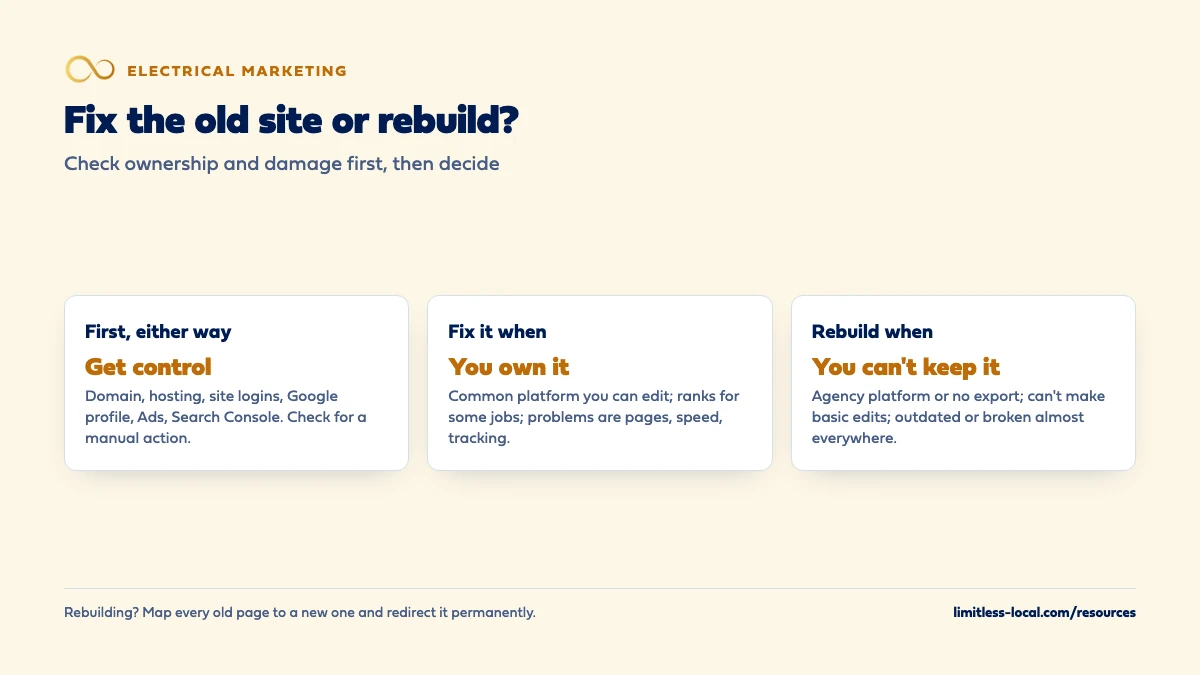
Not automatically. First get control of your domain, hosting, website logins, Google Business Profile, Google Ads account and Search Console, then judge the site itself. Fix it if you own it, can edit it, and the problems are things like thin service pages, slow mobile loading or missing call tracking. Rebuild if the agency won’t release it, it sits on a platform only they can run, or it’s so outdated or spammy that fixing would cost more than starting over, and redirect every old page to its new address when you do.
If you decide to rebuild, our websites start at $3,750 for a themed site of up to 25 pages ($3,000 with any of our marketing packages), custom builds start at $5,000, and every build includes 30 days of post-launch support. Our electrical contractor marketing page explains how we work with electrical shops, and the rest of the electrical marketing questions library goes question by question.
Should I fix my website or start over after a bad agency?
The site you were left with and the agency that built it are two separate problems. A bad agency can leave behind a decent website, and a good-looking site can be impossible to keep. Decide in this order:
- Can you control it? If you can’t get the domain, hosting and logins, the choice is made for you.
- Is it damaged? Spammy links or pages that broke Google’s rules need cleaning up whatever you decide.
- Is it worth fixing? Compare the cost and time of fixing what’s wrong with the cost and time of a new build.
Most owners want a clean break after getting burned, and that’s understandable. But a site that already ranks for a few of your job types has value that a new one has to earn again, so don’t throw it out until you know what’s on it.
Do I actually own my website, domain and accounts?
Check each of these, in your name or your company’s, before anything else:
- The domain. ICANN says to update the registrant information or move a domain to a different registrant, you contact the registrar it’s registered with, and a WHOIS search shows who that registrar is. After a change of registrant, registrars must lock the domain from moving to another registrar for sixty days, unless the prior registrant opted out where the registrar offers it.
- Hosting and the site files. You need an admin login to the hosting account and to the website itself, or a full copy of the files and database.
- Google Ads. If an agency’s manager account owns your ad account, the Google Ads ownership rules say a client account can have only one owner, but the client account still owns its data and can remove an owner’s access by unlinking.
- Google Business Profile. Only the primary owner can transfer primary ownership, and transferring it keeps your business info, like reviews, intact. Make sure that’s you.
- Search Console. A property must have at least one verified owner, and only owners can add and remove other users. Add yourself as a verified owner and remove the agency once you’re in.
How to avoid getting burned again by an electrical marketing agency covers getting accounts back without a fight.
What if the agency built my site on a platform I can't take with me?
Some agencies build on their own system or a rented template that only works while you pay them. You can’t move it to new hosting, and you may not be able to export the pages. Ask directly:
- Can I get a full export of the site, including images and page text?
- Will it run on standard hosting without your account?
- Who owns the design, the photos and the copy?
If the answers are no, plan a rebuild. Save every page’s text and every photo of your own jobs before you cancel, and make a list of every page address so you can redirect them later. Your words and job photos are reusable even when the site isn’t.
How do I tell if the site itself is the problem?
Look at the site the way a homeowner with a tripping breaker would, on a phone:
- Speed. Does it load quickly on mobile data?
- The phone number. Is it at the top of every page, tappable, and the right number?
- Job pages. Is there a page for panel upgrades, EV chargers, generators, rewiring and the other work you want, or one long “Services” list?
- Your area. Does the site say which towns you serve?
- Proof. License, real job photos, reviews.
- Tracking. Are calls and form fills counted, and do you get the leads?
- Business details. Do the name, address and phone match your Google profile?
If most of these fail, that’s a lot of fixing. If only one or two do, a fix is usually faster and cheaper. What to fix on an electrical website before investing in SEO goes through each check in detail.
Did the old agency leave damage I need to clean up?
Some agencies chase quick rankings with paid links, copied pages or dozens of near-identical city pages. Check before you decide anything, because damage follows the domain, not the design.
- Manual actions. Google’s Manual actions report in Search Console shows whether a human reviewer found pages that break Google’s spam policies. If your site has one, some or all of it won’t show in Google search results until it’s fixed and a reconsideration request is accepted.
- Bad links. Google’s disavow links guidance says most sites never need to disavow links, and to do it only if you have a considerable number of spammy, artificial or low-quality links and they’ve caused, or likely will cause, a manual action. Used wrongly, it can hurt your site.
- Thin or copied pages. City pages that only swap the town name, or text lifted from other sites, add little and are worth removing or rewriting.
A rebuild doesn’t wipe this clean if you keep the same domain. Clean-up work is needed either way.
Curious what your marketing is actually booking?
Get a free visibility audit — no obligation, no sales pitch.
When is fixing the existing site the better call?
- You own the domain, hosting and logins, and you can edit the site yourself or hand it to someone else.
- It’s on a common platform that other developers know.
- It already ranks or brings calls for some of your job types.
- The problems are content and setup: missing job pages, slow images, no call tracking, a buried phone number.
- There’s no manual action, or it can be cleaned up.
In that case, fix it in order of what costs you calls: phone number and speed first, then job pages, then everything else. How to make an electrical website fast on mobile covers the speed side.
When is a rebuild the better call?
- The agency won’t release the site, or it only runs on their system.
- You can’t make basic changes, like adding a page or changing a phone number, without paying them.
- It’s built on old technology that’s slow, insecure or no longer supported.
- Most of the checks above fail at once, so fixing it would touch nearly every page anyway.
- Your business has changed: new job types, commercial work, new towns or a new name.
Even then, you’re rebuilding the site, not starting the business from zero. Your domain, reviews, Google profile and good page text all carry over.
How do I rebuild without losing my Google rankings?
Treat it as a site move. Google’s guide on how to move a site lays out the steps:
- Map every old page to a new one. List each old address and the new page that replaces it.
- Redirect old pages permanently. A permanent redirect, such as a server-side 301, tells Google to show the new page in results. Google’s page on redirects explains the types.
- Change one thing at a time. If you’re also changing the domain, do that separately from the redesign.
- Keep redirects for as long as possible, generally at least a year, so Google can transfer signals to the new pages.
- Watch traffic on old and new pages, and fix any page that redirects to the wrong place.
Expect some ups and downs. For medium-sized sites, it can take a few weeks or more for Google to start showing the new pages instead of the old ones. Launching in a slower part of your year, rather than right before storm or generator season, keeps the risk down.
What should the new or fixed site have that the old one didn't?
- Ownership in your name: domain, hosting, site admin, Search Console and analytics, with the builder as a user, not the owner.
- A page for each job you want more of, written for homeowners in your towns.
- A fast mobile layout with a call button on every page.
- Call and form tracking that sends leads to you and tags them by source.
- Your license, real job photos and reviews, not stock images.
- A way to edit it yourself, or with any developer, without asking permission.
What an electrician website should have to get more calls lists the pieces that turn visits into calls.
How long does a rebuild take, and what does it cost?
A themed site built on a proven design is faster and cheaper than a fully custom one, and the number of pages, who writes the content and the tracking setup drive the rest. The usual delay is waiting on the owner’s feedback and photos, so have your job list, towns and photos ready before you start.
For comparison, our themed websites take about 60 days, and custom builds go from concept to launch in 100 days or less. How much a website costs for an electrical business breaks down what drives the price.
What should I keep running while the site is fixed or rebuilt?
- Your Google Business Profile and reviews. Maps calls don’t depend on the website being finished.
- Ads that already book jobs, pointed at your best existing page or a simple landing page.
- Answering and follow-up, so the calls you do get still book.
Don’t go dark while you rebuild. The slow channels lose ground and the fast ones stop paying. The best marketing strategies for an electrical business shows how the website fits with the rest.
Not sure which of these is costing you jobs?
A free visibility audit checks the Google profile, reviews, site and tracking, and shows what to fix first.
What's different for electricians rebuilding after a bad agency
Your license belongs on the site. Make sure the new or fixed site shows it correctly and that no old page shows an expired number or the wrong business name.
Job pages matter more than design. Panel upgrades, EV chargers, generators, rewiring and commercial service are searched separately. A plain site with strong job pages beats a pretty one with a single services list.
Seasons affect timing. Generator and storm work spikes at certain times of year. Launch a rebuild outside your busiest stretch so any ranking dip lands when calls are slower anyway.
Emergency callers won’t wait for a slow page. If someone’s power is out, a site that takes too long to show a phone number sends them to the next electrician.
A worked example: fix or rebuild?
This example is made up to show the decision, not a typical case. Say an electrician leaves an agency and finds the old site has 38 pages:
- Ownership: the domain is in the owner’s name, but the site runs on the agency’s own platform and can’t be exported.
- Content: 22 pages have useful text about real job types; 16 are city pages that only swap the town name.
- Damage: no manual action in Search Console.
The platform settles it: the site has to be rebuilt. But the domain stays, the useful text from the 22 pages is saved and improved, and the 16 thin city pages are folded into a smaller set of real service-area pages. All 38 old addresses get a permanent redirect to the closest new page, and the redirects stay up for at least a year.
Change one fact, so the site runs on a standard platform the owner can log into, and the answer flips: fix the job pages, merge the thin city pages, add tracking and keep the rest.
Frequently asked questions
Can the old agency keep my domain name?
If it’s registered in their name, they control it until it’s changed. Ask them to update the registrant to your business through the registrar; if they won’t, check your contract and the registrar’s process.
Will I lose my Google reviews if I rebuild my website?
No. Reviews live on your Google Business Profile, not your website. Just make sure you’re the primary owner of the profile.
Should I change my domain name when I rebuild?
Only if you have a strong reason, like a business name change. If you do, make it a separate step from the redesign and redirect every old page.
Can I keep the text the old agency wrote?
Check your contract for who owns the content. If it’s yours and it’s accurate, improve it rather than starting from scratch.
How do I know if a rebuild hurt my rankings?
Compare calls, form fills and Search Console clicks for your main job pages before and after launch. Some dip is normal for a few weeks; a steep, lasting drop usually means missing redirects.
Key takeaways
- Get ownership of the domain, hosting, site logins, Google profile, Ads and Search Console before deciding anything.
- Check Search Console for a manual action; damage follows the domain, not the design.
- Fix the site if you own it, can edit it and the problems are pages, speed and tracking.
- Rebuild if the agency won’t release it, it runs only on their platform, or nearly everything is broken.
- If you rebuild, redirect every old page permanently and keep the redirects up for at least a year.
Want a second set of eyes on your setup?
We'll look at how you show up locally and where calls are leaking, then send you a plain-English breakdown.
More in this section
- Should I hire an agency or DIY my electrical marketing?
- Can an electrical owner do DIY marketing first, then hire an agency?
- Should an electrician hire a full-service agency or one specialist?
- What marketing should an electrician never hand to an agency?
- What should an electrician's website have to get more calls?
Sources
- About Change of Registrant — ICANN
- Manager Accounts (MCC): About ownership of client accounts — Google Ads Help
- Transfer primary ownership of a Business Profile — Google Business Profile Help
- Managing owners, users, and permissions — Search Console Help
- Manual actions report — Search Console Help
- Disavow links to your site — Search Console Help
- How to move a site — Google Search Central
- Redirects and Google Search — Google Search Central