
How do I set up a website and GBP for a second restoration location?
- How should a restoration company structure its website and Google Business Profiles for two locations?
- Does my second office qualify for its own Google profile?
- Step 1: Should the second location get its own website?
- Step 2: How should the site be organized for two locations?
- Step 3: What goes on each location page?
- Step 4: How do I set up the second Google Business Profile?
- Step 5: How do I draw the two service areas?
- Step 6: Which website link and phone number go on each profile?
- Step 7: Should each location page have its own structured data?
- Step 8: How should the header, footer and contact page handle two offices?
- Step 9: How do I keep reviews, photos and posts separate?
- What mistakes do owners make setting up a second location?
- What's different about a second location for restoration companies
- A worked example: the site map for a two-office restoration company
- Frequently asked questions
- Key takeaways
- More in this section
- Sources
The short version
- One website, one page per location; a second domain usually just splits your strength.
- A second Google Business Profile only if the office has its own staff and service area.
- Each profile links to its own location page and uses its own local phone number.
- Separate service areas, same name and primary category, managed in one business group.
For restoration owners opening a second staffed office who want the website and Google profiles built right the first time.
Get a free visibility audit · Book a growth call
How should a restoration company structure its website and Google Business Profiles for two locations?
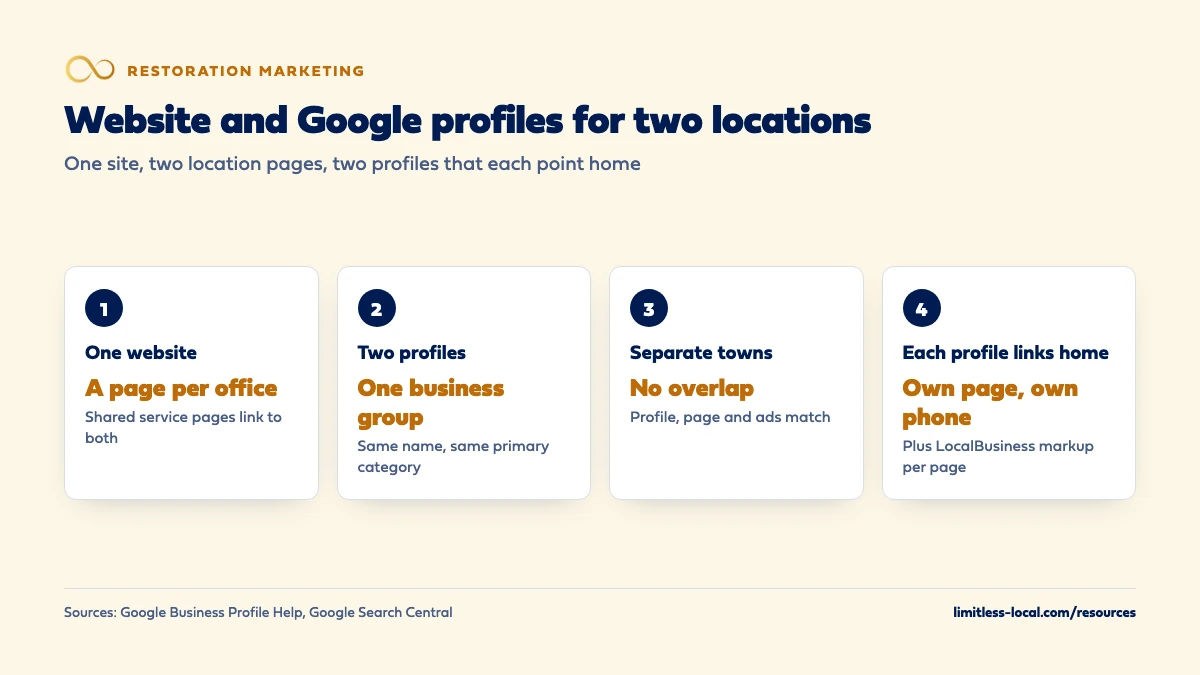
Keep one website and give each location its own page, with that office’s phone number, hours, crew and the towns it serves, then create a second Google Business Profile for the new office that links to its own location page, not your homepage. Use the same business name and primary category on both profiles, manage them together in a business group, and draw service areas that don’t overlap. Add LocalBusiness structured data to each location page with that office’s details, and keep the shared service pages general so you’re not copying the same page for each town.
We build this structure as part of our website and local SEO work. A themed website is $3,750, or $3,000 with any Limitless Engine package, with up to 25 pages; our Growth package, $4,500 a month, covers SEO and Google profile management for up to two locations, and Scale handles more. See how we help restoration companies, read the restoration marketing guide, or browse more restoration marketing questions.
Does my second office qualify for its own Google profile?
Check this before you build anything. Google’s guidelines for representing your business allow one Business Profile per location for a service business that has different locations with separate service areas and separate staff at each. A rented mailing address you don’t work from, often called a virtual office, isn’t eligible, and you can’t create more than one profile for the same location.
So the second office needs real people working from it: a crew, equipment and someone who answers for that area. If it’s a storage unit or a desk you visit once a week, keep one profile and cover those towns with your service area and ads instead. How to market a second restoration location covers the decision in full; the steps below cover the build.
Step 1: Should the second location get its own website?
Almost always, no. One website with a page for each location keeps all your links, reviews and history working for both offices. A second domain starts from zero and splits your effort.
There’s a policy reason too. Google’s spam policies list doorway abuse, with examples that include multiple domain names or pages targeted at specific regions or cities that funnel users to one page, and substantially similar pages that are closer to search results than a clearly defined, browseable hierarchy. A copy of your site with a new town name is exactly that.
The exception is a genuinely separate business: a different name on the trucks and paperwork, its own phone and its own crew. If that’s the plan, it’s a second brand, not a second location.
Step 2: How should the site be organized for two locations?
Keep it simple and predictable:
- Service pages stay shared. One water damage page, one mold page, one fire page. They explain the work and link to both locations.
- A locations page lists both offices with their towns and phone numbers, so a homeowner can pick the nearest one in a tap.
- One page per location, under the locations page, such as /locations/north-county/ and /locations/south-county/.
- Location-plus-service pages only when they’re earned. If the new office runs a dedicated mold crew or does commercial work the first one doesn’t, it can get its own page for that. If the only difference is the town name, skip it.
Add both locations to your main menu, so homeowners and Google can reach each one from any page.
Step 3: What goes on each location page?
- The office’s address, or the towns it serves if you don’t take customers there
- Its own local phone number, large and tappable at the top
- Hours, including how after-hours emergency calls are handled
- The towns that office covers, matching its Google profile service area
- Photos of that crew, its trucks and its equipment
- A few real jobs from that area, with the kind of damage and how it was handled
- Reviews from customers that office served
- Who runs the office, if they’re willing to be named
The content has to be genuinely about that office. Two pages with the same paragraphs and a different town name won’t help either one. How many service and city pages a restoration website needs covers when to add more pages beyond the two location pages.
Step 4: How do I set up the second Google Business Profile?
- Create a business group first. Google’s business groups page recommends that anyone new to Business Profile who manages multiple businesses create a business group and use it to add, verify and manage profiles. It works like a shared folder, so your office manager or agency can help without sharing a password.
- Use the same business name as your first location, the name on your trucks and paperwork. Don’t add service keywords or location descriptors to it.
- Use the same primary category. Google’s guidelines say all locations of a business must share the one category that best represents the business.
- Enter the new office’s address, and hide it if customers don’t visit.
- Verify the profile with the method Google offers for that address.
- Fill in everything: hours, services, description, photos of that crew and its trucks.
Curious what your marketing is actually booking?
Get a free visibility audit — no obligation, no sales pitch.
Step 5: How do I draw the two service areas?
Give each town to one office. Google’s page on service areas says you can set up to 20 service areas by city, postal code or other area, not as a radius, and that the overall area shouldn’t be more than about 2 hours of driving time from where the business is based. For restoration, draw each office’s area by the arrival time you promise, which is usually much tighter than that.
Then make three things match: the profile’s service area, the town list on that office’s location page and the ad targeting for that office. When a town sits on both profiles, both offices compete for the same calls. How to keep restoration locations from cannibalizing each other covers splitting overlapping towns, and how big a restoration service area needs to be covers whether each area has enough demand.
Step 6: Which website link and phone number go on each profile?
Point each profile at its own location page, not your homepage. Google’s guidelines ask for a phone number that connects to the individual business location, or a website that represents that location. Linking both profiles to the homepage throws away the connection between each office and its page.
For phones, the same guidelines say to use a local number instead of a central call center number whenever possible, that the number must be under the direct control of the business, and not to use numbers that redirect callers to anyone other than the actual business. Give each office its own local number, put it on that office’s page and profile, and route it to the people who answer for that area. If you use call tracking on the profiles, whether call tracking numbers hurt restoration rankings covers how to set it up safely.
Step 7: Should each location page have its own structured data?
Yes. Google’s documentation on LocalBusiness structured data describes markup that can tell Google about business details such as hours, and its url property is the fully-qualified URL of the specific business location. So each location page gets its own block with that office’s name, address, phone, hours and that page’s URL.
Keep the markup in step with what’s visible on the page and on the profile. If the hours on the page, the profile and the markup disagree, fix all three at once. Schema markup for a restoration website covers the rest of the site.
Step 8: How should the header, footer and contact page handle two offices?
- Header phone: show the number for the office that page belongs to. On shared pages, either show both or a short “call your nearest office” line with both numbers.
- Footer: list both offices with their name, phone and either the address or the towns they serve, each linking to its location page.
- Contact page: a location picker or two clear blocks, so nobody has to guess which office to call.
- Forms: ask for the property’s town or ZIP code and route the request to the right office.
One phone number across the whole site can work if a central dispatcher answers for both. Just make sure the local numbers still appear on each office’s page and profile.
Step 9: How do I keep reviews, photos and posts separate?
Each profile needs its own review link, sent only to customers that office served. Mixing them up sends reviews to the wrong place, and the new office stays empty while the old one fills up. Put the right link into each crew’s job closeout, whether that’s in Jobber, Housecall Pro or ServiceTitan.
Photos and posts work the same way: the new office’s profile should show its own crew and trucks, not your first location’s job photos. A new profile with real, recent photos looks like a real office to homeowners comparing their options.
What mistakes do owners make setting up a second location?
- Copying the first location page and swapping the town name.
- Pointing both profiles at the homepage.
- Using the same phone number on both profiles.
- Listing every town on both profiles.
- Opening a profile at a mailing address or empty unit nobody works from.
- Adding service keywords or location descriptors to the new profile’s name.
- Building a second website that starts from zero.
- Sending every review request to the original location’s link.
Not sure which of these is costing you jobs?
A free visibility audit checks the Google profile, reviews, site and tracking, and shows what to fix first.
What's different about a second location for restoration companies
The address matters less than the arrival time. Most restoration customers never visit your office, so the second location exists to put a crew close to homes in trouble. Draw each office’s towns by how fast that crew can get there at night.
After-hours calls need a clear route. Each office’s number has to reach someone at 2 a.m. who can dispatch from the right location. Say on each location page how emergency calls are handled.
Storms hit one office harder than the other. When a flood or freeze swamps one area, the other office may send crews over. That’s fine for the work; keep the profiles and pages tied to where each office normally serves, not to a temporary surge.
Insurance customers want a local, real company. A location page with real photos, real jobs and the office manager’s name helps a homeowner filing a claim trust the company sending a crew.
A worked example: the site map for a two-office restoration company
This is a made-up company with offices about 45 minutes apart, to show the structure, not a template to copy word for word.
- /water-damage-restoration/, /mold-remediation/, /fire-damage-restoration/: shared service pages that explain the work and link to both offices.
- /locations/: both offices, their towns and their numbers.
- /locations/north-county/: the original office. Its Google profile links here and uses phone number A. Its town list matches that profile’s service area.
- /locations/south-county/: the new office. Its own Google profile links here and uses phone number B, with its own towns, crew photos and jobs.
- /locations/south-county/commercial-water-damage/: added only because the south office runs a commercial crew the north office doesn’t.
Both profiles sit in one business group, share the same name and primary category, and cover towns that don’t overlap. Each location page carries LocalBusiness markup with its own address, phone, hours and URL.
Frequently asked questions
Can I use the same phone number on both Google profiles?
Give each office its own local number. Google asks for a number that connects to the individual location, and separate numbers also let you track calls by office.
Should the second profile have a different business name?
No. Use the same real-world business name on both. Google’s guidelines don’t permit unnecessary information in the name, and service and location descriptors are among their examples.
How long before the new location page ranks?
It varies. SEO typically takes 3-6 months to show meaningful organic growth, and a new office with few reviews usually starts slower in Maps. Ads can cover the new towns while the page and profile build up.
Can I move reviews from my first location to the new one?
No. Reviews stay on the profile they were left on. Start sending the new office’s customers to its own review link from the first job.
Do I need separate social media pages for each location?
Usually not. One page per platform with posts from both offices is easier to keep active than two quiet ones.
What if the second office closes later?
Mark that profile as permanently closed, move its towns back to the first office’s profile and page, and redirect the old location page to the one that now serves those towns.
Key takeaways
- Keep one website and give each location its own genuinely local page.
- Open a second Google profile only for an office with its own staff and service area.
- Link each profile to its own location page and give each its own local phone number.
- Use the same name and primary category, manage both in a business group, and keep service areas apart.
- Add LocalBusiness markup to each location page and keep it in step with the profile.
Want a second set of eyes on your setup?
We'll look at how you show up locally and where calls are leaking, then send you a plain-English breakdown.
More in this section
- Does a GBP get restoration leads faster than a website?
- Which GBP categories should a restoration company pick?
- Is $2,500 a month too much for restoration SEO and GBP management?
- How do I market each restoration location without duplicate work?
- How should a restoration company market a second location?
Sources
- Guidelines for representing your business on Google — Google Business Profile Help
- Manage your service areas for service-area & hybrid businesses — Google Business Profile Help
- Create & manage business groups — Google Business Profile Help
- Local Business (LocalBusiness) Structured Data — Google Search Central
- Spam Policies for Google Web Search — Google Search Central