
What schema markup should a restoration company website use?

- Which structured data should a water damage restoration website have?
- What does schema markup actually do for a restoration website?
- Which schema type should a restoration company use?
- What has to go in the LocalBusiness markup?
- What if my restoration company is service-area only with no public address?
- Should each service page have its own markup?
- Do city pages need their own schema?
- Should a restoration company mark up its Google reviews?
- Is FAQ schema worth adding to restoration pages?
- Does schema markup help my restoration company show up in AI answers?
- How do I check my markup is working?
- What's different about schema for restoration companies
- A worked example: the markup for one restoration company
- Frequently asked questions
- Key takeaways
- More in this section
- Sources
The short version
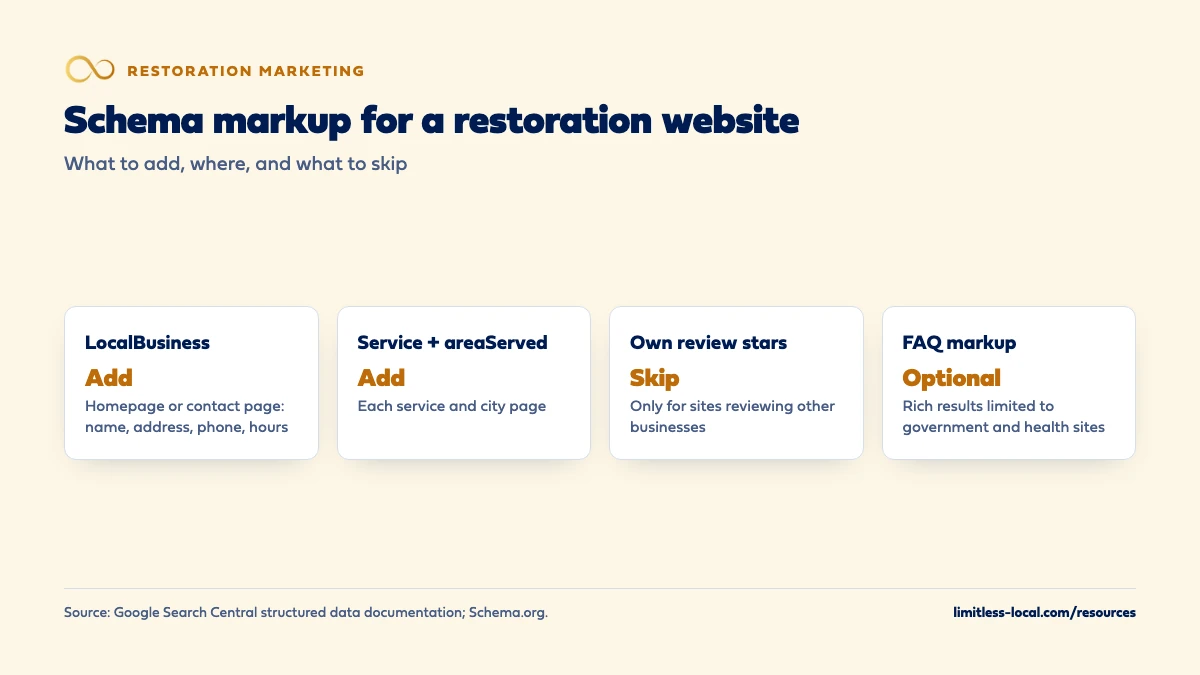
- LocalBusiness markup in JSON-LD: name and address required, plus phone, hours, URL and geo.
- Service markup on each service page, with areaServed for the towns you cover.
- Every value must match the visible page and your Google Business Profile.
- Don't mark up your own reviews, and don't expect FAQ markup to show rich results.
For restoration owners who’ve been told they need “schema” and want to know which markup matters, which doesn’t, and what to ask their web person.
Get a free visibility audit · Book a growth call
Which structured data should a water damage restoration website have?
A restoration company website should use LocalBusiness structured data in JSON-LD on the homepage or contact page, with the business name and address Google requires plus phone, hours, URL and geo coordinates, using the most specific business type that fits. Add Service markup on each service page to name the work, such as water damage restoration or mold remediation, with areaServed for the towns you cover, and keep every value matching what’s visible on the page and in your Google Business Profile. Skip marking up your own reviews or star ratings, because Google says that rating markup is only for sites that capture reviews about other businesses, and don’t expect FAQ markup to show extra results.
Structured data is part of building a site Google can read correctly, which is how we approach every website we build for restoration companies. The restoration marketing guide covers where your website fits among your channels, and the restoration marketing questions library takes the rest one question at a time.
What does schema markup actually do for a restoration website?
Schema markup, which Google calls structured data, is a block of code that labels what’s on a page: this is a business, this is its phone number, this is a service it offers. Google says it uses structured data that it finds on the web to understand the content of the page, and that it gives explicit clues about the meaning of a page.
What it doesn’t do matters just as much. Google doesn’t describe structured data as a ranking boost, and markup alone won’t put you in the map pack. In our judgement, it’s housekeeping that helps Google read your site correctly: worth doing once, properly, and then keeping accurate.
If you’re working on how your company shows up in AI answers more broadly, how restoration companies show up in AI search covers the content side. This page is only the markup.
Which schema type should a restoration company use?
Google’s LocalBusiness structured data guide says to define each business location as a LocalBusiness type and use the most specific LocalBusiness sub-type possible. If you have multiple types, it says to list them as an array.
There isn’t a restoration-specific type. Schema.org’s HomeAndConstructionBusiness type lists more specific types including Electrician, GeneralContractor, Plumber and RoofingContractor, but nothing for water, fire or mold restoration. In our judgement, most restoration companies are best described as HomeAndConstructionBusiness, with GeneralContractor added in the array only if you really do reconstruction and rebuild work. Don’t claim types for work you don’t do just to cast a wider net.
What has to go in the LocalBusiness markup?
Google lists two required properties for a local business rich result: name and address, with the address as a PostalAddress and as many of its parts filled in as possible. The recommended properties that fit a restoration company are:
- telephone: the main number customers call, including country and area code.
- url: the page for that specific location; Google says it must be a working link.
- openingHoursSpecification: your hours. If you take emergency calls around the clock, the hours should say the same thing your Google Business Profile says.
- geo: latitude and longitude, which Google says need at least 5 decimal places.
- priceRange: optional, and Google says it must be shorter than 100 characters. Many restoration companies leave it out, in our judgement, because most jobs are priced after inspection.
Google says you can add LocalBusiness markup to any page, though it may make more sense on a page with information about your business, so the homepage or contact page is the usual home.
What if my restoration company is service-area only with no public address?
This is common in restoration, where many owners run from a home office or a warehouse and hide the street address on their Google Business Profile. Google’s guide lists address as required for local business rich results, and its general rules say don’t mark up content that is not visible to readers of the page.
In our judgement, that leaves two honest options. If your address is shown on your site, mark it up exactly as shown. If you deliberately keep it private, don’t publish a street address in the code that the page doesn’t show; mark up the city, region and postal code you do show, accept that you may not be eligible for that particular rich result, and rely on your Business Profile for Maps. Either way, never invent an address in a town you want to rank in.
Curious what your marketing is actually booking?
Get a free visibility audit — no obligation, no sales pitch.
Should each service page have its own markup?
Yes, in our judgement. A water damage page, a mold remediation page and a fire damage page each describe a different service, and Service markup lets you say so in the same vocabulary as the business markup: the service name, a short description that matches the page, the business as provider, and the area it covers.
The area is where schema.org’s areaServed property fits: it describes the geographic area where a service or offered item is provided. List the towns or counties you actually serve, the same ones your page names. Google’s local business guide doesn’t list areaServed among the properties it uses for rich results, so treat it as labeling for clarity rather than something that changes how a result looks.
If you’re still building those pages, whether your website needs mold and fire damage pages covers what each one should say.
Do city pages need their own schema?
Only if each city is a real location. Google says to define each business location as its own LocalBusiness. If you have a second office or warehouse with its own address and phone, give it its own markup on its own location page.
A city page for a town you serve from your main office is a service-area page, not a location. In our judgement, mark it up with Service markup and areaServed for that city, not as a second LocalBusiness with an address you don’t have there. Building city pages that rank covers what goes on those pages.
Should a restoration company mark up its Google reviews?
No. Google’s local business guide says the aggregateRating and review properties are only recommended for sites that capture reviews about other local businesses. A restoration company showing its own reviews on its own site isn’t that.
Google’s general guidelines also say don’t mark up irrelevant or misleading content, such as fake reviews. Show your best reviews on the page for homeowners to read, by all means; just don’t wrap them in rating markup hoping for stars in search results.

Is FAQ schema worth adding to restoration pages?
Not for search results. In 2023 Google announced that FAQ rich results will only be shown for well-known, authoritative government and health websites. A restoration company website isn’t going to get the expanded FAQ result.
The questions themselves are still worth having on the page, because homeowners ask them and they help a page answer the search. The markup is optional; adding it does no harm if it matches the visible text, but don’t pay extra for it.
Does schema markup help my restoration company show up in AI answers?
Google says no special markup is needed. Its guide to optimizing for generative AI features lists overfocusing on structured data as a mistake: structured data isn’t required for generative AI search, and there’s no special schema.org markup you need to add. It also says it’s a good idea to keep using structured data as part of your overall SEO, because it helps with being eligible for rich results.
So be wary of anyone selling “AI schema”. Clean LocalBusiness and Service markup is the whole job.
How do I check my markup is working?
Google’s guide gives the process:
- Validate the code with the Rich Results Test and fix any critical errors.
- Use the URL Inspection tool in Search Console to see how Google sees the page, and make sure it isn’t blocked by robots.txt, a noindex tag or a login.
- Submit a sitemap so Google hears about future changes.
After that, the job is keeping it accurate. Google’s general guidelines ask you to provide up-to-date information. When your phone number, hours or service area change, update the markup the same day you update your Business Profile and website, so your name, address and phone stay consistent everywhere. Keeping your name, address and phone consistent covers the listings side.
Want to see where your company stands?
A free visibility audit shows where you show up on Google, Maps and AI answers, and what it's costing you in calls.
What's different about schema for restoration companies
No ready-made type. Plumbers, electricians and roofers get their own schema.org types. Restoration companies don’t, so you describe the business with the closest general type and let your Service markup name the actual work.
Service-area addresses. More restoration companies hide their address than most trades, which makes the address rule a real decision rather than a formality.
24/7 hours. If you answer emergency calls around the clock, your hours markup, your website and your Business Profile all need to say the same thing. Mismatched hours are one of the easiest errors to make.
Several service lines. Water, fire, mold, sewage and contents are different services with different searchers. Separate service pages, each with its own Service markup, keep them clear.
A worked example: the markup for one restoration company
This company is made up to show the structure, not a template to copy as-is. Say a restoration company has one office with its address on its website, answers calls 24 hours a day, and serves 6 towns. Its markup plan would be:
- Homepage: one LocalBusiness block with type HomeAndConstructionBusiness, the business name, the full postal address exactly as shown in the footer, the main phone with country code, the homepage URL, geo coordinates to 5 decimal places, and hours covering every day of the week, around the clock.
- 4 service pages (water damage, mold, fire and smoke, sewage cleanup): one Service block each, with the service name, a one-sentence description matching the page, the business as provider, and areaServed listing the 6 towns.
- City pages: Service markup with areaServed for that one town, no second LocalBusiness.
- Reviews section: visible on the page, no rating markup.
That’s one LocalBusiness block plus one Service block on each service and city page, and in our judgement a web developer can add and test them in an afternoon. If you’re rebuilding your site anyway, our themed website is $3,750, or $3,000 with any package, with up to 25 pages.
Frequently asked questions
Do I need a developer to add schema markup?
Not always. Many website platforms and SEO plugins add LocalBusiness markup from a settings screen. Check what they output with the Rich Results Test, because plugin defaults are often incomplete or wrong for a service-area business.
Should the markup go in the head or the body of the page?
Google recommends JSON-LD, which sits in a script tag and can go in the head or the body. It isn’t mixed into the visible text.
Does schema replace my Google Business Profile?
No. Your Business Profile is what shows in Maps. Markup helps Google read your website; keep the two matching.
Can I list every city in my state in areaServed?
You can, but it should match what you actually serve and what the page says. Listing towns you won’t drive to just creates calls you turn away.
Should I add Organization markup as well?
If your site already has LocalBusiness markup for your location, that describes your business. Organization markup is more useful for companies with several brands or locations; check what your platform already outputs before adding more.
How often should I check my schema?
Whenever your phone, hours, address or services change, and after any site redesign, in our judgement. Redesigns often drop markup without anyone noticing.
Key takeaways
- Use LocalBusiness markup in JSON-LD with name and address, plus phone, hours, URL and geo coordinates.
- There’s no restoration type, so use the closest general type and let Service markup name the work.
- Add Service markup with areaServed on service and city pages; only real locations get their own LocalBusiness.
- Don’t mark up your own reviews or hidden content, and don’t expect FAQ markup to show rich results.
- Google says no special markup is needed for AI search; keep every value matching your page and Business Profile.
Not sure what's working right now?
Start with a free visibility audit: rankings, Google profile, reviews and tracking, checked against your service area.
More in this section
- How should a restoration company build city pages that rank?
- What should a restoration website say about mold and fire damage?
- How should a restoration company run Google Ads for fire damage?
- How should a restoration company market to commercial properties?
- How do I optimize my restoration company's Google Business Profile?
Sources
- Local business (LocalBusiness) structured data — Google Search Central
- General Structured Data Guidelines — Google Search Central
- Intro to How Structured Data Markup Works — Google Search Central
- Changes to HowTo and FAQ rich results — Google Search Central Blog
- Optimizing your website for generative AI features on Google Search — Google Search Central
- HomeAndConstructionBusiness — Schema.org
- areaServed — Schema.org