
How do I track which electrical marketing brings in real jobs?

- How can an electrician see which marketing turns into sold jobs, not just calls?
- What counts as a "real job" for an electrical contractor?
- How do I give every marketing channel its own way to be counted?
- How do I separate real leads from junk calls?
- Where should the lead source live, and who enters it?
- How do I track quotes for panel upgrades, EV chargers and generators?
- How do I track commercial work and contractor referrals?
- Can I send sold electrical jobs back to Google Ads?
- Which numbers should I look at every month?
- How do I run a simple monthly marketing review?
- How long before the numbers mean something?
- What's different about tracking marketing for electricians
- A worked example: service calls versus quoted project work
- Frequently asked questions
- Key takeaways
- More in this section
- Sources
The short version
- Give each channel its own tracking number, and tag the links you control.
- Decide what counts as a real job, such as a sold job above a minimum invoice amount.
- Record a lead source and a job type on every customer, quote and job.
- Judge each channel by cost per sold job, with service calls and quoted projects kept apart.
For electrical contractors who get calls from several places and can’t tell which ones turn into panel upgrades, EV chargers and paid service work.
Get a free visibility audit · Book a growth call
How can an electrician see which marketing turns into sold jobs, not just calls?
Give every marketing channel its own way to be counted, usually a call tracking number per source plus tracked web forms, and make sure every call and request lands in your field software with that source attached. Then decide what a real job means for your shop, such as a sold job above a minimum invoice amount, and mark each lead booked, quoted and sold by job type. Once a month, divide what each channel cost by the real jobs it produced, keeping small service calls and quoted project work in separate columns.
That’s the way we report to owners too: call tracking, web and form tracking and a monthly report come in every package, so the conversation is about sold jobs and what they cost, not clicks. You can see what each tier includes on our packages page and how it applies to electricians on our electrical contractor marketing page. The rest of the electrical marketing questions library goes question by question.
What counts as a "real job" for an electrical contractor?
Before you can track it, you have to define it. For most electrical shops, a phone call isn’t a job, and neither is a free estimate. A real job is work that was sold and invoiced for enough to matter. Write your own definition down.
ServiceTitan builds this idea into its reports. It uses a sold threshold for each job type: the minimum invoice subtotal at which a completed job, or an estimate, counts as converted. Jobs marked as recall, warranty or no charge don’t count as opportunities in its close-rate report. You can apply the same rule on paper or in any software: pick a minimum amount for each kind of work, and only count jobs above it as sold.
In our view, most electrical contractors need at least two definitions, because the work splits in two:
- Service work. Troubleshooting, a dead circuit, a breaker that keeps tripping, adding outlets. Booked and done the same week, usually without a formal quote.
- Quoted project work. Panel upgrades, EV charger installs, whole-home generators, rewires, remodel and commercial jobs. These go through an estimate first and can take weeks to close.
A channel can be great at one and useless at the other, so track them as separate results from the start.
How do I give every marketing channel its own way to be counted?
Calls are still most of the business for most electricians, so start with call tracking. CallRail describes source tracking as one tracking number per campaign, each forwarding to your main business line, and says it’s best to use one number per campaign so the reports stay accurate. It lists online sources such as paid search, social ads, organic search and directory listings, and offline ones such as flyers, signs and business cards. For an electrical shop, that list usually looks like this:
- Google Ads and Local Services Ads
- Your Google Business Profile
- Your website (with a number that swaps based on how the visitor arrived)
- Truck wraps, yard signs and job-site signs
- Mailers and door hangers
If you run Google Ads, Google Ads call conversion tracking can also count calls from your ads, with a minimum call length so short hang-ups don’t count.
For the links you control, such as the website button on your Google profile, social posts and QR codes on mailers, add UTM tags so Google Analytics can show which campaign sent each visit. Forms and quote requests then need to carry that source with them, which is easier when your website is built to produce calls and requests in the first place.
How do I separate real leads from junk calls?
Electricians get plenty of calls that aren’t work: vendors, spam, wrong numbers, people asking how to fix something themselves, and price checks for jobs you don’t do. Count those as leads and every channel looks better than it is.
The field software and call tracking tools each have a way to sort them:
- ServiceTitan classifies each call as booked, unbooked, abandoned, excused or not a lead. It warns that if you don’t set up call reasons first, any call longer than 60 seconds is classified as a lead, and your marketing reports may be unreliable.
- Housecall Pro counts total calls as customer calls only (not vendors or spam), separates out the opportunity calls that could turn into jobs, and reports how many estimates and jobs came from them.
- CallRail lets you mark a call as a qualified lead by hand, score it from your phone keypad when the call ends, or set rules that do it automatically.
Whichever you use, the rule is the same: a lead is a customer who could buy work you actually do, in the area you actually serve. Everything else gets marked and set aside.
Where should the lead source live, and who enters it?
In the software you already run the business on, entered by whoever books the job, at the moment they book it.
- ServiceTitan uses marketing campaigns. With phone integration, calls to a campaign’s tracking number are credited automatically, and your call takers can attach a campaign on the booking screen, which carries it onto the job. You can also tie a campaign to specific business units, which helps if you run residential service, installs and commercial as separate units.
- Housecall Pro lets you group lead and estimate reports by lead source and filter estimates by job type, so you can see quoted work by channel.
- Jobber has a Lead Source Report that counts, for each source, leads with a request, a quote, a job and an invoice, plus the value of the first invoice tied to that lead.
Keep the list of sources short and fixed (Google Ads, LSAs, Google profile, website, referral, repeat customer, truck or sign, mailer, each referral partner you want to judge), so nobody skips the field. Give repeat customers their own source too, as ServiceTitan recommends, so a past customer who searches your name first doesn’t make Google Ads look better than it is. Then check for blanks every week. One missing source on a generator install can change which channel looks like it’s working.
Curious what your marketing is actually booking?
Get a free visibility audit — no obligation, no sales pitch.
How do I track quotes for panel upgrades, EV chargers and generators?
This is where electrical tracking differs most from a pure service business. A call for a panel upgrade usually becomes a site visit, then a quote, then a decision some time later. If you only count calls, you can’t see which channel brings people who sign.
Track three numbers for each channel and each kind of project work:
- Quotes sent. How many estimates went out from that channel’s leads.
- Quotes won. How many were approved and turned into jobs.
- Won value. What those jobs sold for.
The software does most of the counting if the lead source and job type are filled in. Housecall Pro’s estimate reports show won, lost and open counts and values, and can be filtered by estimate lead source and job type. Jobber’s quotes report lists every quote with its status, and it can be exported to work out a quote conversion rate. Its lead source report filters by the date the lead was created, so a quote that closes weeks later still lands on the channel that brought the lead.
Open quotes that never get a second touch are a common leak. If that’s where your numbers drop off, following up on electrical quotes automatically is the fix to look at before spending more on marketing.
How do I track commercial work and contractor referrals?
Commercial and new-construction work often doesn’t come through a tracking number at all. It comes from a general contractor, a builder, a property manager or a facilities contact you already know, and it may come as a bid invitation rather than a call.
You can still track it. ServiceTitan recommends setting up campaigns for customer referrals and repeat business, not only ads, and the same idea works in any software: give each referral partner that sends regular work its own lead source, and record bids sent, bids won and won value against it. In our view, a referral partner is a marketing channel like any other. It just costs time and relationships instead of ad spend.
Keep commercial and residential results apart. If commercial work is where you want to grow, marketing to commercial customers covers how to go after it on purpose.
Can I send sold electrical jobs back to Google Ads?
Yes. Out of the box, Google Ads counts a call or a form as a conversion. It can’t tell an EV charger install from someone asking whether you sell light bulbs.
Google offers two ways to close that gap. With imported call conversions you can count calls as conversions only when they led to a sale, and include the value of that sale. With offline conversion imports, you can send back sales that happened later, at your office or over the phone, after an ad click or call. Google now recommends starting with enhanced conversions for leads, which uses details from your lead form, such as an email address, to match sales back to the ad.
Ask your field software or call tracking provider whether they can send this data to Google Ads for you before building anything by hand.

Which numbers should I look at every month?
A handful per channel, split into service work and quoted project work:
- Spend. Ad spend plus any management fees or software for that channel.
- Real leads. Calls, forms and messages from customers who could buy work you do, with junk set aside.
- Booked service calls and their revenue.
- Quotes sent, quotes won and won value for project work.
- Cost per sold job. Spend divided by jobs above your sold threshold.
Cost per lead is an early warning, not a reason to move money; the worked example below shows why. If you’re also deciding how much to put into each channel in the first place, how much to spend on marketing works from the same cost-per-job math.
How do I run a simple monthly marketing review?
Set aside an hour in the first week of the month and go through the same steps every time:
- Pull spend for each channel from invoices and ad accounts.
- Pull real leads by source from your call tracking and form reports, with junk excluded.
- Pull booked jobs, quotes and sold revenue by source and job type from ServiceTitan, Housecall Pro or Jobber.
- Fix the blanks. Find jobs and quotes with no lead source and fill them in from the call records.
- Do the math: cost per sold job and revenue for each channel, service and project work separately.
- Make one decision and write it down, so next month you can see whether it helped.
If you pay an agency, this is the same review to hold them to. Knowing whether your agency is getting results covers what to ask for.
How long before the numbers mean something?
It depends on the channel. Ads can start producing calls within days of launch, so a month of ad data tells you something about service calls. SEO typically takes 3-6 months to show meaningful growth, so judging it on the first month or two will make it look worse than it is.
Quoted project work adds its own delay. In our view, a channel that mostly brings panel upgrade or generator inquiries needs at least one full quote cycle before you judge it, because the jobs it produced in March may not sign until April or May. When a channel sells only a few jobs a month, look at a rolling three months before cutting anything.
Not sure which of these is costing you jobs?
A free visibility audit checks the Google profile, reviews, site and tracking, and shows what to fix first.
What's different about tracking marketing for electricians
Two businesses in one. Small service calls and quoted projects behave differently: different ticket sizes, different time to close, often different channels. Lumping them together hides which channel brings which, so keep them in separate columns from the first month.
Job type matters more than lead count. An EV charger install, a panel upgrade, a generator and a commercial tenant buildout can all start as “a call from Google.” Record the job type on every lead and quote, so you can see which channels bring the work you want more of.
Referral partners are real channels. Builders, general contractors and property managers can send more revenue than any ad. Give each one a source, so you can see who is worth the lunch.
A worked example: service calls versus quoted project work
These numbers are made up to show the math, not a benchmark for your market. Say you run two channels in a month:
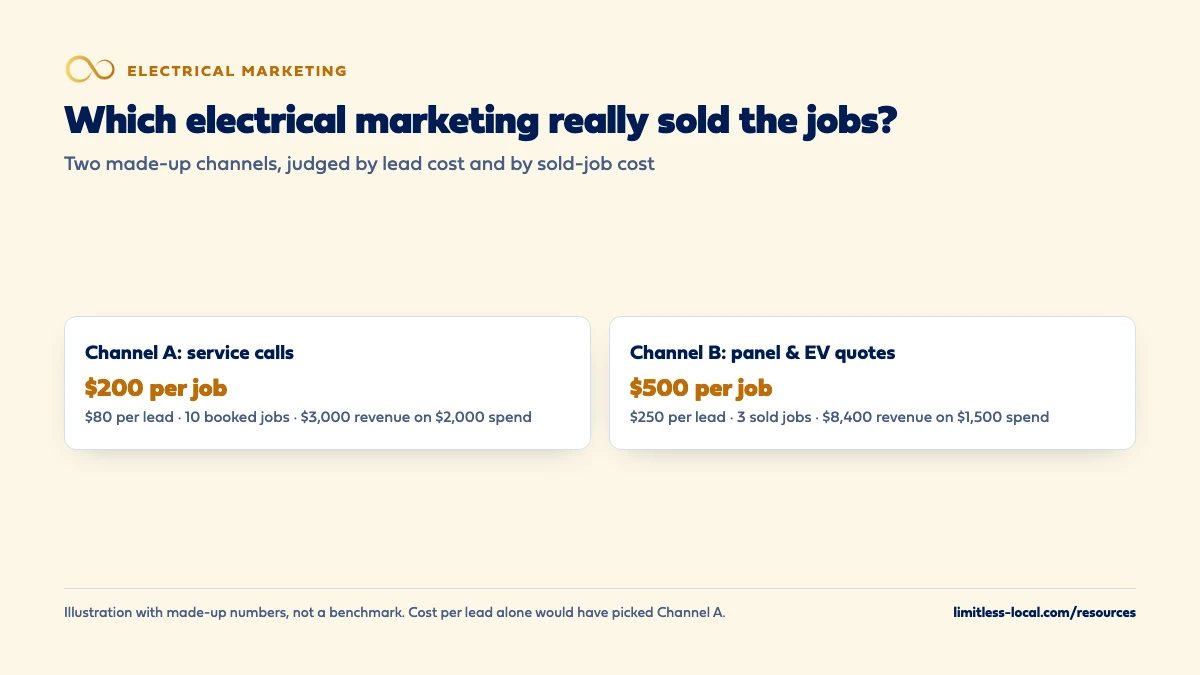
- Channel A (broad “electrician near me” ads): $2,000 spend, 25 real leads, 10 booked service calls. That’s $80 per lead and $200 per booked job. If those calls averaged $300 each, the channel brought in $3,000.
- Channel B (a campaign aimed at panel upgrades and EV chargers): $1,500 spend, 6 real leads, 5 quotes sent, 3 quotes won. That’s $250 per lead and $500 per sold job. If those jobs averaged $2,800 each, the channel brought in $8,400.
Judged by cost per lead, Channel A looks three times better. Judged by what each channel cost against the revenue it sold, Channel B did more with less, even though every job cost more to win. Without the quote and job-type steps in your field software, you’d likely move money the wrong way.
If you pay for management, count that fee as spend too. Our Essentials package, for example, is $3,500 a month, and ad spend is paid to Google separately, so both belong in the math when you judge what we produce.
Frequently asked questions
Do I need a separate phone number for every channel?
Only for channels you want to judge separately. CallRail recommends one source tracking number per campaign; a swapping number on your website covers website visitors by source, so the fixed numbers are mainly for your Google profile, trucks, signs and mailers.
Can I just ask customers how they heard about us?
Ask, but treat it as a backup. In our experience customers say “Google” whether they came from an ad, the map listing or a Local Services Ad, so a tracking number is the more reliable record.
What should the sold threshold be for my electrical jobs?
That’s your call, and it can differ by job type. ServiceTitan lets you set a minimum invoice subtotal per job type; pick an amount below which a job wasn’t worth the truck roll for marketing purposes, and keep it the same month to month so the numbers compare.
How do I credit a job that came from two channels?
Pick one rule and stick to it, such as crediting the channel that produced the first call or form. Jobber’s lead source report, for example, ties revenue to the source on the lead. What matters most is that the rule doesn’t change from month to month.
Should builders and general contractors get their own lead source?
If they send regular work, yes. ServiceTitan recommends campaigns for referrals as well as ads, and a separate source per partner shows which relationships are worth the most.
Key takeaways
- Decide what a real job is before you track anything, such as a sold job above a minimum invoice amount.
- Give each channel its own tracking number or tagged link, and mark junk calls as not a lead.
- Record lead source and job type on every lead, quote and job in ServiceTitan, Housecall Pro or Jobber.
- Track quoted project work by quotes sent, quotes won and won value, separately from service calls.
- Judge channels on cost per sold job and the revenue they bring, over a rolling three months.
Want a second set of eyes on your setup?
We'll look at how you show up locally and where calls are leaking, then send you a plain-English breakdown.
More in this section
- How do I know if my electrical marketing agency is getting results?
- What should I expect from electrical marketing in the first 90 days?
- How much should an electrical contractor spend on marketing?
- What Google Ads campaigns work best for electricians?
- How should an electrical contractor market to commercial customers?
Sources
- Source tracking basics — CallRail Help Center
- Understand call classifications — ServiceTitan Help
- Add marketing campaigns in ServiceTitan — ServiceTitan Help
- Technician Close Rate by Job Type Legacy Report — ServiceTitan Help
- Conversion Rate Reporting — Housecall Pro Help Center
- Lead Source Report — Jobber Help Center
- About phone call conversion tracking — Google Ads Help
- About offline conversion imports — Google Ads Help