
How should a pool builder use project photos and videos?
- How should pool builders use build photos and videos to win more contracts?
- Why do photos and videos matter more for a pool builder than for most trades?
- What should my crew photograph on every build?
- Do I need the homeowner's permission to post photos of their backyard?
- Which photos belong on my Google Business Profile?
- What kind of videos work, and how long should they be?
- Does posting project photos help my pool company rank in Google Maps?
- Can I use 3D design renderings or stock photos?
- How should I set up project photos on my website?
- Should my build videos have their own pages?
- How do I use build videos on Instagram and Facebook during a long sales cycle?
- How do photos help after a homeowner books a design consultation?
- What's different about photos and videos for pool builders
- A worked example: how one season of builds becomes a year of posts
- Frequently asked questions
- Key takeaways
- More in this section
- Sources
The short version
- Shoot every build at the same stages: before, dig and steel, shell, tile and coping, finished.
- Use only photos of your own work; Google says profile photos should represent reality.
- Google profile videos can run up to 30 seconds; longer walkthroughs go on your website.
- Get the homeowner's written OK before posting their backyard, and keep faces and house numbers out.
For pool builders who have years of finished pools on their phones and want those photos and videos to start bringing in design consultations.
Get a free visibility audit · Book a growth call
How should pool builders use build photos and videos to win more contracts?
A pool builder should photograph every build at each stage, from the bare yard through excavation, steel, the shell, tile and the finished pool, and use those real photos everywhere a homeowner checks you: your Google Business Profile, a project gallery on your website, social media and your sales follow-up. Keep them real, because Google says Business Profile photos should represent reality and its Maps media tips ask for media you captured yourself, not stock photos or heavy edits. Short clips of 30 seconds or less fit your Google profile, while longer walkthroughs belong on your website or YouTube, and every backyard you post needs the homeowner’s permission.
Photos of your own builds are the raw material for almost everything a pool builder’s marketing does, which is why they’re worth collecting before you spend on anything else. Google Business Profile management is part of our local SEO work: the Essentials package ($3,500 a month) includes one profile post a week, and Growth ($4,500 a month) moves that to three a week and adds Meta remarketing, where build videos do a lot of the work. See how it fits together in our pool builder marketing, and the rest of the pool builder marketing questions library goes question by question.
Why do photos and videos matter more for a pool builder than for most trades?
A homeowner hiring a plumber is buying a fix. A homeowner hiring a pool builder is buying something that doesn’t exist yet, for a large sum, usually after comparing more than one bid. In our judgement, photos and video are the closest thing they get to seeing the finished product before they sign, and the most direct proof that you’ve built pools like the one they’re picturing.
So every photo you post should answer a question a nervous buyer is asking: what does your work look like up close, do you build pools like the one I want, and what will my yard look like in the middle of it.
What should my crew photograph on every build?
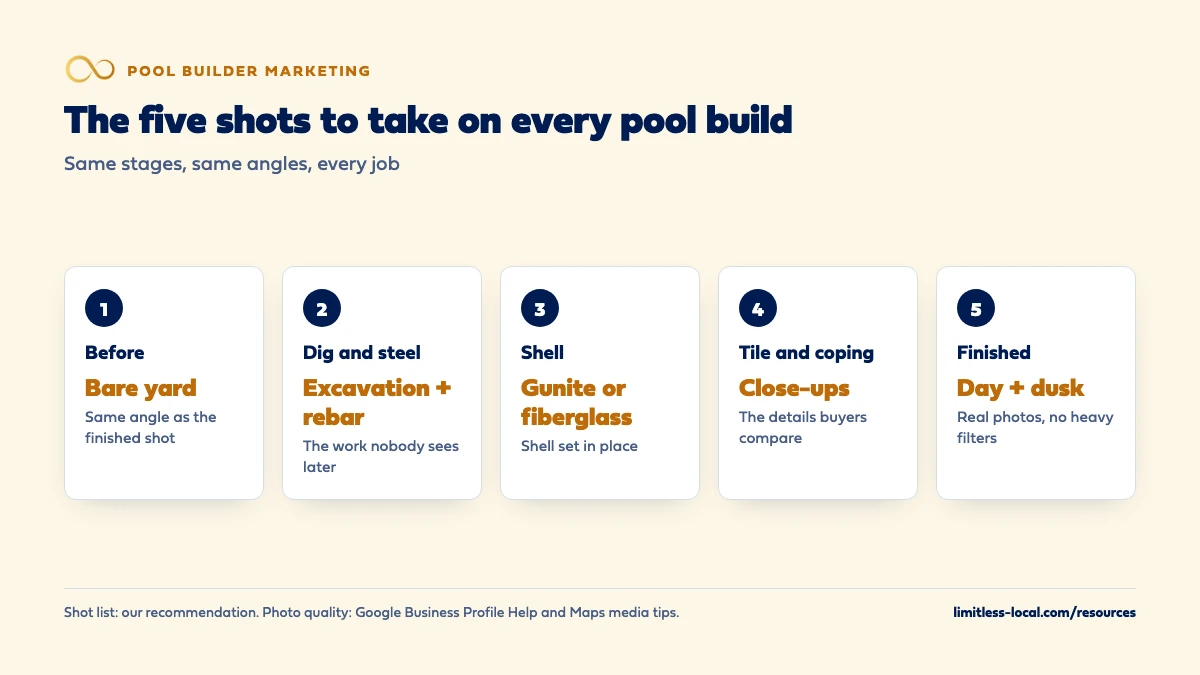
The same stages on every job, so you end up with a complete set instead of a random pile. Our recommended shot list:
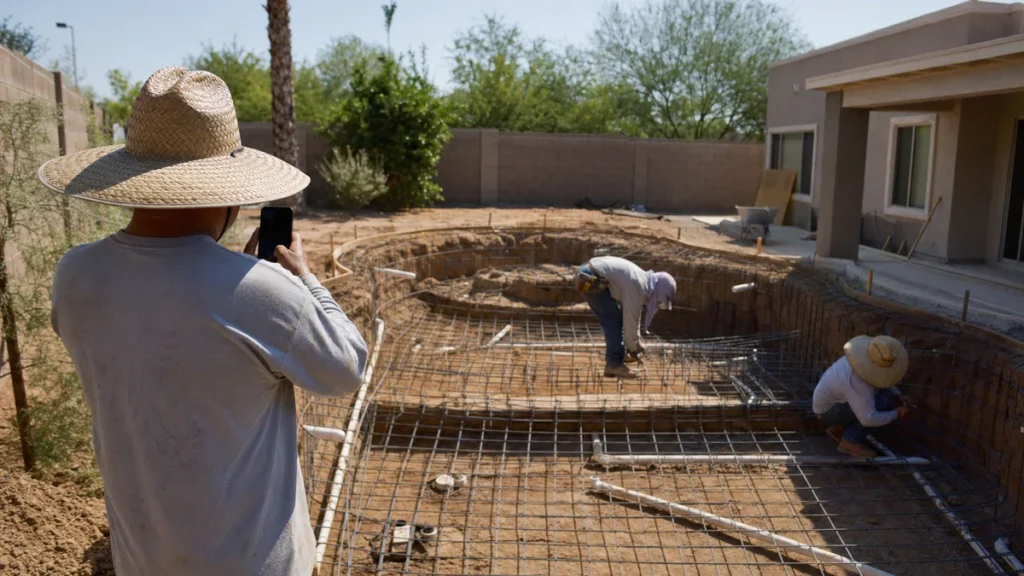
- Before. The bare yard or the old pool, from the angle you’ll use for the finished shot.
- Dig and steel. The excavation, rebar and plumbing. Once the shell goes in, nobody will ever see this work again, so this is your only chance to show how you build.
- Shell. The gunite shell or the fiberglass shell set in place.
- Tile and coping. Close-ups of the details buyers compare: tile lines, coping, water features, the equipment pad.
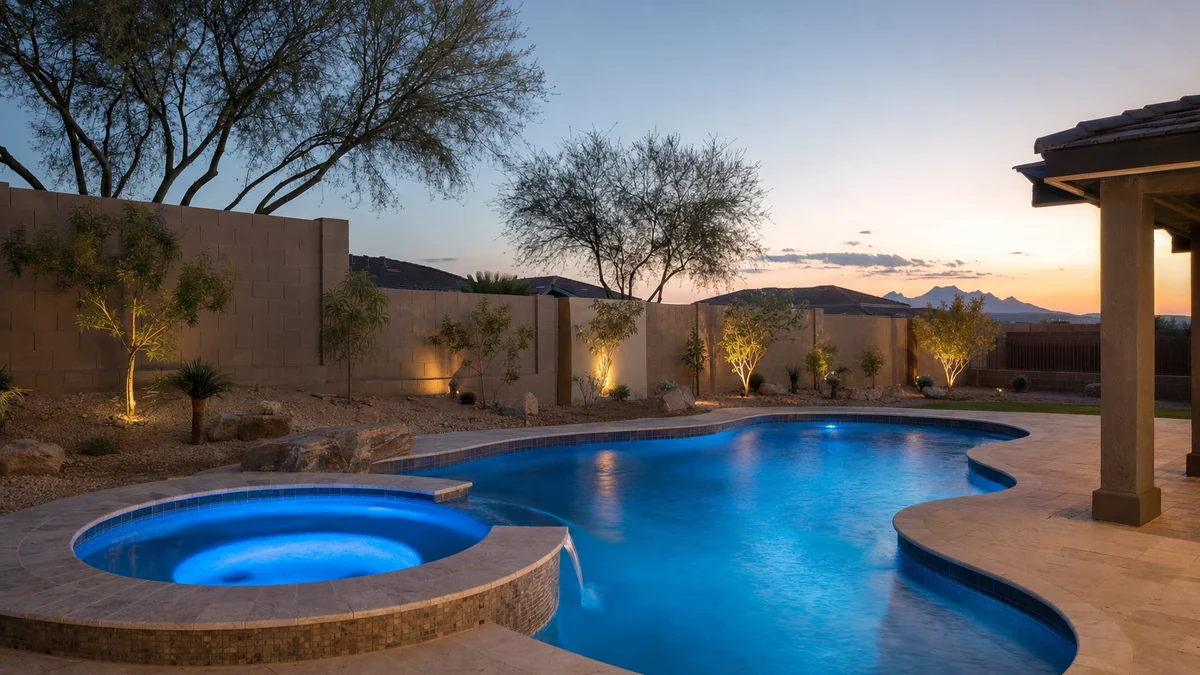
- Finished. The pool full, in daylight and again at dusk with the lights on, from the same spot as the before photo.
Short phone videos at each stage are worth grabbing too: a slow walk around the dig, water going in, the first time the lights come on. Make one person on each crew responsible for it and add it to the job checklist, because in our experience the photos that don’t get assigned don’t get taken.
Do I need the homeowner's permission to post photos of their backyard?
Get it, in writing, before you post. A backyard is part of someone’s home, and in our judgement the easiest place to ask is in the contract or the start-of-build paperwork, with a simple yes or no for photos and video of the project.
Even with permission, keep the shots about the pool. Leave out faces (especially children), house numbers, license plates in the driveway and anything that shows the street address. Google’s own Maps media tips suggest blurring faces and license plates in 360 photos to protect privacy, which is a sensible standard for every photo you publish. If a homeowner agrees to appear in a video about their project, make sure what they say is their own words; the FTC’s rule on consumer reviews and testimonials makes it a violation for a business to write or create a testimonial that materially misrepresents the person’s experience. That’s a summary of the federal rule, not legal advice. Source: 16 CFR Part 465.
Which photos belong on my Google Business Profile?
Real photos of your own builds and your own team. Google’s tips for business-specific photos suggest adding at least three photos at work that represent the services you offer, and at least three team photos that show the people behind the business. For a pool builder, that means finished pools of each type you build, a few in-progress shots, your crews at work and you on a job site.
Google’s quality bar is specific: photos should be in focus, well lit and free of significant alterations or excessive filters or AI. In Google’s words, the image should represent reality. The technical requirements are simple too: JPG or PNG, between 10 KB and 5 MB, with 720 by 720 pixels recommended.
Two things trip owners up. Photos and videos only show on Google after your Business Profile is verified, and Google says new media can take up to 24 to 48 hours to appear. Photos are only one part of the profile; optimizing your pool builder Google Business Profile covers categories, services and the rest. Sources: Tips for business-specific photos and Manage your Business Profile photos and videos.
What kind of videos work, and how long should they be?
It depends on where the video lives. Google’s Business Profile video rules are tight: up to 30 seconds long, up to 75 MB, at 720p or higher. That’s enough for a slow pan across a finished pool at dusk, a time-lapse of a build, or water filling a new shell. Google’s Maps media tips add that stable videos are the most helpful, so hold the phone steady or use a gimbal.
Longer videos, like a two-minute walkthrough of a finished project or the owner explaining how you build a shell, belong on your website and YouTube, where length isn’t capped the same way. In our judgement, the videos that do the most for a pool builder are the plain ones: a real yard, a real pool, a real person explaining what was built and why. Source: Manage your Business Profile photos and videos.
Curious what your marketing is actually booking?
Get a free visibility audit — no obligation, no sales pitch.
Does posting project photos help my pool company rank in Google Maps?
Google doesn’t say photos are a ranking factor, so don’t expect a jump in the map pack from uploading more of them. Its page on improving your local ranking does list adding photos and videos among its tips, in the sense of showing customers what you offer. It then says local results are mainly based on relevance, distance and popularity, and when it explains popularity (how well-known a business is) it names reviews and links from other websites, not photo counts. It also says there’s no way to request or pay for a better local ranking.
Our reading: photos earn their keep after you show up, by turning a profile view into a call or a consultation request. If ranking is the problem, getting your pool company to rank in Google Maps covers the levers that do move it. Source: Tips to improve your local ranking on Google.
Can I use 3D design renderings or stock photos?
Not on your Google profile. Google’s Maps media tips say to use media you captured and to avoid stock photos, collages, heavily edited images and imagery created by other parties, and its Business Profile guidance says photos should represent reality. A rendering of a pool that hasn’t been built yet isn’t a photo of your work, and Google says low-quality media may be removed without appeal.
On your website, renderings are fine as long as they’re labeled as renderings. In our judgement they can help a homeowner picture a design, but placed next to real photos and labeled clearly, so nobody mistakes a computer drawing for a finished job. Stock photos are worth avoiding everywhere: a homeowner comparing bids is looking for proof you can build, and a pool you didn’t build proves nothing. Source: Tips for posting media to Maps.
How should I set up project photos on my website?
As projects, not as one long gallery. Give each finished pool its own short page or section with the town, the pool type (gunite, fiberglass, renovation), the features, and the before, in-progress and finished photos together. In our judgement, a homeowner who wants a freeform gunite pool with a spa wants to find that build in a few taps, not scroll through eighty mixed thumbnails.
Google’s image guidance points the same way. It says Google pulls information about an image from the page around it, including captions, so images should sit near relevant text on a relevant page. It calls alt text the most important attribute for describing an image, asks for useful descriptions instead of keyword-stuffed ones, and says short, descriptive filenames give light clues too, so freeform-gunite-pool-with-spa-at-dusk.jpg beats IMG00023.JPG. The pages around the gallery matter as well; what a pool builder website should include covers the rest. Source: Image SEO best practices.
Should my build videos have their own pages?
Only your best few. Google’s video guidance says that to be eligible for video features, including video results on the main results page, you should create a dedicated watch page for each video where it makes sense for your business, with a title and description unique to that video. A project page where the video sits beside a lot of other content isn’t a watch page.
In our judgement, that’s worth doing for a full walkthrough of a signature build, a start-to-finish build video and an owner’s explanation of how you build. Embed the shorter clips on the matching project pages. Source: Video SEO best practices.
How do I use build videos on Instagram and Facebook during a long sales cycle?
Use them to stay in front of the homeowners who already showed interest. Meta lets advertisers build a video engagement custom audience from people who watched their videos on Facebook or Instagram, for example people who viewed at least ten seconds, and you choose how many days people stay in that audience after they watch. You can then show those people more of your work in ads.
For a pool builder, that fits the way homeowners buy. In our judgement, a homeowner who watched most of your build time-lapse in March is a better audience for a finished-pool video in May than a stranger is. Source: Create a video engagement custom audience.
How do photos help after a homeowner books a design consultation?
This is where most builders leave photos on the table. In our judgement, the most persuasive thing you can send after a consultation is a set of photos from a finished build like the one you just discussed, with the in-progress shots included, because it answers the questions the homeowner is still turning over: what will it look like, and how do you build it.
Build a small library by pool type and size so the office can send the right set the same day. Then keep sending a project every few weeks while the homeowner decides; following up during a long sales cycle covers the rest of that sequence. Finished customers can help too: when you ask for a review, they may add their own photos, and getting more Google reviews for your pool company covers how to ask.
Want to see where your company stands?
A free visibility audit shows where you show up on Google, Maps and AI answers, and what it's costing you in calls.
What's different about photos and videos for pool builders
The best work gets buried. Steel spacing, plumbing runs and the shell are what separate a well-built pool from a cheap one, and they disappear under plaster and deck. A builder who documents them has something to show that a builder who doesn’t can’t fake.
Seasonal building, year-round buying. You shoot most of your photos during building season, but homeowners keep researching through the slow months. Save a backlog of build photos and clips to post through winter; keeping leads coming in the off-season covers the rest of the slow-season plan.
New builds and renovations sell differently. A renovation buyer wants proof you can transform what they already have, so the before-and-after pair from the same angle does most of the work. A new-build buyer wants to see the finished pool and the process. Shoot and label both kinds so each buyer finds their kind of project.
A worked example: how one season of builds becomes a year of posts
These numbers are made up to show the math, not a benchmark. Say you finish 20 pools in a season, and your crews capture the five stages on the shot list for each one. That’s 100 stage photo sets, plus a short clip at the dig and another at the finish, or 40 clips.
Now spread them out. Posting two photos a week to your Google profile uses 104 photos a year, so one season of builds covers the whole year, including the winter months when you have no new jobs to shoot. The 40 clips cover a weekly short video for most of the year on Instagram and Facebook. The cost is a few minutes per job stage and one person who owns it.
Frequently asked questions
Can I add text or my logo on top of the photos I post to Google?
Keep it off. Google’s Maps media tips say to avoid adding borders, text or collaged images, and to keep any superimposed promotional content relevant to the place. A clean photo of a finished pool says more than a caption burned into it.
Why don't my new photos show on my Google profile yet?
Google says media can take up to 24 to 48 hours to appear, and media stays pending until your Business Profile is verified. Photos that break Google’s policies are marked Not approved and won’t show.
Can customers add their own photos of my pools to my Google profile?
Yes, customer-added photos can appear on a Business Profile, and Google lets owners request removal of ones that shouldn’t be there. Google also says that if your chosen cover photo is low quality, a user-submitted photo may be shown instead, which is another reason to upload good ones yourself.
Do I need a professional photographer?
Not for most of it. In our judgement, steady phone photos taken at every stage do more than a once-a-year shoot, because they show the process. A professional shoot of your best few finished pools is worth it for your website and ads.
Can I post a video longer than 30 seconds on my Google profile?
Google’s Business Profile video requirements list a duration of up to 30 seconds. Put longer walkthroughs on your website or YouTube and link to them.
Key takeaways
- Photograph every build at the same five stages, including the steel and plumbing that get buried.
- Use only real photos of your own work; Google says profile photos should represent reality.
- Google profile videos run up to 30 seconds; give your best long videos their own watch pages.
- Photos don’t directly lift your map ranking, but they help turn a profile view into a consultation.
- Get written permission for every backyard, and keep faces, house numbers and plates out of frame.
Not sure what's working right now?
Start with a free visibility audit: rankings, Google profile, reviews and tracking, checked against your service area.
More in this section
- How should a pool builder set up a project gallery page?
- What should a pool builder post on Instagram and Facebook?
- What should a pool builder website include to get more consultations?
- What keywords should a pool builder target?
- How should a pool builder advertise financing options?
Sources
- Manage your Business Profile photos & videos — Google Business Profile Help
- Tips for business-specific photos on your Business Profile — Google Business Profile Help
- Tips for posting media to Maps — Maps User Generated Content Policy Help
- Tips to improve your local ranking on Google — Google Business Profile Help
- Image SEO best practices — Google Search Central
- Video SEO best practices — Google Search Central
- Create a video engagement custom audience — Meta Business Help Center
- 16 CFR Part 465: Rule on the Use of Consumer Reviews and Testimonials — Electronic Code of Federal Regulations (FTC rule)