
How do I ask HVAC customers for 5-star reviews without being pushy?
- How should an HVAC company word, time and send review requests so they feel natural?
- Can I ask HVAC customers for a 5-star review?
- What makes a review request feel pushy?
- What should a review request text say?
- What should a review request email say?
- What should the tech or office say in person or on the phone?
- When should the review request go out?
- Text, email or in person: which works best?
- How many times can I follow up before it's too much?
- How do I ask a customer whose job didn't go perfectly?
- What should I never say or do when asking for reviews?
- How do I make leaving a review take less than a minute?
- What's different about asking for reviews in HVAC
- A worked example: rewriting a pushy request
- Frequently asked questions
- Key takeaways
- More in this section
- Sources
The short version
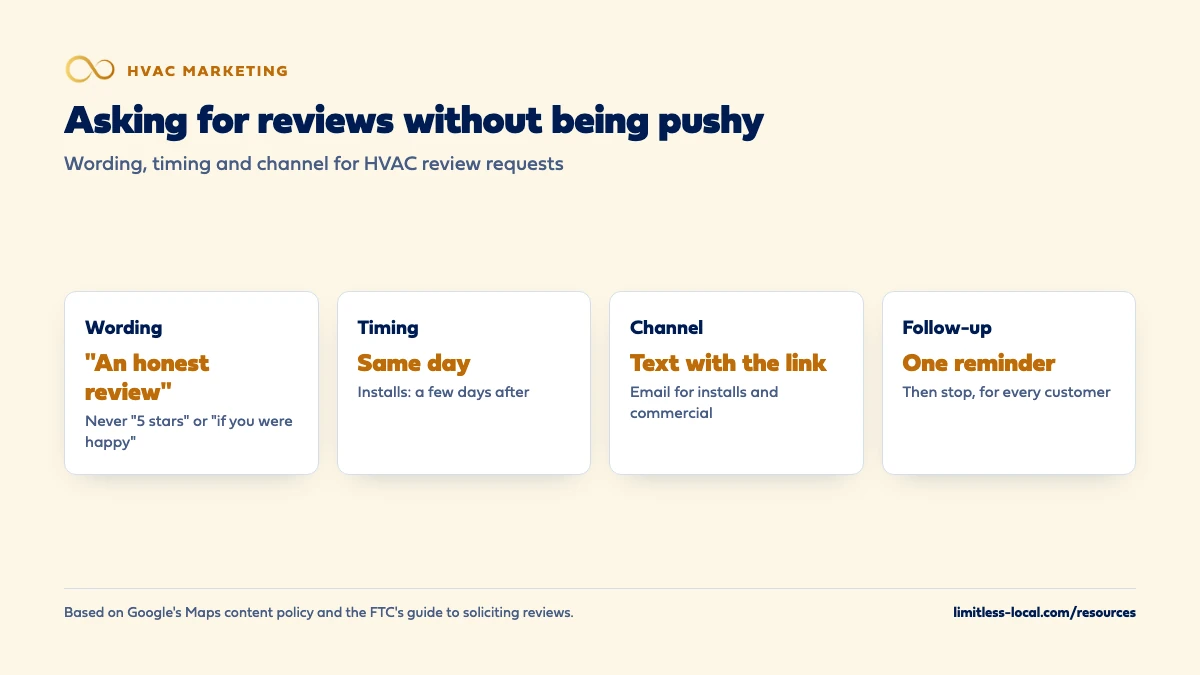
- Ask for an honest review, never for five stars.
- Ask every customer the same way, not just the happy ones.
- Send a short text with the direct link the same day.
- One reminder, then stop.
For HVAC owners who want more five-star Google reviews without making customers feel cornered, and without breaking Google’s rules.
Get a free visibility audit · Book a growth call
How should an HVAC company word, time and send review requests so they feel natural?
Ask every customer for an honest Google review, once, right after they’ve seen the job done well, with a direct link they can use in under a minute. Don’t ask for five stars or only ask the happy ones; Google’s policy doesn’t allow businesses to influence the rating or selectively ask for positive reviews, and a request that hints at the score is exactly what feels pushy. A short, friendly text with the link the same day, plus one reminder a few days later, gets the five-star reviews your good work has earned without pressure.
Good jobs and a calm, consistent ask are what earn five-star reviews; the rest is setup and follow-through. Review response and basic review generation are part of our local SEO work in the Essentials package ($3,500 a month for one location), Growth adds advanced review generation, and automated review requests are part of the Scale tier. See how it fits our HVAC marketing. The HVAC marketing guide covers reviews alongside every other channel, and the rest of the HVAC marketing questions library goes question by question.
Can I ask HVAC customers for a 5-star review?
Not in those words. Google’s Maps content policy lets businesses ask customers to post reviews of a genuine experience, but only without offering incentives or trying to influence the rating or what the review says. “Please give us five stars” is an attempt to influence the rating.
The good news is that you don’t need to say it. A customer whose AC is blowing cold again and whose tech was on time and polite is already inclined to give five stars. Your job is to make it easy for them to say so, not to tell them what to give.
So the goal changes from “get five-star reviews” to “get every customer to leave an honest review.” When the work is good, most of those reviews will be five stars on their own, and the ones that aren’t will tell you something worth knowing. If you’re wondering how many five-star reviews it would take to move your average, what Google rating an HVAC company needs to stay competitive walks through the math.
What makes a review request feel pushy?
Most pushy requests come from a few habits:
- Asking for a score. “Five stars would really help us” makes the customer feel graded on their grade.
- Hovering. Waiting in the kitchen while they pull up Google puts them on the spot.
- Guilt. “Mike’s bonus depends on it” turns a review into a favor.
- Too many reminders. Three texts in a week reads like a collections notice.
- A survey first. “Rate us 1 to 10” followed by a Google link only for the high scorers is both pushy and against the rules.
- Bad timing. Asking while they’re still upset about the price, or at 11 p.m. after an emergency call.
The fix for every one of these is the same: ask once, ask everyone, keep it short, and let them do it on their own time.
What should a review request text say?
Keep it short, personal and free of any hint about the rating. A text that works for most service calls:
“Hi Sarah, it’s Dana from Comfort Heating & Air. Thanks for having Luis out today, and glad the AC is cooling again. If you have a minute, we’d really appreciate an honest Google review. It helps other homeowners find a local company. Here’s the link: [review link]”
What makes it work:
- It comes from a named person at the company, not “noreply.”
- It mentions the actual job, so it doesn’t read like a blast.
- It says “honest,” which takes the pressure off.
- It gives one reason, then the link, then stops.
Using the tech’s name in your thank-you is fine. Asking the customer to mention the tech in the review is not; businesses can’t request specific content, including content that names a staff member.
What should a review request email say?
Email suits bigger jobs, like a system replacement, and commercial customers who live in their inbox. It can be a little longer, but the shape is the same:
Subject: Thanks for choosing us for your new system
“Hi Mark, thanks again for trusting us with your new heat pump. We hope it’s been running quietly. If anything isn’t right, just reply to this email and we’ll sort it out. And if you have a couple of minutes, an honest review on Google would mean a lot to a local company like ours: [review link]. Thank you, Dana and the team at Comfort Heating & Air”
Note the order: it offers help first and asks second. That isn’t a filter, because the review link goes to every customer either way. It just puts the customer’s comfort ahead of your marketing, which is the opposite of pushy.
What should the tech or office say in person or on the phone?
In person, one sentence and the link: “Thanks for having us out. I’m texting you our review link; if you get a minute later, an honest Google review really helps us.” Then the tech packs up and leaves. Businesses shouldn’t require or pressure customers to leave ratings or reviews while on the premises, and for an HVAC company, the customer’s house is the premises.
On the phone, when the office books the next tune-up or follows up on a repair, the ask is the same: thank them, offer to text the link, and move on.
The words matter less than consistency. A script every tech uses on every job beats a perfect line that gets used once a week. Getting your HVAC techs to ask for Google reviews covers how to make the ask a habit for the whole crew.
Curious what your marketing is actually booking?
Get a free visibility audit — no obligation, no sales pitch.
When should the review request go out?
When the customer can feel the result, and while the visit is still fresh:
- Repairs: the same day, an hour or two after the tech leaves, once the house has cooled or warmed back up.
- Tune-ups: the same day, after the tech has walked them through what was checked.
- Replacements: a few days after the install, once the new system has run through a hot afternoon or a cold night.
- Late-night emergency calls: the next morning, not at midnight.
Avoid sending it before the invoice is settled if there’s any question about the bill. A customer who’s still deciding whether the price was fair will review the price.
If you can, send it from your job software automatically when the job is closed out, so it goes out on time even on the busiest day of July.
Text, email or in person: which works best?
Usually a mix, with text doing most of the work. Google suggests sharing your review link on receipts and in thank-you emails, and says you can send review requests through email, WhatsApp messages or Facebook posts.
- Text is the quickest for most homeowners. They read it within minutes and can tap the link right away.
- Email suits replacements, commercial customers and anyone who asked to be contacted that way.
- In person is the warmest, as long as it’s one sentence followed by the link, not a request to do it now.
- A leave-behind card with a QR code works for customers who’d rather not get texts. For now, review QR codes can only be generated from a computer browser, so have the office make them.
Pick one main channel, usually text, and use it for every customer, so nobody gets skipped.
How many times can I follow up before it's too much?
Once. A single reminder three or four days after the first request catches the people who meant to do it and forgot. After that, stop. More reminders don’t add many reviews, and an annoyed customer is the wrong person to push into writing one.
Make the reminder lighter than the first ask: “Hi Sarah, just a quick nudge in case the link got buried. No worries if you’re busy. Thanks again for choosing us. [review link]”
Keep the same rule for every customer. If some get one reminder and others get three, you’re drifting toward treating customers differently based on how you think they’ll review, which is exactly the line the rules draw. For how many reviews a month to expect from this kind of steady asking, see how many Google reviews a month an HVAC company should collect.
How do I ask a customer whose job didn't go perfectly?
The same way as everyone else, after you’ve done what you can to fix it. Skipping them is review gating, and the FTC’s guide to soliciting reviews says plainly: don’t ask for reviews only from customers you think will leave positive ones.
What you can control is the order of events. If the system needed a second visit, or the part was late, fix it, call to confirm it’s right, and then send the same request everyone gets. A customer who watched you make it right often writes the most convincing review you’ll get. If several unhappy reviews have already landed, recovering after a run of bad reviews covers what to do first.
If they do post something critical, reply calmly and specifically. Google’s tips on reviews say that constructive replies and following up on concerns can show you care and may even encourage the customer to update their review. How an HVAC company should reply to Google reviews has examples.
What should I never say or do when asking for reviews?
A short list to share with everyone who talks to customers:
- Never ask for five stars, or say “if you were happy.”
- Never offer a discount, a free filter, a gift card or a drawing entry for a review, or for changing or removing one.
- Never ask only the customers who seem pleased.
- Never ask the customer to mention a tech by name or describe the job a certain way.
- Never give techs a review quota; asking staff to bring in a certain number of reviews isn’t allowed.
- Never have employees, family or friends review the business; reviews based on a conflict of interest aren’t allowed.
- Never wait over the customer while they write it.
Each one either breaks a rule or makes the request feel like pressure, and usually both. Customers can tell when a review is being managed, and so can Google.
How do I make leaving a review take less than a minute?
Remove every step you can. Send the direct review link, not your website or your profile, so one tap opens the review box. Customers must be signed into a Google Account to leave a review, and the account can use a non-Gmail email address, so “I don’t have Gmail” isn’t a dead end.
Keep your services list on Google current. Google may ask customers reviewing a service business to identify the work you did, and the options come from your services list, your website or a standard list. If repairs, replacements and maintenance plans are all listed, the customer can pick the right one quickly.
If a customer says they left a review and you can’t find it, give it a few days. Google checks reviews against its policies, and that can take a few days before a review appears.
Not sure which of these is costing you jobs?
A free visibility audit checks the Google profile, reviews, site and tracking, and shows what to fix first.
What's different about asking for reviews in HVAC
The relief moment. HVAC has a built-in good moment: the house is comfortable again. Time the ask to land just after it, while the customer still feels the difference.
You’re in their home. Pressure feels stronger in someone’s kitchen than at a shop counter. That’s why the in-person ask should be one sentence and a link, never a request to do it now.
Maintenance customers come back. Ask plan members after the first visit, not every tune-up. Someone who’s already reviewed you is better asked for a referral.
Peak season strains everything. In a heat wave, techs forget to ask and the office is buried. An automatic text from your job software when each job closes keeps the requests going out when people are too busy to remember.
A worked example: rewriting a pushy request
Here’s a made-up request of the kind many shops send, and a rewrite.
Before: “Hi! If you were happy with Luis today, please give us 5 stars on Google and mention his name, it really helps his bonus! If anything was wrong, call the office instead.”
That one message breaks most of the rules on this page: it asks for a score, asks only happy customers, requests specific content, ties the review to a tech’s pay, and steers unhappy customers away from Google.
After: “Hi Sarah, it’s Dana from Comfort Heating & Air. Thanks for having Luis out today, and glad the AC is cooling again. If you have a minute, an honest Google review would really help us: [review link]”
Same customer, same job. The second version is shorter, friendlier and within the rules, and a customer who had a good visit has every reason to give five stars without being asked to.
Frequently asked questions
Should I ask for Yelp reviews the same way?
No. Yelp’s business help center says proactively asking for reviews may hurt your Yelp rating, because its software may not recommend reviews that seem prompted by the business. Focus your requests on Google.
Can I offer a discount on the next tune-up for leaving a review?
Not for Google reviews. Incentives such as discounts or free services in exchange for posting, changing or removing a review aren’t allowed.
Is it OK to ask customers to mention the service they got?
Don’t ask them to write specific content. Instead, keep your services list current on Google, which may let customers tag the job type themselves.
Can I send review requests to customers from last year?
A one-time, personal request to recent real customers is reasonable. Spread it out instead of blasting the whole list at once, because Google treats unusual volumes or patterns of reviews that look like rating manipulation as a problem.
What if a customer says they'll leave a review but never does?
Send the one reminder, then let it go. Plenty of satisfied customers never write reviews, and pushing harder risks turning a happy customer into an annoyed one.
Should every review request come from the owner?
It doesn’t have to. A named person, whether that’s the owner, the office manager or the tech, reads as personal. What matters is that it’s consistent and goes to every customer.
Key takeaways
- Ask for an honest review, never for five stars; good work earns the stars.
- Ask every customer the same way; asking only happy ones breaks Google’s policy and the FTC’s guidance.
- A short, personal text with the direct link, sent the same day, does most of the work.
- Send one reminder a few days later, then stop.
- Never offer incentives, request specific content or give techs review quotas.
Want a second set of eyes on your setup?
We'll look at how you show up locally and where calls are leaking, then send you a plain-English breakdown.
More in this section
- How do I get my HVAC techs to ask customers for Google reviews?
- How should an HVAC company reply to Google reviews?
- How do I get more repeat customers and referrals for my HVAC company?
- How do I make my HVAC company look trustworthy online?
- How can I tell if HVAC ads bring real customers, not just calls?
Sources
- Prohibited & restricted content (Maps user-generated content policy) — Google Maps User Generated Content Policy Help
- Create a Google link or QR code to request reviews — Google Business Profile Help
- Tips to get more reviews — Google Business Profile Help
- Soliciting and Paying for Online Reviews: A Guide for Marketers — Federal Trade Commission
- About reviews for service businesses — Google Business Profile Help
- About missing or delayed reviews — Google Business Profile Help
- Don't Ask for Reviews — Yelp for Business Help Center