
How can I tell if HVAC ads bring real customers, not just calls?

- How do I know which HVAC ad calls turn into paying customers?
- What counts as a real customer from an ad?
- Why does my ad account count calls that never became jobs?
- Which ad calls aren't customers at all?
- How do I sort every ad call as it comes in?
- How do I match an ad call to an estimate and a sold job?
- Should I listen to the call recordings?
- Which numbers show whether ads bring customers?
- How long should I wait before judging an ad on sold jobs?
- Can I tell Google Ads which calls became paying customers?
- What if my ads bring calls but very few customers?
- What should a monthly ad report show me?
- What's different about tracking HVAC ad customers
- A worked example: the same ad, judged by calls and by customers
- Frequently asked questions
- Key takeaways
- More in this section
- Sources
The short version
- An ad platform counts calls; only your job board knows which callers paid.
- Sort every ad call into not a lead, lead not booked, booked, and sold.
- Keep the ad as the lead source on the customer, the estimate and the job.
- Judge each ad on cost per sold job and revenue, not cost per call.
For HVAC owners whose ad reports show plenty of calls but who can’t tell how many of those callers ever paid an invoice.
Get a free visibility audit · Book a growth call
How do I know which HVAC ad calls turn into paying customers?
Match every tracked ad call to what happened next: whether it was a real service request, whether it booked, and whether it became a sold job with an invoice. Mark each call’s outcome the day it comes in, keep the ad as the lead source on the customer, the estimate and the job in your field software, and add up sold jobs and revenue by ad once a month. If an ad’s calls rarely reach an invoice, it’s bringing in calls, not customers, no matter what the ad platform’s conversion column says.
That last step is the one most reports skip, and it’s the one our reporting is built around. Call tracking with recording, source tagging and a monthly cost-per-lead breakdown come with every one of our HVAC marketing packages, so each ad is judged on the jobs it booked. For the wider picture, the HVAC marketing guide covers every channel, and the rest of the HVAC marketing questions library goes question by question.
What counts as a real customer from an ad?
A real customer is a household that found you through the ad, asked for work you do, got on your schedule and paid you. Everything short of that is a step along the way. A call is a step. A booked appointment is a bigger step. The invoice is the finish line, and it’s the only one that pays for the ad.
Write that definition down before you look at a single report, because every platform and every agency report uses softer words. “Conversions,” “leads” and “calls” all sound like customers. None of them are until a tech has been out and the job is paid. For the full ladder from click to booked job, the difference between a click, a lead and a booked HVAC job lays out each rung.
Why does my ad account count calls that never became jobs?
Because it can’t see your schedule. Google Ads counts a call from an ad as a conversion in one of two ways: it uses AI to analyze the call recording for signs of a high-quality lead, or it counts any call that lasts longer than a minimum duration you set. If your Google Business Profile is linked to the ad account, profile calls that Google can tie to an ad interaction land in the same “Calls from ads” count.
Both methods are a guess about intent. A ten-minute call with a homeowner asking why your diagnostic fee is higher than the last company’s passes the duration test. So does a long call from an existing customer moving their appointment. Neither one is a new customer from the ad. The conversion column is a useful early signal, and it’s the number that powers automated bidding, but it’s still a count of calls, not of paid invoices.
Which ad calls aren't customers at all?
Sort a month of ad calls by hand and the same groups tend to show up:
- Wrong numbers and solicitors. Vendors, robocalls, someone looking for a different company.
- Existing customers. People who searched your name, clicked the ad at the top and called to reschedule, ask about an invoice or check on a part.
- Out-of-area callers. Real need, but too far for your trucks.
- Work you don’t do. Ductless installs if you don’t do them, commercial rooftop units, appliance repair.
- Price checkers. They ask what a tune-up or a new system costs and hang up.
- Repeat calls. The same homeowner calling three times about one job is one lead, not three.
ServiceTitan treats a call from a delivery company like UPS, or a call to reschedule a job, as an excused call, and a call over 60 seconds with no booked job as an unbooked call. Whatever software you use, the point is the same: each of those groups needs its own label, or they all get counted as “calls from the ad.”
How do I sort every ad call as it comes in?
Give whoever answers the phone four outcomes to pick from, and make picking one part of hanging up:
- Not a lead: wrong number, solicitor, existing customer with an admin question.
- Lead, not booked: a real service request that didn’t get on the schedule, with a short reason (price, timing, out of area, went with someone else).
- Booked: on the schedule with a date and time.
- Sold: filled in later, when the job is invoiced.
Most call tracking and field software can hold these labels. CallRail lets you score a call as a lead, tag it and record a value right after it ends, or mark it qualified from the call log. In ServiceTitan, setting up call reasons is what separates leads from non-leads; without them, any call longer than a minute gets counted as a lead. The tool matters less than the habit. If nobody labels calls the day they happen, nobody remembers a week later.
How do I match an ad call to an estimate and a sold job?
The thread that ties it together is the caller’s phone number and the lead source. When an ad call books, the customer record in your field software gets the ad as its lead source, and that source has to follow the work: onto the estimate, onto the job and onto the invoice. Housecall Pro tracks lead source on customers, jobs and estimates; Jobber and ServiceTitan have their own versions.
Once a month, pull two lists side by side: every tracked call from the ad, with the caller’s number, and every sold job with a lead source of that ad. Match them by phone number. You’ll find three kinds of gaps:
- Ad calls that booked but have no source on the job, so the ad never gets credit.
- Jobs tagged to the ad that never came through a tracked number, often a guess by the office.
- Calls that booked and then quietly cancelled, which belong in the booked column but not the sold one.
Fix the first two at the source by making lead source a required field when a job is booked. Tracking whether your HVAC marketing is paying off covers the tracking numbers and form setup that feed this list.
Curious what your marketing is actually booking?
Get a free visibility audit — no obligation, no sales pitch.
Should I listen to the call recordings?
Yes, at least for the first month you run a new ad and for any month the numbers look odd. Ten minutes with a handful of recordings tells you things no report can. Listen for four things:
- What the caller asked for, in their own words. That shows which searches your ad is really catching.
- Where they live. Out-of-area calls point to targeting that’s drawn too wide.
- How the call was handled. A real lead that didn’t book because nobody offered a time is an office problem, not an ad problem.
- Whether they’d already called someone else. That tells you how fast you need to be.
If your recordings show a lot of real requests that didn’t book, start with what share of calls your office should be booking before you touch the ads.
Which numbers show whether ads bring customers?
Four rates and one cost tell the whole story for each ad or campaign:
- Real lead rate: real service requests divided by all tracked calls. A low rate points at targeting or the ad itself.
- Booking rate: booked appointments divided by real leads. A low rate points at the phones.
- Sold rate: sold jobs divided by booked appointments. A low rate points at pricing, the tech’s visit or the kind of jobs the ad attracts.
- Revenue per sold job: what those jobs actually brought in.
- Cost per sold job: ad spend divided by sold jobs. This is the number to compare across ads and channels.
Cost per call still has a use. It’s an early warning when it jumps. It just can’t tell you whether the ad is paying for itself, because two ads with the same cost per call can have very different shares of callers who end up paying.
How long should I wait before judging an ad on sold jobs?
Repair calls usually settle quickly. The homeowner calls, a tech goes out, the job is sold or not within days. A full month of repair calls is enough to start comparing ads.
Replacement calls take longer. The estimate visit, the financing question and the second opinion can stretch a sale across weeks, so a replacement ad judged after its first month will look worse than it is. Keep the ad as the source on open estimates, and come back to them when they close. How long an HVAC lead takes to turn into a booked job covers the timing by job type.
Can I tell Google Ads which calls became paying customers?
Yes, and it’s worth doing once your labeling habit is solid. Google Ads lets you import call conversions that you track in another system, so you can count calls as conversions only when they include sales, along with the value of each sale. For clicks to your website that turn into sales later, offline conversion imports let you send the result back with the Google Click ID saved from the original click. Google now recommends starting with enhanced conversions for leads instead, which matches the customer details you already collect.
The payoff is that the ad account stops treating a long wrong-number call the same as a sold system. Its reports and its automated bidding start leaning toward the searches that produce paying customers. The catch is that the import is only as good as the outcomes your office records, which is why the call labeling comes first.
What if my ads bring calls but very few customers?
Use the rates above to find the step where people fall out, and fix that step before you change the budget:
- Most calls aren’t real leads: tighten the searches, areas and job types the ad shows for. Fixing HVAC leads that are mostly junk walks through it.
- Real leads don’t book: look at who’s answering, how fast, and whether they offer a time on the call.
- Booked calls don’t sell: look at what the ad promises against what the tech quotes. An ad that leads with a cheap service call can fill the schedule with people who never buy anything else.
If you can’t tell which of the three it is, figuring out whether the problem is your ads, website or follow-up is a better first move than turning the ads off.
What should a monthly ad report show me?
If someone else runs your ads, ask for a report that goes past calls. At minimum it should show, for each campaign: total calls, real leads, booked appointments, sold jobs, revenue from those jobs, and cost per sold job. Ask for the list of calls behind the totals, too, with the caller’s number and outcome, so you can spot-check it against your own job board.
A report that stops at calls and “conversions” isn’t wrong, it’s just unfinished. Whoever runs the ads can’t see your invoices unless your office records outcomes and shares them back, so finishing the report is a job for both sides.
Want to see where your company stands?
A free visibility audit shows where you show up on Google, Maps and AI answers, and what it's costing you in calls.
What's different about tracking HVAC ad customers
Your own customers search for you. Maintenance plan members and past customers often type your company name into Google and tap the first result, which may be your ad. Those calls are real business but not new customers, so give them their own label or your ad will look better than it is.
Heat waves flood the phones. On the first hot week of summer, call counts jump and the office has the least time to label anything. That’s exactly when outcomes go unrecorded. Keep the four outcomes simple enough to tap in a few seconds.
One call can be worth a repair or a system. A no-cool call might end as a capacitor swap or a full replacement estimate. Keep the ad as the source on that estimate, or the ad that found your biggest job of the month gets no credit for it.
A worked example: the same ad, judged by calls and by customers
These numbers are made up to show the math. They aren’t a benchmark for your market.
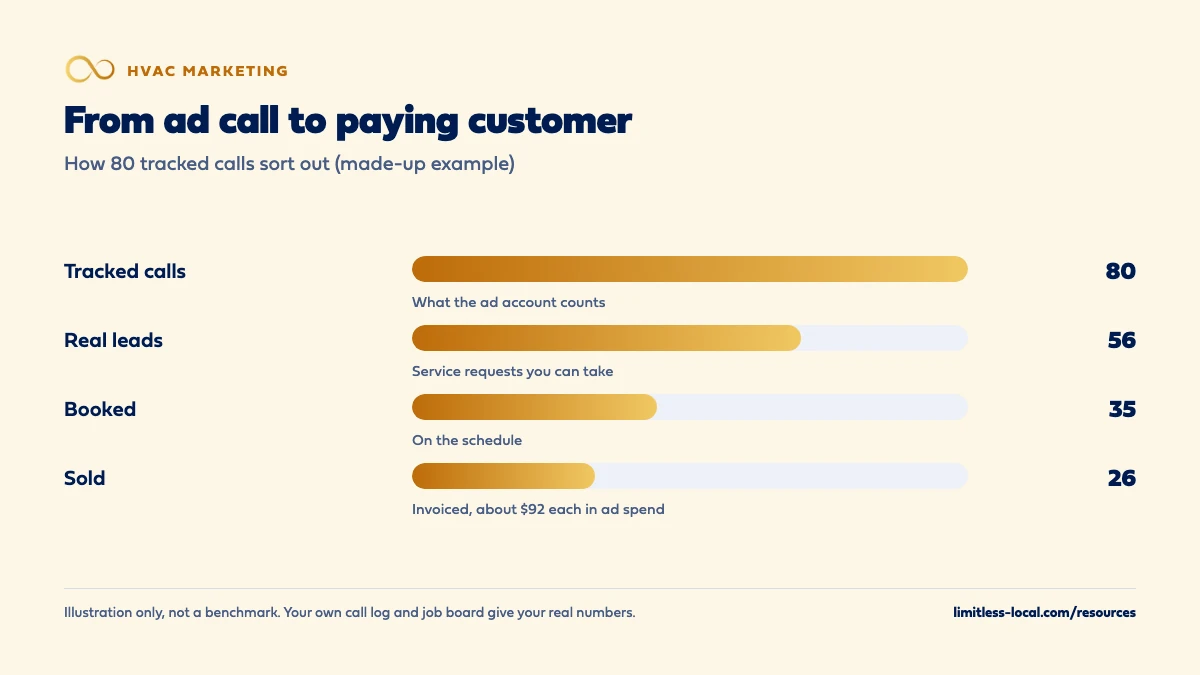
Say a Google search campaign costs $2,400 in a month and brings 80 tracked calls. That’s $30 per call, which looks fine. Now sort the calls:
- 24 aren’t leads: wrong numbers, existing customers and out-of-area callers.
- That leaves 56 real leads, or 70% of the calls.
- 35 of those book, which is 44% of all calls.
- 26 end in a sold job, or 33% of all calls.
Cost per sold job is $2,400 divided by 26, about $92. If those jobs average $400, the campaign brought in $10,400. Whether $92 per sold job works for you depends on your margins, but at least you’re now judging the ad on customers. Run the same sort on a second campaign with the same cost per call, and it could just as easily come out at twice the cost per sold job.
Frequently asked questions
Does a long call mean the caller is a real customer?
Not by itself. Existing customers rescheduling and price checkers can talk for several minutes. Call length is a filter for obvious junk, and the outcome your office records is what tells you whether the caller became a customer.
Should calls from existing customers count toward my ads?
Count them separately. They’re worth knowing about, because the ad may be catching people who searched your name, but they aren’t new customers the ad found.
Will Local Services Ads charge me twice if a customer calls back?
Not within the window. Google’s Local Services Ads rules say follow-up calls or messages from the same phone number or email aren’t charged again if there’s interaction within 15 days.
Should my office still ask how the caller heard about us?
Yes. It catches the jobs a tracking number misses, such as a homeowner who saw the ad, then called the number on your truck. Record the answer next to the tracked source and use both.
How many calls do I need before judging an ad?
Enough that one big job or one bad week doesn’t swing the result. For most small campaigns that means at least a full month of calls, and longer for replacement ads.
What if the office forgets to label calls?
Make the outcome a required step when a job is booked, and review unlabeled calls once a week. A short weekly cleanup beats trying to remember a month of calls at once.
Key takeaways
- Ad platforms count calls by length or AI guesses; only your job board shows who paid.
- Label every ad call as not a lead, lead not booked, booked or sold, the day it comes in.
- Keep the ad as the lead source on the customer, estimate and job, and match by phone number monthly.
- Judge ads on cost per sold job and revenue, and give replacement ads time to close.
- Once labeling is solid, send sold calls back to Google Ads so it learns which calls matter.
Not sure what's working right now?
Start with a free visibility audit: rankings, Google profile, reviews and tracking, checked against your service area.
More in this section
- How do I get HVAC calls without paying for ads?
- What types of HVAC ads on Facebook and Google bring calls that book?
- How do I tell if my HVAC ads, website or follow-up is the problem?
- Do Facebook ads work for getting HVAC calls?
- What does good HVAC advertising look like?
Sources
- Measure calls from ads — Google Ads Help
- About phone call conversion tracking — Google Ads Help
- About offline conversion imports — Google Ads Help
- Understand call classifications — ServiceTitan Help
- How to qualify leads in CallRail — CallRail Help Center
- How to Use Lead Sources — Housecall Pro Help Center
- How leads work — Google Local Services Help