
How long after raising HVAC ad spend do more calls increase?

- How soon do more HVAC calls show up after you raise your Google Ads budget?
- What happens in Google Ads the moment I raise my budget?
- How soon should more HVAC calls show up?
- Does raising my budget restart Google's learning period?
- How long until my cost per call settles after a raise?
- How do I know if my HVAC campaign was held back by budget?
- Why didn't raising my ad spend bring more calls?
- How long should I wait before judging a budget increase?
- How long does it take with Local Services Ads?
- Why do calls go up but booked jobs don't?
- How can I get the extra calls sooner?
- Should I raise the budget all at once or in steps?
- What's different about raising ad spend for HVAC companies
- A worked example: raising a daily budget from $50 to $75
- Frequently asked questions
- Key takeaways
- More in this section
- Sources
The short version
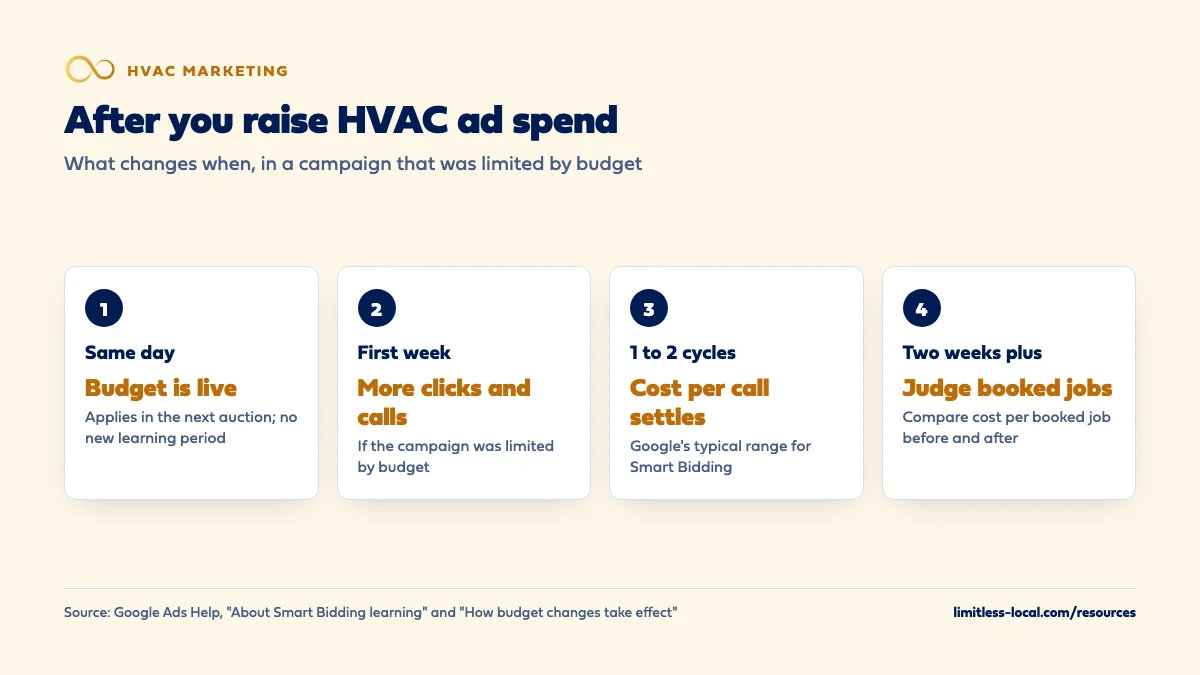
- Budget increases apply right away, in the next auction, with no new learning period.
- If the campaign was limited by budget, extra calls usually show within the first week.
- Cost per call settles over one to two conversion cycles; judge after two weeks at the earliest.
- No extra calls? Check whether budget was ever the limit, and whether the office is answering.
For HVAC owners who just turned the ad budget up, or are about to, and want to know when the extra calls should show up and when to judge the result.
Get a free visibility audit · Book a growth call
How soon do more HVAC calls show up after you raise your Google Ads budget?
If your Google Ads campaign was held back by its budget, more HVAC calls can start within days, because a budget increase takes effect in the next auction and doesn’t restart the learning period. Cost per call and cost per booked job take longer to settle, typically one to two conversion cycles, so give a raise at least two weeks before judging it. If the campaign wasn’t limited by budget, raising it may bring few extra calls at all, and the fix is bids, targeting or new services instead.
That last check is where a lot of extra ad spend quietly disappears. In our HVAC marketing packages, Google Ads management covers up to $2,500 a month in spend on Essentials and up to $5,000 on Growth, with the spend paid directly to Google, and every package tracks calls to booked jobs so you can see what a raise actually bought. For the bigger picture, the HVAC marketing guide covers every channel, and the rest of the HVAC marketing questions library goes question by question.
What happens in Google Ads the moment I raise my budget?
The change is live almost at once. Google’s guide to how budget changes take effect says it starts serving your ads based on the new budget, and that an increase in budget may be followed by an increase in spend. For most campaigns, your daily spending limit becomes two times the highest daily budget you set that day, and for the rest of the month your spend won’t go past the new daily budget times the calendar days left.
So there’s no waiting period on Google’s side. If people in your towns are searching for AC repair and your ads were dropping out by mid-afternoon, they can stay up longer the same day.
What doesn’t change instantly is what the extra spend buys. More money only turns into more calls if there were searches you were missing, and only into more booked jobs if someone answers.
How soon should more HVAC calls show up?
If the campaign was clearly short on budget, you should see more clicks and calls within the first few days and a clearer picture by the end of the first week. That’s the best case: the searches were already there and your ads were sitting out of them.
It takes longer, or doesn’t happen, when:
- The budget wasn’t the limit. If you rarely spent your full daily budget, more budget gives Google nothing new to spend it on.
- Demand is low. In a mild week in the shoulder season, there may not be many more people searching.
- Calls aren’t tracked, so automated bidding can’t tell which clicks turned into calls and you can’t see the change.
- You also changed bids, keywords or areas at the same time, which muddies the result.
For a brand-new campaign the timeline is different; how soon Google Ads start bringing in HVAC calls covers the launch period.
Does raising my budget restart Google's learning period?
No. Google’s page About Smart Bidding learning says updates to budgets take effect in the next auction and never trigger the “Learning” status, and that budget changes don’t remove your historical data. It also says adjusting daily budgets lets campaigns scale without triggering it.
The “Learning” status shows up for structural changes instead: adding or removing campaigns, ad groups or keywords from a bid strategy, or significantly changing the conversion goals it’s working toward. It never lasts more than 7 days, and your ads keep running normally while it shows.
That’s a good reason to raise the budget on its own first, and save keyword or goal changes for a separate step you can judge separately.
How long until my cost per call settles after a raise?
Plan on one to two conversion cycles. Smart Bidding performance typically settles toward your goal within 1 to 2 conversion cycles, faster with more conversion data, and slower with restrictive settings like tight targets, low daily budgets or narrow targeting.
A conversion cycle is how long it takes for a click to turn into a conversion. Google’s conversion cycle definition gives the example that if most clicks convert within 2 days, the system adjusts in about 2 days. For HVAC calls tracked straight from the ad, that cycle is often short. If you import booked jobs from your field software into Google Ads, the cycle includes the time it takes those jobs to be reported, so it runs longer.
Expect the first week after a raise to be noisy. The cost per call can bump up while Google bids for searches it used to skip, then level off.
How do I know if my HVAC campaign was held back by budget?
Google tells you. Two places to look before you raise anything:
- The “Limited by budget” status on the campaign. Google’s page on fixing “Limited by budget” says applying the recommended budget will help increase clicks and impressions. It also says Google won’t show a recommended budget if you rarely meet your daily budget or the campaign has limited data.
- Search lost impression share (budget). This column is the percentage of time your ads weren’t shown on Search because the budget ran short. You can add it to the campaign view; Google’s impression share guide explains where to find it.
If both point to budget, a raise should bring more calls fast. If you’re losing impressions to rank instead, meaning your bids or ad quality are too low to win the auction, more budget alone won’t do much.
Curious what your marketing is actually booking?
Get a free visibility audit — no obligation, no sales pitch.
Why didn't raising my ad spend bring more calls?
The usual reasons, in the order to check them:
- Budget wasn’t the constraint. The campaign was already spending what it could find.
- Bids or targets are too tight. A low target cost per call can keep Google from bidding on more searches even with more money available.
- Your towns have only so many searches. In a small market, you may already be showing for most of them.
- The extra spend went to weaker clicks. Broader matches or towns farther out can bring calls that don’t book.
- Calls came in but weren’t answered or tracked. Check call logs before you blame the ads.
If the answer is “the ads are fine, the conversions aren’t,” whether to raise ad spend or fix conversion first walks through that choice.
How long should I wait before judging a budget increase?
At least two weeks, and longer if your calls are slow to turn into booked jobs. A week of hot weather or a cold snap can make any change look brilliant, and a mild week can make it look like a waste. Compare the same days of the week, and the same kind of weather if you can, before and after.
Judge on booked jobs and cost per booked job, not clicks. If calls went up but booked jobs didn’t, the extra spend may be buying calls your office can’t convert or doesn’t want. How many months to wait before judging HVAC Google Ads covers the longer view.
How long does it take with Local Services Ads?
A budget change in Local Services Ads also works on the remaining days of the month. Google’s page on editing your Local Services Ads budget says your new average weekly budget sets what you can spend for the rest of the month, regardless of what you’ve already spent, and that once you hit the monthly max your ad stops showing until you raise the budget. If you’d hit that cap mid-month, raising the budget puts the ad back in front of homeowners right away.
How many more leads you get still depends on your rank. Google’s page About ad rankings says your responsiveness counts, and that missed calls may hurt it, along with your rating and number of reviews. Note that Google is moving Local Services Ads into Google Ads, and its transition guide says budgets there become daily instead of weekly, so check which setup your account is on before you change anything.

Why do calls go up but booked jobs don't?
Because the phone and the schedule have limits the ad budget doesn’t. More calls only become more booked jobs if:
- Someone answers. A heat wave plus a bigger budget can swamp a two-person office. Missed calls are paid clicks you lose.
- You have room on the schedule. If techs are booked out four days, many homeowners will call the next company.
- After-hours calls get handled. If the extra budget runs overnight, someone or something has to answer.
- The office books well. A good script and a clear price for the diagnostic matter more at higher volume.
Before a big raise, check the office side. How your HVAC office should handle incoming calls covers what to tighten up.
How can I get the extra calls sooner?
Most of the delay is in your control:
- Raise before the weather turns. Lift the budget a few days ahead of a forecast heat wave or cold snap, not after the phones are already ringing everywhere.
- Make sure calls are tracked as conversions so automated bidding learns from them right away.
- Change one thing at a time. A budget raise alone avoids the learning status; bundling it with new keywords doesn’t.
- Point the extra money at your best job. No-cool and no-heat calls in your closest towns turn into booked jobs fastest.
- Line up the office first, so the extra calls get answered.
Scaling up HVAC ads for peak season covers the timing in detail.
Should I raise the budget all at once or in steps?
In steps you can afford to judge. A big jump makes it hard to tell which dollars did the work, and if cost per booked job climbs, you’ll have spent a lot before you notice. Raise it, give it a couple of weeks, look at booked jobs and cost per booked job, then decide on the next step.
The exception is a short, predictable spike like a forecast heat wave, when waiting costs you the calls. Even then, have a number in mind for when you’ll bring it back down. When to raise, lower or pause HVAC ad spend sets out the rules for each move.
Talk it through with someone who runs this every day
A 15-minute growth call: your market, your numbers, and what a realistic budget looks like. No pressure.
What's different about raising ad spend for HVAC companies
Weather moves faster than your data. HVAC demand can double in a heat wave and fall off when it breaks. A raise that lands the same week as a temperature swing can look far better or worse than it is, so read results against the weather.
Emergency calls show the change first. No-cool and no-heat searches turn into calls within minutes, so a raise on emergency repair campaigns shows up in days. Replacement campaigns take longer, because homeowners compare quotes before they book an estimate.
Capacity caps the payoff. In peak season, the limit is often trucks, not budget. If your schedule is full for days, extra spend buys calls you can’t serve in time.
A worked example: raising a daily budget from $50 to $75
These numbers are made up to show the math, not a benchmark for HVAC costs or booking rates.
Say your AC repair campaign runs at $50 a day and shows “Limited by budget,” with a meaningful share of searches lost to budget. At 30.4 days, that’s about $1,520 a month. At $40 a call, you get 38 calls, and if your office books 60%, about 23 booked jobs, or about $66 per booked job.
You raise the budget to $75 a day, about $2,280 a month. Extra calls start showing in the first week. Because Google now bids on searches it used to miss, the cost per call rises a little, to $45. That’s about 50 calls and, at the same 60% booking rate, 30 booked jobs.
Look at what the extra money bought: $760 more spend for about 7 more booked jobs, or roughly $109 per extra booked job. That’s higher than your average, which is normal. The question is whether $109 is still well under what a repair job is worth to you. If it is, the raise is working, and after two to four weeks of steady results you have a case for the next step.
Frequently asked questions
Can raising my budget hurt my campaign?
It won’t restart learning or erase history. The risk is spending more on clicks that don’t book, so watch cost per booked job for the first couple of weeks.
Will Google spend my new budget on the first day?
It can spend up to two times the highest daily budget you set that day, and less on slow days. Across the rest of the month, spend stays within the new daily budget times the days left.
Should I raise bids instead of the budget?
Only if you’re losing impressions to rank rather than budget. If the campaign is limited by budget, raise the budget first and leave bids alone so you can see what the money did.
What if Google doesn't show a recommended budget?
Google won’t show one if you rarely spend your daily budget or the campaign has limited data. That usually means budget isn’t what’s holding you back.
Does raising the budget help my Google Maps ranking?
No. There’s no way to pay for a better free map ranking; those results rank on relevance, distance and how well-known your business is.
Key takeaways
- Google Ads budget increases take effect in the next auction and never trigger the Learning status.
- If the campaign was limited by budget, more calls typically show within the first week.
- Cost per call settles over one to two conversion cycles; judge a raise on booked jobs after at least two weeks.
- Check the Limited by budget status and Search lost impression share (budget) before you raise anything.
- The extra calls only become jobs if the office answers and the schedule has room.
Ready to compare options?
Book a short growth call and we'll walk through the math for your service area, including when we're not the right fit.
More in this section
- When should I raise, lower or pause my HVAC ad spend?
- How long does HVAC SEO take to bring in calls?
- What close rate do HVAC service calls need for paid ads to pay off?
- How do I get HVAC calls coming back on a tight budget?
- How do I keep HVAC calls coming in during slow months?
Sources
- About Smart Bidding learning — Google Ads Help
- How budget changes take effect — Google Ads Help
- Fix “Limited by budget” status — Google Ads Help
- Get impression share data — Google Ads Help
- Conversion cycle: Definition — Google Ads Help
- How to edit your budget — Google Local Services Help
- Local Services Ads transition to Performance Max campaigns with pay-per-lead goals — Google Ads Help
- About ad rankings — Google Local Services Help