
How many towns should an HVAC company try to rank in with local SEO?
- How many towns can one HVAC shop realistically rank in at the same time?
- Why can't my HVAC company rank in every town I'll drive to?
- How many towns can one HVAC shop realistically rank in at once?
- Is listing 20 towns on my Google profile the same as ranking in them?
- What happens when an HVAC company spreads SEO across too many towns?
- Which towns should I try to rank in first?
- What does it take to rank in one town?
- How do I know a town is working and it's time to add the next one?
- How do I add towns one at a time?
- Do map rankings and regular search rankings reach the same towns?
- Where do ads fit for the towns I'm not ranking in yet?
- Should my town list grow when I add trucks or a second location?
- What's different about town lists for HVAC companies
- A worked example: picking a three-town list from job history
- Frequently asked questions
- Key takeaways
- More in this section
- Sources
The short version
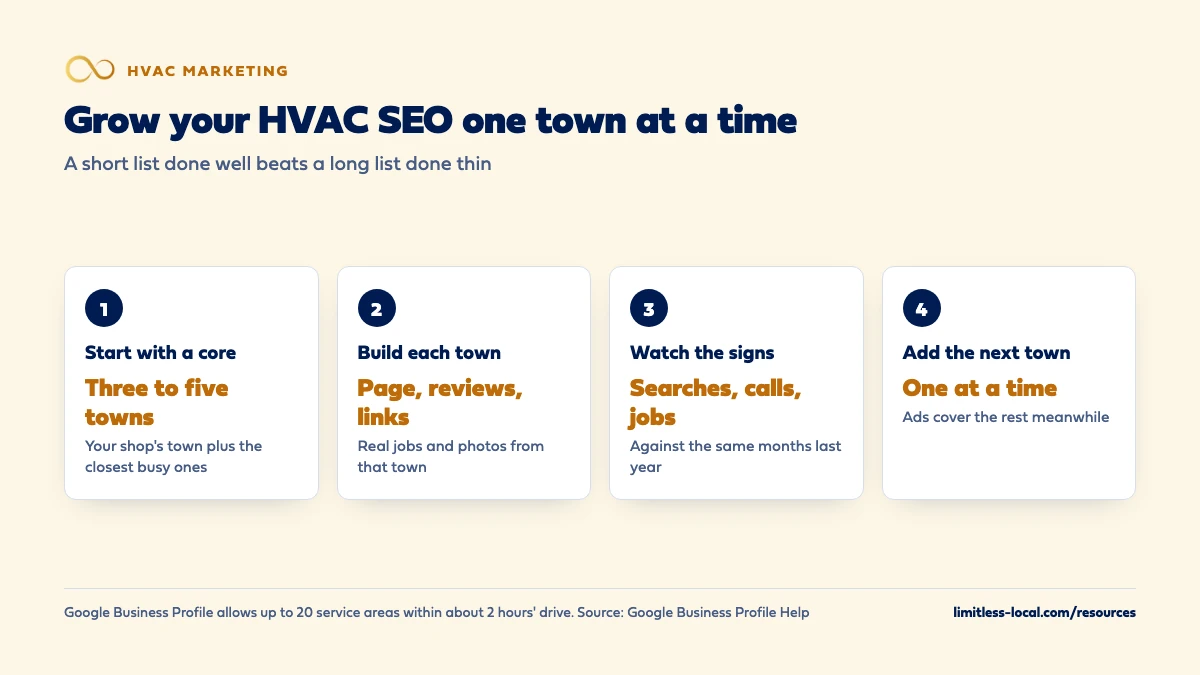
- Work on three to five towns at a time, starting with the town your shop is in.
- Your service area list and your ranking list are different things; the second is much shorter.
- Each town needs a real page, reviews from people there and jobs to show for it.
- Add one town at a time once the current ones bring steady booked jobs, and use ads for the rest.
For HVAC owners whose website and Google profile list every town they’ve ever driven to, and who still only show up near the shop.
Get a free visibility audit · Book a growth call
How many towns can one HVAC shop realistically rank in at the same time?
Most single-location HVAC companies do best actively working to rank in three to five towns at a time: the town the shop is in and the nearest few where you already book the most jobs. Distance from the searcher is one of the main things Google weighs in local results, so Maps rankings fade the farther a town is from your shop, no matter how many towns you list. Every town you chase also needs its own real page, reviews and jobs behind it, so add the next town only once the first ones bring steady calls, and reach the rest with ads in the meantime.
A short town list done properly is how we approach local SEO too: pick the towns and jobs you want, build them one at a time, and judge each by booked jobs. It’s part of every HVAC marketing package we run. For how SEO fits with ads and follow-up, the HVAC marketing guide covers every channel, and the rest of the HVAC marketing questions library goes question by question.
Why can't my HVAC company rank in every town I'll drive to?
Two things set the limit. The first is distance. Google’s local ranking help says local results are mainly based on relevance, distance and popularity, and it describes distance as how far each business is from the person searching. Your shop doesn’t move. The farther a homeowner is from it, the harder it gets to show up in their map results, whatever your profile says.
The second is effort. Showing up in the regular results for “AC repair” plus a town name takes a page that’s genuinely about that town, reviews from people who live there and some proof that you actually work there. That has to be built town by town, and a shop with one person on content and one office asking for reviews can only do it well in so many places at once.
How many towns can one HVAC shop realistically rank in at once?
For most single-location shops, three to five towns at a time is a workable list: the town you’re based in, plus the closest few that already bring you the most work. It isn’t a Google rule. It’s about the number you can support with real pages, a steady trickle of reviews from each town and enough jobs to talk about.
A few things move the number up or down:
- How many trucks you run. A shop with eight trucks has more jobs, reviews and photos from more places than a shop with two.
- How big the towns are. Five suburbs of a big metro can be a full year’s work. Five small towns strung along a highway might all sit inside one county.
- How crowded each town is. A town where the top map results carry hundreds of reviews takes longer than one where nobody has bothered. Whether a bigger, tougher market slows your results covers how that changes the ramp.
- What you can spend. Every new town means new content, new review requests and one more set of numbers to watch.
Is listing 20 towns on my Google profile the same as ranking in them?
No. Google’s service area help lets a service-area business list up to 20 service areas, and says the overall area shouldn’t be more than about two hours of driving time from where the business is based. The service area shows customers where you work. It doesn’t put you in the map results of every town on the list, because distance from the searcher still counts.
So keep two lists. Your service area can include every town your trucks really serve. Your ranking list is the short set of towns you’re putting work into right now. How wide your service area should be on Google Business Profile covers the first list; the rest of this page is about the second.
What happens when an HVAC company spreads SEO across too many towns?
The pattern is easy to spot: a website with a page for every town in the county, each one the same few paragraphs with the name swapped, and a Google profile listing every town the owner has ever driven to. A year later the shop ranks at home, maybe in one neighboring town, and nowhere else.
Spreading thin costs you three ways:
- No town gets enough. Ten towns that each get a tenth of the effort rarely beat two towns that each get half.
- Copy-paste town pages are a risk. Google’s spam policies list “pages targeted at specific regions or cities that funnel users to one page” among their examples of doorway abuse.
- The calls you do get come from the wrong places. Far-off homeowners who find you anyway are the long drives that eat a tech’s afternoon.
If your site already has a page for every town, building HVAC city pages without them looking like spam covers what to keep, merge or rewrite.
Which towns should I try to rank in first?
Start from your own job history, not a map. Pull last year’s booked jobs by town or ZIP code from ServiceTitan, Housecall Pro or Jobber and look at three things: where most of your work already comes from, how long the drive is, and where the tickets are worth having. The town your shop is in almost always makes the list, because that’s where distance works in your favor.
Then add the next closest towns that score well on all three. Leave off, for now, the town you’d love to win but barely work in yet. That one belongs on your ads list, not your SEO list. Deciding which cities and ZIP codes to target walks through sorting every town into core, stretch and no-go.
Curious what your marketing is actually booking?
Get a free visibility audit — no obligation, no sales pitch.
What does it take to rank in one town?
Treat each town on the list as its own small project with a checklist:
- One real page. Jobs you’ve done there, the kinds of homes and equipment your techs see, how quickly you get there, and reviews from customers in that town.
- Reviews that mention the town. Ask happy customers to say what you fixed and where. It shows homeowners there that you actually work in their town.
- Local mentions and links. A youth league sponsorship, the town’s chamber of commerce, a builder or supply house you work with there. Links from other websites and your review count both feed the popularity side of local ranking.
- Photos from the town. Real jobs, real trucks, real equipment, never stock shots.
- A way to measure it. Calls and booked jobs tagged by ZIP code in your field software, so you can see whether the town is moving.
None of this happens in a month. Reviews in particular take time to build, and how long map pack rankings take to move after reviews sets expectations there.
How do I know a town is working and it's time to add the next one?
Look for three signs over a few months, not a few weeks:
- Searches with the town name find you. The Business Profile performance report lists the search terms people used to find your profile, refreshed at the start of each month.
- Calls and booked jobs from the town are rising in your field software, compared with the same months last year so the season doesn’t fool you.
- The town page is getting visits from search in whatever analytics your website uses.
When a town shows all three and holds there, move it to upkeep (keep asking for reviews, keep the page current) and start the next one. SEO typically takes 3 to 6 months to show meaningful organic growth, so if a town hasn’t moved after a solid half year of work, find out why before adding more. Usually it’s too far, too crowded, or the page is thin.
How do I add towns one at a time?
- Pick the next town from your list: the next closest one with good jobs.
- Run ads there first if you aren’t already, so calls come in (and you get jobs worth writing about) while SEO builds.
- Build the town page once you have real jobs, photos and a few reviews from it.
- Ask every customer there for a review for the next few months.
- Add it to your Google service area if it isn’t listed yet.
- Watch the three signs, then repeat.
One new town every few months is a steady pace for a single-location shop. Going faster than that usually means pages with no jobs behind them.
Do map rankings and regular search rankings reach the same towns?
Usually not. The map pack is tied to where your business sits, so it tends to be strongest close to the shop and fade as you move out. The regular results can reach a little farther, because a good town page can show up for searches that name the town even when your shop is a twenty-minute drive away.
That gives your ranking list two rings: a tight inner ring where you expect to show up in Maps, and a slightly wider one where town pages do the work in the regular results. A town too far for either is an ads town.
Where do ads fit for the towns I'm not ranking in yet?
Ads don’t fade with distance the way map rankings do. Google Ads lets you target the areas where you do business, down to individual cities, and Local Services Ads let you include or exclude counties, cities and ZIP codes. So the towns past your SEO list don’t have to go quiet. Run ads there for the jobs worth the drive, such as system replacements, and keep the SEO list short.
One catch: Google’s location targeting help says that when you target an area, your ad may also show to people in nearby, closely related areas, and that location targeting is a best effort. Check calls by ZIP code so ads don’t quietly pull you into towns you never picked. Running emergency ads while SEO builds covers how to pair the two.
Should my town list grow when I add trucks or a second location?
More trucks means more capacity, more jobs and more reviews from more places, so yes, a growing shop can carry a longer list. Add towns as the schedule fills, not ahead of it. A town you rank in but can’t reach on a busy Tuesday turns into calls you send to voicemail.
A second, staffed location is a different case. It sits in a new spot, so distance starts working for you around it, and it gets its own short list built the same way. Keep the two lists from overlapping so the locations don’t compete for the same towns.
Not sure which of these is costing you jobs?
A free visibility audit checks the Google profile, reviews, site and tracking, and shows what to fix first.
What's different about town lists for HVAC companies
Response time draws the inner ring. A no-heat call in January or a dead AC in July goes to whoever can get there first. The towns you rank in should be towns your trucks can reach fast on your busiest day, not your slowest.
Maintenance plans reward density. Tune-up routes run best when members live close together. Ranking near the shop feeds the maintenance base you can actually serve twice a year without burning half the day in the truck.
Replacements travel farther than repairs. A homeowner will wait a day for a system estimate from a company they trust. That makes replacement-only ads a good fit for towns beyond your ranking list.
A worked example: picking a three-town list from job history
These numbers are made up to show the method, not a benchmark for your market. Say a two-truck shop booked 600 jobs last year:
- Town A (where the shop is): 210 jobs
- Town B (next door): 130 jobs
- Town C (two exits up the highway): 90 jobs
- Town D (across the river): 50 jobs
- Eleven other towns combined: 120 jobs
Towns A, B and C produced 430 of the 600 jobs, about 72%. That’s the ranking list: one page each, review requests to every customer there, local links where they come naturally. Town D is next in line and gets replacement ads in the meantime. The other eleven stay in the service area, but nobody writes pages for them.
Six months later, B and C show up in the profile’s search terms and their booked jobs are up on the same months last year. Town D goes on the list. That’s the pace of a short list done well. Our Essentials package ($3,500 a month, one location) includes a content sprint of up to 10 pages, which suits a short town list built properly far better than a long one built thin. A free visibility audit can run the same job-history check on your own numbers.
Frequently asked questions
Can I rank in a town where I don't have a shop?
In the regular results, yes, with a real page about your work there and reviews from customers in that town. In Maps it’s harder, because distance from the searcher is one of the main local ranking factors, so towns close to your shop have the edge.
Should every town in my service area get its own page?
No. Give a page only to the towns on your active list, where you have real jobs, photos and reviews to show. The others can share one general service-area page until their turn comes.
Will listing more towns on my Google profile hurt my ranking?
Google doesn’t say it lowers your ranking. The problem is calls from towns you’d rather not drive to, and expecting map results in places that are too far away. List the towns you really serve, within about two hours of driving.
How long until I start ranking in a new town?
SEO typically takes 3 to 6 months to show meaningful organic growth, and longer in a town where competitors already have strong profiles. Ads can bring calls from that town within days of launch while the SEO builds.
What if my best town isn't the one my shop is in?
Keep it on the list. Expect to do better there in the regular results, through a strong town page and reviews, than in Maps, and use ads to fill the gap.
Do I need separate reviews for each town?
All your reviews land on your one Google profile. Asking customers to mention their town in the review is what helps homeowners in each town see that you work there.
Key takeaways
- Most single-location HVAC shops should actively work on three to five towns at a time.
- Distance from the searcher limits how far your map rankings reach, whatever your service area says.
- Your Google service area can list up to 20 areas; your ranking list should be far shorter.
- Each town needs a real page, reviews from customers there and jobs to point to.
- Add the next town only when the current ones show rising searches, calls and booked jobs.
- Use ads for towns past your list, and check calls by ZIP code.
Want a second set of eyes on your setup?
We'll look at how you show up locally and where calls are leaking, then send you a plain-English breakdown.
More in this section
- Why should an HVAC company invest in local SEO?
- Is SEO worth it for a small HVAC company?
- What can I do myself to improve my HVAC company's Google ranking?
- Should my HVAC company start with LSAs, Google Ads or SEO?
- How much should an HVAC company spend on Local Services Ads?
Sources
- Tips to improve your local ranking on Google — Google Business Profile Help
- Manage your service areas for service-area & hybrid businesses — Google Business Profile Help
- Spam Policies for Google Web Search — Google Search Central
- Understand your Business Profile performance & insights — Google Business Profile Help
- About targeting geographic locations — Google Ads Help
- Edit your industries, service areas, and job types — Local Services Help