
How should a one-truck electrician prepare marketing for storm season?
- What should a one-truck electrical shop set up before storm season starts?
- Why does storm season need its own plan when you run one truck?
- When should I start getting ready for storm season?
- How do I make sure storm calls don't go to voicemail?
- Which storm calls should I take first?
- What should my Google Business Profile show before and during storms?
- Do I need a storm page on my website?
- How should I set up Google Ads so I can turn them up or down fast?
- What should I send past customers before storm season?
- What do I do with my scheduled jobs when the storm calls start?
- How do I stand out from storm chasers?
- What should I do after the storm passes?
- What's different about storm season for electricians
- A worked example: storm week with one truck
- Frequently asked questions
- Key takeaways
- More in this section
- Sources
The short version
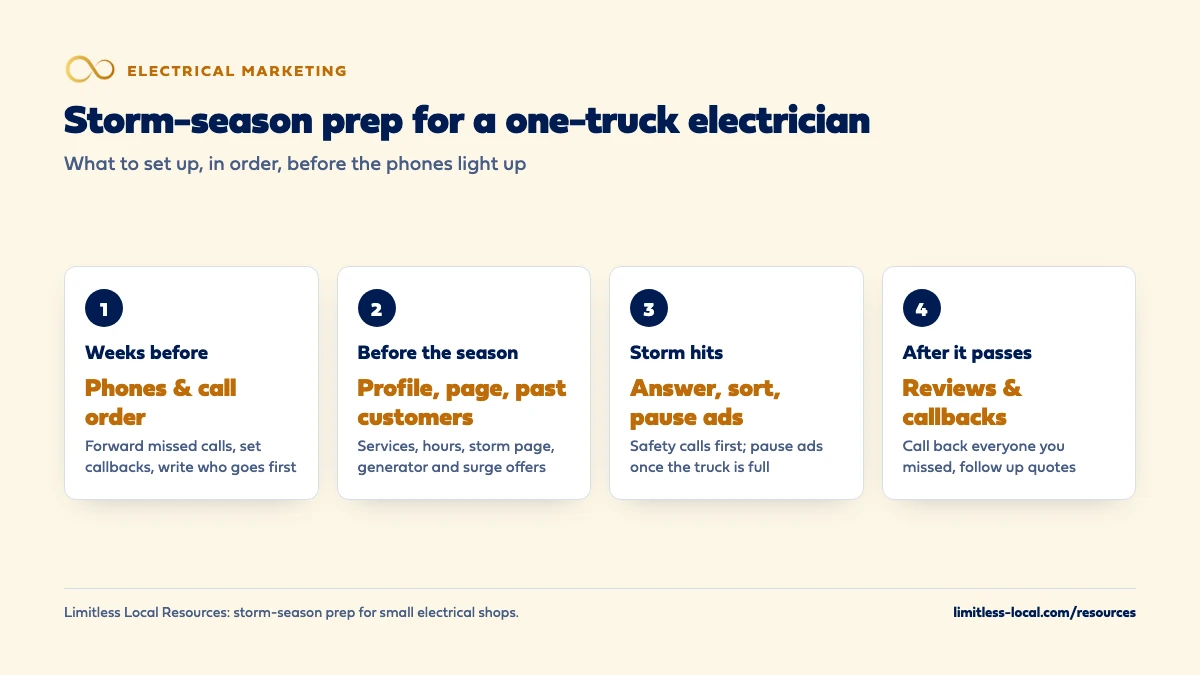
- Start a few weeks before your local storm season, earlier for generator installs.
- Fix the phone first: every storm call answered or called back fast.
- Decide your call order now: safety and no-power calls before routine work.
- Keep ad budgets small and easy to pause, because one truck fills fast.
- Book generator and surge work with past customers before the storms arrive.
For owner-operators running one truck who want the storm rush to fill the schedule without burying them in calls they can’t reach.
Get a free visibility audit · Book a growth call
What should a one-truck electrical shop set up before storm season starts?
Get ready a few weeks before your storm season starts, not when the first outage hits. Set up your phone so storm calls get answered or called back fast, and decide now which calls go first, such as no-power and storm-damage calls ahead of routine work. Tune your Google profile, a storm page and an ad budget you can turn up or pause in minutes, and line up past customers for generator and surge-protection work before the rush. With one truck, your hours are the limit, so market only for the calls you can actually reach.
Getting the phone, Google profile and ads ready before a busy stretch is the groundwork we do first for every shop. Our local ads work covers Google Ads in every package and Local Services Ads from the Growth tier up, and after-hours answering is one of the automation add-ons that plug into any package. Our electrical contractor marketing page explains how we work with electrical shops, and the rest of the electrical marketing questions library goes question by question.
Why does storm season need its own plan when you run one truck?
A big shop handles a storm by adding people to the phones and sending more trucks. You can’t. When the lines come down, you get a week of demand in a day, and your capacity doesn’t move: one truck, one set of hands, maybe a helper. Marketing that’s tuned for a normal week will either miss the rush because nobody answers, or bury you in calls you can’t get to.
So the goal is different. You’re not trying to get more storm calls. You’re trying to answer the ones that come, take the right ones first, keep the customers you have to put off, and use the weeks before the season to book the planned work that storms create, like generators and surge protection. Most of it gets set up before the first storm.
When should I start getting ready for storm season?
Work backward from when storms usually hit where you work, whether that’s spring thunderstorms, hurricane season or ice storms. Use your own job history from the past couple of years: look for the weeks when emergency calls jumped and the weeks after, when generator and repair quotes came in.
- A few weeks out: phones, call order, Google profile, storm page and ad settings. None of these take long, but they’re hard to do once the phone is ringing.
- Earlier for generators: a standby install needs a site visit, a quote, permits and equipment, so generator marketing has to start well before the season. The full plan for that is in getting more generator installation leads before storm season.
- Budget: decide what you’ll spend on ads in the run-up and what you’ll cut back to once you’re full. Changing your marketing budget by season covers how to set that from crew time.
How do I make sure storm calls don't go to voicemail?
This is the first thing to fix, because storm callers don’t wait. They call the next electrician on the list. With one truck, you’ll be on a roof line or in a panel when most of them ring.
- Ring more than one phone. Your cell and a spouse, partner or part-time office person at the same time.
- Forward unanswered calls after a few rings to an answering service or an AI receptionist that can take the address, the problem and a callback number. Using an AI receptionist for after-hours calls covers what to have it ask.
- Change your voicemail greeting for storm week: say you’re on emergency calls, when you’ll call back, and what to do if they smell burning or see sparks.
- Set a callback rule. Every missed call gets a call or text back within the hour, even if the answer is “I can be there Thursday.”
If you run Local Services Ads, voicemail costs you too. A call that goes to voicemail or an automated greeting during your business hours counts as a charged lead if the caller stays on the line for more than 20 seconds, whether or not they leave a message, according to Google’s page on how leads work. For the full setup, see how to stop missing calls.
Which storm calls should I take first?
Decide your order before the storm, write it down, and give it to whoever answers your phone. When a hundred things feel urgent, a short list keeps you from driving across town for an outlet while a customer down the street has no power.
- Safety calls: sparking, burning smells, water in or near a panel, a damaged service mast or meter base on the house.
- No power on the customer’s side when the neighbors have theirs back.
- Your existing customers, especially anyone with a generator you installed or service.
- New emergency calls in the towns closest to you.
- Everything else gets a firm callback day.
Have one line ready for the calls that aren’t yours: if the problem is the utility’s lines or the street is dark, point them to the utility’s outage line. They’ll remember you were straight with them.
What should my Google Business Profile show before and during storms?
Your Google profile is where most storm callers find you, so get it right before the season:
- Services: list the storm work you do, like generator installs and service, surge protection, service repairs and panel work, so you show up for those searches.
- Hours: if you’ll run longer or different hours for a stretch, Google lets you set special hours for a brief period without changing your regular ones. If you’ll be closed for a week or more, Google says to mark the business as temporarily closed instead (Google Business Profile Help). Don’t list hours you can’t answer.
- A post when storms are coming: say you’re taking emergency calls, which towns you’re covering, and how to reach you.
- Photos: your truck, your face (or a clear photo of you at work) and real jobs. Storm callers are picking between strangers.
Hours matter for ads too. Local Services Ads take your business hours from your Google profile, and missed calls are only charged during your active ad schedule and within those hours.
Curious what your marketing is actually booking?
Get a free visibility audit — no obligation, no sales pitch.
Do I need a storm page on my website?
One page is worth having. When someone clicks through from Google during an outage, they want three answers fast: do you handle this, do you come to my town, and how do I reach you right now. Build a page that covers:
- The storm work you take: no power on the house side, damaged service masts and meter bases, water near panels, surge damage, generator hookups and repairs.
- Your service area, named town by town.
- A tap-to-call button at the top, and what happens when they call: who answers, when you’ll call back.
- Your license number and proof of insurance.
- One or two plain safety tips, like Ready.gov’s advice to run a generator only outdoors and away from windows, doors and attached garages. It’s useful, and it shows you know the work.
Keep it calm. No storm-chaser countdowns or fear headlines.
How should I set up Google Ads so I can turn them up or down fast?
With one truck, ads are a faucet, not a firehose. You want them running in the run-up to the season, for generator, surge and panel searches, and you want to be able to cut them in minutes once you’re full.
- Know how the budget works. Google’s page on average daily budgets says that for most campaigns, spend can run up to two times your average daily budget on a single day, and the month is capped at 30.4 times that daily average. Busy storm days can spend more, so set the daily budget for what you could actually handle.
- Use an ad schedule. Ads only show during the days and times you list, so match it to the hours someone can answer.
- Pause when you’re booked. Local Services Ads can be paused and turned back on in your campaign settings. Pausing is better than paying for calls you’ll send to voicemail.
What should I send past customers before storm season?
Your past customers are the cheapest storm-season work you’ll get, and the best time to reach them is before the storms, when you have open days to fill:
- Generator owners: a service reminder before the season, so their unit starts when they need it.
- Homeowners in older houses or areas that lose power often: a note about surge protection, generator inlets or a standby install.
- Everyone: a short note that you’re taking emergency calls this season, with your number and a line about calling you first.
Send it by email, or by text only to customers who agreed to get texts from you. What to send past customers to bring them back has the rest of the year’s messages.
What do I do with my scheduled jobs when the storm calls start?
Something has to give, and the worst version is a customer who took a day off for a panel quote and never hears from you. Decide now:
- Which planned jobs can move (most estimates and small service calls) and which can’t (inspections already booked, jobs with a crew from another trade waiting on you).
- A short message to send the morning you start moving jobs: you’re on emergency calls after the storm, here’s the new day, reply if it doesn’t work.
- Who sends it. If it’s you, write it now so it takes one minute on the day.
Customers forgive a storm delay when they hear about it first. They don’t forgive silence. And keep some planned work on the books for the weeks after the spike, when the emergency calls drop off. Marketing emergency calls versus planned projects explains how to balance the two across the year.
How do I stand out from storm chasers?
After big storms, homeowners get warned about scammers, and that warning can work for you. The FTC’s advice on avoiding scams after weather emergencies tells people to watch for contractors who claim they don’t need a license, ask for everything up front or insist on cash or wire transfers, and won’t give copies of their license, insurance or a written contract. It also tells them to get written estimates.
So make it easy to see you’re the opposite. Put your license number on the storm page, your Google profile and your estimates. Have proof of insurance ready to text. Give written estimates every time, take normal payment methods, and don’t push same-day signatures. You’re local and you’ll be here next storm. Say so.
What should I do after the storm passes?
- Ask for reviews from every storm customer while the relief is fresh. A Google review link or QR code makes it one tap.
- Call back everyone you couldn’t reach, including the calls you put on the list for later. Many will still need work.
- Follow up open quotes, especially generators. People who just sat through an outage are deciding now.
- Tag storm jobs in Jobber, Housecall Pro or whatever you use, so next year you know how many calls came, how many you booked and what they were worth.
- Reset your ads to the normal budget and schedule.
Not sure which of these is costing you jobs?
A free visibility audit checks the Google profile, reviews, site and tracking, and shows what to fix first.
What's different about storm season for electricians
Some calls are safety calls. Water near a panel, sparking, a damaged service on the house: the person on the phone needs to know what to do before you get there. Whoever answers, human or AI, needs a short script for those.
Not every outage is your job. Plenty of storm callers have a utility problem. Sending them to the utility quickly saves your day and earns trust.
The best storm work is booked before the storm. Generators, transfer switches, inlets and surge protection are planned jobs with real tickets. A one-truck shop that sells those in the quiet weeks gets paid work out of storm season without needing to race anyone on the night of the outage.
Permits and inspections slow everything down. Storm repairs on the service often need a permit and an inspection. Rules vary by state and city, so tell customers what to expect up front.
A worked example: storm week with one truck
These numbers are made up to show the math, not a benchmark for your market. Say a storm hits and over the next 5 working days, 27 calls come in. Storm jobs take longer than normal service calls, so you can run about 3 a day, or 15 jobs for the week. That leaves 12 callers you can’t get to that week.
Turning ads up that week does nothing for you: you’re already full. What matters is what happens to those 12. If they hit voicemail with no callback, most call someone else. If each one gets a callback the same day with a firm date, and 8 of them book for the following week, you’ve filled the next week before the storm calls fade.
Now the budget side, also made up. Say your Google Ads average daily budget is $40. On a busy day Google can spend up to $80 for most campaigns, and the month is capped at 30.4 times $40, or $1,216. If you’re full, pausing the campaign for the week saves that money for the run-up to next season, when it can book generator quotes.
Frequently asked questions
Should I advertise during a power outage?
Only if you can take more work. Plenty of people search on their phones during an outage, but if your truck is already full, extra ad clicks just become calls you can’t return. Pause and put the budget into the run-up to next season.
Should I raise my prices for storm calls?
Set your after-hours and emergency rates before the season and tell callers up front. A clear rate that’s the same every storm protects your reviews far better than one that changes with the weather.
Can I take storm work outside my usual service area?
You can, but every hour on the road is an hour you’re not working. Stick close to home unless your nearby calls dry up, and check that your license covers the work where you’re going.
Is it worth hiring help just for storm season?
A temporary person to answer phones and schedule is often worth more than a second helper on the truck, because it keeps calls from going to voicemail while you work.
What should my voicemail say during storm week?
Your name, that you’re on emergency calls, when you’ll call back, and what to do if they see sparks or smell burning. Keep it under half a minute.
Key takeaways
- Start a few weeks before your storm season, and earlier for generator installs.
- Make sure every storm call is answered or called back fast, then decide who goes first.
- Keep your Google profile hours, services and photos ready before the season.
- Run ads in the run-up and pause them once one truck is full.
- Sell generator and surge work to past customers in the quiet weeks before storms.
Want a second set of eyes on your setup?
We'll look at how you show up locally and where calls are leaking, then send you a plain-English breakdown.
More in this section
- How should an electrician change marketing to grow vs stay busy?
- How do I get more generator installation leads before storm season?
- Should an electrician change marketing budget by season?
- Which marketing wins emergency electrical calls vs planned projects?
- How should an electrical contractor market to commercial customers?
Sources
- How leads work — Local Services Help
- How to set Special hours — Google Business Profile Help
- Power Outages — Ready.gov
- About average daily budgets — Google Ads Help
- Set up an ad schedule — Google Ads Help
- Local Services Ads transition to Performance Max campaigns with pay-per-lead goals — Google Ads Help
- How To Avoid Scams After Weather Emergencies and Natural Disasters — Federal Trade Commission