
What software does an electrician need to run jobs and get paid?

- Which field service software should an electrical shop use for quotes, scheduling and invoicing?
- What does an electrician's software actually need to do?
- Do I need one app or a stack of them?
- What should quoting software do for an electrician?
- What do I need for scheduling and dispatch?
- How should the software help me get paid?
- How does it connect to QuickBooks or my accounting?
- Can the software tell me which jobs make money?
- How does field service software connect to my marketing?
- How do I choose between Jobber, Housecall Pro and ServiceTitan?
- What happens to my data if I switch software later?
- What's different about software for electricians
- A worked example: what the paperwork is costing you
- Frequently asked questions
- Key takeaways
- More in this section
- Sources
The short version
- One field service app for requests, quotes, scheduling, invoicing and payments.
- Accounting software it syncs to, so nobody types invoices twice.
- Lead source on every customer, tied through to the paid invoice.
- Choose by team size and job mix, then trial it on real jobs.
For electrical shop owners choosing, or replacing, the software that runs quotes, schedules, invoices and payments, and wondering how it ties back to their marketing.
Get a free visibility audit · Book a growth call
Which field service software should an electrical shop use for quotes, scheduling and invoicing?
Most electricians need one field service app that runs the whole job, from the request to the quote, schedule, invoice and card payment, plus accounting software such as QuickBooks that it syncs to. Jobber, Housecall Pro and ServiceTitan are common choices for electrical shops, and the right one depends on your team size, how much planned and commercial work you quote, and whether you have office staff booking calls. Whichever you pick, make sure it records where each lead came from and ties it to the paid invoice, so you can see which marketing actually pays.
We don’t sell field service software, but we connect your marketing to it. Every package includes call, web and form tracking with source tagging and a monthly report with a cost-per-lead breakdown, so you can see which calls became jobs in the software you already use. Our packages page lists what each tier includes, and our electrical contractor marketing page shows how it fits an electrical shop. The rest of the electrical marketing questions library goes question by question.
What does an electrician's software actually need to do?
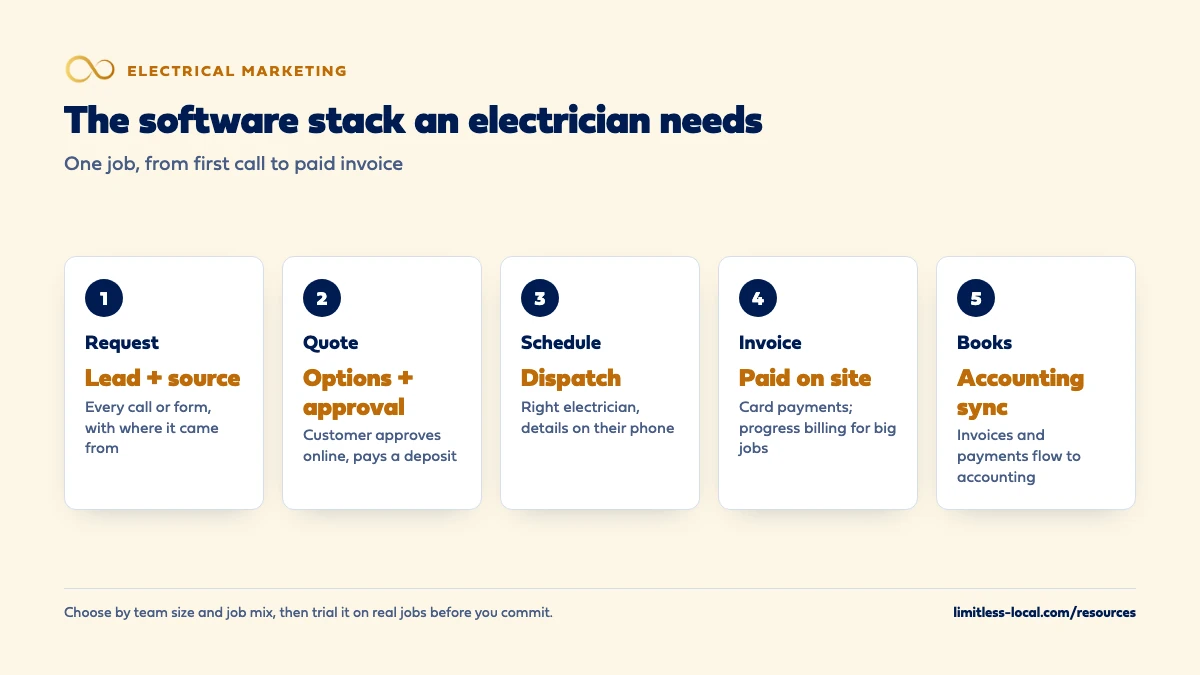
Follow one job from start to finish and the list writes itself:
- Take the request: a call, form or booking, with the customer’s details, the job type and where they found you.
- Quote it: line items, options and a way for the customer to approve.
- Schedule and dispatch: put it on a calendar, assign the right electrician and get them the address and notes.
- Do the work: photos, notes, time on the job and materials used.
- Invoice and get paid: send the invoice from the job site and take a card payment.
- Keep the books: pass invoices and payments to your accounting software.
- Follow up: review requests, reminders and the next job for that customer.
If you’re doing those steps across a notebook, a calendar app, a word processor and a stack of paper invoices, things fall through the gaps. Field service software is built to hold all seven in one place.
Do I need one app or a stack of them?
For most electrical shops, the answer is one field service app, one accounting program and, once you’re spending on marketing, call tracking. That’s it.
More apps mean more places for a lead or an invoice to get lost, more logins for the office and more subscriptions. Before you add a separate tool for quotes, reminders or reviews, check whether your field service app already does it on your plan. Many features sit behind higher tiers, so read the plan page carefully when you compare.
The test for any extra tool: does it connect to your main app, or does someone have to copy information between them? If it’s copying, it’ll eventually be skipped. The same goes for people: the software only works if everyone knows who enters what, which how a small electrical company should organize its lead handling lays out step by step.
What should quoting software do for an electrician?
Quotes are where planned work is won or lost, so this part matters more than most owners think. Look for:
- A price book of your standard jobs and parts, so quotes are fast and consistent between estimators.
- Options on one quote, like a standard panel, a panel with surge protection and a panel with an EV charger circuit.
- Online approval. Jobber’s help page on quote approvals shows the idea: customers view the quote online, approve it with a signature, request changes and can pay a deposit while approving.
- Follow-up reminders on quotes that haven’t been answered.
A quote that a homeowner can approve from their phone the same evening beats one that sits in an email attachment. How an electrical contractor should bid a job covers what goes into the quote itself.
What do I need for scheduling and dispatch?
For one or two trucks, a shared calendar that the office and techs both see on their phones is most of it. As you grow, look for:
- Day, week and map views, so you can see where trucks are headed and avoid crossing town twice.
- Assigning by skill, so commercial work, service calls and big installs go to the right electricians.
- Job details on the tech’s phone: address, gate codes, the customer’s notes, photos from the request and the quote that was approved.
- Automatic reminders to customers before the visit, which cut down on no-one-home trips.
The office person who books calls should be able to see open slots while the customer is on the phone. If they have to call a tech to ask, the booking is slower and the customer is more likely to try someone else.
Curious what your marketing is actually booking?
Get a free visibility audit — no obligation, no sales pitch.
How should the software help me get paid?
Getting paid fast is mostly about removing steps. Look for invoicing straight from the finished job on the tech’s phone, card and bank payments the customer can make from a link, and automatic reminders on unpaid invoices.
For bigger work, deposits and payment schedules matter. Jobber’s help page on deposits on quotes describes collecting a deposit when the quote is approved, as a percentage of the total or a fixed amount, and setting up a payment schedule that splits the work into multiple invoices. That fits a service upgrade, a generator install or a multi-week remodel far better than one big bill at the end.
One rule for card payments: don’t keep card numbers you don’t need. The PCI Security Standards Council’s Guide to Safe Payments for small merchants puts it plainly: if you don’t need card data, don’t store it. Take payments through the app’s payment system, not by writing card numbers on work orders or saving them in notes.
How does it connect to QuickBooks or my accounting?
Your field service app should pass invoices and payments to your accounting software automatically, so your bookkeeper isn’t retyping them. Housecall Pro’s help page on syncing to QuickBooks Online is a good example of what to expect. The connection typically works one way, from Housecall Pro to QuickBooks Online, and it syncs invoices, payments, new customer information and new price book items. It also asks you to make sure all work is completed inside Housecall Pro so the transfer happens automatically.
That last point applies to every app: the sync only works if the work is actually done in the app. If techs still write paper tickets that the office enters later, the books lag behind the jobs. Ask your bookkeeper or accountant to look at the integration before you commit.
Can the software tell me which jobs make money?
Some can, if you feed them the right information. Jobber’s help page on job costing explains that it calculates profit from timesheets, line items with unit costs and prices, and expenses logged on a job, and that job costing is available on its Grow and Plus plans. Other apps have their own versions.
For an electrician, that means techs clocking time to the job and materials going on the job, not into a general bucket. Once that’s in place, you can see whether service calls, panel upgrades, EV chargers or commercial work actually earn the most, which is exactly what you need to decide where to point your marketing. How electricians work out profit per job and customer value goes through the math.

How does field service software connect to my marketing?
This is the part most owners skip, and it’s the part that tells you whether your marketing works. Every customer record needs a lead source: Google, Local Services Ads, referral, truck wrap, a builder and so on.
With that in place, the software can show you what each source turned into. Jobber’s lead source report, for example, can show the number of leads from each source, how many had a quote, a job or an invoice, and the value of the first invoice tied to each lead. ServiceTitan’s help on marketing campaigns describes setting them up to track incoming leads, monitor CSR performance and run marketing reports.
The weak link is usually data entry. If the source field is optional and nobody fills it in, the report is useless. Make it required, and pair it with call tracking so phone leads carry their source automatically. Whether you need call tracking numbers and tracking which marketing brings in real jobs cover the setup.
How do I choose between Jobber, Housecall Pro and ServiceTitan?
Skip the feature checklists and start with your shop:
- Team size and office staff. An owner-run shop with one or two trucks needs something simple enough to run from a phone. A shop with dispatchers and customer service reps needs call booking, dispatch boards and reporting by employee.
- Job mix. Mostly service calls needs fast booking and invoicing. More panel upgrades, generators and commercial bids needs stronger quoting, options, deposits and progress billing.
- Connections. Check it connects to your accounting software, your call tracking and, if you run them, Local Services Ads.
- Plan tiers. Note which features you need sit on which plan, so the price you compare is the real one.
- Your techs. If the mobile app is clumsy, they won’t use it, and the data falls apart.
Then trial your top choice on real jobs for a couple of weeks: one service call, one quoted job, one invoice paid by card and one sync to accounting. That tells you more than any demo.
What happens to my data if I switch software later?
Ask before you sign, not when you’re leaving. Check that you can export customers, jobs, quotes and invoices in a standard format like CSV, and whether exports are limited by plan or file size.
When you do switch, plan it for a slower month, move customer and price book data first, run both systems side by side for open jobs, and make sure lead sources and job history come across. Losing years of customer history means losing the easiest marketing you have: past customers who already trust you.
Whatever you choose, keep the account in the business’s name with the owner as an admin, not in an office manager’s or contractor’s personal account.
Want to see where your company stands?
A free visibility audit shows where you show up on Google, Maps and AI answers, and what it's costing you in calls.
What's different about software for electricians
Job types vary more than in most trades. A shop can run a 30-minute outlet repair, a panel upgrade, a generator install and a commercial tenant buildout in the same week. Set up job types and price book items to match, so quotes, schedules and reports keep them apart.
Permits and inspections are part of the schedule. Panel upgrades, service changes and generators often need a permit and an inspection. Use the job’s notes, tasks or checklists so nothing stalls waiting on an inspection nobody booked.
Builder and commercial work bills differently. Progress invoicing, deposits and longer payment terms matter here, along with tracking bid dates.
Photos protect you. Photos of the panel before and after, attached to the job, help with warranty questions and customer disputes, and they’re ready-made proof of work for your website.
A worked example: what the paperwork is costing you
These numbers are made up to show the math, not a benchmark for your shop. Say the owner of a two-truck shop spends six hours a week on quotes, invoices and chasing payments at the kitchen table, and good software cuts that to two.
- That’s four hours saved a week, or about 16 hours a month (4 times 4 weeks).
- If the owner’s time is worth $100 an hour on the tools or quoting jobs, that’s 16 times $100, or $1,600 a month of time back.
Compare that with the subscription for the plan you’d actually need, plus card processing fees. Then add what you can’t see yet: deposits collected up front on big jobs, invoices paid on the spot instead of weeks later, and a lead source report that shows which marketing turned into paid work.
Frequently asked questions
What's the best software for electricians?
There isn’t one best for everyone. The right app depends on your team size, your mix of service, project and commercial work, and the tools it needs to connect to. Trial your top choice on real jobs before you commit.
Can I run an electrical business on QuickBooks alone?
You can invoice from accounting software, but it won’t schedule techs, send quotes for approval or track leads. Most shops outgrow it quickly and add field service software that syncs to it.
Should my techs invoice and take payment on site?
For most service work, yes. Invoicing from the finished job and taking a card payment before leaving gets you paid faster and cuts the office’s chasing.
Can customers book jobs from my Google listing?
Some field service apps connect to Google’s Local Services Ads. Jobber’s integration, for example, adds a Book Online option to the ad so customers can schedule an available time in your calendar.
Do I need a separate CRM on top of field service software?
Usually not at first. Most field service apps already track leads, quotes and customer history. Add a separate CRM only when you have a need your app can’t cover.
How long does it take to switch to new field service software?
Plan for a few weeks: setting up the price book and job types, importing customers, training the office and techs, and running both systems for open jobs. A slower month makes it much easier.
Key takeaways
- Most electricians need one field service app, accounting software it syncs to, and call tracking.
- Quoting with options, online approval and deposits matters most for planned and commercial work.
- Take card payments through the app, and don’t store card numbers you don’t need.
- Make lead source a required field so you can tie marketing to paid invoices.
- Choose by team size and job mix, then trial it on real jobs before committing.
Not sure what's working right now?
Start with a free visibility audit: rankings, Google profile, reviews and tracking, checked against your service area.
More in this section
- What apps and sites can an electrician join to get more bids and jobs?
- What tools and software does an electrician need to DIY marketing?
- How do electricians work out profit per job and customer value?
- What should an electrician charge per hour or per job?
- Should an electrician optimize for calls or form fills?
Sources
- Quote Approvals — Jobber Help Center
- Deposits on Quotes — Jobber Help Center
- Job Costing — Jobber Help Center
- Lead Source Report — Jobber Help Center
- QuickBooks Online: Syncing Information from Housecall Pro — Housecall Pro Help Center
- Add marketing campaigns in ServiceTitan — ServiceTitan Help
- Data Security Essentials for Small Merchants: Guide to Safe Payments — PCI Security Standards Council
- Jobber and Google's Local Services Ads — Jobber Help Center