
How do I switch roofing marketing agencies without losing leads?

- What's the handover checklist for changing roofing marketing agencies?
- What's the safest order to switch roofing marketing agencies?
- Step 1: What should I list before I tell the old agency?
- Step 2: How do I make sure I control my Google Business Profile?
- Step 3: How do I keep my Google Ads account and its history?
- Step 4: What happens to the phone numbers on my ads and listings?
- Step 5: How do I keep my website and domain under my control?
- Step 6: How long should the old and new agency overlap?
- Step 7: What should the new agency test in the first two weeks?
- Step 8: How do I know no leads slipped through during the switch?
- When is the wrong time to switch roofing agencies?
- What should I avoid doing during the switch?
- What's different when a roofing company switches agencies
- A worked example: what one dead tracking number costs
- Frequently asked questions
- Key takeaways
- More in this section
- Sources
The short version
- List every account, login and phone number your marketing uses before you say anything.
- Make yourself primary owner of your Google profile and an admin on Google Ads.
- Port tracking numbers first and keep them ringing until each one is tested.
- Overlap the agencies, test every number and form, then remove the old agency's access.
For roofing company owners who have decided to change agencies and want the phone to keep ringing through the handover.
Get a free visibility audit · Book a growth call
What's the handover checklist for changing roofing marketing agencies?
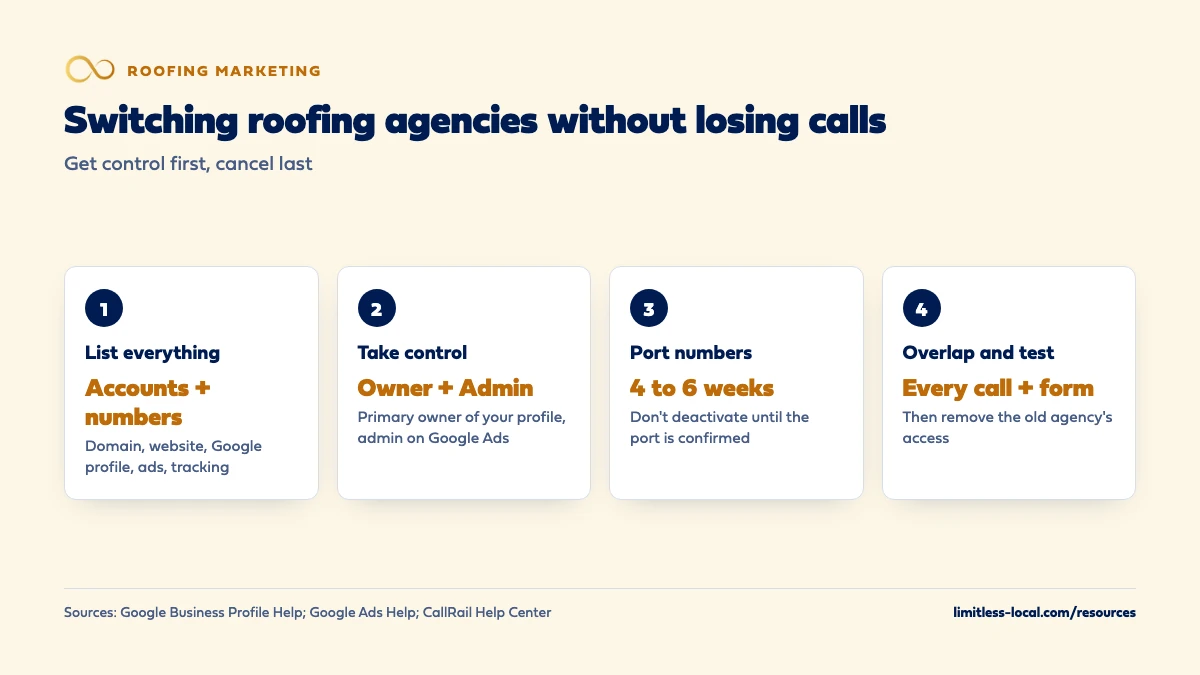
Get owner or admin access to your Google Business Profile, Google Ads, website, domain and call tracking before you give notice, then cancel the old agency last, not first. Port or keep forwarding every tracking phone number until the new setup has been tested, since a number port can take weeks. Let the old and new agency overlap while the new team tests every number, form and conversion, and compare weekly calls and booked inspections against the weeks before the switch.
Our first phase with any new client is building the foundation: tracking, follow-up and a clean online presence, which is where a clean handover protects the calls you’re already paying for. Our packages page lays out what’s included at each tier, and our roofing marketing page shows how we work with roofers. If you’re still choosing a replacement agency, what to look for in a new roofing agency covers that decision, and the roofing marketing questions library goes question by question.
What's the safest order to switch roofing marketing agencies?
Get control first, cancel last. Most leads lost in a switch go missing in the gap between the old agency stopping and the new one starting: a tracking number that stops forwarding, an ad account nobody can log into, or a Google profile the new team can’t edit. The order below closes that gap.
- List every account and phone number your marketing touches.
- Make sure you, not the agency, hold owner or admin access to each one.
- Move or port the phone numbers before anything is shut off.
- Let the old and new agency overlap while the new team tests everything.
- Only then end the old contract and remove the old agency’s access.
If you’re still deciding whether to leave, start with judging your current agency. This page assumes the decision is made.
Step 1: What should I list before I tell the old agency?
Write down every place your marketing lives, who controls it and which login it uses. For most roofing companies that list includes:
- Your domain name and the registrar it’s registered with
- Website hosting and the website’s admin login
- Your Google Business Profile
- Google Ads and Local Services Ads
- Google Search Console, Google Analytics and any tag manager
- Call tracking numbers and the account they live in
- Website forms, chat and where those leads are sent
- Facebook and Instagram pages and any Meta ad account
- Review request tools and directory listings such as Yelp, Bing and Apple
Next to each one, note the phone numbers and email addresses it uses. A form that emails a former agency employee, or a listing that shows a tracking number you can’t control, is a lead you’ll lose the day access ends.
Step 2: How do I make sure I control my Google Business Profile?
Your Google Business Profile should have you, the business owner, as the primary owner. Google says a profile can have several owners but only one primary owner, and only owners can add or remove users or delete the profile. Managers can do almost everything else, including edit info, reply to reviews and publish posts.
So the agency should be a manager, or at most an extra owner. If the agency is the primary owner, ask it to transfer primary ownership to you before anything else. Google notes a profile must have another owner or manager to transfer primary ownership to, and that a new owner or manager has to wait 7 days before they can use every feature, including making someone else the primary owner. That wait is one reason to do this step well before the switch date.
Once you control the profile, invite the new agency as a manager. When you later remove the old agency, Google says its earlier review replies and posts stay on the profile.
Step 3: How do I keep my Google Ads account and its history?
Keep the same Google Ads account if you can, and change who manages it. Agencies usually manage client accounts through a manager account. Google says the client account still owns its data and can remove a manager’s ownership access by unlinking it, but unlinking a manager takes Admin access on your account. Standard access can edit campaigns, but it can’t manage users or unlink managers.
Before you give notice, log in yourself and confirm you have Admin access. Google also suggests keeping at least one additional administrator, because an account with a single admin can lose access to its tags if that person becomes unavailable. Then the new agency links its manager account, you accept the request, and the old manager is unlinked after the overlap.
Starting over in a brand-new account throws away the conversion history your bidding has learned from. Google says new campaigns or bid strategies without historical data may see temporary performance swings while Smart Bidding ramps up, and that big changes such as new conversion goals put a strategy into a learning status for up to 7 days. If your Local Services Ads have already moved into Google Ads, the same access check covers them.
Step 4: What happens to the phone numbers on my ads and listings?
This is where roofing companies most often lose calls. Call tracking numbers sit on your ads, website and sometimes your Google profile, and they belong to whatever account they were created in. If that’s the old agency’s account and it closes, those numbers can stop ringing your office.
Find out whose account holds the numbers. If it’s yours, you keep them. If it’s the agency’s, ask to port them to an account you own. CallRail, as one example, says the receiving provider starts the port, the process typically takes 4 to 6 weeks, and you shouldn’t deactivate the numbers or close the account until the port is confirmed. It says porting a U.S. or Canadian number away is free and that you should place a test call after the port finishes.
In our judgement, the safest plan is to start the port in the first week of the switch and keep the old agency’s contract running until every number has been tested. If a number can’t be ported, keep it forwarding while you replace it everywhere it appears, including directory listings. Mismatched numbers across listings are their own problem; matching info on every listing covers why.
Curious what your marketing is actually booking?
Get a free visibility audit — no obligation, no sales pitch.
Step 5: How do I keep my website and domain under my control?
Your domain should be registered in your company’s name, in a registrar account you can log into. If the agency registered it under its own name, ask your current registrar to change the registrant to you. ICANN notes that changing the registrant name, organization or email can put a 60-day lock on moving the domain to a different registrar, so do this early and don’t try to switch registrars in the same week.
If the website itself is moving to new hosting, copy and test the site on the new host first, then point the domain at it, and keep the old hosting running until you’re sure everything is reaching the new one. Keep the same page addresses where you can.
Check Google Search Console too. Google says a property needs at least one verified owner, and if the only verified owner leaves you should verify ownership yourself to keep access. Add yourself as a verified owner before the old agency’s access goes away.
Step 6: How long should the old and new agency overlap?
Long enough for every phone number, form and account to be handed over and tested. In our judgement that’s usually several weeks, and longer if numbers are being ported, since the port alone can take over a month. Check your current contract’s notice terms and time your notice so the old agency stays responsible until the handover is done.
During the overlap, agree on who changes what. Two agencies editing the same Google profile or ad campaigns in the same week is how settings get overwritten. A simple rule works: the old agency keeps things running, the new agency audits and prepares, and nothing is switched over until you’ve signed off on the checklist.
Step 7: What should the new agency test in the first two weeks?
- Every phone number. Call each number on your ads, website and listings from an outside phone and confirm it rings the right person.
- Every form. Submit each estimate request form and confirm the lead lands in your office’s inbox or CRM, not an old agency address.
- Conversion tracking. Confirm that calls and form leads are still recorded as conversions in Google Ads after any tag or website change.
- Your Google profile. Check the hours, phone number, website link and service area against what’s on your trucks.
- Ads and Local Services Ads. Confirm campaigns are running, budgets are what you approved and billing is in your name.
- Who still has access. List every user on each account and plan when the old agency comes off.
Step 8: How do I know no leads slipped through during the switch?
Compare the switch weeks with the weeks before it. Count calls, form leads and booked inspections by source, week by week. A sudden drop in one source, such as Google Ads calls falling to zero while form leads hold steady, usually points to a broken number or tag rather than a slow market.
This only works if leads are tagged by source when they come in. If they aren’t yet, the switch is a good moment to start; tracking leads to signed jobs walks through the stages. Judge the new agency on the months after the handover, not the handover itself.
When is the wrong time to switch roofing agencies?
In our judgement, the worst time is the start of storm season or right after a big hail or wind event, when any missed call is a missed inspection and nobody has time to test numbers. The slow months give you room to do the handover carefully, which is why slow-season roofing marketing often includes this kind of cleanup.
That said, don’t keep paying for work you’ve already decided isn’t working just to wait for a better month. If you have to switch in a busy stretch, keep the overlap longer and test every number twice.
What should I avoid doing during the switch?
- Canceling before you have access. Once the relationship ends, getting logins back is slower and harder.
- Creating a new Google Business Profile. A second profile for the same business tends to cause duplicate and ownership problems. Recover the existing one instead. If your profile seems to have disappeared from Maps, see why a roofer isn’t on Maps.
- Building a new ad account by default. Keep the history unless there’s a clear reason not to.
- Shutting off call tracking early. Wait until each number has been ported or replaced and tested.
- Changing your business name, address or phone mid-switch. Make one set of changes at a time so you can see what caused any drop.
Not sure which of these is costing you jobs?
A free visibility audit checks the Google profile, reviews, site and tracking, and shows what to fix first.
What's different when a roofing company switches agencies
Storm timing. Roofing demand can jump overnight after hail or high wind. A switch that leaves numbers or ads half-working during a storm week costs more than the same mistake in a quiet month, so plan the handover around your season.
Long sales cycles. A roof replacement can sign weeks after the first call. Leads that came in under the old agency may sign after the new one starts, so keep source tags intact and don’t credit those jobs to the new team.
Numbers on more than the website. Roofers often print phone numbers on yard signs, truck wraps and door hangers. If any of those use a tracking number from the old agency’s account, it has to be ported or kept forwarding, or those calls disappear when the account closes.
Canvassing and referral leads. Door knocking and referrals don’t depend on the agency, so keep them in their own column during the switch. Otherwise a strong canvassing month can hide a broken ad number, or a slow one can make the handover look worse than it was.
A worked example: what one dead tracking number costs
These numbers are made up to show the math, not a benchmark. Say your Google Ads bring in about 30 calls a month, roughly one a day, and the tracking number on those ads stops ringing your office during the switch. If nobody notices for ten days, that’s about ten calls gone, and if your office usually turns 1 in 5 ad calls into a signed roof, that’s 2 roofs you never got the chance to quote.
The fix costs almost nothing: one test call from an outside phone on the day of each change. That’s why the checklist above puts testing before canceling.
For context on our side of a switch: onboarding starts with a 15-minute discovery call, takes the owner’s team about 2 to 3 hours, and campaigns typically go live in weeks one and two. Packages start at $3,500 a month for Essentials, and ad spend is paid to Google separately. We ask for three months in the contract, but if you want to leave, we won’t make you stay. A free visibility audit is a reasonable first step before any switch.
Frequently asked questions
Can my old agency delete my Google Business Profile?
Only owners can remove a profile; managers can’t. If the agency is an owner, make yourself primary owner and change the agency to a manager before you give notice.
Do I have to pay to port my call tracking numbers?
It depends on the provider. CallRail says porting a U.S. or Canadian number away from it is free; check your provider’s own help pages.
What if the agency registered my domain in its own name?
Ask the current registrar to change the registrant to your company. ICANN says the registrar confirms the change with the current registrant, so get the agency’s cooperation in writing first.
Should the new agency build a new Google Ads account?
Usually not. Keeping the existing account keeps its conversion history; Google says new campaigns without historical data may see temporary performance swings while Smart Bidding ramps up.
Can I give my bookkeeper or office manager view-only access to Google Ads?
Yes. Google Ads has a Read-only access level that can view campaigns and reports but not edit campaigns.
Will switching agencies hurt my Google rankings?
Changing who manages your accounts doesn’t, by itself, change your website or profile. In our judgement, rankings are more at risk from changing page addresses, your business details or a second profile during the switch, so change one thing at a time.
Key takeaways
- Get control first and cancel last: lost leads happen in the gap between agencies.
- Be the primary owner of your Google profile and an admin on Google Ads before giving notice.
- Port or keep forwarding every tracking number; a port can take 4 to 6 weeks.
- Overlap the agencies and test every number, form and conversion before removing access.
- Compare weekly calls and booked inspections by source to catch anything that slipped.
Want a second set of eyes on your setup?
We'll look at how you show up locally and where calls are leaking, then send you a plain-English breakdown.
More in this section
- How do I know if my roofing marketing agency is getting results?
- How do I track which roofing leads turn into signed jobs?
- Does a roofing company need a CRM to follow up on leads?
- When is a roofing company ready for a full-time marketing hire?
- Should my roofing marketing go after repairs or replacements?
Sources
- Manager Accounts (MCC): About ownership of client accounts — Google Ads Help
- About access levels in your Google Ads account — Google Ads Help
- About Smart Bidding learning — Google Ads Help
- Manage your Business Profile owners & managers — Google Business Profile Help
- Transfer primary ownership of a Business Profile — Google Business Profile Help
- Managing owners, users, and permissions — Search Console Help
- Port a phone number away from CallRail — CallRail Help Center
- FAQs for Registrants: Transferring Your Domain Name — ICANN