
How can I tell if HVAC SEO or Google Ads is making profitable jobs?

- How do I compare HVAC SEO and Google Ads on profit instead of lead count?
- Why isn't lead count enough to compare SEO and Google Ads?
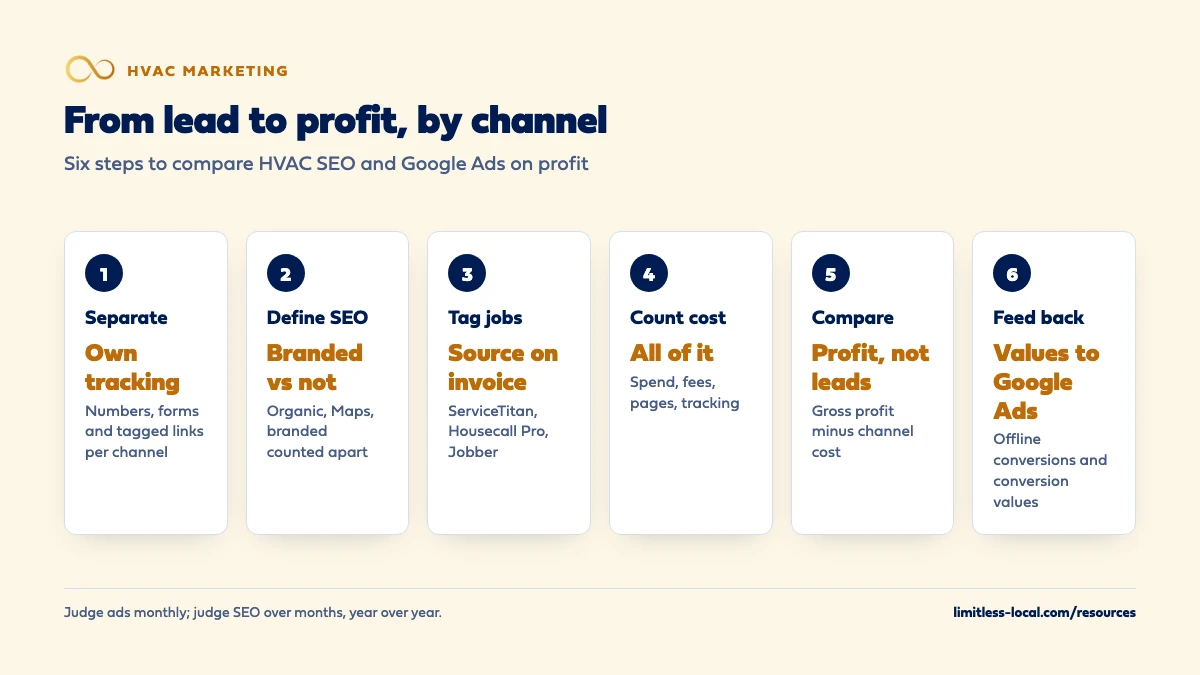
- Step 1: Give each channel its own way to be counted
- Step 2: Decide what counts as SEO
- Step 3: Put the lead source on every job
- Step 4: Count what each channel really costs
- Step 5: Compare profit, not revenue
- Step 6: Send booked-job values back into Google Ads
- How long should I give each one before judging it?
- Why can SEO look worse early and better later?
- What if SEO and Google Ads both claim the same job?
- What should I do once I know the answer?
- What's different about measuring HVAC marketing profit
- A worked example: same cost per booked job, different profit
- Frequently asked questions
- Key takeaways
- More in this section
- Sources
The short version
- Separate the channels: own tracking numbers, tagged forms, tagged links.
- Put the lead source on every job in ServiceTitan, Housecall Pro or Jobber.
- Compare gross profit minus marketing cost per channel, not leads or revenue.
- Judge ads monthly; judge SEO over months, against the same months last year.
For HVAC owners paying for both SEO and Google Ads who want to know which one is actually putting profit in the bank, not just which one makes the phone ring.
Get a free visibility audit · Book a growth call
How do I compare HVAC SEO and Google Ads on profit instead of lead count?
Follow each channel all the way to the invoice, not just the lead. Give Google Ads and SEO their own tracking numbers and tagged forms, record the lead source on every job in your field software, and each month add up the revenue and gross profit each channel’s jobs produced, then subtract what that channel cost. Judge Google Ads month by month, because it can bring calls within days; judge SEO over a longer stretch, because it typically takes 3-6 months to show meaningful organic growth and its cost per job tends to fall as it matures.
Tying every job back to its source is the part most HVAC companies skip, and it’s built into every one of our packages: call tracking with recording and transcription, form and chat tracking, source tagging across phone, web, chat and social, and a monthly report with a cost-per-lead breakdown. Our HVAC marketing page shows how SEO and Google Ads fit together for an HVAC company. The HVAC marketing guide covers every channel, and the HVAC marketing questions library goes question by question.
Why isn't lead count enough to compare SEO and Google Ads?
Because the two channels rarely bring the same kind of job. Ads can be aimed at the searches you pick, so they might bring mostly repair calls, or mostly replacement shoppers, depending on how they’re set up. SEO brings whoever finds your pages and your Google profile, which often includes people researching a bigger job and people who already know your name.
So a channel with more leads can still make you less money. Twenty tune-up calls and two system replacements aren’t the same month, even though the lead count looks better for the tune-ups.
There’s also a cost trap. Ad leads come with a price tag you can see on every click. SEO leads feel free, because nobody bills you per call. Both have real costs, and both need to be measured the same way: what you spent, what booked, and what those booked jobs left you after parts and labor. The difference between a click, a lead and a booked HVAC job sets out the terms.
Step 1: Give each channel its own way to be counted
If calls from your ads and calls from your website ring the same number, you can’t split them later. Set up:
- A tracking number for Google Ads calls, so ad calls are counted as ad calls.
- A separate tracking number for organic website visitors, which call tracking tools can swap in for people who arrive from search results.
- A tracking number on your Google Business Profile, set up so your main number stays listed as well.
- Tagged web forms and chat, so each form fill carries where the visitor came from.
- Tagged links you control, such as the website link on your Google Business Profile. The utm_source, utm_medium and utm_campaign tags show up in Google Analytics, so you can see which visits came through that link (see URL builders).
How to track whether your HVAC marketing is paying off walks through the setup in detail.
Step 2: Decide what counts as SEO
“SEO” can mean three different sources, and you need to decide up front which ones you’re counting:
- Organic website visits from the regular search results.
- Google Business Profile calls and clicks from Maps and the map pack.
- Branded searches, where someone typed your company name.
That last one matters. Someone who searched your name already knew you from a truck, a referral or an old job, so SEO didn’t really win them. Search Console now has a branded queries filter that splits your search traffic into branded and non-branded in the Performance report. Non-branded traffic shows how new customers find you without already looking for you, which is the part your SEO work is supposed to grow.
Report the three separately if you can, and judge your SEO mostly on non-branded organic and Maps.
Step 3: Put the lead source on every job
Tracking numbers tell you where calls came from. Your field software is where you find out which calls turned into money. Every booked job needs a lead source attached, set by the office when the call is booked, not guessed later.
- Jobber has a Lead Source Report that shows, for each source, the number of leads, how many have a job, and the value of the first invoice tied to those leads.
- Housecall Pro can track job costs and profit per job once you turn on job costing.
- ServiceTitan uses marketing campaigns to track incoming leads and run marketing reports, so each booked call carries the campaign it came from.
Keep the source list short and match it to your tracking: Google Ads, Local Services Ads, Organic website, Google Business Profile, Referral, Repeat customer and Other. If the office can pick from twenty options, they’ll pick the wrong one.
Step 4: Count what each channel really costs
Owners usually undercount both, in different ways.
Google Ads costs include the ad spend, the management fee, landing pages built for the ads, and the call tracking numbers the ads use.
SEO costs include the monthly SEO fee, content and page building, website work done for SEO, and Google Business Profile management.
Some costs are shared, like your website or a combined agency fee. Split them by a simple rule you write down, such as by the share of work each channel gets, and use the same rule every month. A rough split used consistently tells you more than a perfect split you only do once.
Leave out costs you’d pay either way, like your phone system and office staff. They matter to the business, but they don’t help you choose between the two channels.
Curious what your marketing is actually booking?
Get a free visibility audit — no obligation, no sales pitch.
Step 5: Compare profit, not revenue
For each channel, each month:
- Booked jobs from that source.
- Revenue from those jobs, from your invoices.
- Gross profit from those jobs: revenue minus parts, equipment and the labor to do them. If your software doesn’t track job costs, use your average gross margin by job type.
- Marketing profit: gross profit minus what the channel cost.
- Cost per booked job: channel cost divided by booked jobs.
Marketing profit is the number that answers the question. Cost per booked job is useful for spotting trouble early, but a channel with a higher cost per job can still win if its jobs are bigger. The worked example below shows that happening.
Step 6: Send booked-job values back into Google Ads
Google Ads only knows what you tell it. If it only sees calls, it’ll chase calls, including the cheap ones that never book. Two features close that gap:
- Offline conversion imports. You can measure what happens after an ad click or call, such as a booked job or a signed replacement, by sending that result back to Google Ads (see offline conversion imports). Google now recommends enhanced conversions for leads as the easier way to set this up.
- Conversion values. Giving each conversion a value lets you see the total value your campaigns produced, not just the count, and compare it with cost in the “Conversion value/cost” column (see conversion values).
Once booked jobs and their values flow back, the profit view you build in your field software and the view inside Google Ads start to agree, and automated bidding can start favoring the searches that bring profitable work.
How long should I give each one before judging it?
Google Ads: ads can generate leads within days of launch, so you’ll have booked-job numbers within the first month. Give a new campaign a few weeks to settle, then judge it month by month.
SEO: it typically takes 3-6 months to show meaningful organic growth. Judging SEO on its first or second month is like judging a new tech on their first morning. Look for the early signs in the meantime: more non-branded search impressions, more Google Business Profile calls, new pages showing up for the services and towns you want.
For both, compare the same months year over year once you have the history. An HVAC company’s June and its April aren’t comparable, no matter which channel you’re looking at. How long HVAC SEO takes to bring in calls covers the SEO timeline in more depth.

Why can SEO look worse early and better later?
SEO costs come first and the jobs come later. In the first few months you’re paying for pages, profile work and links, and the calls haven’t caught up yet, so cost per booked job looks terrible. Once pages rank and the profile is strong, the work keeps producing calls without a per-click charge, and cost per booked job tends to fall.
Google Ads works the other way. Cost per booked job is visible from week one and stays roughly where your market sets it. Stop paying, and the calls stop.
So compare them over a long enough window. A useful view is cumulative: total cost and total marketing profit for each channel since it started. Ads usually lead early; SEO often catches up. If SEO hasn’t started catching up after a fair stretch, that’s when to ask hard questions about what’s being done. Whether SEO is worth it for a small HVAC company covers when it fits and when it doesn’t.
What if SEO and Google Ads both claim the same job?
It happens all the time. A homeowner clicks your ad on Monday, doesn’t call, searches your name on Wednesday, and calls from your Google profile. Google Ads may count the job, your call tracking credits Google Business Profile, and your office records whatever the homeowner says.
You won’t make that perfectly clean, so pick a rule and stick to it:
- For comparing channels, credit the job to the tracking number or form the customer actually used to contact you.
- Treat Google Ads’ own conversion count as its view, useful inside Google Ads but not the scorekeeper for your business.
- Watch branded searches. If ads are running on your own name, some of what looks like ad profit was going to find you anyway.
What attribution means for your HVAC marketing explains why the platforms disagree.
What should I do once I know the answer?
- Both profitable: keep both, and put the next dollar where marketing profit per dollar is higher, as long as your crews have room.
- Ads profitable, SEO not yet, and SEO under six months old: keep ads carrying the calls, and check SEO’s early signs instead of cutting it.
- Ads profitable, SEO not after a fair stretch: ask what’s being done and why it isn’t working before you decide whether to keep paying.
- Ads not profitable: check tracking, targeting, landing pages and how the office handles calls before you cut the budget. The problem is often after the click.
- Neither profitable: look at your booking rate and average ticket first. If calls come in but don’t book, the fix isn’t more marketing.
Not sure which of these is costing you jobs?
A free visibility audit checks the Google profile, reviews, site and tracking, and shows what to fix first.
What's different about measuring HVAC marketing profit
Replacements swing the numbers. One system replacement can be worth more than a month of repair calls. A channel can look weak for weeks and then land two replacements. Look at several months, and report replacement jobs separately so one big ticket doesn’t hide a weak month.
Maintenance plans pay later. A tune-up customer who joins your maintenance plan brings repeat visits and is likely to call you for the replacement. If you can, count plan sign-ups by source alongside first-job profit.
Seasons hit both channels. Both SEO and ads produce more in July and January. That’s why year-over-year comparisons matter more than month-to-month ones.
Estimates take time to close. A replacement estimate booked in May might sell in June. Count the job in the month it sold, but credit it to the source of the original call.
A worked example: same cost per booked job, different profit
These numbers are made up to show the math, not a benchmark for your market. The SEO numbers are for a month after the SEO has had time to mature.
Google Ads: $3,000 in ad spend plus a $1,000 management fee, so $4,000 for the month. It brought 32 booked jobs, so $125 per booked job. Mostly repairs, averaging $500, for $16,000 in revenue. At a 40% gross margin after parts and labor, that’s $6,400 in gross profit. Minus the $4,000 it cost, marketing profit is $2,400.
SEO: $2,000 for the month. It brought 16 booked jobs, also $125 per booked job. But more of them were replacements, so the average ticket was $900, for $14,400 in revenue. At the same 40% margin, gross profit is $5,760. Minus the $2,000 it cost, marketing profit is $3,760.
Same cost per booked job, fewer jobs, and SEO still made more profit, because of what those jobs were. In a different market, or a different month, it could easily go the other way. The point is to run this math on your own numbers instead of judging by lead count.
Frequently asked questions
Can Google Analytics tell me which channel made more money?
Only partly. It can show visits and form fills by source, especially with tagged links, but it doesn’t see phone calls that didn’t start on your site or what a job sold for. Your field software is where revenue and profit live.
Should Local Services Ads count as Google Ads in this comparison?
Track them as their own source. They’re moving into Google Ads, but they charge per lead instead of per click and bring a different mix of jobs, so lumping them in hides which one is working.
What gross margin should I use if I don't track job costs?
Use your own average gross margin by job type from your books, kept separate for repairs, maintenance and replacements if you can. Don’t borrow an industry average; your margin is the one that matters.
Do repeat customers count as SEO if they found me on Google again?
Usually not. A past customer searching your name was coming back anyway. Tag repeat customers as their own source so they don’t make SEO or ads look better than they are.
How often should I run this comparison?
Monthly for a quick look at cost per booked job, and quarterly for the full profit view. Once you have a year of data, compare each quarter with the same quarter last year.
My agency reports leads. Is that enough?
It’s a start, but ask them to report booked jobs and revenue by source, using the lead sources from your field software. If they can’t connect leads to jobs, set that up together before judging the work.
Key takeaways
- Give SEO and Google Ads their own tracking numbers, tagged forms and tagged links.
- Count SEO as non-branded organic and Maps; branded searches mostly reflect people who already knew you.
- Put a lead source on every job and compare gross profit minus channel cost, not leads or revenue.
- Send booked jobs and their values back into Google Ads so it can favor profitable searches.
- Judge ads monthly and SEO over a longer stretch, comparing the same months year over year.
Want a second set of eyes on your setup?
We'll look at how you show up locally and where calls are leaking, then send you a plain-English breakdown.
More in this section
- Should my HVAC company start with LSAs, Google Ads or SEO?
- Are Google Local Services Ads worth it for an HVAC company?
- How much should an HVAC company spend on Google Ads?
- How soon will Google Ads start bringing in HVAC calls?
- What decides how much my HVAC company pays per click on Google Ads?
Sources
- URL builders: Collect campaign data with custom URLs — Google Analytics Help
- Introducing the branded queries filter in Search Console — Google Search Central Blog
- Lead Source Report — Jobber Help Center
- Job Costing Reports — Housecall Pro Help Center
- Add marketing campaigns in ServiceTitan — ServiceTitan Help
- About offline conversion imports — Google Ads Help
- About conversion values — Google Ads Help