
How do I track restoration visibility in Maps and AI search?

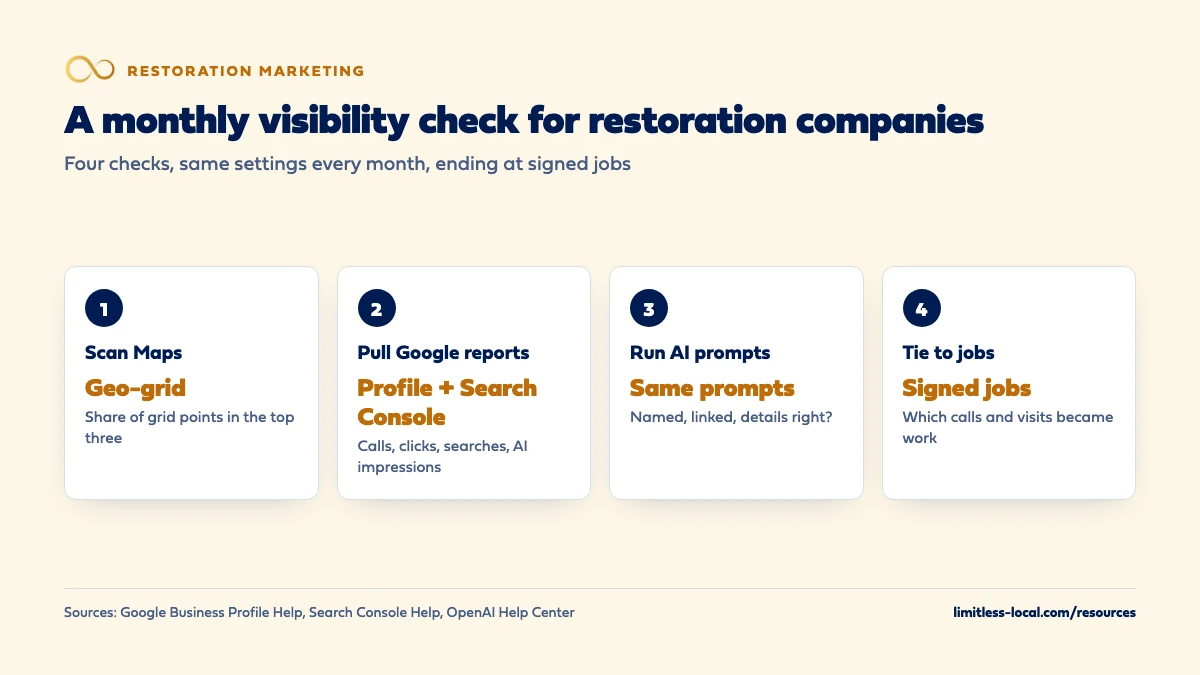
- How should a restoration company measure its Google Maps, search and AI visibility each month?
- What should a restoration company actually measure for visibility?
- Why does my Maps ranking look different in every part of town?
- How does a geo-grid check work for a restoration company?
- What can my Google Business Profile performance report tell me?
- How do I see how my website shows up in regular Google results?
- How do I check whether Google's AI Overviews show my company?
- How do I check whether ChatGPT recommends my restoration company?
- How do I connect Maps and AI visibility to actual calls?
- How often should I check, and what counts as real movement?
- What's different about tracking visibility for restoration
- A worked example: three months of a visibility log
- Frequently asked questions
- Key takeaways
- More in this section
- Sources
The short version
- Scan your Maps ranking across the whole service area, not from your office.
- Download your Google profile performance data and Search Console reports monthly.
- Run the same AI prompts each month and log whether you're named and correct.
- Tie every source to calls and signed jobs, not just rankings.
For restoration owners who want a monthly read on where they show up across their service area, in Google and in AI answers, and whether it brings calls.
Get a free visibility audit · Book a growth call
How should a restoration company measure its Google Maps, search and AI visibility each month?
Track three things each month: where you rank in the Maps results across your whole service area with a geo-grid scan, what your Google Business Profile performance report and Search Console show, and whether a fixed set of AI prompts names your company. Google’s Search Console now has a Generative AI performance report for AI Overviews and AI Mode, but ChatGPT has no report, so you check it by hand with the same prompts from the same location. Then tie it to the phone: count profile calls, tag your profile’s website link, and record which of those leads become signed jobs.
Showing up in the regular Google results, the Maps 3-pack and AI answers is what our local SEO work is built around, and every package includes reporting and attribution: monthly reports with a cost-per-lead breakdown, call tracking, source tagging and a real-time dashboard. You can see how that work runs on our local SEO page and how it applies to water, fire and mold work on our restoration marketing page. For channels, budget and getting started, see the restoration marketing guide, and the rest of the restoration marketing questions library goes question by question.
What should a restoration company actually measure for visibility?
Three things, in this order, because each one only matters if the next one follows:
- Where you show up. Your spot in the Maps results across your service area, your pages in the regular Google results, and whether AI answers name or link to you.
- What people do when they see you. Calls, website clicks and messages from your Google profile, and clicks from search.
- What turns into work. Calls and forms from those sources that become signed jobs.
Most owners only look at the first one, usually by searching their own company name on their own phone. That check tells you almost nothing. Google’s Search Console help says results are specific to the time, place, device and recent history of the person searching (Search Console Help), so what you see from your office is not what a homeowner sees across town at midnight.
In our judgement, a useful visibility log fits on one spreadsheet tab, updated monthly.
Why does my Maps ranking look different in every part of town?
Because distance is built into how Google ranks local results. Google says local results are mainly based on relevance, distance, and popularity, and that distance means how far each business is from the person searching; if a searcher doesn’t share where they are, Google uses what it knows about their location (Google Business Profile Help).
For a restoration company that’s a big deal. Your office or shop sits in one spot, but your jobs come from a whole service area. You might hold the top of the map pack for “water damage restoration” two miles from your shop and not appear at all on the far side of the county where half your insurance work comes from.
So the question to track is not “what’s my Maps rank?” It’s “in how much of my service area do I show up in the top three, for the searches that bring jobs?” If you’ve dropped out entirely rather than slipped in some areas, start with getting back into the map pack before measuring anything.
How does a geo-grid check work for a restoration company?
A geo-grid tool runs the same search as if it came from many points laid out in a grid over your service area, then records where your business placed in the Maps results at each point. The result is a map of your town covered in numbered dots: low numbers where you rank well, high numbers or blanks where you don’t show.
A few setup choices decide whether the grid is useful:
- Pick the searches that bring jobs. For most restoration companies that’s a short list: water damage restoration, water damage cleanup, emergency water removal, mold remediation, fire damage restoration, and sewage cleanup if you do it. Five to eight terms is plenty.
- Size the grid to your real service area. A grid that stops at your city limits misses the suburbs you drive to; one that spreads two counties past where you’ll send a truck makes you look worse than you are and tells you nothing useful.
- Keep everything the same each time. Same terms, same grid size, same center point, same time of month. Change one and the comparison breaks.
- Track the share, not one dot. The number that matters is how many grid points have you in the top three, and whether that share grows month over month.
Geo-grid tools are paid third-party products, not a Google report, and each counts a little differently, so in our judgement pick one and stay with it.
What can my Google Business Profile performance report tell me?
More than most owners use it for. Google’s performance report is free for verified profiles and shows how people found your profile on Search and Maps and what they did next. The metrics that matter for restoration:
- Calls: how many times someone tapped the call button on your profile. Google notes you need a phone number on the profile for this to count.
- Website clicks: taps on the website link.
- Messages: the number of conversations through messages, if you have them turned on.
- Views: how many people viewed your profile on Search and Maps. Google counts unique visitors and counts a person only once a day, so this can run lower than the views shown elsewhere.
- Searches: the search terms people used when your profile appeared. Google updates this at the start of each month, and it can take up to 5 days to show.
Google also says these numbers include activity from both organic results and Google Ads, which matters if you run ads that show your profile. You can set a date range and download the data to a spreadsheet, which is the easiest way to keep a month-by-month record.
The searches list is worth a slow read once a month. If “mold remediation” and “fire damage restoration” never appear and you want that work, that’s a gap the profile and your service pages need to close; optimizing your restoration Google profile covers how.
Curious what your marketing is actually booking?
Get a free visibility audit — no obligation, no sales pitch.
How do I see how my website shows up in regular Google results?
Use the Performance report in Google Search Console. It shows clicks, impressions, click-through rate and average position, and you can group the data by search query, page, country, device and date (Search Console Help). The default view covers the past three months, and you can switch the chart to weekly or monthly to smooth out daily swings.
For a restoration company, a few views carry most of the value:
- Queries with your service and town names. Filter for “water damage”, “mold” or “fire” and watch impressions and clicks on those terms month over month.
- Pages. Check that your water, mold, fire and sewage pages each get impressions for their own service, not just your home page.
- Devices. Emergency searches skew to phones in our judgement, so watch mobile clicks separately.
How do I check whether Google's AI Overviews show my company?
Search Console now has a Generative AI performance report. Google says it rolled out to all websites worldwide as of August 31, 2026, and it shows how often links to your site were shown in AI Overviews and AI Mode on Google Search (Search Console Help). You can use it to:
- See how your impressions from these AI features change over time.
- See which of your pages get the most AI impressions.
- Group data by page, country, date and device, and export it.
Two limits to know. The report counts impressions, meaning a link to your site was shown; it doesn’t tell you the exact question or whether you were named in the text. And if you can’t see the report, Google says that usually means your site hasn’t had enough impressions in those features yet, or that the site has been excluded from Search’s generative AI features.
For a single-location restoration company, in our judgement, low AI impressions are normal at first: the panic search that brings an emergency call still mostly plays out in Maps and ads. Watch which pages earn AI impressions. How restoration companies show up in AI answers covers what earns those mentions.
How do I check whether ChatGPT recommends my restoration company?
There’s no report for it, so you run a fixed set of prompts by hand and log the results. OpenAI says ChatGPT can search the web, include citations to its sources, and use location information to find local results (OpenAI Help Center). That makes a monthly check possible, with a few rules:
- Write the prompts once. Use the questions customers and property managers actually ask: “who does emergency water damage cleanup in [town]”, “best mold remediation company near [neighborhood]”, “restoration company that works with insurance in [county]”. Ten or so is enough.
- Control for location. OpenAI says ChatGPT may use an approximate location from your IP address, that a VPN can change it, and that saved memories can influence search results. Run the checks from the same place, with memory off or in a fresh chat, and put the town in the prompt.
- Log four things per prompt: were you named, were you linked, which page or listing was cited, and were your details (phone, hours, services, area) right.
- Repeat monthly, same prompts. One run is a snapshot; the trend across months is the signal.
OpenAI also says search results and citations can be incomplete, outdated or incorrect. When an answer gets your company wrong, open the cited source: in our judgement it’s usually an old listing or page, and fixing that source is the repair.

How do I connect Maps and AI visibility to actual calls?
Visibility only counts if the phone rings and the job signs. Two bits of plumbing make the connection:
- Tag your profile’s website link. Add UTM parameters to the website link on your Google profile so visits from it show up as their own source. Google’s URL builder help lists
utm_source,utm_mediumandutm_campaignand shows the values in the Traffic acquisition report in Analytics. - Count profile calls separately. Your profile’s call metric covers taps on the call button. If you use call tracking, give your profile its own number, set up the way your call tracking provider recommends for Google profiles; whether call tracking numbers hurt rankings covers how to do it safely.
Then carry the source onto the job record, so each month you can see how many profile calls and website visits became signed jobs. Tracking which marketing brings booked jobs covers that job sheet, including insurance payments that land weeks later.
AI answers are harder to tie to a call. Some AI referrals show up as website visits from the AI tool, and some people just call the number they saw. In our judgement, asking “how did you find us?” on every call and logging “AI or ChatGPT” as an answer option is the most practical fix today.
How often should I check, and what counts as real movement?
Monthly for everything, with one exception: check your profile for wrong edits, missing hours or a suspension any time calls drop suddenly. A monthly rhythm keeps the work small and matches how Google updates its own reports: the profile’s searches list updates at the start of each month.
What counts as movement, in our judgement:
- Maps: the share of grid points where you’re in the top three, moving the same direction for two or three months running.
- Profile: calls and website clicks, compared with the same month last year where you have it, because storm and freeze months swing everything.
- Search Console: clicks on your service terms, monthly.
- AI: how many of your fixed prompts name you, and whether your details are right.
Local SEO is a ramp. It typically takes 3-6 months to show meaningful organic growth, so a single bad month after a change isn’t a verdict. If you’re working to rank for water damage in your city, judge the work on the trend across a season, not week to week.
What's different about tracking visibility for restoration
Searches happen at night and in a panic. A burst pipe at 2 a.m. is a phone search from wherever the water is, so your grid needs to cover the homes you serve, not just the area around your office.
Storms distort every number. One weather event can double profile calls for a week. Mark storm and freeze periods in your log so a quiet month after doesn’t look like a collapse.
Each service has its own map. You can lead for water damage and be invisible for mold or fire in the same town. Scan each service you want work in.
Property managers search differently. If you want commercial work, add a few property-manager prompts to your AI log.
Not sure which of these is costing you jobs?
A free visibility audit checks the Google profile, reviews, site and tracking, and shows what to fix first.
A worked example: three months of a visibility log
These numbers are made up to show how the log reads, not a benchmark for your market. Say a restoration company scans “water damage restoration” on a 7-by-7 grid, which is 49 points across its service area.
- January: it’s in the top three at 18 of 49 points. The profile shows 40 calls for the month, and the job sheet shows 9 of those became signed jobs.
- April: after filling in the profile, adding service-area pages and asking every customer for a review, it’s in the top three at 27 of 49 points. Profile calls are 52, and 13 became signed jobs.
The grid share went from about 37% to about 55% of the service area. Calls rose by 12, and signed jobs by 4. In the same months, 3 of its 10 fixed ChatGPT prompts named the company in January and 5 in April, and one prompt that had listed an old phone number was fixed by correcting an old directory listing.
The log ties dots on the map to calls and signed jobs. If April had shown more grid points but the same calls, the next question would be what happens after people find the profile.
Frequently asked questions
Is searching my own company name on my phone a good check?
No. Google says results depend on the time, place, device and recent history of the searcher, so your own search mostly shows what Google thinks you want to see.
Do I need a paid geo-grid tool?
Not to start. Your Google profile performance report and Search Console are free. A geo-grid tool adds the part they can’t show: where you rank across different parts of your service area.
Does the Generative AI report show ChatGPT?
No. Google’s report covers AI Overviews and AI Mode on Google Search only. ChatGPT, Copilot and other assistants need their own prompt checks.
Why don't my profile views match what Google emails me?
Google says the performance report counts unique visitors and counts a person once a day, so it can run lower than other view counts you see.
What if an AI answer lists my old phone number?
Open the source it cites and fix that listing or page first. OpenAI says results and citations can be outdated or incorrect, and in our judgement a wrong detail usually traces back to the source.
Should I track Bing too?
If you have time, yes; in our judgement it’s worth a quick monthly look, and a few of your AI prompts can be run in Copilot too. Start with Google, where in our judgement most restoration searches happen.
Key takeaways
- Measure Maps visibility as the share of your service area where you’re in the top three, using the same geo-grid settings every month.
- Download your Google profile performance data monthly: calls, website clicks, messages and the searches list.
- Use Search Console’s Performance and Generative AI performance reports for regular and AI Overview visibility.
- Check ChatGPT with a fixed prompt list from the same location, and log whether you’re named, linked and correct.
- Tie every visibility source to calls and signed jobs, and judge the trend across a season.
Want a second set of eyes on your setup?
We'll look at how you show up locally and where calls are leaking, then send you a plain-English breakdown.
More in this section
- How do restoration companies show up in AI search answers?
- How do I track which marketing brings in booked restoration jobs?
- How do I get my restoration company back into the Map Pack?
- How should a restoration company build city pages that rank?
- Restoration ads geo targeting: how tight a service area?
Sources
- Tips to improve your local ranking on Google — Google Business Profile Help
- Understand your Business Profile performance & insights — Google Business Profile Help
- Performance report (Search results): Overview and basic setup — Search Console Help
- Generative AI performance report — Search Console Help
- Searching the web with ChatGPT — OpenAI Help Center
- URL builders: Collect campaign data with custom URLs — Google Analytics Help