
What should a roofer track monthly for local SEO and AI visibility?

- Which few numbers show a roofer's local SEO and AI visibility are improving each month?
- Why does a roofer need a monthly scorecard instead of a ranking report?
- What should I pull from my Google Business Profile each month?
- What should I pull from Search Console?
- How do I track whether Google's AI answers show my roofing company?
- How do I track visits from ChatGPT and other AI tools?
- Which lead numbers belong on the scorecard?
- Should I still track my rankings?
- What review numbers belong on the scorecard?
- How do I read the scorecard month to month?
- What can a roofer stop tracking every month?
- How long before the scorecard shows SEO is working?
- What's different about tracking local SEO for roofers
- A worked example: one month on a roofer's scorecard
- Frequently asked questions
- Key takeaways
- More in this section
- Sources
The short version
- Google Business Profile: calls, website clicks, searches.
- Search Console: non-branded clicks and impressions by page, and AI feature impressions.
- Google Analytics: organic and AI Assistant visits and the leads they produced.
- Call tracking and CRM: inspections booked and roofs signed from search and Maps.
- Reviews: new reviews this month and your average rating.
For roofing owners who want one short monthly scorecard that shows whether Google, Maps and AI answers are bringing more calls and signed roofs.
Get a free visibility audit · Book a growth call
Which few numbers show a roofer's local SEO and AI visibility are improving each month?
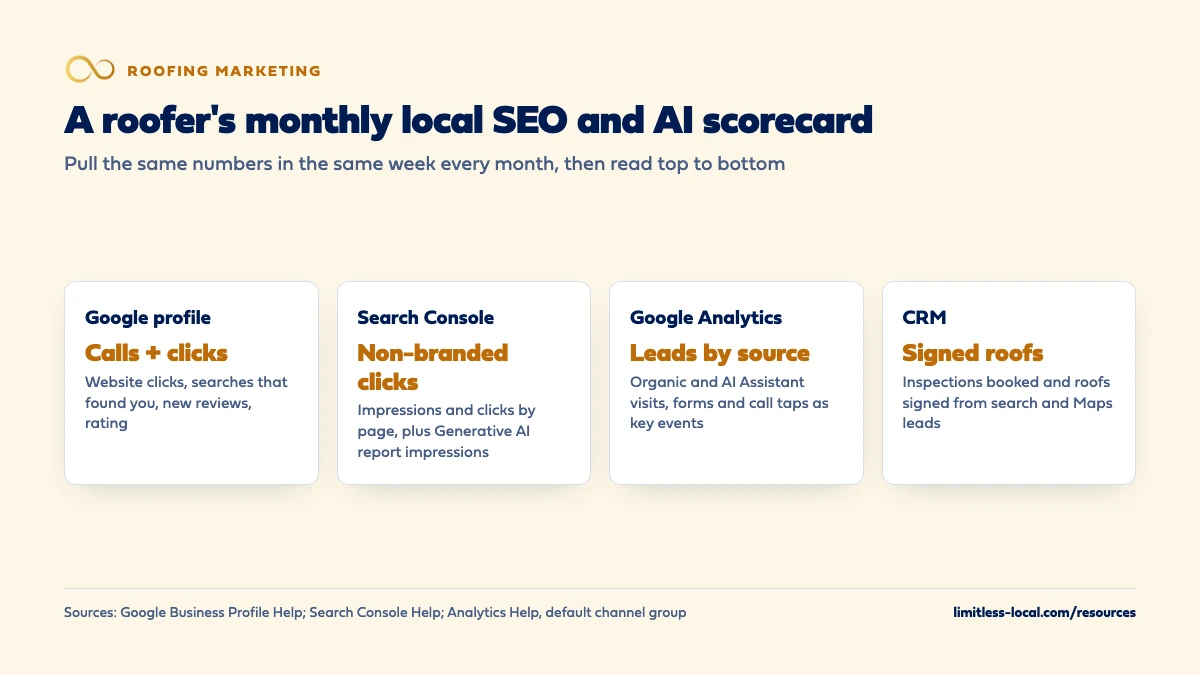
Track about a dozen numbers in the same week each month: calls, website clicks and searches from your Google Business Profile; non-branded clicks, impressions by page and AI feature impressions from Search Console; organic and AI Assistant visits and the leads they produced from Google Analytics; and new reviews and your rating. Then follow those leads in your call tracking and CRM to inspections booked and roofs signed. Visibility numbers show whether homeowners and AI answers are finding you; calls and signed roofs show whether it’s paying.
Every package we offer includes this kind of reporting: monthly reports with a cost-per-lead breakdown, call tracking with recording, source tagging on every lead and a real-time dashboard, so the scorecard ends at booked jobs instead of rankings. It’s how we report on local SEO across the regular results, the Maps 3-pack and AI answers for our roofing marketing packages. For how to judge an SEO provider’s reporting before you hire, see the guide to roofing SEO companies, and browse the rest of the roofing marketing questions library.
Why does a roofer need a monthly scorecard instead of a ranking report?
Rankings move with the searcher’s location, the device and the day, so one screenshot of “position 3” tells you very little. A long report full of traffic charts tells you even less about whether the phone rang.
A scorecard fixes that by following one chain each month:
- Seen: are more homeowners seeing you on Google, Maps and in AI answers?
- Chosen: are more of them clicking, calling or asking for directions?
- Booked: are those calls turning into inspections and signed roofs?
Keep it to about a dozen numbers on one page. Pull them in the same week every month, from the same reports, so the comparison is fair. If a number never changes a decision, drop it.
What should I pull from my Google Business Profile each month?
Your profile’s performance report shows how people find you on Search and Maps and what they do next. Google’s help page on Business Profile performance lists the metrics. The ones that matter for a roofer:
- Calls: taps on the call button on your profile.
- Website clicks: taps on your website link.
- Searches: the search terms people used to find your profile. This updates at the start of each month and can take up to 5 days to appear, so pull the scorecard after the first week.
- Views: unique people who viewed your profile on Search and Maps.
- Messages and bookings, if you’ve turned them on.
Two cautions. Performance data is only available for verified profiles. And the numbers include actions from both organic results and Google Ads, so if you run ads that show your profile, don’t credit every call to SEO. A tracking number on the profile’s website link and phone, set up properly, helps separate them.
What should I pull from Search Console?
Search Console’s Performance report shows clicks, impressions and average position, grouped by query or by page. For a roofer, three views are worth a minute each month:
- Clicks and impressions for the whole site, compared with last month and the same month last year.
- The Pages tab: which service and town pages get clicks. If your roof replacement page has impressions but almost no clicks, its title and description need work.
- Non-branded searches only. Search Console added a branded queries filter that splits searches that include your company name from everything else. Branded clicks mostly come from people who already know you. Non-branded clicks, like “roof repair” plus a town, show whether SEO is winning you new homeowners.
The branded filter is only available for top-level properties with enough search volume, so smaller sites may not see it yet. In that case, filter out queries containing your company name by hand. How a roofer sees which searches and pages bring leads shows how to line these reports up by page.
How do I track whether Google's AI answers show my roofing company?
Use the Generative AI performance report in Search Console, which Google rolled out to all websites as of August 31, 2026. It shows:
- How many times links to your site appeared in generative AI features on Google Search, over time.
- Which pages got those impressions.
- Where they came from, by country and device.
For a roofer, the Pages view is the useful one. If your leak repair and replacement pages show up in AI features, those pages are being used to answer homeowners’ questions. If only a blog post does, your service pages may need clearer, more specific answers.
If the report isn’t there, your site usually hasn’t had enough impressions in those features yet. Clicks from AI Overviews and AI Mode aren’t split out; they’re counted in the regular Web search numbers in your Performance report.
How do I track visits from ChatGPT and other AI tools?
Two places cover most of it.
Google Analytics. The default channel group includes an AI Assistant channel for visitors who arrive from sources like ChatGPT, Gemini, Deepseek, Copilot or Grok. It excludes Google’s AI Overviews and AI Mode, which land in Organic Search. Each month, note AI Assistant sessions and the leads they produced.
Bing Webmaster Tools. Its AI Performance report shows how often your pages are cited in AI-generated answers across Microsoft Copilot, AI summaries in Bing and some partner tools, which pages are cited and the phrases the AI used to find them. It counts citations, not rankings or importance, so read it as a sign that AI tools are using your pages.
Neither catches the homeowner who reads your name in a chat answer and calls without visiting your site. Only a lead-source question on every call catches that one. How to know if AI search is sending your roofing company leads covers the setup.
Curious what your marketing is actually booking?
Get a free visibility audit — no obligation, no sales pitch.
Which lead numbers belong on the scorecard?
These are the numbers that decide whether SEO is worth what you pay:
- Calls from your Google profile, through a tracking number.
- Calls and estimate forms from organic visits to your website. Mark form submissions and call-button taps as key events in Google Analytics so they show up next to each traffic source.
- Leads where the homeowner mentioned AI, from your office’s lead-source question.
- Inspections booked from those leads.
- Roofs signed, and the revenue behind them.
The last two come from your CRM or field software, such as AccuLynx, JobNimbus or ServiceTitan. Without them the scorecard stops at leads, and you can’t tell whether a busy month was real work or tire-kickers. How a roofer can track calls and forms from Google walks through the tracking step by step.
Should I still track my rankings?
A few, yes, but treat them as a check, not the goal. Pick five to ten searches that match the jobs you want, like “roof replacement” and “roof repair” plus your main towns, and check where your profile shows in the map pack from several points across your service area. A roofer can be first near the shop and missing three towns over, and a single check from your office hides that.
Map pack visibility across your target towns is worth watching because it tends to show up in calls. A roofing client of ours got 3x map pack visibility in its target towns; better presence and consistent info across the web increased inbound calls.
Skip daily rank checks and long keyword lists. If calls are rising, a ranking dip on one term doesn’t matter much.
What review numbers belong on the scorecard?
Three numbers, from your Google profile:
- New reviews this month. A steady trickle beats a burst followed by silence.
- Average rating. Watch the direction, not the decimal.
- Reviews without a reply. This should be zero.
Reviews affect where you show in Maps and what homeowners and AI answers say about you, so they belong next to the visibility numbers. How many Google reviews a roofer should get each month covers a realistic pace.
How do I read the scorecard month to month?
Roofing is seasonal and storms swing everything, so compare each month with the same month last year as well as with last month, and watch three-month trends instead of single months. Then read the chain from top to bottom:
- Impressions up, clicks flat: you’re being seen but not chosen. Look at page titles, your profile photos and reviews.
- Clicks up, calls flat: homeowners visit but don’t reach out. Check the page’s phone number, form and mobile speed.
- Calls up, signed roofs flat: marketing is working and the problem is lead quality or sales follow-up.
- AI impressions up, no AI-sourced leads: AI tools use your pages for research questions. That’s fine; check whether those homeowners come back later through your name.
- Everything down after a storm season: normal. Compare with last year before changing anything.
What can a roofer stop tracking every month?
Plenty of numbers look busy without changing a decision:
- Total website traffic, without knowing which pages or towns it came from.
- Bounce rate and time on site, unless you’re fixing a specific page.
- The number of keywords you “rank for”, most of which no homeowner searches.
- Third-party authority scores.
- AI “mention” counts from tools that can’t show where the data comes from.
If a provider’s report leads with those and never reaches calls or signed roofs, ask for the scorecard above instead.
How long before the scorecard shows SEO is working?
Expect the chain to move in order. Impressions usually rise first, then clicks, then calls, then signed roofs. SEO typically takes 3-6 months to show meaningful organic growth, so give the lower lines time before judging them. AI impressions follow the same pattern, since Google’s AI features draw from the same index as regular search; whether SEO is still worth it for roofers in 2026 explains why.
For a fuller picture of the ramp, see how long SEO takes to bring a roofer its first leads.
Want to see where your company stands?
A free visibility audit shows where you show up on Google, Maps and AI answers, and what it's costing you in calls.
What's different about tracking local SEO for roofers
Big tickets, small counts. A roofer may sign only a handful of roofs a month from search. One signed replacement can outweigh a hundred extra visits, which is why the scorecard has to reach signed roofs.
Storms distort every month. A hailstorm can double calls in a week with no SEO change at all. Mark storm months on the scorecard so you don’t credit or blame SEO for the weather.
Long sales cycles. A homeowner may call in March and sign in May after three estimates. Credit the signed roof to the month and source of the first call, so the channel that found them gets the credit.
A worked example: one month on a roofer's scorecard
These numbers are made up to show how the scorecard reads, not a benchmark for your market.
| Number | This month | Same month last year |
|---|---|---|
| Profile calls | 32 | 22 |
| Profile website clicks | 58 | 47 |
| Non-branded clicks (Search Console) | 140 | 95 |
| AI feature impressions | 410 | none reported |
| AI Assistant visits | 18 | 4 |
| Organic calls and forms | 12 | 8 |
| Inspections booked | 19 | 15 |
| Roofs signed | 6 | 5 |
| New reviews | 7 | 3 |
Visibility and calls are up clearly; signed roofs barely moved. Leads went from 30 (22 plus 8) to 44 (32 plus 12), but inspections only rose by four. The next step isn’t more SEO. It’s listening to call recordings and checking how fast the office books inspections.
That’s the kind of read our monthly reports are built for. Essentials is $3,500 a month and Growth is $4,500 a month, with any ad spend paid to Google separately.
Frequently asked questions
What day of the month should I pull my scorecard?
After the first week. The searches metric in your Business Profile updates at the start of each month and can take up to 5 days to show, so pulling on day eight or later gives you a complete month.
Can I see which AI answer mentioned my roofing company?
Not the exact answer. The Generative AI report shows impressions by page, country and device, and Bing’s report shows cited pages and grouped phrases, not full questions.
Do AI Overview clicks show up in Google Analytics as AI traffic?
No. Clicks from Google’s AI Overviews and AI Mode count as Organic Search. The AI Assistant channel covers tools like ChatGPT, Gemini and Copilot.
Is a scorecard worth it if I only get a few leads a month?
Yes, and it’s quicker. With small numbers, track each lead by name and source and follow it to signed or lost; the trend shows up over a few months.
Should my SEO provider build the scorecard for me?
They should report every number on it, and the report should reach calls and signed roofs. You’ll likely need to add signed-job data from your CRM if they don’t have access.
What if my profile calls drop but website calls rise?
Check whether a homeowner can reach your site’s phone number from the profile and whether your profile lost a spot in the map pack for a key search. Total calls matter more than which door they came through.
Key takeaways
- Keep the monthly scorecard to about a dozen numbers, pulled in the same week from the same reports.
- Google profile calls and clicks, non-branded Search Console clicks and AI feature impressions show whether you’re being seen.
- The AI Assistant channel covers ChatGPT-style tools; Google’s own AI clicks count as organic search.
- Inspections booked and roofs signed, from your CRM, decide whether SEO is paying.
- Compare with the same month last year to account for seasons and storms.
Not sure what's working right now?
Start with a free visibility audit: rankings, Google profile, reviews and tracking, checked against your service area.
More in this section
- What website changes help a roofer show up in AI results?
- Which SEO tasks can be replaced by AI for roofing companies?
- Is SEO still worth it for roofers in 2026 with AI search?
- How much should a roofer expect to pay for SEO?
- How do I know if AI search is sending my roofing company leads?
Sources
- Understand your Business Profile performance & insights — Google Business Profile Help
- Performance report (Search results): Overview and basic setup — Search Console Help
- Introducing the branded queries filter in Search Console — Google Search Central Blog
- Generative AI performance report (Search) — Search Console Help
- Default channel group — Analytics Help
- About key events — Analytics Help
- AI Performance in Bing Webmaster Tools — Bing Webmaster Tools