
How do I handle a storm call surge without missing jobs?
- How does a restoration company scale call intake during a storm without missing calls?
- What breaks first when storm calls surge?
- Step 1: How should I set up overflow call routing before a storm?
- Step 2: What should the storm triage script say?
- Step 3: Which storm calls get a crew first?
- Step 4: Where should every storm caller be logged?
- Step 5: How do I handle callbacks during a surge?
- Step 6: What should I tell callers about timing?
- Step 7: How do I keep my Google listings from making the surge worse?
- Step 8: Who can I add to answer phones when a storm hits?
- How many people do I need answering during a storm?
- What should I review after the storm passes?
- What's different about storm surges for restoration companies
- A worked example: staffing the phones for a storm day
- Frequently asked questions
- Key takeaways
- More in this section
- Sources
The short version
- Before the season: route calls to several phones at once, with overflow to an answering service or AI, never straight to voicemail.
- Use one two-minute triage script so every caller is sorted the same way.
- Log every caller in one list with a promised callback time, and keep the promise.
- Be honest about arrival times, and slow new demand once crews are full.
For restoration owners whose phones go from steady to nonstop after a storm or freeze, and who need every caller answered, sorted and called back while the crews are already out.
Get a free visibility audit · Book a growth call
How does a restoration company scale call intake during a storm without missing calls?
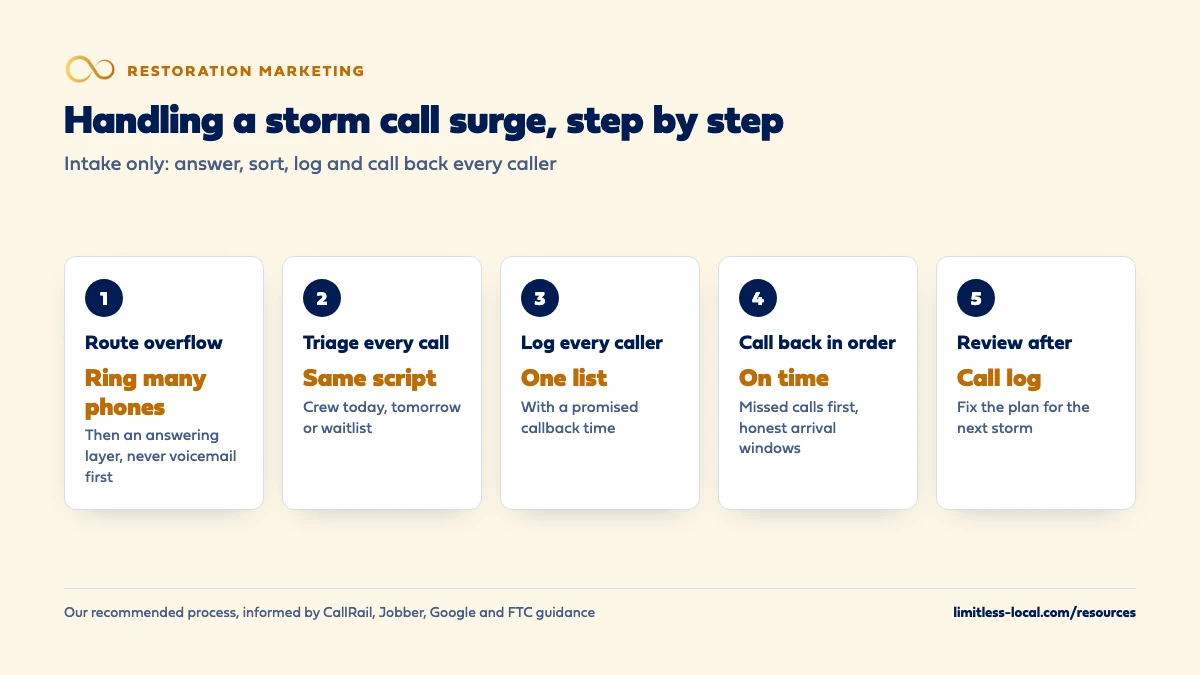
Handle a storm call surge by setting up overflow before the storm, so calls ring several phones at once and spill to an answering service or AI receptionist instead of voicemail. Give everyone who answers the same short triage script that sorts callers into crew today, crew tomorrow and waitlist, and log every caller in one list with a promised callback time. Then work that list in order, tell people honestly when you can get there, and pull back new demand once your crews are full rather than letting calls ring out.
After-hours answering, automated follow-up and a single inbox for every call, text and form are among the automation add-ons we set up and manage; they plug into any package of our restoration marketing, and add-on pricing is covered on the discovery call. The restoration marketing guide covers the channels that bring storm calls in; this page is only about catching them once the phones light up. More owner questions are in the restoration marketing library.
What breaks first when storm calls surge?
Usually the phone, before the crews. On a normal day, one person can answer every call because calls arrive one at a time. After a storm, they arrive in clumps: the first few hours after the water gets in, and again the next morning when people wake up to wet carpet. One line means one conversation at a time, and every other caller hears ringing, a busy signal or voicemail.
Then the follow-up breaks. Callers who got a “we’ll call you back” sit on sticky notes, in three people’s phones and in a voicemail box nobody has cleared. In our judgement the jobs lost in a surge are split between calls nobody answered and callbacks nobody made. The steps below fix both. Marketing during storm season covers budgets and ads; this page stays on intake.
Step 1: How should I set up overflow call routing before a storm?
Build it in calm weather and test it, because nobody reprograms a phone system during a storm. Call tracking and phone systems offer the pieces. CallRail’s call flow builder, as one example, includes:
- Simulcall, which rings several phones at the same time and connects the first person who answers.
- Round robin, which rings people in order with a set ring time before moving to the next.
- Schedule steps, which send calls one way during business hours and another way after hours.
A storm setup we’d suggest: ring the office and two backup phones together; if nobody answers within a few rings, send the call to an answering service or AI receptionist that uses your script; never let a new caller reach voicemail first. Write the setup down so you can switch it on with one change when the forecast turns. Source: Call routing and call flow builder (CallRail).
Step 2: What should the storm triage script say?
Everyone who answers, whether office staff, a borrowed tech, an answering service or an AI tool, should ask the same questions in the same order and take no more than a couple of minutes:
- Name, callback number and the property address. Confirm it’s in your service area.
- What happened and what’s wet, burned or flooded.
- Is the water still coming in, and is it clean water or sewage?
- Is the power off where it’s wet, and is anyone unsafe in the house?
- Is it a home or a business, and do they rent or own?
- Have they called their insurance company? Take a claim number if they have one; give no opinion on coverage.
- Can they text photos to a number you give them?
End every call by telling the caller which group they’re in and when they’ll hear from you next. A two-minute script is what keeps one person from getting stuck on a fifteen-minute call while five more ring.
Step 3: Which storm calls get a crew first?
Decide the order before the storm so the person answering doesn’t have to. Our suggested priority:
- Crew today: water still coming in, standing water inside, sewage, and anyone with a safety concern in the house. Commercial clients with a standing service agreement belong here too, because you promised them.
- Crew tomorrow: water stopped but materials still wet, and calls that came in late in the day.
- Waitlist: damage that’s dry or old, mold questions, rebuild estimates and insurance paperwork.
Keep these rules in writing and stick to them, even when a caller pushes. If a caller doesn’t fit your work or area, say so on the first call and, if you can, point them to someone who can help. Passing overflow to another company you trust is fine, but don’t pay or take a fee for it: some states restrict referral payments, and building a referral network explains why.
Step 4: Where should every storm caller be logged?
In one list that everyone can see, not in individual cell phones. Job software already does this. Jobber, for example, creates a request for each new inquiry with the details of the work needed, lets your team add requests by hand for phone calls, and lets you collect contact details, job information and photos through online request forms.
Whatever you use, every entry needs: the caller’s details, the triage group, the promised callback time, who owns the callback and what happened. A whiteboard works for a two-person shop if it’s photographed every hour. What doesn’t work is five people keeping five lists. Source: Request Basics (Jobber Help Center).
Curious what your marketing is actually booking?
Get a free visibility audit — no obligation, no sales pitch.
Step 5: How do I handle callbacks during a surge?
Treat the callback list like a dispatch board. One person owns it for each shift and works it in order: missed calls first, then waitlist callers whose promised time is coming up.
- Missed calls get a call back within minutes. A homeowner who couldn’t get through is still dialing other companies.
- Promised callbacks happen on time, even if the news is “we can’t get there until Thursday.” A caller who hears that from you can decide; a caller who hears nothing moves on and may leave a bad review.
- Automatic missed-call texts help as a bridge. CallRail notes that callers on landlines won’t get the text, callers who hang up within 15 seconds don’t get one, and you need to register for text messaging compliance first.
What missed calls cost a restoration company shows how quickly unreturned calls add up. Source: Automated responses for missed calls (CallRail).
Step 6: What should I tell callers about timing?
The truth, in specific words. “We’re booked through tomorrow, and we can be there Wednesday morning” earns more trust than a vague promise. It also separates you from the people homeowners are being warned about. The FTC tells homeowners after weather disasters to be skeptical of anyone promising immediate clean-up or repairs, to confirm a contractor’s license and insurance, and to get written estimates.
So give storm callers what the FTC tells them to ask for: your company name, license and insurance information, and a real arrival window. Don’t promise anything about insurance; the FTC also tells homeowners not to rely on a contractor to tell them what’s covered. Source: How To Avoid Scams After Weather Emergencies and Natural Disasters (FTC).
Step 7: How do I keep my Google listings from making the surge worse?
Your hours and ads decide how many calls arrive, so line them up with what you can answer. Google lets you set special hours on your Business Profile for a short stretch, up to 6 days in a row, without changing your regular hours. If you add night coverage for a storm week, special hours can show it.
On Local Services Ads, Google charges for a missed call during your business hours when the caller stays on the line more than 20 seconds, counts voicemail and automated greetings during business hours as connected calls, and says missed calls may hurt your ranking. During a surge that’s a double cost: paying for calls you can’t answer and ranking lower afterward. Once your crews are full, slow new demand with your ad budgets rather than letting calls ring out. Avoiding more leads than your crews can handle covers how. Sources: How to set Special hours, How leads work and About ad rankings.
Step 8: Who can I add to answer phones when a storm hits?
Line them up before the season, with the script and the list already set up:
- Office staff from other roles, such as estimators or admin, moved to phones for the first days.
- A family member or part-timer trained on the script once, in calm weather.
- An answering service or AI receptionist as the overflow layer, set to transfer emergencies to a person and to log everything else on your list.
- A dispatcher, even a temporary one, whose only job is the callback list and the crew schedule.
Keep technicians off the phones where you can. A tech on an extraction can’t run intake well, and every minute on the phone is a minute not drying a house. Choosing who answers after hours compares those options in more detail.
How many people do I need answering during a storm?
Work it out from your busiest hour, not your busiest day. Count how many calls came in during the worst hour of your last storm, estimate how long a triage call takes, and divide. If one call plus logging takes about five minutes, one person can handle at most about 12 calls an hour, and only if calls arrive evenly, which they don’t. Add a second person, or an overflow layer, for anything near that. The worked example below runs the numbers.
If you don’t have a past storm in your call log, use a guess and correct it after the first event. A plan built on a rough number beats no plan.
What should I review after the storm passes?
Within a week, pull the call log and the callback list and check: how many calls came in by hour, how many were answered live, how many missed calls were called back and how fast, how many callers on the waitlist booked, and how many you lost and why. Listen to a handful of recordings to hear whether the script held up under pressure.
Then change one or two things: more phones in the first hours, a shorter script, an earlier switch to overflow. Every storm makes the next plan better if somebody writes down what happened.
Not sure which of these is costing you jobs?
A free visibility audit checks the Google profile, reviews, site and tracking, and shows what to fix first.
What's different about storm surges for restoration companies
Everyone calls at once, and so does everyone else’s customer. A storm hits every company in the area on the same day. Homeowners call several companies, and the first one to answer and give a real arrival time usually wins.
Capacity runs out in two places. Phones jam in the first hours; crews and equipment run out over the following days. Intake has to keep working after the schedule is full, because waitlist callers still deserve a call back.
Homeowners are wary. Storms bring out-of-area contractors and scams, and government advice tells homeowners to check licenses and be skeptical of instant promises. A calm, specific answer is a selling point.
Commercial clients expect priority. If you’ve promised property managers a response time, the triage rules have to honor it even when residential calls are stacking up.
A worked example: staffing the phones for a storm day
These numbers are made up to show the math, not a benchmark for your market. Say a normal day brings 6 calls, and after a storm you get 48 calls in one day, with 18 of them in the worst hour.
If a triage call plus logging takes about five minutes, one person can handle at most about 12 calls an hour. With one person on the phone, about 6 of the 18 callers in that hour hit a busy line or voicemail, so the worst hour needs at least two people answering, plus an overflow layer for the clumps.
Now the crews. Say 22 of the 48 callers are real job requests in your area, and your crews can start 8 new jobs that day. That leaves 14 callers on the waitlist. Each one needs a callback time and a real arrival window, or many of them will book whoever calls back first.
The point of the math: with this made-up storm, two phones and an overflow layer catch the calls, and a working callback list keeps the 14 waitlist callers from becoming lost jobs.
Frequently asked questions
Should I turn off my phone menu during a storm?
Usually, yes, for new callers. Every extra step between a flooded homeowner and a person adds time, and a menu that makes callers listen to options can lose them.
Should I stop answering once crews are fully booked?
No. Keep answering, tell callers honestly when you can come, and put them on the waitlist. Slow new demand through your ads and hours instead of letting calls ring out.
Can an AI receptionist handle a storm surge on its own?
It can answer every call and log details, which is a big help in the first hours. Set it to transfer active water and sewage calls to a person, and have someone working its call log.
Should storm callers be told to text photos?
It helps you sort calls faster, and it gives you something to look at before a crew is free. Use a number your team checks and keep photos with the caller’s entry on the list.
What if a caller is outside my service area?
Say so on the first call, and point them to someone closer if you can. Driving far during a surge usually costs you jobs closer to home.
How far ahead should I set up the storm plan?
Before your storm season starts, then test it with a real call when a storm is in the forecast. Changes made during a surge rarely go well.
Key takeaways
- Set up overflow routing before the season: several phones ring at once, then an answering layer, never voicemail first.
- Give everyone who answers one short triage script that sorts callers into crew today, crew tomorrow or waitlist.
- Log every caller in one shared list with a promised callback time, and work it in order.
- Give callers honest arrival windows and your license and insurance details; the FTC tells homeowners to check both.
- Line up Google hours and ad budgets with what you can answer, because missed Local Services Ads calls can be charged and can hurt ranking.
Want a second set of eyes on your setup?
We'll look at how you show up locally and where calls are leaking, then send you a plain-English breakdown.
More in this section
- How do I keep restoration work coming in between storms?
- How should a restoration company handle marketing during storm season?
- How do I keep marketing steady while hiring restoration techs?
- Why do restoration ad costs spike during storms and freezes?
- How do I avoid paying for more leads than my crews can handle?
Sources
- Call Routing: Call Flow Builder — CallRail
- Request Basics — Jobber Help Center
- Automated responses for missed calls — CallRail Help Center
- How To Avoid Scams After Weather Emergencies and Natural Disasters — Federal Trade Commission
- How to set Special hours — Google Business Profile Help
- How leads work — Google Local Services Help
- About ad rankings — Google Local Services Help