
How do I build city pages for my plumbing company without spam?
- How should a plumber build town pages that help instead of looking like spam?
- What makes a plumbing city page spam in Google's eyes?
- Step 1: Which towns should get a plumbing city page?
- Step 2: What do I need before writing a plumbing city page?
- Step 3: What should a plumbing city page actually say?
- Step 4: Should I build a page for every service in every town?
- Step 5: How should city pages fit into my plumbing website?
- Step 6: What about the towns that don't get their own page yet?
- Can I use a template or AI to build plumbing city pages?
- Is three city pages enough, or do I need ten or more?
- Will a city page get my plumbing company into the map pack in that town?
- What do I do with thin plumbing city pages I already have?
- How do I know a plumbing city page is working?
- What's different about city pages for plumbing companies
- A worked example: deciding which towns get a page
- Frequently asked questions
- Key takeaways
- More in this section
- Sources
The short version
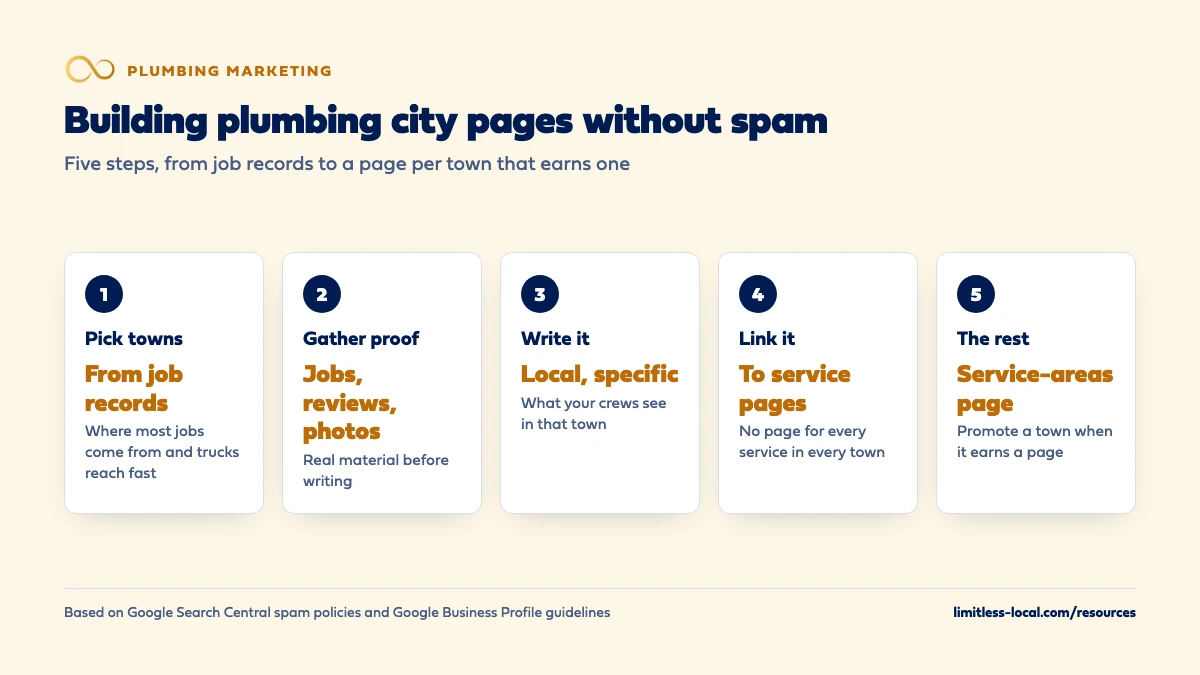
- Pick towns from your job records, not from a map of everywhere you'd drive.
- Gather real jobs, reviews and photos for a town before writing its page.
- Link city pages to your service pages; don't build a page for every service in every town.
- List the remaining towns on one service-areas page.
For plumbing owners who serve several towns and want pages for them that bring calls, without the copy-and-swap pages Google treats as spam.
Get a free visibility audit · Book a growth call
How should a plumber build town pages that help instead of looking like spam?
Build a city page only for a town where you can say something true and specific about plumbing there: the jobs your crews have done, reviews from customers in that town, the pipes, drains and water heaters you run into, and how fast you can get there. Google’s spam policies name pages targeted at specific cities that funnel visitors to one page as doorway abuse, so copies with the town name swapped are the risk. Start with the few towns that bring most of your jobs, link each page to your service pages, and list every other town on one service-areas page until it has enough real material for its own.
That’s how we approach town pages for plumbers: fewer pages, each built from real jobs, judged by the calls and booked jobs they bring. City and service pages are part of our website work and the local SEO in our plumbing marketing packages. The rest of the plumbing marketing questions library covers the other parts of getting found.
What makes a plumbing city page spam in Google's eyes?
Google’s spam policies describe doorway abuse as pages created to rank for specific, similar searches that lead people to intermediate pages less useful than the final destination. Two of its examples fit city pages exactly: “pages targeted at specific regions or cities that funnel users to one page” and “substantially similar pages that are closer to search results than a clearly defined, browseable hierarchy” (Spam policies for Google web search).
In plumbing terms, that’s the familiar pattern: “Emergency Plumber in Springfield”, “Emergency Plumber in Shelbyville” and twenty more, each with the same three paragraphs, the town name swapped, and a button to the same contact page. The problem isn’t having city pages. It’s having pages that say nothing a homeowner in that town couldn’t read on every other one.
Step 1: Which towns should get a plumbing city page?
Start from your job records, not from a map. Pull last year’s jobs from ServiceTitan, Housecall Pro or Jobber and sort them by town. In our judgement, the first city pages belong to the few towns that bring most of your work, especially the high-ticket jobs, and that your trucks can reach quickly for an emergency.
Keep the list honest about reach. Google’s Business Profile guidelines say a service area shouldn’t extend farther than about 2 hours of driving time from where the business is based, though larger areas may suit some businesses (Guidelines for representing your business on Google). For an emergency plumber, a town that’s a long drive away is a town you’ll struggle to serve on a Saturday night, and a page for it invites calls you can’t answer well.
Step 2: What do I need before writing a plumbing city page?
Real material from that town. Before writing a word, in our judgement you want most of these:
- Jobs you’ve done there: a few short write-ups, such as a water heater swap in an older neighborhood or a main line cleared after tree roots got in.
- Reviews from customers in that town, quoted with permission or pulled from your Google profile.
- Photos from local jobs, with the homeowner’s permission and no house numbers in frame.
- What your crews see there: the age of the housing, common pipe materials, whether homes are on city sewer or septic, hard water, slab foundations.
- How you get there: where your trucks come from and how quickly you can usually respond.
If you can’t fill most of that list for a town yet, it isn’t ready for its own page.
Step 3: What should a plumbing city page actually say?
What a homeowner in that town would want to know before calling. In our judgement, a solid plumbing city page covers:
- The plumbing work you do most there, and why, in a sentence or two.
- Local problems you see often, from your own jobs: older galvanized or cast iron lines, clay sewer pipes and roots, or water heaters wearing out early from hard water, only if that’s what your crews actually find.
- Recent jobs nearby, with photos.
- Reviews from customers in that town.
- How emergency calls work there, and your typical response.
- Links to the service pages for the jobs you mention.
Google’s test for content is whether it’s made primarily for people rather than to gain rankings, and whether it leaves readers feeling they need to search again (Creating helpful, reliable, people-first content). A page written from that list passes; a page written from a template usually doesn’t.
Step 4: Should I build a page for every service in every town?
No. A grid of pages like “water heater repair in [town]” for every service and every town multiplies fast and produces exactly the substantially similar pages Google’s doorway examples describe. It also fits Google’s description of scaled content abuse: many pages made mainly to manipulate rankings, typically unoriginal and of little value to readers (Spam policies for Google web search).
The cleaner setup is two sets of pages that link to each other: one page per service, which explains the work, and one page per town that genuinely earns one, which explains your work there and links to the relevant services. How many service pages you need covers the service side.
Curious what your marketing is actually booking?
Get a free visibility audit — no obligation, no sales pitch.
Step 5: How should city pages fit into my plumbing website?
Give them a clear home. In our judgement, a “Service areas” page in your main menu that lists every town you serve, with links to the towns that have their own page, is the browsable hierarchy Google’s policy contrasts with doorway pages. Each city page should link back to it and to the related service pages, and service pages can mention and link to the towns where you do that work most.
Give each page its own title, too. Google’s title link guidance says every page should have descriptive, concise title text, distinct for each page, and warns that long titles varying by only a single piece of information are boilerplate (Influencing your title links). “Plumber in [Town]” repeated twenty times is that pattern; a title that reflects what the page actually covers is better.
Step 6: What about the towns that don't get their own page yet?
List them on the service-areas page, with a sentence on how you cover them, and mention them where relevant on service pages. In our judgement, that tells homeowners and Google where you work without inventing pages you have nothing to say on.
Your Google Business Profile carries the same list in a different form. Service-area businesses can set up to 20 service areas by city, postal code or other area, and Google doesn’t allow a radius around your business (Manage your service areas). Keeping the towns on your site and your profile consistent is simple housekeeping. When a town builds up enough jobs, reviews and photos, promote it to its own page. Setting up as a service-area business covers the profile side.
Can I use a template or AI to build plumbing city pages?
A shared layout is fine; shared content is the problem. Every city page can use the same structure (intro, local jobs, reviews, problems you see, service links), as long as what fills it is different for each town. Google’s spam policies list “using generative AI tools or other similar tools to generate many pages without adding value for users” as an example of scaled content abuse (Spam policies for Google web search), and they apply however the pages were made.
In our judgement, AI can help tidy a draft written from your own job notes, reviews and photos. It can’t supply the local material, and a page built without it reads like every other one.
Is three city pages enough, or do I need ten or more?
The count should follow your job history, not a target. In our judgement, most single-shop plumbing companies start with a handful of towns where most of their work comes from, and add more one at a time as they collect real material. Three strong pages for the towns that bring most of your jobs will usually do more than a dozen thin ones.
A company with several shops, or a wide metro where you genuinely run trucks in many towns every week, may justify more. The test for each one is the same: could you fill Step 2’s list for that town today?
Will a city page get my plumbing company into the map pack in that town?
Not on its own. Google says local results are mainly based on relevance, distance and popularity, and that there’s no way to request or pay for a better local ranking (Tips to improve your local ranking on Google). A city page can help your website show for searches that name the town; it doesn’t change how far that town is from your base.
Don’t try to fix distance with extra profiles either. Google’s guidelines say a service-area business should have one profile for its central office with a designated service area, and only separate locations with their own staff and service areas get their own profiles. Getting into the map pack covers what moves Maps.
What do I do with thin plumbing city pages I already have?
In our judgement, sort them into three piles. Towns that bring real work: rewrite those pages with the material from Step 2. Towns you serve but have little to say about yet: fold them into the service-areas page and point the old page addresses there with redirects. Towns you don’t really serve: remove them, along with the matching service areas on your profile.
Work through the important towns first rather than deleting everything at once. Check in Search Console which old city pages actually get impressions and clicks before deciding, so you don’t remove the one that quietly brings calls.
How do I know a plumbing city page is working?
Look at it on its own. Search Console’s Performance report lets you filter to one page and see its impressions, clicks, average position and the searches it shows up for (Search Console Performance report). Then check your job records: are calls and booked jobs from that town rising? Tracking which marketing books jobs shows how to tag them.
Give a new page time before judging; SEO is a ramp of months, as how long plumbing SEO takes explains.
Not sure which of these is costing you jobs?
A free visibility audit checks the Google profile, reviews, site and tracking, and shows what to fix first.
What's different about city pages for plumbing companies
The plumbing really does change from town to town. An older town with cast iron drains and clay sewer laterals, a newer suburb on slab foundations, and a rural area on septic and wells produce different calls. That’s real, local material most trades don’t have, and it’s what makes a plumbing city page worth reading, as long as it comes from your own jobs.
Emergency response is part of the pitch. A homeowner with a burst pipe wants to know you can get there. If your typical response differs by town, say so honestly; it’s better than a promise you’ll break at night.
High-ticket jobs make good local proof. A repipe, a sewer line replacement or a run of water heater swaps in one neighborhood is a stronger story than a list of services, and it’s the work most plumbers want more of.
Keep homeowner privacy in mind. Job photos and write-ups shouldn’t show house numbers, street signs or anything that identifies the home without the owner’s permission.
A worked example: deciding which towns get a page
This company and its numbers are made up to show the sorting, not a benchmark. A residential plumber lists 15 towns on its Google profile. Its job records show 300 jobs last year, and 210 of them, or 70%, came from four towns, including most of its water heater and sewer work.
Those four towns get city pages, each with local jobs, reviews and photos. The other 11 go on the service-areas page, each with a sentence on how it’s covered. Compare that with the template approach: eight service pages times 15 towns is 120 near-identical pages, which is the pattern Google’s doorway and scaled content examples describe.
Each year, the owner re-sorts the job records and promotes any town that has built up enough real material. For scale, our Essentials package, $3,500 a month, includes a content sprint of up to 10 pages, which is room for a plumber’s core service pages and its first few genuine city pages, not a grid of copies.
Frequently asked questions
Can I make city pages for towns I don't serve yet?
In our judgement, no. A page for a town your trucks don’t reach brings calls you can’t take, and it’s the kind of page Google’s doorway examples describe.
Should city pages have their own phone numbers?
Not unless you have separate locations there. In our judgement, use your main tracked number so calls stay consistent with your Business Profile.
Do neighborhoods or ZIP codes need their own pages?
Rarely. In our judgement, a neighborhood only earns a page when you have real, different material for it; otherwise mention it on the town page.
Can I put the town name in the page title?
Yes, if the page is really about that town. Google asks for distinct, descriptive titles and warns against boilerplate titles that change only one word.
Can I open a Business Profile in each town to rank there?
Only for real locations with their own staff and service area. A service-area business should have one profile for its central office.
How long should a plumbing city page be?
Long enough to cover the local jobs, reviews and problems you know about. Google says it has no preferred word count.
Key takeaways
- Copies with the town name swapped are what Google’s spam policies call doorway abuse.
- Pick towns from your job records: where most jobs come from and your trucks reach quickly.
- Fill each page with real local jobs, reviews, photos and the plumbing your crews see there.
- Link city pages to service pages instead of building every service in every town.
- List other towns on one service-areas page and promote them as material builds up.
- City pages help with searches that name the town; they don’t change distance in Maps.
Want a second set of eyes on your setup?
We'll look at how you show up locally and where calls are leaking, then send you a plain-English breakdown.
More in this section
- How do I make my plumbing company look trustworthy online?
- How many service pages should a plumbing website have?
- How do I optimize my plumbing Google Business Profile?
- How do I stop attracting price shoppers to my plumbing company?
- How do I get more Google reviews for my plumbing company?
Sources
- Spam policies for Google web search — Google Search Central
- Creating Helpful, Reliable, People-First Content — Google Search Central
- Influencing Title Links in Google Search — Google Search Central
- Guidelines for representing your business on Google — Google Business Profile Help
- Manage your service areas for service-area & hybrid businesses — Google Business Profile Help
- Tips to improve your local ranking on Google — Google Business Profile Help
- Performance report (Search results): Overview and basic setup — Search Console Help