
What are the first SEO fixes a roofer should make on their website?
- Which roofing website SEO fixes should come first, and in what order?
- Why does the order of roofing SEO fixes matter?
- Fix 1: Can Google find and index my roofing website?
- Fix 2: Is a leftover setting telling Google to stay away?
- Fix 3: Do my page titles say what I do and where?
- Fix 4: Does my homepage say "roofing" and my area right away?
- Fix 5: Does my business info match everywhere?
- Fix 6: Does each main roofing service have its own page?
- Fix 7: Does my roofing site work on a phone?
- Fix 8: Are my pages linked together with plain words?
- Fix 9: Are my job photos helping or just sitting there?
- What can wait until the first fixes are done?
- How soon will these fixes show up in Google?
- What's different about website SEO fixes for roofers
- A worked example: a roofer's first two weeks of fixes
- Frequently asked questions
- Key takeaways
- More in this section
- Sources
The short version
- First: Search Console, and confirm Google can index your main pages.
- Then: clear titles and a homepage that says roofing plus your area.
- Then: the same name and a tap-to-call phone number on every page.
- Then: one page per main service, phone fixes, plain-word links and real job photos.
For roofing owners with a website that isn’t pulling its weight who want a short, ordered list of fixes before spending on anything bigger.
Get a free visibility audit · Book a growth call
Which roofing website SEO fixes should come first, and in what order?
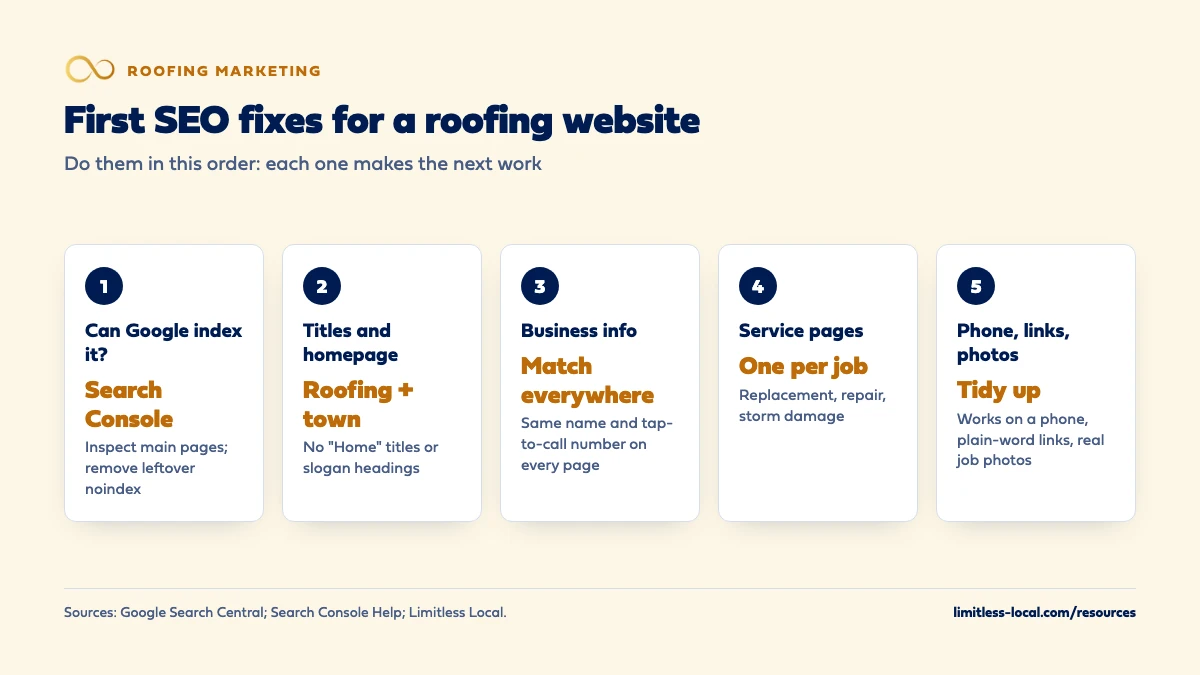
Start by making sure Google can find and index your pages: set up Google Search Console, check your main pages, and remove any leftover “noindex” tag. Then give every page a clear title naming the service and your area, make the homepage say what you do and where in the first lines, and put the same name and a tap-to-call phone number on every page. After that, give each main roofing service its own page, fix anything broken on a phone, and link your pages together with plain words. Those fixes cost little and make everything you do later work better.
These fixes are the first part of the foundation we build for any roofer before turning on more lead flow, and they’re where our local SEO work starts on a roofing marketing account. If you’re still deciding whether SEO is worth the effort at all, is SEO worth it for roofers weighs it up, and the roofing marketing questions library takes the follow-ups one at a time.
Why does the order of roofing SEO fixes matter?
Because each fix only pays off if the one before it is done. A great title on a page Google can’t index does nothing. A new service page that loads badly on a phone loses the homeowner before they read it. Links from other sites help less if they point at a homepage that never says “roofing”.
So the list below runs from “can Google see you at all” to “does the site make sense to Google and homeowners” to “does each page have a job”. Most roofers can get through the first five in a week or two without a developer. If you’ve already done these and still aren’t ranking, why a roofing website isn’t on the first page of Google goes through the deeper causes.
Fix 1: Can Google find and index my roofing website?
Set up Google Search Console if you haven’t. It’s free, and it’s the only place Google tells you directly what it sees on your site.
Then check your homepage and each main service page with the URL Inspection tool. Google says it shows information about Google’s indexed version of a page, why Google could or couldn’t index it, and lets you request indexing for a URL (URL Inspection tool). If your roof replacement page isn’t indexed, nothing else on this list helps that page yet.
While you’re there, make sure the site uses one version of its address, either with www or without, and that the other version sends visitors to it.
Fix 2: Is a leftover setting telling Google to stay away?
This one catches more roofers than you’d think. Website builders often hide a site from search while it’s being built, using a “noindex” tag or a “discourage search engines” box in the settings. When the site goes live, nobody unchecks it.
A page with noindex in its robots meta tag tells search engines not to show it in results (Robots meta tag specifications). The URL Inspection tool will flag it, or you can ask whoever built the site to check. It’s a two-minute fix that can be the whole problem.
Fix 3: Do my page titles say what I do and where?
The page title is the blue headline Google often shows in search results. On a lot of roofing sites, it says “Home” or just the company name.
Google’s advice: make sure every page has a title, write descriptive and concise ones, avoid vague labels like “Home” for your homepage, avoid repeating the same boilerplate on every page, and avoid keyword stuffing (Influencing title links in Google Search). For a roofer, that usually looks like:
- Homepage: Roofing Contractor in [Your Town] | [Company Name]
- Replacement page: Roof Replacement in [Your Town] | [Company Name]
- Repair page: Roof Repair and Leak Repair in [Your Town] | [Company Name]
One town per title is enough. Stuffing in every suburb makes the title look spammy and gets it cut off anyway.
Fix 4: Does my homepage say "roofing" and my area right away?
A homeowner should know within a few seconds that you’re a roofing company, which towns you serve, and how to call you. So should Google. Check the top of your homepage on a phone:
- The main heading names what you do and where, like “Roof replacement and repair in [Your Town] and [County]”.
- A short line lists the towns you really serve.
- A phone number and a button to request an inspection are visible without scrolling.
- There’s a reason to pick you: years in business, warranty, reviews, local crews.
Slogans like “Quality you can trust” or “Building the future” in the main heading tell neither Google nor the homeowner anything. Put the plain words first and the slogan underneath.
Curious what your marketing is actually booking?
Get a free visibility audit — no obligation, no sales pitch.
Fix 5: Does my business info match everywhere?
Your business name, phone number and address (or service area) should read exactly the same on your website, your Google Business Profile and your other listings. Put them in the footer of every page, with the phone number set up so a tap on a phone starts a call.
Watch for the usual slips: an old phone number from before you switched carriers, a former business name, a suite number that appears in one place and not another. Also make sure your Google profile links to the right page on your site, usually the homepage. For cleaning up listings beyond your website, see how to make your roofing company’s info match every listing.
Fix 6: Does each main roofing service have its own page?
If your whole site is a homepage plus an “About” and “Contact” page, Google has one page to match against every roofing search you care about. Give each service you want more of its own page: roof replacement, roof repair, storm damage, and any material you specialize in, like metal or tile.
Each page needs real content: what the job involves, what the homeowner can expect, photos of your own work, reviews that mention that job, and a clear way to book. A page that’s three sentences with a stock photo won’t do much. Start with the one or two services that bring the most profit, not all of them at once. What pages a roofing website should have to bring leads covers the full set, including town pages.
Fix 7: Does my roofing site work on a phone?
Google uses the mobile version of a site’s content for indexing and ranking, and it says having the same content on the desktop and mobile versions means both can rank for the same searches (Mobile-first indexing best practices). If your phone version hides service details, reviews or photos to save space, Google may never see them.
Open your site on your own phone and check: does it load quickly, can you read it without zooming, does the phone number start a call when tapped, and does the inspection form work with your thumb? How to know if your roofing website works well on phones has a fuller checklist.
Fix 8: Are my pages linked together with plain words?
Links between your own pages help Google find them and understand what each one is about. The visible words of a link matter: Google describes good anchor text as descriptive, reasonably concise and relevant to both pages (SEO link best practices for Google).
On a roofing site, that means linking from the homepage to “roof replacement” and “roof repair” with those words, not with “click here” or “learn more”. Link from each service page to the related ones, like storm damage to roof replacement, and make sure every important page is reachable from your main menu.
Fix 9: Are my job photos helping or just sitting there?
Real photos of your crews and finished roofs are some of the best proof a roofing site can have. Make them work twice:
- Name the files for what they show, like
metal-roof-replacement-oak-ridge.jpg, notIMG_4471.jpg. - Write alt text that describes the photo in plain words. Google calls alt text the most important attribute for giving it more information about an image (Image SEO best practices).
- Shrink them before uploading. Photos straight off a phone are often far bigger than a web page needs, and they slow the site down on a phone.
Swap stock photos of other people’s roofs for your own as you go. Homeowners can tell.
What can wait until the first fixes are done?
Plenty of SEO work is worth doing, just not first:
- Link building. Mentions from local sites matter, but they help most once your pages are indexed and say the right things.
- Blogging every week. Helpful posts can bring calls later; fix the service pages first.
- Structured data. Adding LocalBusiness markup can tell Google your business hours and other details (Local business structured data). It’s a good later step, not a fix for a site Google can’t read.
- Chasing a tool’s score. SEO tools give scores and long lists of warnings. Many don’t matter for a local roofer; the fixes above do.
- A full redesign. If the site can do everything above, fix it before you replace it.
If you’d rather hand the list to someone, how much a roofer should expect to pay for SEO covers what that costs and what to ask for.
How soon will these fixes show up in Google?
Some changes can show within days of Google recrawling a page, especially indexing fixes and new titles. Ranking gains take longer, because Google has to recrawl, re-evaluate and compare you with the other roofers in your area. SEO typically takes 3-6 months to show meaningful organic growth, and these fixes are what start that clock.
Track it in Search Console: impressions and clicks for searches like roof repair or roof replacement plus your town should start to move before the phone does. How long SEO takes to bring a roofer their first leads covers what to expect month by month.
Not sure which of these is costing you jobs?
A free visibility audit checks the Google profile, reviews, site and tracking, and shows what to fix first.
What's different about website SEO fixes for roofers
Your best proof is on the roof. Few trades have work as visible as a finished roof. Before-and-after photos from real jobs in real towns help homeowners trust you and give Google something specific to read, so they belong on your service pages, not just on social media.
Storm pages need care. A storm damage page is worth having, but keep it about inspections and repairs in your area. Pages built for one storm and then left up for years, or pages for towns you only visit after storms, can make you look like the out-of-town crews homeowners are wary of.
Repair and replacement need separate pages. The homeowner with a leak and the homeowner ready for a new roof search differently and want different things from the page, so one combined “roofing services” page serves neither well.
A worked example: a roofer's first two weeks of fixes
This is a made-up roofer to show the order, not a promise of results. The site has a homepage, an About page, a Contact page and one “Services” page.
- Day 1: Search Console is set up. URL Inspection shows the Services page isn’t indexed; a leftover noindex tag from the original build is removed and indexing is requested.
- Day 2: The homepage title changes from “Home” to “Roofing Contractor in [Town] | [Company]”. The main heading changes from a slogan to “Roof replacement and repair in [Town] and [County]”.
- Day 3: An old phone number is found in the footer and on two directory listings; all three are fixed and the footer number is made tap-to-call.
- Week 2: The Services page is split into Roof Replacement and Roof Repair pages with the owner’s own job photos, renamed and resized, and linked from the homepage with plain words.
None of that needed a new website. It also isn’t the end: the next steps are town pages, steady reviews and local links. Our Essentials package, $3,500 a month, starts with exactly this kind of cleanup, plus a content sprint of up to 10 pages, and campaigns go live in weeks 1-2 after onboarding.
Frequently asked questions
Do I need a developer for these roofing SEO fixes?
Usually not for the first few. Search Console, titles, headings, footer info and photos can be changed in most website builders. Splitting pages and removing hidden settings may need whoever built the site.
Should I add every town I serve to my homepage title?
No. Use your main town in the title and list the others in a short line on the page. Town pages come later, for the areas you most want.
Will changing my page titles hurt my current rankings?
Clear, accurate titles rarely hurt. Change one page at a time, and watch Search Console for a few weeks so you can see what moved.
Is my Google Business Profile part of website SEO?
They’re separate, but they work together. Your profile should link to your site, and the name, phone and service area on both should match.
Should I delete old pages that bring no traffic?
Not without checking. If an old page has links pointing to it or covers a service you still offer, improve it or redirect it to the closest current page instead of deleting it.
What if my website is on a builder like Wix or Squarespace?
These fixes still apply. Look in the builder’s SEO settings for page titles and search visibility, and connect Search Console using the builder’s instructions.
Key takeaways
- Start with Search Console and make sure Google can index your main pages, with no leftover noindex.
- Give every page a clear title, and make the homepage say roofing and your area at the top.
- Put the same business name and a tap-to-call number on every page, matching your Google profile.
- Give each main service its own page, check the site on a phone, and link pages with plain words.
- Links, blogging, structured data and redesigns can wait until those are done.
Want a second set of eyes on your setup?
We'll look at how you show up locally and where calls are leaking, then send you a plain-English breakdown.
More in this section
- Can a roofing company do its own SEO?
- How long does SEO take to bring a roofer their first leads?
- Why is my roofing website not on the first page of Google?
- How much should a roofer expect to pay for SEO?
- What pages should a roofing website have to bring in leads?
Sources
- URL Inspection tool — Search Console Help
- Robots meta tag specifications — Google Search Central
- Influencing title links in Google Search — Google Search Central
- Mobile-first indexing best practices — Google Search Central
- SEO link best practices for Google — Google Search Central
- Image SEO best practices — Google Search Central
- Local business (LocalBusiness) structured data — Google Search Central