
Should a restoration company spend 20k a month on Google clicks?

- Is $20,000 a month on Google Ads too much for one restoration market?
- Is $20,000 a month on Google clicks a lot for a restoration company?
- What has to be true before I spend $20,000 a month?
- How do I work out whether $20,000 a month can pay for itself?
- Does my market have enough searches to spend $20,000 well?
- Is budget really what's holding my ads back?
- What happens to the cost per job as spend goes up?
- Can my phones, crews and cash flow handle it?
- How should I ramp up to $20,000 a month?
- Should all $20,000 go to Google search clicks?
- What are the warning signs that $20,000 is too much?
- What's different about big Google Ads budgets for restoration companies
- A worked example: the cost of the extra jobs
- Frequently asked questions
- Key takeaways
- More in this section
- Sources
The short version
- The size of the number matters less than the cost per signed job it buys.
- Prove your cost per signed job at a lower spend first.
- Check that budget, not ad rank, is what's limiting you, and that searches are left to buy.
- Extra spend usually buys pricier, weaker clicks, so watch the cost of the extra jobs.
- Make sure phones, crews and cash flow can carry the extra work.
For restoration owners weighing a big jump in Google Ads spend in one market, and wanting a test to run before they commit.
Get a free visibility audit · Book a growth call
Is $20,000 a month on Google Ads too much for one restoration market?
Spend $20,000 a month on Google clicks only if your tracking shows what a signed job costs today, that cost sits well under what a job is worth, and your market has enough real emergency searches left to buy. Check how often your ads already show for those searches, whether budget is what’s holding you back, and whether your phones and crews can handle the extra work. If any of those is missing, step up from a lower budget and watch the cost of each extra job, instead of jumping straight to $20,000.
That step-by-step test is how we’d approach any big jump in spend. Google Ads management is part of every Limitless Engine package: Essentials covers up to $2,500 a month in ad spend, and Growth covers up to $5,000 and adds Local Services Ads management. An account spending $20,000 a month is a Scale conversation, with custom pricing, custom Google Ads and Local Services Ads across multiple markets. Ad spend is never included in a package; you pay it directly to Google. See how our local ads work fits restoration companies, read the restoration marketing guide, or browse more restoration marketing questions.
Is $20,000 a month on Google clicks a lot for a restoration company?
It’s a lot for one market, and whether it’s too much depends almost entirely on your market and your numbers. In a big metro with plenty of water damage searches every day and strong job values, a restoration company can sometimes spend that well. In a mid-size town, the same budget may run out of good searches to buy long before it runs out of money.
So the useful question isn’t “is $20,000 too much?” It’s “would the next dollar still buy a signed job at a cost I can afford?” A company that can answer that with real numbers can decide on any budget level. A company that can’t is guessing, and a $20,000 guess is an expensive one.
If you haven’t worked out a baseline budget yet, what monthly marketing budget a restoration company needs covers the floor. This page is about the ceiling.
What has to be true before I spend $20,000 a month?
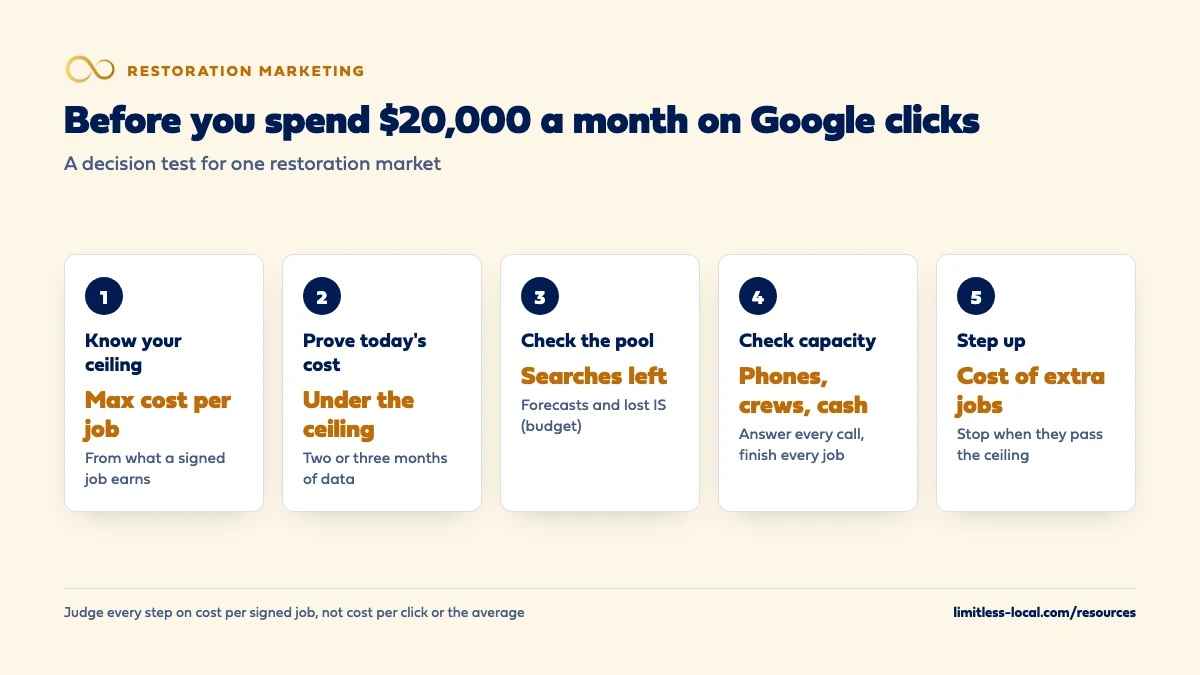
Treat this as a checklist. Every line should be a yes before the budget goes up that far:
- You can trace clicks to signed jobs. Calls and forms are tracked by source, and your job software shows which leads signed.
- You know today’s cost per signed job, from at least two or three months at your current spend.
- You know your ceiling: the most you’ll pay to win a job of each type, based on what that job earns you.
- Today’s cost sits comfortably under that ceiling. If you’re already near it, more spend will push you over.
- Your ads aren’t already showing for nearly every search they could. If they are, there’s little left to buy.
- Someone answers every call, day and night, and crews and equipment can take on more jobs.
If two or more are a no, fix those first. They’ll make the money you already spend work harder, and you’ll be able to judge a bigger budget properly later.
How do I work out whether $20,000 a month can pay for itself?
Start from the job, not the ad account:
- Set your ceiling. Take the gross profit on a typical signed job and decide what share of it you’re willing to spend to win one. That’s the most a signed job can cost.
- Divide the budget by the ceiling. $20,000 divided by your ceiling is the number of signed jobs the ads must bring in each month just to stay inside it.
- Compare with today. If you sign far fewer jobs from ads than that today, the bigger budget has to more than close the gap, and extra spend rarely gets cheaper as it grows.
Do it separately for water, mold, fire and sewage if you advertise them, because the ceilings are different. What a good cost per booked job is for a restoration company walks through setting each ceiling. The worked example below shows the math with made-up numbers.
Does my market have enough searches to spend $20,000 well?
Before you raise anything, look at how big the pool is. Google’s Keyword Planner gives two kinds of numbers, and its help page about Keyword Planner forecasts explains the difference:
- Historical metrics, like average monthly searches for a keyword in the location you pick, and top-of-page bid ranges. The low and high ends are roughly the 20th and 80th percentile of what advertisers have paid for a top-of-page bid, based on the last 30 days.
- Forecasts, which estimate clicks, cost and impressions for your keywords and take your bid, budget, seasonality and historical ad quality into account.
Run a forecast at your current budget and at $20,000 for your real service area and your real emergency keywords. If the forecast barely moves as the budget rises, there aren’t enough searches left to buy at a sensible price. Treat the numbers as estimates: searches swing with weather and storms, and the forecast can’t see your booking rate.
Crowded markets cost more per click, too. How local competition changes restoration ad costs covers how to size up the other bidders.
Curious what your marketing is actually booking?
Get a free visibility audit — no obligation, no sales pitch.
Is budget really what's holding my ads back?
Google Ads tells you this directly, if you add the right columns. Its help page on how to get impression share data defines two that matter here:
- Search lost IS (budget): the percentage of time your ads weren’t shown on the Search Network because the budget ran out.
- Search lost IS (rank): the percentage of time they weren’t shown because of poor Ad Rank in the auction.
If you’re losing a big share to budget, more money can buy more of the same searches. If budget loss is small and rank loss is big, more budget won’t fix it; your ads, landing pages or bids are the problem, and money alone will mostly buy pricier clicks. Google also flags campaigns as Limited by budget when a limited budget is holding performance back, and it may suggest a higher budget. Those suggestions aim to increase clicks and impressions, not your signed jobs, so check them against your own numbers before you accept one.
What happens to the cost per job as spend goes up?
It usually rises. The first dollars in a restoration account buy the best searches: “water damage restoration” and “emergency water removal” in your core towns, at the hours you answer. As the budget grows, the extra money has to go somewhere, and the options get weaker:
- higher bids on the same searches, so each click costs more;
- towns further out, where the drive is longer and fewer jobs sign;
- broader searches, including “how to dry a wet carpet” and “water damage cost” researchers who weren’t going to call;
- hours when nobody answers, if the ad schedule isn’t set.
That’s why the average cost per job can look fine while the extra jobs from the extra spend cost far more. Watch the search terms report, which shows the actual searches that triggered your ads and how they performed; Google’s page about the search terms report covers how to read it. Cut the junk with negative keywords for restoration Google Ads before you add budget, not after.
Can my phones, crews and cash flow handle it?
A bigger budget only pays if you can turn the extra calls into finished jobs:
- Phones. More spend means more calls at night and on weekends. A missed call on a $20,000 budget is money you paid for and threw away.
- Crews and equipment. If you’re already turning down jobs in busy weeks, extra leads become extra referrals to competitors.
- Cash flow. Google bills for clicks now; insurance-paid jobs can take weeks or months to pay. A bigger ad bill plus more jobs in progress can squeeze cash even when every job is profitable on paper.
If capacity is the limit, the better move is often to hold spend steady and raise your booking rate, or to aim the budget at the job types and towns you most want. Avoiding paying for more leads than your crews can handle covers how to match spend to capacity.
How should I ramp up to $20,000 a month?
In steps, not in one jump. Raise the budget, hold it there long enough to see signed jobs come through, check the cost of the extra jobs, then decide on the next step. A few weeks per step is a sensible minimum for most restoration accounts, longer if a step lands in a storm or a dry spell.
Know how Google spends a monthly figure, too. Its page about average daily budgets says you’ll never pay more than two times your average daily budget on a single day, or more than 30.4 times it in a month, for most campaigns. So $20,000 a month works out to an average daily budget of about $658, and a busy day could spend up to about $1,316. That’s normal, and it helps on storm days, but it means one bad week of junk searches can burn a lot before anyone notices.
Write down what each step bought: spend, real leads, signed jobs and cost per signed job. That record is what tells you where to stop.
Should all $20,000 go to Google search clicks?
Not necessarily. At that level, it’s worth asking whether one channel should carry the whole budget:
- Split by service. Water, sewage, mold and fire searches have different costs and job values. Give each its own campaign and budget, so a cheap-to-book service doesn’t subsidize one that never books.
- Local Services Ads, where you pay per lead instead of per click, can sit alongside search ads for the same jobs.
- Your own company name. Make sure searches for your name are covered cheaply, so a competitor’s ad doesn’t catch people already looking for you.
- Search engine optimization and your Google profile. Every job that comes from Maps or organic results is one you didn’t pay for click by click.
There’s no right split for every company. The rule is the same for every channel: judge it on its own cost per signed job and move money toward what books.
What are the warning signs that $20,000 is too much?
Pull the budget back toward the last good step if you see any of these for more than a few weeks:
- The cost per signed job rises above your ceiling, or the extra jobs cost far more than the old average.
- The search terms report fills up with research, DIY and job-seeker searches.
- More calls come from towns you don’t want to drive to.
- Missed calls rise, or callers wait longer to reach someone.
- Crews are booked out and you’re handing work away.
- Google spends heavily at hours when nobody answers.
- Your bank balance is shrinking while jobs wait on insurance payments.
None of these means the bigger budget was a mistake. It means the account found its limit, and that’s useful to know.
Not sure which of these is costing you jobs?
A free visibility audit checks the Google profile, reviews, site and tracking, and shows what to fix first.
What's different about big Google Ads budgets for restoration companies
Demand comes in waves. A freeze or a storm can multiply searches for a few days, then they fall back. A flat $20,000 a month may be too much in a dry month and not enough in a freeze week. Why restoration ad costs spike during storms and freezes covers how to plan around it.
The best searches happen at bad hours. Burst pipes and backed-up sewers don’t wait for business hours, so the budget has to be matched to when someone answers.
The money arrives late. Insurance-paid jobs can take a long time to pay, so a bigger budget raises the cash you have tied up, not just the leads.
One job can lead to another. Mitigation can turn into a rebuild, so decide up front whether your ceiling counts only mitigation or both.
A worked example: the cost of the extra jobs
These numbers are made up to show the math, not a benchmark for your market. Say a typical signed water job brings in $6,000, and you’re willing to spend up to 25% of that to win one. Your ceiling is $1,500 per signed job, so a $20,000 month needs at least 14 signed jobs from ads to stay under it.
Today you spend $8,000 a month and sign 12 jobs from ads, which is about $667 per job. You step up to $20,000. The extra $12,000 brings in 7 more signed jobs, so you now sign 19.
The average looks fine: $20,000 divided by 19 jobs is about $1,053, well under your ceiling. But the 7 extra jobs cost $12,000, or about $1,714 each, which is over it. You’d be better off stopping at a lower step, where the extra jobs still cost less than $1,500 each, and putting the rest into raising your booking rate or another channel.
Frequently asked questions
Can a small restoration company spend $20,000 a month on Google Ads?
It can, but it rarely should without the tracking, the crews and the cash flow to back it. A small company usually gets more from tightening a smaller budget and answering every call.
Will Google spend the whole $20,000 if there aren't enough searches?
Not if there aren’t enough eligible searches to show for. A big budget in a small market often goes unspent, or gets spent on broader, weaker searches if your settings allow it.
Should I accept Google's recommended budget?
Only after checking it against your cost per signed job. The recommendation is built to increase clicks and impressions, which isn’t the same as more signed jobs.
Is it smarter to spend $20,000 across several cities?
Only where you have crews and want the work. Spreading the budget across towns you won’t serve brings calls you’ll turn down, and they still cost you.
How long should I test a bigger budget before judging it?
Long enough to see signed jobs, not just calls: a few weeks per step at minimum, and longer if a storm or a freeze lands in the middle of it.
Does a bigger budget help my Google Maps ranking?
No. Google says there’s no way to request or pay for a better local ranking. A bigger ad budget buys more ad clicks, not a higher spot in Maps.
Key takeaways
- Judge a $20,000 month on cost per signed job, not on whether the number feels big.
- Prove your cost per signed job at a lower spend first, and set a ceiling for each job type.
- Use forecasts and Search lost IS (budget) to check there are searches left to buy.
- Extra spend usually buys pricier, weaker clicks, so track the cost of the extra jobs.
- Make sure phones, crews and cash flow can carry the work before you scale.
- Step up gradually and stop when the extra jobs cost more than your ceiling.
Want a second set of eyes on your setup?
We'll look at how you show up locally and where calls are leaking, then send you a plain-English breakdown.
More in this section
- Should a restoration company run Google Ads, LSAs or both?
- Is paying for SEO worth it for a restoration company?
- Do Google Ads help a restoration company's SEO rankings?
- Are invalid clicks wasting my restoration Google Ads budget?
- How should a restoration company run Google Ads for fire damage?
Sources
- About Keyword Planner forecasts — Google Ads Help
- Get impression share data — Google Ads Help
- Fix “Limited by budget” status — Google Ads Help
- About average daily budgets — Google Ads Help
- About the search terms report — Google Ads Help
- Tips to improve your local ranking on Google — Google Business Profile Help