
Are invalid clicks wasting my restoration Google Ads budget?
- How can a restoration company tell if fake clicks are eating its Google Ads budget?
- What counts as an invalid click on Google Ads?
- Does Google charge me for competitor and bot clicks?
- How do I see how many invalid clicks Google filtered?
- Can a competitor really drain my restoration ad budget?
- Is a sudden spike in clicks a sign of fraud?
- Why am I getting clicks from outside my service area?
- Are junk searches the real problem instead of click fraud?
- Should I block competitor IP addresses?
- What about fake form fills and junk leads?
- Do Local Services Ads have the same problem?
- When should I ask Google to investigate?
- Are third-party click fraud tools worth it?
- What's different about invalid clicks for restoration
- A worked example: fraud versus settings in one month
- Frequently asked questions
- Key takeaways
- More in this section
- Sources
The short version
- Google counts competitor clicks and bot clicks as invalid traffic and filters them; you aren't billed for what it catches before your invoice.
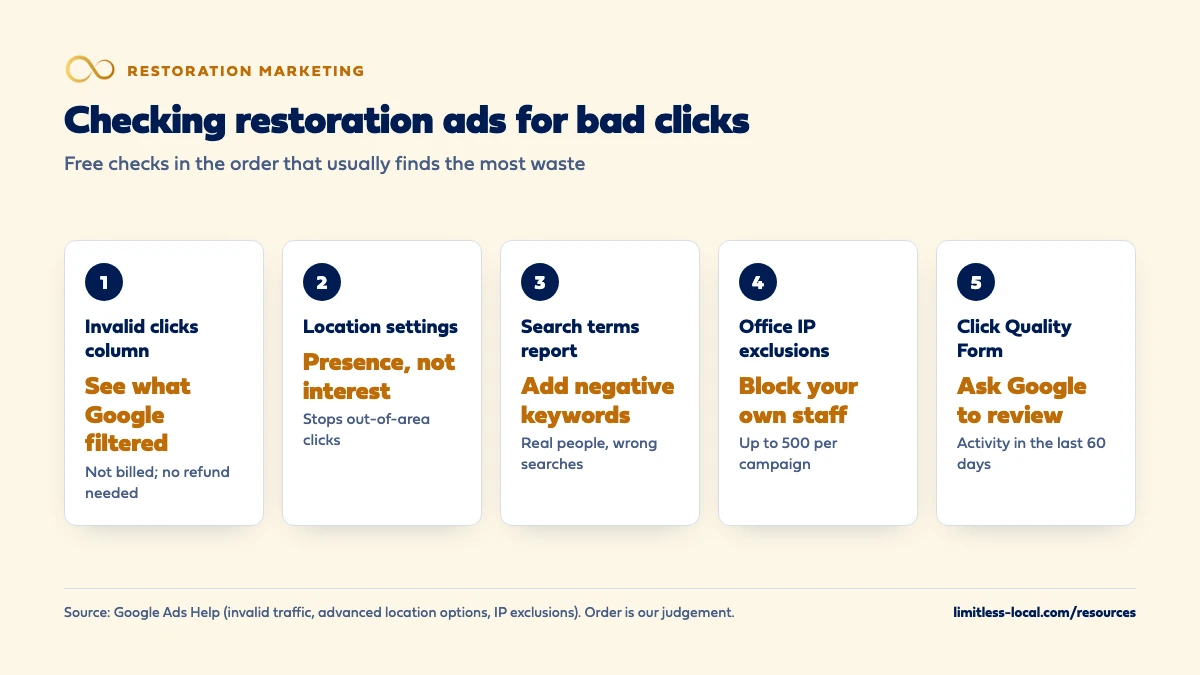
- Add the Invalid clicks column to see how much Google already removed.
- Out-of-area clicks, junk searches and fake form fills usually waste more than click fraud, and you control those settings.
- If you see a pattern Google missed, request an investigation within 60 days with dates, IPs and click IDs.
For restoration owners who suspect a rival or a bot is burning through their water damage ad budget and want to know what Google already catches, what to check, and when to ask Google to investigate.
Get a free visibility audit · Book a growth call
How can a restoration company tell if fake clicks are eating its Google Ads budget?
Some of your restoration ad clicks probably are invalid, and Google says competitors who click to raise your spend and bots both count as invalid traffic that it filters out, so you aren’t charged for what it catches before billing and get a credit for what it finds later. Check the Invalid clicks column in Google Ads to see what was filtered, then look for out-of-area clicks, junk searches and fake form fills, which cost far more in most accounts. If you still see a pattern Google missed, gather your dates, IP addresses and click IDs and submit a click quality investigation within 60 days.
Every wasted click raises what each booked job costs, which is the number we judge ads by when we manage Google Ads and Local Services Ads for restoration companies. Checking invalid clicks, location settings and search terms is routine account work, not an extra. The restoration marketing guide covers where paid ads fit among your channels, and the restoration marketing questions library takes the rest one question at a time.
What counts as an invalid click on Google Ads?
Google defines invalid clicks as clicks on your ads that don’t represent a genuine interest in your business. Its help page Invalid clicks: Definition names three kinds: accidental clicks caused by poor ad placement, automated traffic from bots and other deceptive software, and manual clicks meant to increase your ad costs or inflate a publisher’s profits.
Google’s longer page, About invalid traffic, adds fraudulent ad placements such as clickjacking and ad stacking, and says plainly that “other invalid user activity” includes competitors who manually click to increase your spend. So yes, Google treats a rival restoration company clicking your ads as invalid traffic, the same as a bot.
What doesn’t count: a homeowner who clicks, reads your page and calls someone else. That’s a real click from a real prospect who chose a competitor. It costs you money, but it isn’t fraud, and Google won’t credit it.
Does Google charge me for competitor and bot clicks?
Not for the ones it catches. Google says its ad traffic quality team uses automated filters, machine learning and manual reviews, and that it often detects invalid traffic as it happens or shortly after. Anything it finds before the end of your billing cycle is removed from your campaign metrics and your bill, so no refund is needed.
Some invalid traffic takes longer to spot. When Google finds it after you’ve been billed, it issues an “Invalid activity” credit on a later invoice, “where appropriate and possible”, in Google’s words. Those credits show under Adjustments in the billing summary, and the Invalid Activity Credit Report in Report Editor shows your campaign numbers with the credited traffic taken out.
Google also says that when invalid traffic is filtered before month end, the cost is restored to your campaign budget and its systems try to spend it on valid traffic. In our judgement, that’s worth knowing: Google filtering a bot doesn’t mean your monthly spend drops, it means the money goes back into the auction.
How do I see how many invalid clicks Google filtered?
Add the Invalid clicks column to your campaigns table. Google’s steps:
- Go to Campaigns in the Campaigns menu.
- Click the Columns icon above the table.
- Search for “Invalid clicks”.
- Select Apply.
That column shows clicks Google already filtered and didn’t charge you for. Google says the number moves around naturally, and a rise means its defenses caught more, not that you paid more. A big Invalid clicks number next to a small credit on your invoice is normal, because the two measure different things: filtered-before-billing versus found-after-billing.
Google also says there is no industry standard for a “normal” invalid traffic rate, so there’s no benchmark to compare your number against. Watch your own trend instead.
Can a competitor really drain my restoration ad budget?
They can try, and Google lists it as a known form of invalid activity. Whether it works is another matter. Google’s filters look for interactions that don’t match normal human behavior, and repeated clicks from the same person to run up your costs are exactly that kind of pattern.
In our judgement, restoration owners worry about this more than most trades because the local field is small, everyone knows everyone, and water damage clicks are expensive. That makes a suspicious afternoon feel personal. But a rival clicking a handful of times is usually a small cost next to the waste most accounts carry from settings, which the next sections cover. Fix those first, then look for fraud.
One thing not to do: click a competitor’s ads back. Google treats it as invalid activity either way, it proves nothing, and it’s a habit you don’t want anyone on your team to have.
Is a sudden spike in clicks a sign of fraud?
Not necessarily. Google’s FAQ says an unexpected traffic spike or a budget that spends quickly doesn’t always mean invalid traffic, and lists other causes:
- Seasonal trends or news events. For restoration, that’s a storm, a freeze or a regional flood.
- The competitive picture. If a competitor stops running ads, your ads can show more often and get more clicks.
- Your own changes. A bigger budget, new keywords, or wider audience and location settings bring more impressions and clicks.
Google suggests checking your Change history first. In restoration, check the weather too. A burst of clicks the morning after a hard freeze is far more likely to be homeowners with broken pipes than a bot. Why restoration ad costs spike in storms covers what happens to prices in those weeks.
Curious what your marketing is actually booking?
Get a free visibility audit — no obligation, no sales pitch.
Why am I getting clicks from outside my service area?
Often because of your location setting, not fraud. Google’s invalid traffic page says it works out location from signals such as IP address, settings, device type and behavior, so location is never guaranteed, and your ads can show to people outside your area if they search for a place you target.
By default, Google Ads location targeting reaches people in or regularly in your area and people who’ve shown interest in it. Google’s page on advanced location options calls this “Presence or Interest”, and says “Presence” makes sense when you only want people in your locations. Google’s own invalid traffic FAQ suggests switching to Presence to focus your reach.
For a restoration company that sends a truck, a click from someone three states away researching their mother’s flooded basement can’t book. Switching to Presence, excluding areas you don’t serve, and checking the location report is usually the biggest single fix in this list, in our judgement. Setting your service area in restoration ads covers the targeting itself.
Are junk searches the real problem instead of click fraud?
Very often, in our judgement. A click from someone searching for a wet phone fix, a dehumidifier rental or a restoration technician job is a real person, so Google won’t filter it as invalid. You pay for it in full, and it was never going to book.
Those clicks show up in the search terms report, and the fix is negative keywords. Google’s page About negative keywords explains how they keep your ads off searches you don’t want. Negative keywords for restoration ads has starting lists by group, and water damage Google Ads keywords covers what to bid on in the first place.
If your cost per booked job is high and you suspect fraud, read the last month of search terms before anything else. It’s free, it takes an hour, and it shows you exactly what people typed.
Should I block competitor IP addresses?
You can, with limits. Google’s page Exclude IP addresses lets you exclude up to 500 IP addresses per campaign, use an asterisk to replace the last 3 digits to exclude a block, and set exclusions at the account level, which Google says applies across campaigns including Performance Max. Campaign-level IP exclusions aren’t available for Performance Max campaigns.
Google’s own example is excluding your office network so your staff checking your search results don’t run up clicks. That’s the most useful case for a restoration company, in our judgement: your office, your shop and your estimators’ home connections.
Blocking a competitor is harder than it sounds. Google’s invalid traffic page notes that an IP address isn’t unique to one device: offices, coffee shops and mobile carriers put hundreds or thousands of devices behind one public address. A rival on a phone changes IP addresses as they drive, and blocking a shared address can block real homeowners too. Exclude an address only when your server logs show repeated clicks from it with no calls.
What about fake form fills and junk leads?
That’s a separate problem, and Google is clear about the split. Its filters run after an ad is served, so they can’t stop bots or people from reaching your website and submitting a form, even when Google has already marked the click invalid. Google calls lead quality “a shared effort”.
On your side, Google recommends:
- Form safeguards: reCAPTCHA and server-side validation on your lead forms, and a double opt-in for email.
- Lead-focused goals: optimize campaigns toward goals like “qualified lead” or “book appointment”, not raw form fills.
- First-party data: the Google tag and enhanced conversions, so Google learns from real outcomes.
For restoration, in our judgement, the phone matters more than the form. Most emergency jobs come in by call, and call tracking that records which calls booked is what tells you whether a campaign’s leads are real. Tracking which marketing books jobs covers that setup.
Do Local Services Ads have the same problem?
Local Services Ads charge by the lead, not the click, so bot clicks aren’t the issue. Junk leads are. Google’s page About Automated Local Services Ads lead credits says leads judged invalid or low quality aren’t charged, and charged leads are reassessed over time and may be credited automatically. In most cases, credits land within 30 days, and the original charge still shows on your invoice.
Two limits matter for restoration. Google no longer gives credits for “job type not serviced” or “geo not serviced” leads, so if you get sewage calls you don’t take or calls from outside your area, the fix is your job types and service area, not a dispute. And Google asks for feedback through “Rate this lead” to improve what it sends.
Google is moving Local Services Ads into Google Ads as Performance Max campaigns with pay-per-lead goals, described on its Local Services Ads transition page, so check the current lead-credit rules in your account. Google Ads, LSAs or both compares the two.
When should I ask Google to investigate?
When you’ve fixed your settings and still see a pattern Google didn’t filter. Google accepts investigation requests for activity in the last 60 days through its Click Quality Form. Before you submit, gather what Google asks for:
- Your Google Ads customer ID.
- The exact date range of the suspicious activity.
- The campaign and ad group names, and any keywords driving it.
- Web server logs showing the IP addresses with repeated clicks or clicks without conversions, the browser or device details, and the Google click IDs (GCLIDs).
- For junk leads, a spreadsheet with each lead’s GCLID and what happened when you called or emailed them.
- A short note on why it looks wrong, such as a jump in clicks with no more calls, or clicks from outside your targeted area.
Google says specialists review it manually, it typically takes several business days, and you’ll get an email with the findings and any credits. It also says the review won’t confirm whether specific clicks were valid or invalid, because sharing that would help bad actors.
Are third-party click fraud tools worth it?
They can give you a second view, but read their reports carefully. Google says third-party tools often flag traffic that Google already detected and filtered out of your bill, that it can’t evaluate their reports because it doesn’t know their criteria, and that it won’t do a click-by-click comparison.
Google also warns against two common false alarms. A zero-second visit in your analytics may just mean the visitor didn’t click a second time, which many tools need to measure time on page. And repeated visits from one IP address can be many different people on the same office, campus or mobile network.
In our judgement, a restoration company spending a few thousand dollars a month on Google Ads gets more from the free checks on this page (Invalid clicks column, location settings, search terms, call outcomes) than from a paid fraud tool. If a tool shows a strong pattern, use its data to support a Click Quality Form request rather than treating its number as money owed.
Not sure which of these is costing you jobs?
A free visibility audit checks the Google profile, reviews, site and tracking, and shows what to fix first.
What's different about invalid clicks for restoration
The clicks are expensive. Emergency water damage searches tend to cost more per click than everyday service searches, in our judgement, so a few bad clicks feel like real money, and owners notice them faster.
The local field is small. In most towns a handful of restoration companies bid on the same searches, and they know each other. That makes rival-clicking an easy suspicion. Check the settings first, then the logs.
Weather looks like fraud. A storm or freeze can double clicks overnight with no bad actor involved. Line up any spike against the weather before you blame anyone.
Calls tell the truth. Restoration jobs mostly start with a phone call, so call tracking tied to booked jobs is the fastest way to see whether a burst of clicks was real people with real water in their basement.
A worked example: fraud versus settings in one month
These numbers are made up to show the math, not a benchmark for your market. Say your water damage campaign is billed for 310 clicks in a month at an average of $21, so $6,510 in spend, and it books 14 jobs. Your cost per booked job is $6,510 ÷ 14, or $465.
You add the Invalid clicks column and see Google filtered 38 clicks that month. You weren’t billed for those; they’re not in the 310. A third-party tool you’re testing flags 52 clicks as suspicious, but you can’t tell how many of them Google already filtered, so that number isn’t money owed.
Then you open the location report and find 22 billed clicks came from outside your service area, because the campaign was set to Presence or Interest. That’s 22 × $21, or $462, that couldn’t book a job. Switch to Presence, and the same 14 jobs would have cost $6,048, or $432 each.
In practice Google will usually spend the budget on other clicks rather than hand the $462 back, so the gain is that money going to people who can actually hire you. Judge it the next month the same way: spend divided by booked jobs. If you’d like help, our Growth package at $4,500 a month covers Google Ads management for up to $5,000 a month in ad spend and adds Local Services Ads management; ad spend is paid to Google separately.
Frequently asked questions
Will Google refund me for competitor clicks?
If Google detects them before billing, you’re never charged, so no refund is needed. If it finds them after you were billed, it issues an “Invalid activity” credit on a later invoice where appropriate and possible.
Can Google tell me which clicks were from my competitor?
No. Google says it keeps detection methods and specific invalid traffic sources confidential so bad actors can’t learn to avoid them, and an investigation won’t confirm whether individual clicks were valid.
Why does my website analytics show visits Google Ads doesn't?
Google filters invalid clicks out of Google Ads reports, but your analytics may still record the visit. Google says that’s a normal data difference, not proof you paid for it.
Should I pause my ads if I think a competitor is clicking?
Usually not. Pausing stops your real calls too. Check the Invalid clicks column, location settings and search terms first, and file a Click Quality Form if a pattern remains.
Can my own staff cost me money by checking our ads?
Yes, if they click. That’s Google’s own example for IP exclusions: exclude your office network so staff checking search results don’t create unwanted impressions and clicks.
How long does a click quality investigation take?
Google says it typically takes several business days because specialists review the data by hand, and you get an email with the findings and any credits.
Key takeaways
- Google counts competitor and bot clicks as invalid traffic, filters them, and doesn’t bill you for what it catches before your invoice.
- Add the Invalid clicks column to see what was filtered; there’s no standard “normal” rate to compare against.
- Out-of-area clicks and junk searches are real clicks Google won’t credit; fix them with Presence targeting and negative keywords.
- Fake form fills are on your side of the fence: reCAPTCHA, server-side validation and call tracking tied to booked jobs.
- If a pattern survives those fixes, gather dates, IPs and click IDs and file a Click Quality Form within 60 days.
Want a second set of eyes on your setup?
We'll look at how you show up locally and where calls are leaking, then send you a plain-English breakdown.
More in this section
- What negative keywords should restoration Google Ads use?
- Do Google Ads help a restoration company's SEO rankings?
- What happens to my restoration job flow if I stop paying for ads?
- Why is my restoration website getting clicks but no calls?
- How should a restoration company run Google Ads for fire damage?
Sources
- Invalid clicks: Definition — Google Ads Help
- About invalid traffic — Google Ads Help
- Exclude IP addresses — Google Ads Help
- About advanced location options — Google Ads Help
- About negative keywords — Google Ads Help
- About Automated Local Services Ads lead credits — Local Services Ads Help
- Local Services Ads transition to Performance Max campaigns with pay-per-lead goals — Google Ads Help