
Which Google Ads keywords should a water damage company target?
- What keywords should a water damage restoration company bid on in Google Ads?
- What kinds of searches should a water damage company pay for?
- Should I put my city name in my water damage keywords?
- Which match types should I use for water damage keywords?
- How should I group water damage keywords into ad groups?
- Which negative keywords does a water damage company need?
- Should I bid on insurance and FEMA searches?
- Can I bid on storm or hurricane names after a disaster?
- How do I find out what water damage keywords cost in my area?
- How do I see what people actually typed before clicking my ad?
- How do I know which water damage keywords book jobs?
- What's different for water damage companies
- A worked example: cleaning up a month of search terms
- Frequently asked questions
- Key takeaways
- More in this section
- Sources
The short version
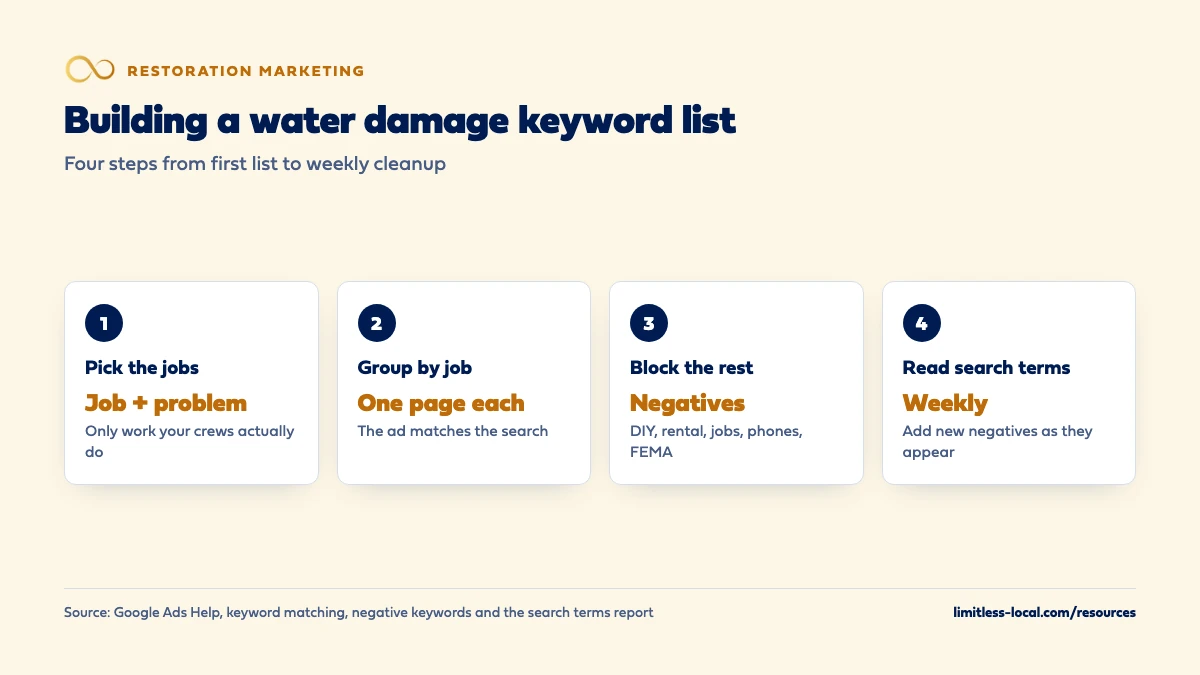
- Pay for searches about the job and the problem, in homeowners' words, and only for work you do.
- Let location targeting cover your towns rather than city names in every keyword.
- Group keywords by job and send each group to a page that matches it.
- Block DIY, rental, job-seeker, wet-phone and FEMA searches with negative keywords, then check the search terms report weekly.
For restoration owners setting up or cleaning up Google search ads for water damage work, without paying for DIY, job-seeker and wrong-meaning clicks.
Get a free visibility audit · Book a growth call
What keywords should a water damage restoration company bid on in Google Ads?
Target the searches of people who have water damage now and want a company to fix it: the job itself (water damage restoration, water removal, water extraction) and the problem in their own words (flooded basement cleanup, burst pipe cleanup, sewage backup cleanup), grouped by job and sent to a matching page. Let your campaign’s location targeting handle the towns instead of adding city names to every keyword, which is what Google’s own keyword advice suggests. Block the searches that look similar but won’t book, such as DIY, equipment rental, job hunting, wet phones and FEMA or lawyer searches, with negative keywords. Then read the search terms report every week, because it shows what people actually typed before they clicked.
Building keyword lists, negatives and landing pages around the jobs you want is part of our Google Ads management for restoration companies, with call tracking so you can see which keywords turn into booked jobs. For where water damage leads come from overall, and whether to buy them or build your own, the water damage leads guide covers it, and the restoration marketing questions library goes one question at a time.
What kinds of searches should a water damage company pay for?
Google’s keyword advice is to describe how your customers think about your service, and to be specific without being too specific. For a water damage company, our judgement is that the searches worth paying for fall into a few groups:
- The job by name: water damage restoration, water damage repair, water removal, water extraction, water mitigation.
- The problem in the homeowner’s words: flooded basement cleanup, burst pipe cleanup, water heater leak, ceiling leak, wet carpet drying.
- Dirty water you’re set up for: sewage backup cleanup, toilet overflow cleanup. Only bid on these if your crews do that work.
- Urgency: emergency water removal, water damage restoration near me, same day water extraction.
- Your own company name, so a homeowner who heard about you from a plumber finds your number first.
Leave out what you don’t do. Every keyword is a promise that the ad and the page behind it can answer that search. Source: Best practices for finding new keywords.
Should I put my city name in my water damage keywords?
Usually not. Google’s keyword advice says to leave a location out of your keywords if you plan to use location targeting, and to include one only when your customers aren’t in the same place as your service. So “water damage restoration” with your service area set in the campaign’s location targeting does the job that “water damage restoration” plus every town name would, without multiplying your keyword list.
Restoration has a twist here. By default, Google Ads location targeting reaches people who are in or regularly in your area and people who’ve shown interest in it, for example through what they search. Google says you can switch to people in or regularly in your area only, and that most campaigns see fewer impressions when they do. In our judgement, the default can suit restoration: a landlord, or the grown child of an elderly homeowner, may be searching from another state about a flooded house in your town. Look at where your booked calls actually come from before you change it. If out-of-area calls are already a problem, the water damage leads guide covers how to cut them. Sources: Best practices for finding new keywords and About advanced location options.
Which match types should I use for water damage keywords?
Google Ads has three. Broad match is the default and can show your ad on searches related to your keyword, including ones that don’t contain its exact meaning. Phrase match (the keyword in quotes) shows on searches that include the meaning of your keyword. Exact match (the keyword in square brackets) shows on searches with the same meaning or intent, and Google says it gives you the most steering over who sees your ad while reaching the fewest searches.
Google also says it’s critical to use Smart Bidding with broad match, because broad match leans on automated bids that weigh the context of each search. Smart Bidding works toward the goals you give it, so in our judgement it’s only as good as what you count as a conversion: real calls and booked jobs, not page views.
Our judgement for a modest budget: start with phrase and exact match on your core job searches, and test broad match once your conversion tracking is proven, because “water damage” also means wet phones and warped tables. If you’re working with one truck and a small budget, getting emergency calls cheaply covers where to start. Source: About keyword matching options.
How should I group water damage keywords into ad groups?
Group keywords by job, and send each group to the page that answers it. Keyword Planner can sort keyword ideas into categories as you build a plan, but you know your services better than the tool does. A setup we’d start with (our judgement, not a Google template):
- Water removal and extraction to your emergency water damage page.
- Burst pipes, leaks and flooded basements to the same page, or one page per problem if you have them.
- Sewage cleanup to a page that explains how you handle contaminated water.
- Mold after water damage to your mold page, if you do that work and your state allows you to.
- Fire and smoke damage in its own campaign, because the searches, budget and timing are different.
The point is that the ad and the landing page both say what the homeowner just searched for. What your mold and fire pages should say covers the pages themselves. Source: Use Keyword Planner.
Curious what your marketing is actually booking?
Get a free visibility audit — no obligation, no sales pitch.
Which negative keywords does a water damage company need?
Negative keywords stop your ads from showing on searches that contain them. Google’s own example is an optometrist who sells eyeglasses excluding “wine glasses”. For water damage, our judgement is that these groups are worth blocking from day one:
- Do-it-yourself: how to, DIY, yourself, tips.
- Equipment: rental, rent, buy, dehumidifier rental, shop vac.
- Job seekers and training: jobs, hiring, salary, technician jobs, certification, course, training.
- Other things that get “water damage”: phone, iPhone, laptop, car, watch, wood table, book.
- Business shoppers: franchise, software, for sale, how to start.
- Help you don’t offer: FEMA, grant, lawyer, attorney.
Google’s rules matter here. Negative keywords don’t match close variants, so add plurals and synonyms yourself (“job” and “jobs”); casing and misspellings are handled for you. A negative broad match keyword, the default, blocks searches containing all its words in any order, and one account-level list can cover all your search campaigns. Google also warns that too many negatives can shrink your reach, so in our judgement don’t block a word like “insurance” without checking what it costs you. Source: About negative keywords.
Should I bid on insurance and FEMA searches?
Treat them separately, in our judgement. Searches like “does insurance cover water damage” or “water damage claim help” come from homeowners with a real problem who are still working out how to pay for it. Some hire a company that day; many are just reading. Searches with “FEMA”, “grant” or “assistance” in them are usually looking for money rather than a contractor, which is why they sit on the negative list above.
If you want the insurance-minded searches, give them their own ad group, a budget limit and a landing page that explains in general terms how you work with insurance, then judge them on booked jobs after a month or two. Keep the ad honest: say you work with insurance companies or document the damage if that’s true, but never promise that a claim will be approved or that a policy covers the job. Whether your website should explain insurance claims covers what that kind of page can safely say.
Can I bid on storm or hurricane names after a disaster?
Be careful. Google Ads has a Sensitive Events policy covering events such as natural disasters and civil emergencies, and among the things it lists as prohibited is using keywords related to a sensitive event to try to drive extra traffic. The same policy prohibits price gouging during such an event. Google describes a sensitive event as an unforeseen event that creates significant risk to the quality of its information, and says Google Ads may take a variety of actions while one is going on.
In our judgement, the safer move is to keep bidding on the job (water extraction, flooded basement cleanup) rather than the storm’s name, and to raise the budget on those keywords when demand jumps. Handling marketing during storm season covers the budget and crew side. Source: Sensitive events.
How do I find out what water damage keywords cost in my area?
Use Keyword Planner for your own service area instead of trusting a national average. Google says it shows estimates of how many searches a keyword gets each month and the cost to target it. To use it, your Google Ads account setup has to be complete, including billing information.
Google adds two cautions: keywords with very low search volume aren’t discoverable or forecastable, so some small-town wordings won’t show, and results depend on much more than the estimate, including your bid, budget, ad quality and location targeting. In our judgement, treat the cost column as a range for a first budget, then replace it with your own numbers after a month. Source: Use Keyword Planner.
How do I see what people actually typed before clicking my ad?
Open the search terms report. Google draws a line between a keyword, which is what you add to your campaign, and a search term, which is what the person typed. Depending on your match types the two can be quite different. The report lists search terms used by a significant number of people that triggered impressions and clicks; some low-volume searches are left out for privacy.
Turn on the “Keyword” column to see which of your keywords matched each search, and use the “Match type” column to see how closely it matched. In our judgement, a new water damage campaign needs this report checked every week for the first couple of months, because that’s where the DIY, rental and job-seeker searches show up first. The worked example below shows what that cleanup looks like. Source: About the search terms report.
How do I know which water damage keywords book jobs?
Clicks, and even calls, don’t answer it. A keyword that brings several calls from people asking how to dry a carpet themselves is worth less than one that brings a single mitigation job. To see the difference, each call needs tracking back to the keyword or ad group that produced it, and a note on what happened: booked job, estimate, wrong service, out of area. Tracking which marketing books restoration jobs covers that setup.
Keywords are also only half of Google’s paid search options for restoration. Local Services Ads don’t use keywords at all; Google targets them by the service categories and areas you choose. If you’re deciding how to split money between the two, whether to run Google Ads, LSAs or both walks through it. Source: Local Services Ads transition to Performance Max campaigns with pay-per-lead goals.
Not sure which of these is costing you jobs?
A free visibility audit checks the Google profile, reviews, site and tracking, and shows what to fix first.
What's different for water damage companies
Most searches are emergencies. In our judgement, someone typing “flooded basement cleanup” late at night wants a truck, not an article. That favors keywords about the job and the problem over research phrases, and ads that say plainly when you answer and where you go.
“Water damage” means a lot of things. The same two words cover wet phones, warped tables, stained ceilings and flooded homes. That’s why the negative list matters more for restoration than for most trades, and why broad match needs a closer eye.
Night calls cost money either way. If nobody answers at 2 a.m., in our judgement fix that coverage before buying more night-time clicks.
Job size varies widely. A dripping supply line and a fully flooded basement can come from nearly the same search. Track which keywords bring the bigger mitigation jobs, not just the most calls.
A worked example: cleaning up a month of search terms
These numbers are made up to show the method, not a benchmark for any market. Say your new water damage campaign got 120 clicks in its first month. You open the search terms report and sort what people typed into groups:
- 66 clicks from job searches: water extraction, flooded basement cleanup, burst pipe cleanup.
- 18 clicks from DIY searches: how to dry out a wet carpet, fixing water-damaged drywall yourself.
- 12 clicks from equipment searches: dehumidifier rental, carpet dryer rental.
- 9 clicks from people looking for FEMA help or general insurance answers.
- 9 clicks from job seekers: water damage technician jobs.
- 6 clicks from phone and laptop water damage.
That’s 54 clicks, or 45% of the month, that were never going to become a mitigation job. You add each group’s words to your negative list, with plurals and synonyms, since negatives don’t cover close variants. Next month you check again, because phrase and broad match will keep finding new wordings.
On our side, Google Ads management is in every package. Essentials ($3,500 a month) covers Google Ads management up to $2,500 a month in ad spend, and Growth ($4,500 a month) raises that to $5,000 and adds Local Services Ads management. Ad spend is paid to Google separately. A free visibility audit can show which searches you’re paying for now.
Frequently asked questions
Do I need separate keywords for "water damage" and "water damage restoration"?
Not always. Google says broader match types already cover the searches of narrower ones, and very similar keywords are treated as duplicates with only one bid in the auction. Add a separate keyword when you want a different ad or landing page for it.
Should I use only exact match to keep costs down?
It’s a reasonable way to start. Google says exact match gives you the most steering over who sees your ad but reaches the fewest searches, so in our judgement add phrase match once you know which searches book.
How often should I check the search terms report?
In our judgement, weekly for the first couple of months of a new campaign, then every two weeks once the negative list has settled. Check it again after any big change to match types or budget.
Can I advertise mold remediation in the same campaign as water damage?
In our judgement, give it its own ad group or campaign with its own page, so the ad and page match the search. Check what your state requires for mold work before you advertise it.
Do Local Services Ads use the same keywords?
No. Google says Local Services Ads stay keywordless after their move into Google Ads; targeting is based on the service categories and areas you choose.
Should I bid on my own company name?
In our judgement, usually yes, so a homeowner who was given your name lands on your number and not someone else’s. The search terms report will show whether people search for you by name at all.
Key takeaways
- Pay for searches about the job and the problem, in homeowners’ words, and only for work you actually do.
- Let location targeting cover your towns instead of putting city names in every keyword.
- Group keywords by job and send each group to a page that matches the search.
- Block DIY, rental, job-seeker, wet-phone and FEMA searches, adding plurals and synonyms yourself.
- Don’t bid on storm names: Google’s Sensitive Events policy prohibits using event keywords to try to drive extra traffic.
- Judge keywords by booked jobs, using the search terms report and call tracking together.
Want a second set of eyes on your setup?
We'll look at how you show up locally and where calls are leaking, then send you a plain-English breakdown.
More in this section
- Should a restoration company run Google Ads, LSAs or both?
- How do restoration companies get insurance-related water damage jobs?
- How should a restoration company market to commercial properties?
- How should a restoration company handle marketing during storm season?
- How do I track which marketing brings in booked restoration jobs?
Sources
- About keyword matching options — Google Ads Help
- About negative keywords — Google Ads Help
- About the search terms report — Google Ads Help
- Use Keyword Planner — Google Ads Help
- Best practices for finding new keywords — Google Ads Help
- About advanced location options — Google Ads Help
- Sensitive events — Google Advertising Policies Help
- Local Services Ads transition to Performance Max campaigns with pay-per-lead goals — Google Ads Help