
What is the map pack and how does it bring restoration calls?
- What does the Google map pack mean for a water damage company's phone?
- What is the map pack, in plain terms?
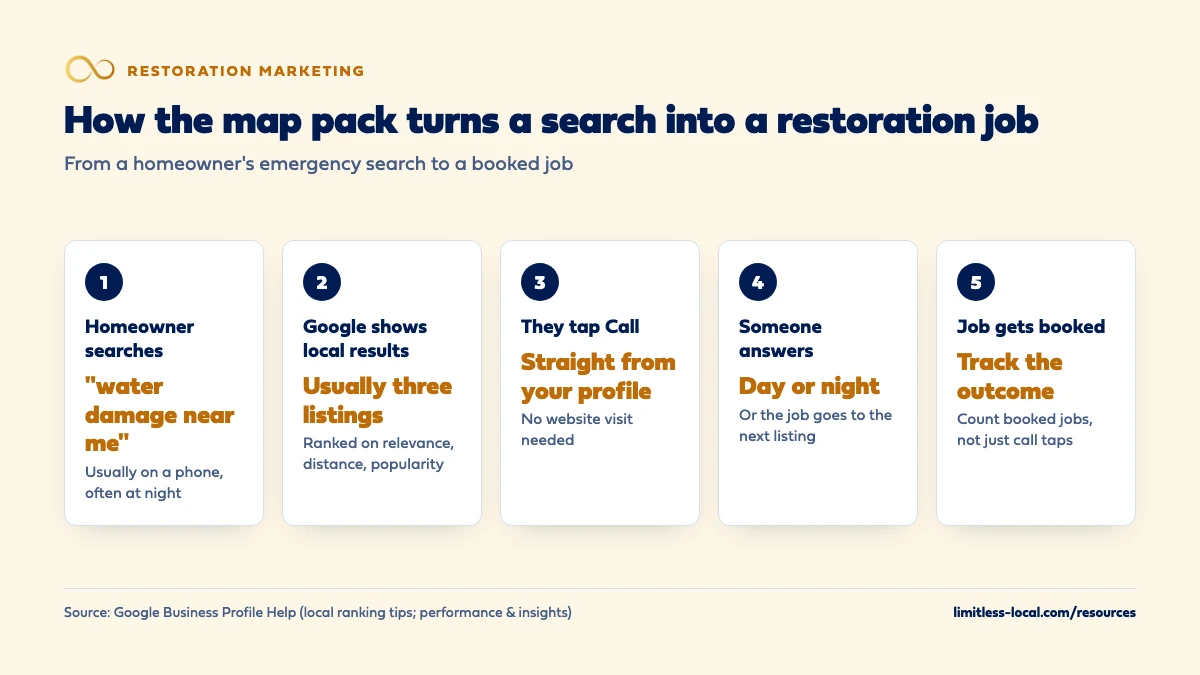
- How does a map pack listing turn into a phone call?
- Why does the map pack matter so much for emergency restoration calls?
- What decides who gets into the map pack?
- Why do I show up in the map pack in one town but not the next?
- Is the map pack the same as Local Services Ads or Google Ads?
- What does a call from the map pack cost me?
- What does a restoration profile need to compete for map pack spots?
- Do my business hours really change map pack calls?
- How do I tell how many calls the map pack is bringing in?
- What can knock a restoration company out of the map pack?
- What's different about the map pack for restoration companies
- A worked example: what map pack calls are worth
- Frequently asked questions
- Key takeaways
- More in this section
- Sources
The short version
- The map pack is the box of local listings with a map that Google shows for local searches.
- Each listing has a Call button, so emergency searchers can ring you without visiting your site.
- Google ranks local results mainly on relevance, distance and popularity, and you can't buy a higher spot.
- Calls from the map pack cost nothing per call; the cost is the profile, review and website work behind them.
- Judge it by booked jobs, not by views or call-button taps.
For restoration owners who keep hearing about the map pack and want to know what it is, why it rings the phone on emergency jobs, and what decides who gets in.
Get a free visibility audit · Book a growth call
What does the Google map pack mean for a water damage company's phone?
The map pack is the short list of local businesses, usually three, that Google shows with a map near the top of the results when someone searches for a service in their area. For restoration it matters because a homeowner with water on the floor tends to search on a phone, see those listings first and tap Call straight from one of them, often without opening a website. Who gets in depends mainly on how well your Google Business Profile matches the search, how close you are to the person searching and how well-known your business is, and you can’t pay for a better spot.
The map pack is one of the three places we work to get restoration companies seen: the regular Google results, the Maps 3-pack and AI answers. Our local SEO work covers the Google Business Profile, reviews and the site pages that back it up, and it’s part of every package on our restoration marketing page. For the wider picture, read the restoration marketing guide or browse the rest of the restoration marketing questions.
What is the map pack, in plain terms?
Search “water damage restoration” or “water damage near me” on your phone and, near the top of the page, you’ll usually see a small map with pins and a short list of local businesses underneath it. That box is what owners and marketers call the map pack. You’ll also hear it called the local pack or the 3-pack, because it typically shows three businesses. Google itself just calls these local results.
Each listing comes from a business’s Google Business Profile: the name, star rating and review count, whether it’s open, and buttons to call, get directions or visit the website. Tap “More places” or open Google Maps, and you get the longer list behind those three.
The map pack isn’t an ad. Nobody bids to get in, and nobody pays Google when someone calls, which is exactly why restoration companies fight so hard for those spots.
How does a map pack listing turn into a phone call?
On a phone, the shortest path from a search to a call is the Call button on a listing. The homeowner searches, sees three companies with stars and a phone icon, and taps. No website, no form, no waiting.
Google counts this. In the performance section of your Business Profile, Calls is the number of times a customer clicked the call button on your profile, alongside website clicks, messages and the search terms people used to find you. Google’s help page on Business Profile performance and insights lists each metric and notes that the numbers include views and actions from both organic results and Google Ads.
Some callers read your reviews, click through to your website and call from there. Those calls don’t count as profile calls, so the profile’s numbers understate what the map pack brings in.
Why does the map pack matter so much for emergency restoration calls?
Think about the person searching. A pipe has burst, the ceiling is dripping or the basement has an inch of water in it. They’re standing in it, phone in hand, and they want someone on the way. They aren’t comparing ten websites. They’re picking from whatever is in front of them, and the map pack is in front of them.
Three things about restoration make that moment count more than it does in most trades:
- Speed decides the job. The first company that answers and can get there usually gets the work.
- The hours are terrible. Floods, freezes and sewer backups don’t wait for business hours. A listing that shows you’re open, and a phone someone actually answers at 2 a.m., wins jobs that a 9-to-5 shop never sees.
- The jobs are big. One water mitigation job can be worth more than a month of small service calls in other trades, so even a handful of extra map pack calls a month can change the year.
What decides who gets into the map pack?
Google keeps the exact formula private, but its help page with tips to improve your local ranking says local results are mainly based on relevance, distance and popularity. It also says there’s no way to request or pay for a better local ranking.
- Relevance is how well your profile matches the search. If your categories, services and description say water damage restoration, you’re a candidate for water damage searches. If they say carpet cleaning, you’re not.
- Distance is how far you are from the person searching. If the searcher doesn’t share their location, Google uses what it knows about where they are.
- Popularity, which Google’s page discusses under the heading of prominence, is how well-known you are. Google says it’s based partly on how many websites link to your business and how many reviews you have, and that more reviews and positive ratings can help.
You control relevance almost completely, popularity over time and distance hardly at all, so the work goes into the first two.
Why do I show up in the map pack in one town but not the next?
Distance. Most restoration companies are service-area businesses: you go to the customer, and the customer never comes to you. Google’s page on managing service areas lets a service-area business list up to 20 service areas by city or postal code, and suggests the whole area shouldn’t stretch more than about 2 hours of driving from where the business is based.
Listing a town tells customers you work there. It doesn’t move you closer to the people searching in it. So it’s normal to show up strongly in the map pack near your base, less often a few towns out and rarely at the far edge of your area, even when the profile is in great shape. A competitor based in that far town has distance on their side for searches made there.
That’s why edge towns are usually covered another way: real town pages on your website, and ads where the map pack won’t reach. How a restoration company shows up in near me searches goes through those steps.
Curious what your marketing is actually booking?
Get a free visibility audit — no obligation, no sales pitch.
Is the map pack the same as Local Services Ads or Google Ads?
No, though they often share the same screen, and homeowners rarely know the difference. For a water damage search you might see three different things:
- Local Services Ads. Paid listings, shown prominently in Google Search results, where you pay per lead rather than per click. Water damage services is one of the categories Google lists for them in the United States, according to Google’s Local Services Ads getting-started page.
- Search ads. Regular Google Ads, which you pay for per click. With location assets linked to your Business Profile, ads can also appear beside, above or below results on Google Maps.
- The map pack. The free local results, ranked on relevance, distance and popularity.
The paid spots buy you a place on the page today. The map pack has to be earned, and once you hold a spot, calls from it don’t come with a bill. You can run all three at once, and each covers gaps the others leave. Whether to run Google Ads, LSAs or both covers how the paid side fits.
What does a call from the map pack cost me?
Nothing per call. That’s the big difference from ads, where every click or lead has a price, and in a busy storm week that price tends to climb.
The cost sits upstream, in the work that gets you into the pack and keeps you there:
- a complete, accurate Google Business Profile, kept up to date;
- a steady stream of genuine reviews and replies to them;
- real photos of your crews, trucks and equipment on jobs;
- a website with proper service pages that back up what the profile says;
- someone answering the phone whenever the profile says you’re open.
Some of that is your own time, some of it is paid help. Either way, it’s a fixed monthly cost that doesn’t rise with every extra call, so a strong map pack position tends to pull your overall cost per booked job down over time.
What does a restoration profile need to compete for map pack spots?
Google’s own list is short, and every item on it applies to restoration:
- Verify the profile. Google says verification makes a business more likely to show up in search results.
- Fill in everything, accurately. Google says businesses with complete and accurate information are more likely to show up in local results. For restoration, that means the right primary category, every service you actually do (water, fire, mold, sewage, storm), your service areas and your real hours.
- Earn reviews and reply to them. Ask every customer after the job is done, and reply to what they write.
- Add photos and videos. Drying equipment set up in a real home, your trucks, your crew. Not stock images.
Two cautions specific to the trade. Don’t stuff words like “24/7 water damage” into your business name, and don’t list an address where you don’t actually serve customers. Both break Google’s Business Profile guidelines and can get a profile suspended, which takes you out of the pack completely. How to optimize a restoration company’s Google Business Profile walks through each field.
Do my business hours really change map pack calls?
More than most owners expect. Google’s own explanation of how it uses Business Profile information gives the example of a business showing up for searches like “open now” because it has listed its address and hours. A homeowner searching late at night is often looking for exactly that, and a listing marked closed is easy to skip.
Your Business Profile lets you set 24-hour hours, and Special hours for holidays. Use 24-hour hours only if someone really answers around the clock, whether that’s you, an on-call tech or an answering service. Listing yourself as open and then letting the call ring out is worse than being marked closed, because you’ve spent the homeowner’s one tap and given the job to the next listing.
If you can’t cover nights yet, list the hours you can. Who should answer restoration calls after hours compares the options.
How do I tell how many calls the map pack is bringing in?
Start in your Business Profile’s Performance section. It shows the searches people used to find you, how many people viewed your profile on Search and Maps, and how many tapped Call, clicked through to your website or sent a message. You can set a date range and compare months.
Read those numbers carefully:
- A call tap isn’t a booked job. It’s someone pressing the button. Some hang up, some are vendors, some are wrong numbers.
- Website calls aren’t in it. People who find you in the pack and call from your site count as website clicks, not calls.
- The searches list is a gift. It shows the actual words people typed, which tells you whether you’re showing up for “water damage” and “burst pipe” or for “carpet cleaning”.
The number that matters is how many of those calls turned into booked jobs. That means a tracking number on the profile and a habit of marking each call’s outcome in your job software. What booked job tracking is for a restoration company shows how to set it up.
What can knock a restoration company out of the map pack?
Spots move. The usual causes are a suspension (often from a keyword-stuffed name or an unstaffed address), an edit that changed your categories or hours, a new competitor based closer to the searchers, reviews that stopped coming in, or details that no longer match your website.
If you’ve already dropped, getting your restoration company back into the Map Pack walks through the diagnosis in order.
Want to see where your company stands?
A free visibility audit shows where you show up on Google, Maps and AI answers, and what it's costing you in calls.
What's different about the map pack for restoration companies
Most of your calls are emergencies. Water damage searches are made in a hurry, so the map pack’s Call button does more of the work than it does for a trade where homeowners plan ahead and compare quotes.
Different services, different searches. Water, fire, mold and sewage searches each pull their own set of listings. List every service you really do, so your profile matches all of them.
Demand comes in waves. A freeze or a storm floods the map pack with searchers for a few days. The companies that answer every call in those days collect the jobs and, later, the reviews that help them hold their spots.
A worked example: what map pack calls are worth
These numbers are made up to show the math, not a benchmark for your market. Say your Business Profile shows 60 call taps in a month. Your call log shows 40 of them were real customers with a job, and 12 of those booked.
Now suppose your ads bring in booked jobs at about $600 each. Getting those same 12 jobs from ads would have cost about $7,200 in ad spend. From the map pack, they cost nothing per call. What you paid for was the profile, review and website work behind them, and that cost doesn’t go up when the calls do.
The same math shows where to look when calls don’t book: taps that never reach a person point to the phones, and too few taps point to the profile.
Frequently asked questions
Does everyone see the same map pack for the same search?
No. Distance is one of the main factors, so someone searching from your street and someone searching two towns over can see different companies. Checking from your own office tells you little about the far side of your area.
Do I need an office address to show up in the map pack?
No. Restoration companies that go to the customer can set up as service-area businesses. Google says that if you don’t serve customers at your business address, you should remove the address from your profile and list your service areas instead.
Can I make a separate profile for each town I serve?
Not for one base. Google says a service-area business can only have one profile for the whole area it serves. A new profile belongs with a genuinely new, staffed location.
Will running Google Ads lift my map pack ranking?
No. Google says there’s no way to request or pay for a better local ranking. Ads can put you on the page, but they don’t move your free listing.
How long does it take to get into the map pack?
There’s no fixed timeline, and it depends on your market and where your profile starts. Search work like this typically takes 3 to 6 months to show meaningful growth, while ads can bring calls within days.
Key takeaways
- The map pack is the box of local listings with a map, usually three, that Google shows for local searches.
- For restoration, its Call button is the fastest route from an emergency search to your phone.
- Google ranks local results mainly on relevance, distance and popularity, and nobody can pay for a better spot.
- Distance limits how far one profile reaches, so cover edge towns with ads and real town pages.
- Only list hours you actually answer; a missed call hands the job to the next listing.
- Measure map pack calls by booked jobs, not by views or call taps.
Not sure what's working right now?
Start with a free visibility audit: rankings, Google profile, reviews and tracking, checked against your service area.
More in this section
- How do I get my restoration company back into the Map Pack?
- How do I hold my Map Pack spot against a new restoration competitor?
- Restoration phone stopped ringing: is it Maps, ads or reviews?
- Restoration leads: shared, exclusive or pay-per-call?
- How do I track restoration visibility in Maps and AI search?
Sources
- Tips to improve your local ranking on Google — Google Business Profile Help
- Understand your Business Profile performance & insights — Google Business Profile Help
- Understand how Google sources & uses info in Business Profiles & local search results — Google Business Profile Help
- Manage your service areas for service-area & hybrid businesses — Google Business Profile Help
- Edit your business hours — Google Business Profile Help
- Getting started with Local Services Ads — Google Local Services Help
- About location assets — Google Ads Help
- Guidelines for representing your business on Google — Google Business Profile Help