
What should an electrician’s website have to get more calls?

- What does an electrical contractor's website need so visitors pick up the phone?
- What should someone see first when your site opens on a phone?
- Do I need a separate page for each kind of electrical work?
- How do I show homeowners I'm not just a handyman?
- How should reviews show up on an electrician's website?
- What should the quote request form ask for?
- Should my website mention emergency or after-hours service?
- How fast does an electrician's website need to load?
- Does the page my Google Ads send people to matter?
- How do I know if my website is actually bringing in calls?
- What can I leave off an electrician's website?
- What's different about websites for electricians
- A worked example: what a few more calls a month are worth
- Frequently asked questions
- Key takeaways
- More in this section
- Sources
The short version
- On a phone: what you do, where, and a tap-to-call number, with no scrolling.
- One page per main kind of work, from repairs to panel upgrades, EV chargers, generators and commercial.
- Proof you're the licensed pro: license number, insurance, real job photos, genuine reviews.
- Fast load, a short quote form for project work, and tracking on every call and form.
For electrical contractors whose website gets visits but not enough calls, quote requests or booked service work.
Get a free visibility audit · Book a growth call
What does an electrical contractor's website need so visitors pick up the phone?
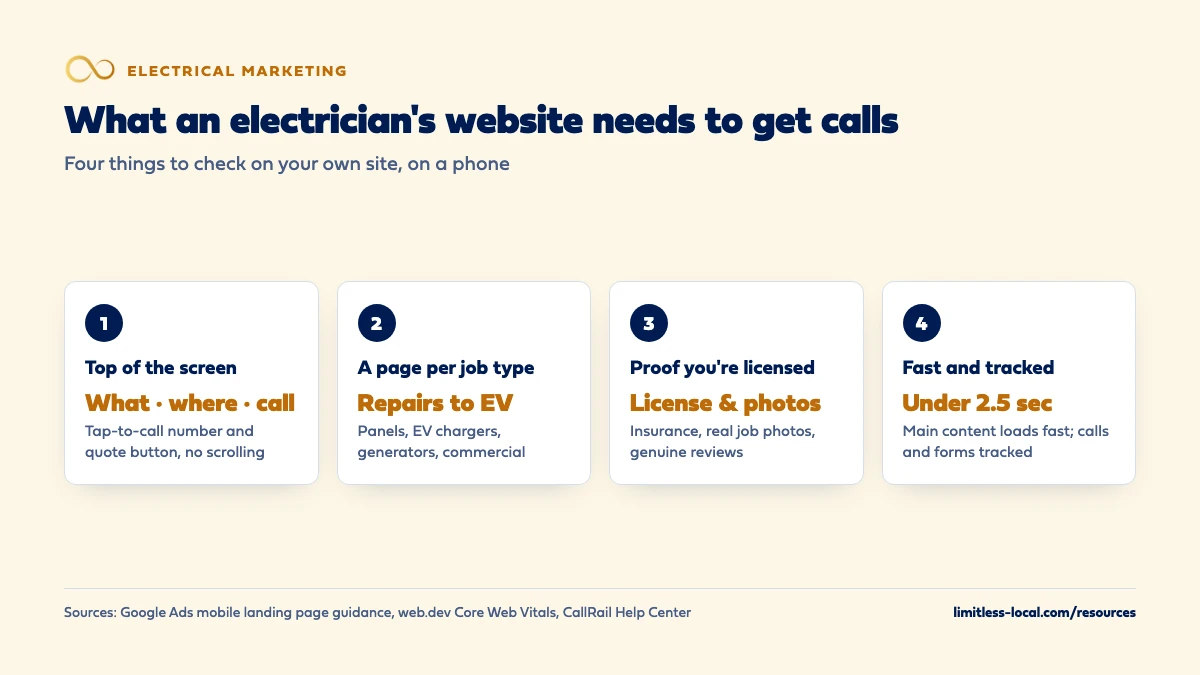
An electrician’s website gets more calls when, on a phone, it shows within seconds what you do, where you work and a tap-to-call number, and gives a short way to request a quote for bigger jobs. It needs a separate page for each main kind of work, such as repairs, panel upgrades, EV chargers, generators and commercial work, plus proof that you’re licensed, insured and real: your license number, real job photos and genuine reviews. It should load fast on a phone and track which calls and requests it produces.
That’s how we build electrician websites: fast on a phone, a page for each kind of work you want more of, and call and form tracking from day one, so you can see what the site actually produces. Our website design page shows how a build works and what it costs, and our electrical contractor marketing page shows how the site fits with search, ads and reviews. The rest of the electrical marketing questions library goes question by question.
What should someone see first when your site opens on a phone?
Most people who find an electrician online are on a phone, often standing in front of the problem: a dead outlet, a tripping breaker, a quote they want for an EV charger. Before they scroll, the top of your home page should answer three questions:
- What do you do? “Residential and commercial electrician” beats a slogan.
- Where? The main towns or the county you serve.
- How do I reach you? A phone number they can tap to call, and a button for requesting a quote.
Google’s own advice for mobile landing pages points the same way: a responsive design that adapts to the screen, pages free of clutter and easy to read, no full-screen pop-ups or chat boxes covering the page, and fast loading, because people will wait only seconds before going elsewhere. In our view, a big hero photo with no phone number in sight is the most common reason a decent electrical site doesn’t ring.
Do I need a separate page for each kind of electrical work?
Yes, for every kind of work you want more of. Someone searching for an EV charger installer and someone whose lights keep flickering are asking different questions, and one “Services” page with a bulleted list answers neither. A typical electrical site might have pages for:
- Electrical repairs and troubleshooting
- Panel upgrades and replacements
- EV charger installation
- Generator installation
- Lighting, outlets and fixtures
- Rewiring older homes
- Commercial electrical work
Each page should say what the job involves, who it’s for, what happens on the first visit, and how to get a quote. Google’s guidance on helpful, people-first content asks whether a page shows first-hand expertise and leaves the reader feeling they’ve learned enough to act. A page written by someone who has actually done a hundred panel swaps reads differently from one written to fill space.
If panel upgrades and EV chargers are the work you most want to grow, getting more panel upgrade and EV charger jobs covers the marketing side beyond the website.
How do I show homeowners I'm not just a handyman?
Homeowners comparing quotes don’t always know the difference between a licensed electrician and a handyman who’ll “take a look.” Your website is where you make that difference obvious. Put these where people see them, not buried on an about page:
- Your license number and the fact that you’re insured, near the top of the home page and in the footer.
- Real photos of your work: clean panels, finished EV charger installs, your trucks and your crew. Stock photos of someone else’s work tell the visitor nothing.
- Who’s behind the business: the owner, how long you’ve been doing the work, and the towns you serve.
- How you handle the paperwork, such as permits and inspections, if you take care of them for the customer.
Google’s helpful-content guidance makes a similar point about trust: it asks whether content shows clear sourcing, evidence of the expertise involved and background about the people behind the site, for example through an about page. In our view that’s the same test a homeowner runs before letting someone work on their panel.
How should reviews show up on an electrician's website?
Show real ones, and show them near the call button. A few recent reviews that mention the job (“replaced our panel,” “installed our EV charger,” “came out the same day”) do more than a star rating floating in the header. Linking to your Google reviews lets visitors check them where you can’t edit them.
Keep them honest. The FTC’s guidance on its consumer reviews and testimonials rule says a business that puts testimonials on its own website is spreading them as advertising, not just hosting them, and can be liable if they’re fake or false. That’s a summary of FTC staff guidance, not legal advice. Don’t write reviews for customers, and don’t post one you can’t trace to a real job.
If you don’t have many reviews yet, that’s a problem to fix at the source. Getting more Google reviews covers how to ask without breaking Google’s rules.
Curious what your marketing is actually booking?
Get a free visibility audit — no obligation, no sales pitch.
What should the quote request form ask for?
As little as you can get away with. Google’s mobile landing page advice notes that forms are inconvenient on a phone and can make visitors leave. For most electrical work, a name, a phone number, the address or town, and a short “what do you need?” box is enough to call back.
For project work, one or two optional extras can save a site visit, in our view:
- A photo upload, so the customer can send a picture of the panel or the spot where they want the charger.
- A drop-down for the type of job (repair, panel upgrade, EV charger, generator, commercial), so the request lands with the right person.
Keep those optional. A form that demands panel amperage before it will submit loses the customer who doesn’t know what that means. And make sure someone answers requests fast; a form that sits until tomorrow afternoon is a quote a competitor gets to first. Following up on electrical quotes automatically covers what happens after the request comes in.
Should my website mention emergency or after-hours service?
Only if you really offer it, and then say exactly what it is. “Emergency service, day or night” on a site where nobody picks up at night does more harm than leaving it off, because the customer remembers who didn’t answer.
If you do take after-hours calls, say which problems you’ll come out for (no power to part of the house, a burning smell, sparking), how to reach you, and whether there’s an after-hours rate. If you don’t, say your hours plainly and offer a way to leave a request for the morning. Your hours should match what’s on your Google Business Profile, which is often the first place people check.
How fast does an electrician's website need to load?
Fast enough that nobody notices. Google’s Core Web Vitals give three targets for a good experience: the main content should load within 2.5 seconds, the page should respond to a tap within 200 milliseconds, and the layout should stay stable, with a layout shift score of 0.1 or less. You can check your own site for free with PageSpeed Insights.
The usual causes on trade websites are oversized photos, sliders and video backgrounds on the home page, and a pile of add-on scripts. Real job photos matter, but they should be compressed to a sensible size. If your site is slow on a phone over a cellular connection, that’s the version most of your customers are seeing.
Does the page my Google Ads send people to matter?
A lot. Google Ads rates landing page experience on how relevant and useful the page is to the person who clicked, and says higher-rated pages are usually well organized, with text that relates to what the person searched. A below-average rating is a sign the page may be hurting your chances of getting calls.
In practice, that means an ad for EV charger installation should land on your EV charger page, not your home page, and an ad for emergency repairs should land on a page with a phone number at the top. Google’s mobile landing page article gives the same example in other terms: send people straight to the page for what they searched, not a general page that makes them start over. Which Google Ads campaigns work best for electricians covers how to split campaigns so each one has a page to land on.
How do I know if my website is actually bringing in calls?
Track it, or you’re guessing. Two pieces do most of the work:
- Call tracking on the site. CallRail’s dynamic number insertion swaps the phone number on your site for a tracking number based on how the visitor arrived, so calls from Google Ads, organic search or your Google profile are counted separately. The number on the page has to be real text (or a supported image), not baked into a graphic, for the swap to work.
- Ad click-to-call tracking. Google Ads can count clicks on a phone number on your mobile website after an ad click. It counts the tap, not the call itself, so it’s a starting point, not the final word.
Track form submissions too, and send every call and request into your field software with its source. Tracking which marketing brings in real jobs walks through the whole setup, from tracking numbers to cost per sold job.
What can I leave off an electrician's website?
Plenty. In our view, these rarely earn a call:
- A slider of rotating banners. Slow, and the second slide is rarely seen.
- Long company history on the home page. Keep it for the about page.
- A services list with no service pages behind it. Better to have five real pages than fifteen links that go nowhere.
- Pages for work you don’t want. If you’ve stopped doing small residential jobs, don’t advertise them.
- Pop-ups that cover the page before the visitor has read anything. Google’s mobile landing page advice calls them out specifically.
Local business structured data is worth adding, though. Google’s local business structured data documentation shows how to mark up details such as your phone number and opening hours so Google can read them clearly. It’s invisible to visitors and doesn’t take long once the site is built.
Want to see where your company stands?
A free visibility audit shows where you show up on Google, Maps and AI answers, and what it's costing you in calls.
What's different about websites for electricians
Service calls and projects need different paths. Someone with a dead circuit wants to call now. Someone planning a panel upgrade or a generator may want to read, compare and request a quote. The home page should serve both: a tap-to-call number for the first, a clear quote request for the second.
New technology work is its own audience. EV charger, generator and smart-home customers often research before calling. A page that answers their basic questions in plain words, such as whether their panel can handle a charger and what the visit looks like, gives them a reason to call you instead of the next result.
Commercial buyers check different things. A property manager or general contractor wants to see the kinds of commercial work you’ve done, your service area and how to send a bid request. If commercial work matters to you, give it its own page instead of a line on the residential home page.
Credentials carry more weight than in many trades. Electrical work is dangerous when it’s done wrong, and homeowners know it. Your license, insurance and real job photos belong where they’re seen, not behind a menu.
A worked example: what a few more calls a month are worth
These numbers are made up to show the math, not a benchmark for your market. Say your site gets 600 visits a month and 2% of visitors call or send a request. That’s 12 calls and requests. If the redesign makes the number easier to find on a phone, adds service pages and speeds things up, and 3% of the same 600 visitors reach out, that’s 18 a month, or 6 more.
If 1 in 3 of those turns into a booked job, that’s 2 more jobs a month, or 24 a year, from the same traffic. Whether that pays for a new site depends on your average ticket, which is why it’s worth tracking calls before and after any change.
For comparison, our themed websites are $3,750, or $3,000 with any of our marketing packages, for up to 25 pages, and custom builds start at $5,000. Payment plans over 6 or 12 months are available. A free visibility audit is the easier way to see whether your current site is the thing holding calls back.
Frequently asked questions
Should my phone number be in the header of every page?
Yes. On a phone, a tap-to-call number at the top of every page saves the visitor from hunting for it, and if you use call tracking, the number needs to be real text so it can be swapped.
Is a website still worth it if most of my calls come from Google Maps?
Usually, yes. Many people check your website after finding you on Maps, and your Business Profile can link to it. Optimizing your Google Business Profile covers the Maps side.
Do I need online booking on my electrical website?
Not necessarily. Online booking can work well for simple service calls if your field software supports it, but most project work needs a conversation or a site visit first, so a short quote request form is often enough.
Should I put prices on my website?
That’s a business decision, not a rule. Some electricians list a service-call fee or a starting price for common jobs to screen out price shoppers; others prefer to quote every job. If you list prices, keep them current.
Can I build the website myself?
You can. A self-built site that is fast, clear on a phone and has a page for each kind of work can do the job; what matters is whether it produces calls you can track.
Does a chat widget help an electrician's website?
It can, if someone answers it or it hands off cleanly to your office. Google’s mobile advice warns against chat boxes that pop up and cover the page, so keep it small and out of the way.
Key takeaways
- On a phone, show what you do, where you work and a tap-to-call number before any scrolling.
- Give each kind of work you want more of its own page, from repairs to panels, EV chargers, generators and commercial.
- Put your license number, insurance, real job photos and genuine reviews where visitors see them.
- Keep quote forms short, load fast, and send ads to the matching service page.
- Track calls and forms by source so you know what the site actually produces.
Not sure what's working right now?
Start with a free visibility audit: rankings, Google profile, reviews and tracking, checked against your service area.
More in this section
- How should a new electrical contractor get its first customers?
- How should an electrical contractor market to commercial customers?
- What Google Ads campaigns work best for electricians?
- How do I get more Google reviews for my electrical business?
- How do I optimize my electrician Google Business Profile?
Sources
- Optimizing your mobile landing page for sales — Google Ads
- Creating helpful, reliable, people-first content — Google Search Central
- Web Vitals — web.dev (Google)
- Landing page experience: Definition — Google Ads Help
- About phone call conversion tracking — Google Ads Help
- Dynamic number insertion overview — CallRail Help Center
- The Consumer Reviews and Testimonials Rule: Questions and Answers — Federal Trade Commission
- Local business (LocalBusiness) structured data — Google Search Central