
How can an electrician prep for peak season with an old website?

- How do I get ready for peak season demand if my electrical website is old?
- Should I rebuild the website before the busy season?
- Fix 1: Can a homeowner call you in one tap from a phone?
- Fix 2: Does the site load fast enough on a phone?
- Fix 3: Is everything on the site still true?
- Fix 4: Does the site have a page for the seasonal work you want?
- Fix 5: Do forms and calls from the site actually reach you?
- Fix 6: Can Google see the pages that matter?
- Fix 7: Do your Google profile and ads point to the right pages?
- What if the old site is too broken to patch?
- What should I keep an eye on once peak season starts?
- What can wait until after the busy season?
- How far ahead of peak season should I start?
- What's different about peak season for electricians
- A worked example: what a few days of fixes can be worth
- Frequently asked questions
- Key takeaways
- More in this section
- Sources
The short version
- Patch the old site now; plan any rebuild for the slow season.
- First fixes: tap-to-call on mobile, faster pages, current information.
- Add pages for seasonal jobs like generators and panel upgrades early.
- Test forms and call tracking, and check your pages are indexed.
For electrical contractors heading into a busy stretch with a website that’s a few years old, who need it to catch calls now and can rebuild later.
Get a free visibility audit · Book a growth call
How do I get ready for peak season demand if my electrical website is old?
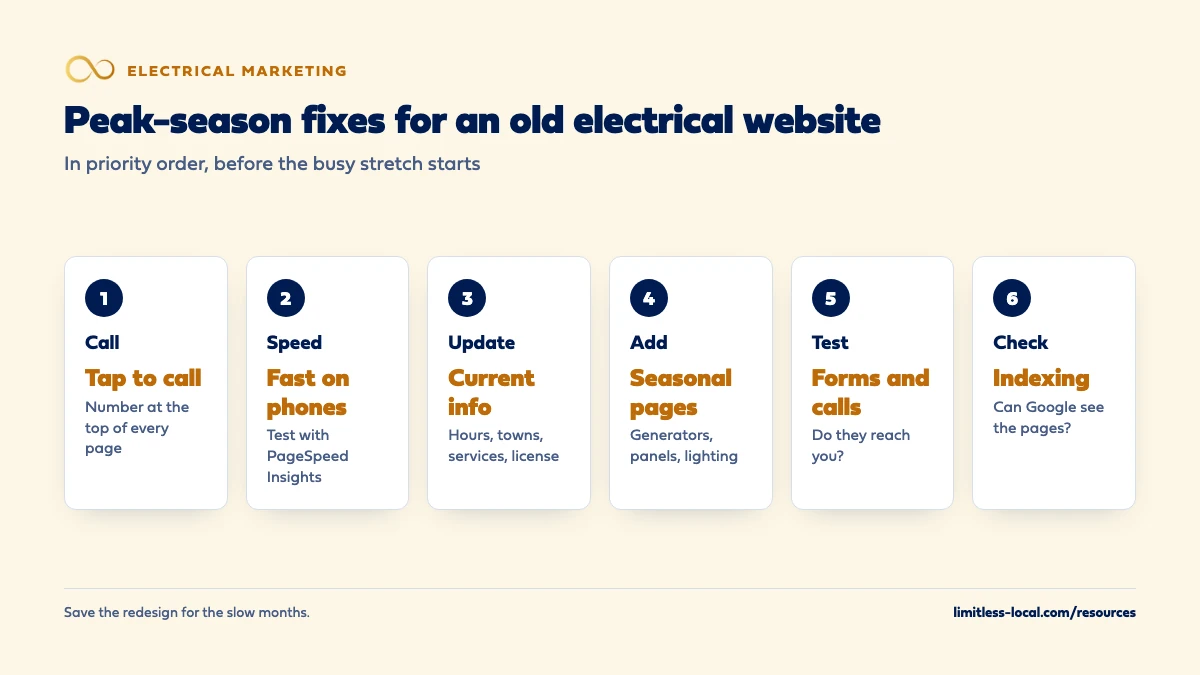
Don’t rebuild right before peak season; spend a few days fixing what loses calls on the site you have. In order: put a tap-to-call number at the top of every page on mobile, speed up the mobile version, update hours, service area and services, add pages for the seasonal jobs you want, test that forms and calls reach you, and check that Google can see your key pages. Save the redesign for the slow months.
A site that catches calls is one piece of showing up locally, alongside your Google profile and reviews. Our local SEO work includes building out service pages and tracking calls and forms back to their source. When you’re ready to replace the old site, a themed website is $3,750, or $3,000 with any Limitless Engine package. We don’t guarantee rankings or lead counts; nobody honestly can. See how we work with electrical shops on our electrical contractor marketing page, or browse more electrical marketing questions.
Should I rebuild the website before the busy season?
Usually not. A new site takes time to plan, write and launch, and launching one in the middle of your busiest stretch is a good way to break forms, lose pages Google had already found, and spend your evenings on website feedback instead of estimates.
Our own website builds run concept to launch in 100 days or less, with themed sites around 60 days, and that’s with nobody rushing. If peak season is closer than that, patch the old site now and plan the rebuild for the slow months after.
The fixes below are in priority order. Each one is about not losing a homeowner who already found you. What to fix on an electrical website before investing in SEO covers the longer-term list.
Fix 1: Can a homeowner call you in one tap from a phone?
This is the first thing to check and the cheapest to fix. Open your site on your own phone, on mobile data, not Wi-Fi, and look at the top of the home page and your main service pages:
- Is the phone number visible without scrolling?
- Does tapping it start a call?
- Is it the number someone answers in peak season, including after hours if you take emergency calls?
On old sites, the number is often an image, buried in the footer, or the old office line. A tap-to-call button at the top of every page is usually a small job for whoever looks after the site.
Fix 2: Does the site load fast enough on a phone?
A homeowner with a dead circuit won’t wait for a slow page. Run your home page and your busiest service page through PageSpeed Insights. Google’s page about PageSpeed Insights says it reports on a page’s experience on both mobile and desktop and suggests how to improve it, using lab data and, where there’s enough traffic, real-world data.
The main loading target is simple to remember. Google’s Web Vitals guide says that for a good experience, the largest piece of content should load within 2.5 seconds.
On old sites, the quick wins are usually oversized photos and plugins nobody uses. How to make an electrical website fast on mobile walks through the fixes in order.
Fix 3: Is everything on the site still true?
Old sites drift out of date, and a homeowner notices. Before peak season, check:
- Hours and emergency availability, matching what your Google profile says.
- Service area, listing the towns you’ll actually drive to this season.
- Services, adding work you now do (EV chargers, generators) and removing work you’ve stopped.
- Offers and coupons, taking down anything expired.
- License details and photos, current and from real jobs. Whether to show your electrical license number in your marketing covers where it belongs.
None of this needs a developer. Most old sites let you edit text and swap photos yourself.
Fix 4: Does the site have a page for the seasonal work you want?
Peak season brings searches for specific jobs: whole-home generators and surge protection before storms, extra circuits and panel upgrades when everyone runs the AC, lighting before the holidays. If your site only has one “services” page that lists them in a sentence, those searches have nothing to land on.
Add or refresh a page for each seasonal job you want, with what the job involves, the towns you do it in, real photos and a clear way to call. Google’s mobile-first indexing guide says Google uses the mobile version of a site for indexing and ranking, and recommends the mobile site has the same content as the desktop site. So check the new page on a phone, not just a laptop.
New pages can take a while to rank, so the earlier you add them, the better. How to get more generator installation leads before storm season shows how to plan that work.
Curious what your marketing is actually booking?
Get a free visibility audit — no obligation, no sales pitch.
Fix 5: Do forms and calls from the site actually reach you?
On old sites, forms quietly stop working. Plugins update, email settings change, and requests land in a spam folder or an inbox nobody checks. Fill out your own form from a phone and confirm the message reaches the person who books jobs.
Then make sure you can see where calls come from. Google’s page on phone call conversion tracking describes tracking calls from your website, where a Google forwarding number replaces your number on the site for people who clicked an ad. If you run ads in peak season, that’s how you know which clicks turned into calls. A separate call tracking number for the site does the same job for all visitors.
Fix 6: Can Google see the pages that matter?
If your site has been neglected, some pages may have dropped out of Google. Search Console is free, and its URL Inspection tool shows Google’s indexed version of a page, tests whether a page might be indexable, and lets you request that a page be crawled.
Check your home page and each service page, especially new seasonal ones. If one isn’t indexed, request indexing after you’ve fixed it. If you don’t have Search Console access, ask whoever built the site, or set it up yourself; it’s worth owning.
Fix 7: Do your Google profile and ads point to the right pages?
Your Google profile’s website button and your ads should send people to the most useful page, not always the home page. If a generator ad lands on a home page that doesn’t mention generators, many people leave.
- Point the profile’s website link to your home page, or a main service page if your site is thin.
- Point each ad group to the page for that job.
- Make sure every landing page has the tap-to-call button from Fix 1.
Whether electricians need landing pages for Google Ads explains when a separate page pays off.
What if the old site is too broken to patch?
Sometimes the patch list is longer than the time you have: the site won’t load on phones, you can’t log in, or the person who built it is gone. In that case, build one good page instead of fixing twenty bad ones.
- A single landing page with your phone number at the top, the jobs you want this season, your towns, real photos, reviews and a short form.
- Point your ads and your Google profile’s website button at it.
- Leave the old site up so existing pages keep whatever Google traffic they get.
It’s a stopgap, not a plan. Recover your domain and site logins while you’re at it, because you’ll need them for the rebuild.
What should I keep an eye on once peak season starts?
Once the rush starts, you won’t have time for website projects, so keep it to a quick weekly check:
- Call your own number from the site on a phone. Does it ring through?
- Submit a test form every couple of weeks.
- Look at calls and form requests from the site against last week. A sudden drop usually means something broke.
- Update hours and emergency availability if your schedule changes with the weather.
Note every problem you notice, even ones you don’t fix. That list becomes the brief for the rebuild.
What can wait until after the busy season?
- A full redesign or new branding. Plan it for the slow months.
- Moving to a new website platform or host, unless the current one is down or hacked.
- Rewriting every page. Fix the pages that bring calls first.
- Blog posts. They help over time, but they won’t change peak-season calls.
Write the list down as you go. The slow season is when the bigger fixes get done.
How far ahead of peak season should I start?
Start a month or two before your busy stretch. The quick fixes (tap-to-call, hours, forms) take a day or two. New seasonal pages need time to get found, and quoted work like panel upgrades and generators gets researched weeks before it’s booked.
Line it up with your ad budget too. Whether an electrician should change marketing budget by season covers when to raise spend before a busy stretch. There’s no point paying for more clicks to a site that can’t turn them into calls.
Not sure which of these is costing you jobs?
A free visibility audit checks the Google profile, reviews, site and tracking, and shows what to fix first.
What's different about peak season for electricians
Peaks come from different directions. Storms drive generator and surge protection work; heat waves overload old panels; the holidays bring lighting and extra circuits. Your site needs pages for the peaks you actually serve.
Emergencies spike with the weather. After a storm, homeowners search and call fast. A slow site or a hidden phone number loses those calls first.
Quoted work starts early. Homeowners research panel upgrades and generators weeks before they book. Pages for that work need to be live before the rush, not during it.
Trust questions don’t go away when you’re busy. Current license details, real job photos and recent reviews still decide who gets the call.
A worked example: what a few days of fixes can be worth
These numbers are made up to show the math, not a forecast for your business. Say an electrician’s old site gets 500 visits from phones in a peak month, and about three in every hundred phone visitors call: 15 calls.
- The owner adds a tap-to-call button at the top of every page, shrinks the oversized photos, and adds a generator page.
- If five in every hundred phone visitors now call, that’s 25 calls from the same traffic.
- If about half of calls book, that’s roughly 12 jobs instead of 7.
At a made-up average ticket of $550, those 5 extra jobs are about $2,750 of work in one month, from fixes that took a few days instead of a rebuild.
Frequently asked questions
Is it worth adding a chat box before peak season?
Only if someone will answer it quickly during your busiest weeks. An unanswered chat box loses the same customers a missed call does, and it can slow the page down.
Can I just send ads to a single landing page and ignore the old site?
For ads, a good landing page can carry you through a season. Homeowners still check your main site and Google profile, so fix the basics there too.
Should I put seasonal coupons on the site?
If they’re real and you’ll honor them, yes, and put an end date on them. Take them down when they expire so the site doesn’t look abandoned.
Who should make these changes if I don't have a web person?
Most text, photo and hours changes you can make yourself in the site’s editor. Speed fixes and forms may need someone who knows the platform, for a few hours of work.
Will these fixes help my Google rankings?
Some may help over time, like new service pages and a faster mobile site. Their main job before peak season is turning visitors you already get into calls.
Key takeaways
- Patch the old site before peak season; rebuild in the slow months.
- Put a tap-to-call number at the top of every page and test it on a phone.
- Speed up the mobile version and bring hours, towns and services up to date.
- Add seasonal job pages early, and make sure Google can see them.
- Test that forms and calls reach you, and track where calls come from.
Want a second set of eyes on your setup?
We'll look at how you show up locally and where calls are leaking, then send you a plain-English breakdown.
More in this section
- What should an electrician's website have to get more calls?
- How should a one-truck electrician prepare marketing for storm season?
- What website layout turns visitors into booked electrician calls?
- What website content helps electrician customers choose me?
- How should an electrician change marketing to grow vs stay busy?
Sources
- About PageSpeed Insights — Google for Developers
- Web Vitals — web.dev
- Mobile site and mobile-first indexing best practices — Google Search Central
- URL Inspection tool — Search Console Help
- About phone call conversion tracking — Google Ads Help