
How much should a restoration company spend on Google Ads?

- What's the right monthly Google Ads budget for one restoration market?
- Is there a standard Google Ads budget for a restoration company?
- How do I size the Google Ads line from the jobs I want?
- What does a water damage lead cost through Google Ads?
- How do I turn a monthly budget into a daily budget?
- How should I split the budget across water, mold, fire and sewage?
- How much should I spend while I'm still testing?
- How big an area should my Google Ads budget cover?
- How do I know when to spend more on Google Ads?
- When should I spend less on Google Ads?
- Does Local Services Ads money come out of the same budget?
- What does it cost to have someone run my Google Ads?
- What's different about Google Ads budgets for restoration companies
- A worked example: sizing Google Ads for six water damage jobs a month
- Frequently asked questions
- Key takeaways
- More in this section
- Sources
The short version
- Size it from booked jobs: jobs x leads per job x cost per lead.
- Estimate local costs with Keyword Planner, then use your own numbers.
- Divide the monthly budget by 30.4 for the daily budget.
- Spend more only while cost per booked job holds and crews have room.
For restoration owners sizing the Google Ads line for one local market, from the jobs they want down to a daily budget.
Get a free visibility audit · Book a growth call
What's the right monthly Google Ads budget for one restoration market?
A restoration company should spend what it takes to buy the booked jobs it wants from Google Ads in one market: jobs wanted, times leads per booked job, times cost per lead. Before you have your own tracked numbers, start from Keyword Planner’s local bid ranges and a cautious guess at how many clicks turn into calls, then divide the monthly number by 30.4 for a daily budget that keeps ads running into the evening. Raise it only while the cost per booked job stays well below what a job is worth and your crews have room.
Our local ads work covers Google Ads, Local Services Ads and the call tracking that turns this math into real numbers, and the restoration marketing page shows how it fits water, fire and mold companies. For how ads fit with SEO and referrals, read the restoration marketing guide, or browse more restoration marketing questions.
Is there a standard Google Ads budget for a restoration company?
No, and be wary of anyone who quotes one without asking about your market. Google’s help on average daily budgets says you choose a budget for each campaign based on your advertising goals and what you’re comfortable spending each day. What that comes to depends on things only your market can tell you: what clicks cost in your towns, how many people search for water damage help there, how many of your leads book, and how many jobs your crews can take.
Two restoration companies with the same goals can need very different budgets. A company in a crowded metro may pay a lot more per click than one in a smaller market, but it also has more searches to buy. The useful question isn’t “what’s normal?” It’s “what does it cost me to book one more job through Google Ads, and how many of those do I want?”
How do I size the Google Ads line from the jobs I want?
Work backward from booked jobs, one market at a time:
- Jobs you want from Google Ads each month. Not your whole revenue goal, just the share you expect ads to carry.
- Leads per booked job. If about 1 in 3 real leads books, you need three leads per job.
- Cost per lead. Your own number if you’ve run ads before; an estimate if you haven’t (next section).
- Multiply. Jobs times leads per job times cost per lead is your monthly ad spend.
The worked example below runs the numbers. If you’d rather start from a revenue target, how many water damage jobs a month you need to hit your revenue goal walks the same chain from dollars down to calls.
Use your own records wherever you have them. A booking rate you made up will give you a budget you made up.
What does a water damage lead cost through Google Ads?
There’s no reliable national number for restoration, and any article quoting one is giving you somebody else’s market. What you can get is a local estimate before you spend anything, and your real number once ads are running.
Google’s Keyword Planner shows estimates of how often keywords are searched and what it costs for your ad to show on them. Its forecast help explains the two bid columns: the top of page bid low range is roughly the 20th percentile of what advertisers have paid for a top-of-page spot, and the high range is roughly the 80th percentile, based on your location settings and the last 30 days. Set the location to the towns you actually serve, not the whole state.
Treat those as rough. Google says forecasts are less accurate for small geographic areas, and for a brand-new account they’re based on averages across all advertisers. A click isn’t a lead, either. To turn a cost per click into a cost per lead, you need to know how many clicks call or fill in a form, and that only comes from running the ads with call tracking.
Once you’re live, your cost per lead is the cost divided by conversions, as long as conversions are set to count real calls and forms, not page views.
How do I turn a monthly budget into a daily budget?
Google Ads budgets are set per day, so divide your monthly number by 30.4, the average number of days in a month. A $2,700 monthly budget becomes about $89 a day.
Two rules make this matter for restoration. Google may spend more on busy days and less on quiet ones, but you’ll never pay more than two times your average daily budget on any one day for most campaigns, or more than 30.4 times it in a month. So a freeze or a storm can push one day’s spend well past the daily number, while the month still lands where you set it.
The other rule is yours: make sure the daily budget is big enough to keep ads showing into the evening. A water heater that lets go at 7 p.m. is a real job. If your budget is gone by 3 p.m., you’re missing it.
How should I split the budget across water, mold, fire and sewage?
Give each service its own campaign, or at least its own budget, so one doesn’t eat the others. Water damage usually gets the biggest share because it’s the most frequent emergency search. Mold, fire and sewage searches behave differently: mold is often researched over days, fire is rarer but bigger, sewage is urgent and messy.
Start by putting most of the budget where your best-paying, most frequent jobs are, and give the others enough to collect real data. Then move money toward whichever service books jobs at the lowest cost per job, as long as your crews can handle it.
Mold is the one most owners ask about splitting out. Whether mold remediation should have its own Google Ads campaign covers the trade-offs.
Curious what your marketing is actually booking?
Get a free visibility audit — no obligation, no sales pitch.
How much should I spend while I'm still testing?
Enough to learn something. A budget so small it buys a handful of clicks a week won’t tell you whether Google Ads works in your market, because you can’t separate a bad week from a bad campaign.
Plan the first two to three months as a test with a clear question: what does a booked job cost me through Google Ads in these towns? Set the budget so you’ll get enough real leads in that time to see a pattern, track every call to a booked or not-booked outcome, and only then decide whether to scale, fix or stop.
Fix the obvious leaks before you add money: negative keywords for jobs you don’t do, a landing page that makes calling easy, and someone answering the phone around the clock. Money poured into a leaky campaign just leaks faster.
How big an area should my Google Ads budget cover?
Only as big as your crews will really drive, and only as big as the budget can cover all day. Spreading a modest budget across a whole metro usually means ads that show for a few hours and disappear, with leads from towns you’d rather not serve.
A tighter area concentrates the money where you’re most likely to win the job and get there fast. When the cost per booked job is healthy and the budget isn’t running out early, then widen the area.
How tight to draw it, and how to set location targeting so you reach people in your area, is in how tight a service area restoration ads should target.
How do I know when to spend more on Google Ads?
Spend more when three things are true at once: your cost per booked job is comfortably below what a job is worth, budget is what’s holding the campaign back, and your crews have room for more work.
Google tells you about the second one. It marks a campaign “Limited by budget” when the budget is holding it back, and may show a recommended daily budget. Recommendations are based on recent performance, your current budget, keywords and targeting. They’re a hint, not an order. Raise the budget in steps and check that the cost per booked job holds.
Impression share tells you how many searches you’re missing because the money ran out. Impression share in restoration Google Ads explains how to read it.

When should I spend less on Google Ads?
Pull back when the extra spend isn’t buying extra jobs you can take:
- Your crews are full. Paying for leads you can’t serve for a week is money gone, and those customers call someone else.
- Cost per booked job is climbing. Check search terms, landing pages and call handling before cutting, but don’t keep feeding a campaign that’s getting worse.
- A surge has pushed prices past what the work is worth. After storms and freezes, more companies bid on the same searches.
Why costs jump during weather events, and how to set limits before they happen, is covered in why restoration ad costs spike during storms and freezes.
Does Local Services Ads money come out of the same budget?
Plan it as its own line. Google is moving Local Services Ads into Google Ads as Performance Max campaigns with pay-per-lead goals. The first phase began in August 2026 for select home and storefront service advertisers, and Google lists service-area businesses without physical storefronts in the late 2026 wave. When an account moves, the weekly budget is divided by 7 to set a daily average, and monthly spend is capped at that daily average times 30.4.
Even inside one account, Local Services Ads and search campaigns charge differently: you pay per valid lead with Local Services Ads and typically per click with search. Budget each one on its own cost per booked job.
Whether you need both is a separate decision, covered in whether a restoration company should run Google Ads, LSAs or both.
What does it cost to have someone run my Google Ads?
Management is a separate line from ad spend. Ad spend is never included in our packages; it’s paid directly to Google. Here’s how management works with us:
- Essentials, $3,500 a month: Google Ads management for up to $2,500 a month in ad spend, plus local SEO, Google Business Profile management, review response, call tracking and reporting for one location.
- Growth, $4,500 a month: Google Ads management for up to $5,000 a month in ad spend, plus Local Services Ads management, Meta remarketing and SEO for up to 2 locations.
- Scale: custom Google Ads and Local Services Ads across multiple markets.
We recommend an ad budget after a quick audit of your market, not before. Every package includes call tracking with recording and a monthly cost-per-lead breakdown, so you can see what each booked job really cost.
Talk it through with someone who runs this every day
A 15-minute growth call: your market, your numbers, and what a realistic budget looks like. No pressure.
What's different about Google Ads budgets for restoration companies
Demand comes in waves. Freezes, storms and heavy rain can multiply water damage searches overnight, then drop off. A budget that’s fine in a quiet month can run dry by noon during a surge, and costs per click rise as competitors pile in.
Evenings and nights matter. Leaks get found when people get home, and emergencies don’t wait for business hours. Restoration budgets need to stretch further into the day than most trades’.
Several services with different economics. A water job, a mold job, a fire job and a sewage job differ in size, urgency and how long the customer shops around. One budget for all of them hides which one is actually paying.
Big tickets can justify a high cost per lead. A cost per lead that would sink a small service trade can be fine when one water or fire job is worth thousands. Judge it on cost per booked job, not on what feels expensive.
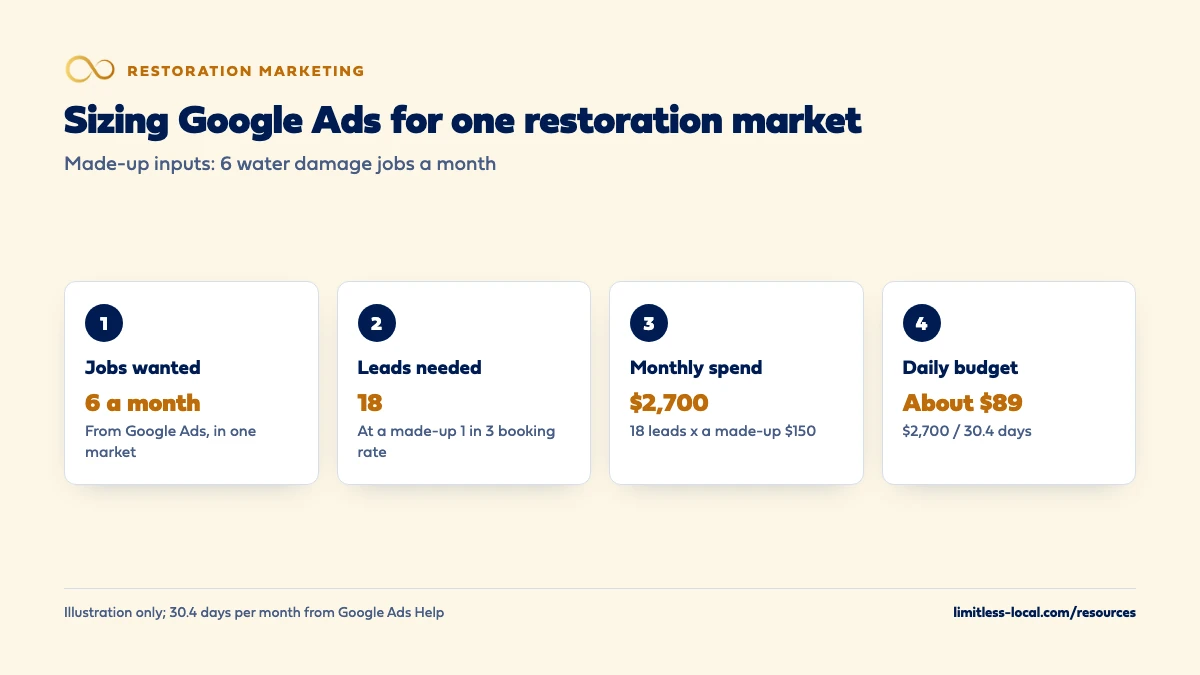
A worked example: sizing Google Ads for six water damage jobs a month
These numbers are made up to show the math, not a benchmark for your market.
- Jobs wanted from Google Ads: 6 water damage jobs a month.
- Booking rate: 1 in 3 real leads books, so 6 times 3 is 18 leads.
- Cost per lead: a made-up $150.
- Monthly ad spend: 18 times $150 is $2,700.
- Daily budget: $2,700 divided by 30.4 is about $89 a day. On a busy day Google can spend up to about $178, but the month won’t pass $2,700.
That works out to $450 in ad spend per booked job. If an average water job leaves you several times that in gross profit, the budget is doing its job, and you’d test adding more. If the real cost per lead comes in at $200 instead of $150, the same six jobs cost $3,600 a month, or $600 each. Same plan, very different answer, which is why the first months of real data matter more than any estimate.
Frequently asked questions
Is $1,000 a month enough for restoration Google Ads?
It can be for one service in a small area. Run the math: if it buys only a few leads a month at your local cost per lead, you’ll struggle to learn anything. Narrow the services and towns before you spread it thin.
Should I set my Google Ads budget as a percentage of revenue?
A percentage gives you a ceiling, not a plan. Size the ads line from the booked jobs you want and what a lead costs in your market, then check it against what you can afford.
Can I set a monthly Google Ads budget instead of a daily one?
Standard campaigns use an average daily budget. Divide your monthly target by 30.4, and Google keeps the month’s spend at or under 30.4 times that daily amount.
Why did Google spend more than my daily budget?
Google can spend up to two times your average daily budget on a busy day for most campaigns, then spend less on quieter days. Over the month, it won’t pass 30.4 times the daily amount.
Does a higher budget lower my cost per click?
No. A bigger budget buys more clicks at roughly the going price; it doesn’t make each click cheaper. Ad quality and a strong landing page are what help on price.
Should I pause Google Ads when I'm booked solid?
Lower the budget or narrow the area first, so you keep some presence and data. Pause fully only if you truly can’t take more work for a while.
Key takeaways
- There’s no standard restoration Google Ads budget; size it for one market from the booked jobs you want.
- Jobs wanted times leads per job times cost per lead gives the monthly ad spend.
- Use Keyword Planner’s local bid ranges as a rough starting estimate, then your own tracked numbers.
- Divide by 30.4 for a daily budget, and make sure it lasts into the evening.
- Budget water, mold, fire and sewage separately, and keep Local Services Ads as its own line.
- Spend more only while cost per booked job holds and your crews have room.
Ready to compare options?
Book a short growth call and we'll walk through the math for your service area, including when we're not the right fit.
More in this section
- Should a restoration company spend 20k a month on Google clicks?
- How should a restoration company run Google Ads for fire damage?
- Should a restoration company run Google Ads, LSAs or both?
- Do Google Ads help a restoration company's SEO rankings?
- How much should a restoration company budget for landing pages?
Sources
- About average daily budgets — Google Ads Help
- Use Keyword Planner — Google Ads Help
- About Keyword Planner forecasts — Google Ads Help
- Fix "Limited by budget" status — Google Ads Help
- Local Services Ads transition to Performance Max campaigns with pay-per-lead goals — Google Ads Help