
How does a pool builder keep its name, address, phone consistent?
- How do I get my pool company's name, address and phone number right on every listing?
- Why does a pool builder need one version of its details everywhere?
- Step 1: What should my one official version look like?
- Step 2: Should my address show at all?
- Step 3: How do I fix my Google Business Profile first?
- Step 4: Does my website have to match too?
- Step 5: How do I update Bing, Apple Maps and Yelp?
- Step 6: Which other listings should I check?
- Step 7: How do I find old and duplicate listings?
- Why do old details keep coming back after I fix them?
- Can I use call tracking numbers without breaking consistency?
- What do I update when my pool company moves or changes its number?
- What's different about consistent listings for pool builders
- A worked example: one afternoon's listing audit
- Frequently asked questions
- Key takeaways
- More in this section
- Sources
The short version
- Pick one exact version of your name, address and phone.
- Fix Google first, then your website, Bing and Apple, then directories.
- Search old numbers and addresses to find forgotten listings.
- Merge or remove duplicate profiles instead of leaving them live.
A step-by-step audit for pool builders whose details are out of date somewhere online, after a move, a new number, a rebrand or an old agency’s work.
Get a free visibility audit · Book a growth call
How do I get my pool company's name, address and phone number right on every listing?
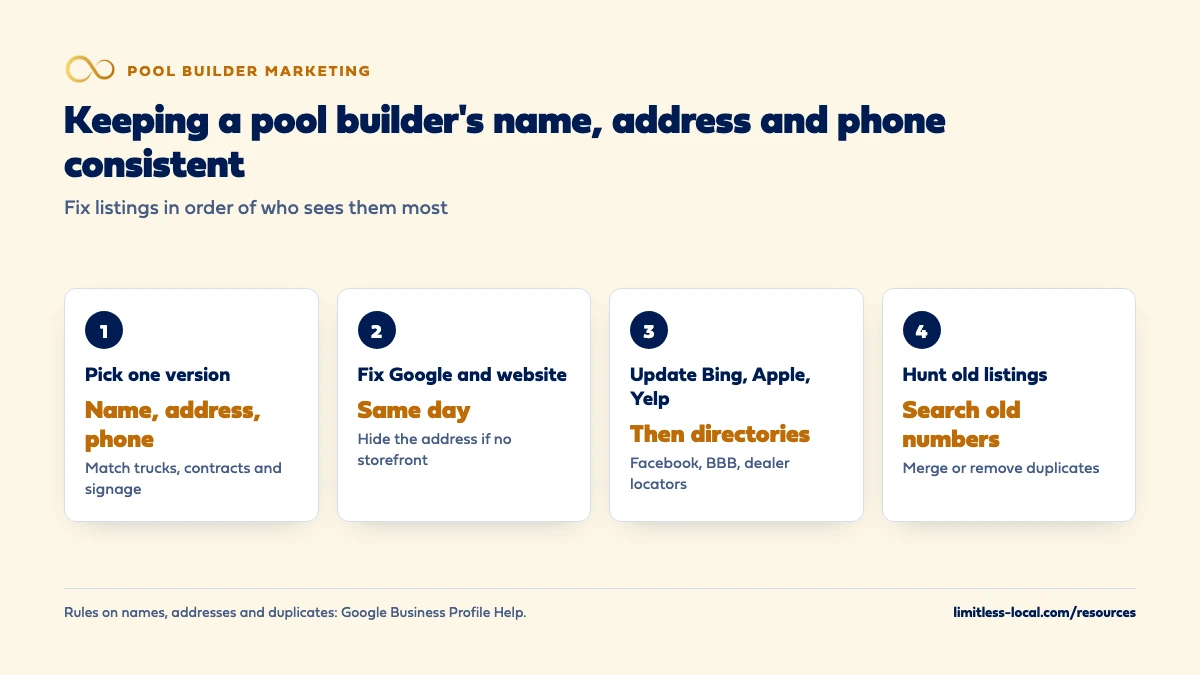
Write down one official version of your business name, address and phone number, then fix your listings in order of who sees them most: your Google Business Profile, your website, Bing Places and Apple Business, then Yelp, Facebook, the Better Business Bureau and any pool-industry or dealer listings. Search for your old phone numbers, old addresses and old names to find the listings you’ve forgotten, and merge or remove duplicates. If you don’t serve customers at your address, hide it on Google and keep the same choice everywhere else, and recheck everything after any move, rebrand or number change.
Business listing cleanup and buildout is part of every package, starting with Essentials at $3,500 a month, and we sync your name, address and phone across 50+ directories so the details stay the same everywhere. Our local SEO page covers that work, our pool builder marketing page covers the trade, and the pool builder marketing questions library goes question by question.
Why does a pool builder need one version of its details everywhere?
Because Google doesn’t only read what you type into your profile. Google’s page Understand how Google sources & uses info in Business Profiles says profile information comes from a variety of sources: publicly available information such as your own website, licensed data from third parties, users who contribute facts like addresses and phone numbers, and Google’s own interactions with the business. If your website, an old directory and a homeowner’s suggested edit all say different things, you’re leaving Google to pick.
The bigger cost is simpler. A homeowner who finds your old number on a directory calls a line nobody answers, and that consultation goes to the next builder. If you want the background on what NAP means and why it matters, what NAP is for a pool builder covers it. This page is the clean-up.
Step 1: What should my one official version look like?
Write it down before you touch a single listing, and share it with whoever updates anything for you. Get four things exact:
- Name: the name on your trucks, yard signs, contracts and invoices. Google’s Guidelines for representing your business on Google say your name should reflect your real-world name as used consistently on your storefront, website and stationery, and they don’t allow marketing taglines or phone numbers in the name. Legal terms like LLC are only allowed with real-world proof that you use them as part of the name.
- Address: the street address in one format. Pick Street or St, Suite or Ste, and stick to it. Suite numbers go on the second address line.
- Phone: one main local number that rings your office.
- Website: one address for your home page, in one form, so every listing links to the same place.
Small formatting differences matter far less than a wrong number or an old address. Fix the wrong details first; tidy the formatting as you go.
Step 2: Should my address show at all?
Decide this once and keep it the same everywhere. Under Google’s rules, a business that travels to customers and has no storefront with clear signage is a service-area business, and should hide its address from customers. Most pool builders who run from a yard, a home office or a shop homeowners don’t visit fit that description.
If homeowners do visit, such as a staffed design center or showroom with permanent signage, you can show the address and set a service area too. Google calls that a hybrid business. Two things don’t qualify: P.O. boxes or remote mailboxes, and a virtual office you rent but don’t work from.
Whichever you choose, mirror it on other listings that offer the option. A hidden address on Google and a home address printed on twenty directories isn’t consistent. Setting up a pool builder’s Google service area covers the towns to list.
Step 3: How do I fix my Google Business Profile first?
Open your profile and check the name, address or service area, phone number, website and hours against your official version. Correct anything that’s off. Google’s page Understand what happens to your Business Profile edits says edits usually take up to 10 minutes to review, but sometimes up to 30 days, and that Google may update your profile itself if it gets reports that your info isn’t accurate. You’ll get a notification when that happens, so read those instead of dismissing them.
If you can’t get into the profile because a past employee or old agency owns it, request ownership through Google before you do anything else. A second profile is not the fix. What a Google Business Profile is and why a pool builder needs one covers the basics if yours is new.
Step 4: Does my website have to match too?
Yes, and it’s the one source you fully control. Check every place your details appear:
- The header and footer on every page.
- The contact page and any location or service-area pages.
- Forms, thank-you pages and email signatures that print your number.
- The business details your web developer may have added behind the scenes for search engines. Ask them to confirm those match too.
- Old PDFs, brochures and financing pages that still carry a past number.
If you use call tracking numbers on the site, keep your main number in the footer and contact page so search engines and homeowners see the official one.
Curious what your marketing is actually booking?
Get a free visibility audit — no obligation, no sales pitch.
Step 5: How do I update Bing, Apple Maps and Yelp?
Bing Places. Bing’s help page Bing Places for Business says Bing uses many internal and external data sources for its local listings, with Bing Places as one of the main ones. Claim your listing and verify it; updates only go live after verification. If you’ve moved or changed your name, Bing recommends creating a new listing with the new details and marking the old one as closed instead of editing it, because the old listing may stay linked to outside sources.
Apple Business. Apple Business is how you keep your details right on Apple Maps. Apple’s guide Maintain location information accuracy with Apple Business says Apple reviews reports and edits your place card to keep Maps accurate, then emails you when it changes details like your name or hours. Check those emails and accept or correct the changes.
Yelp. Yelp’s How do I suggest changes to the general business info? says updates from Yelp for Business appear right away but go to moderators for review, and can be rejected. Moves and closures follow a separate process.
Step 6: Which other listings should I check?
Work through the places homeowners actually look before they call a builder:
- Facebook and Instagram business pages.
- The Better Business Bureau.
- Nextdoor and Houzz business pages.
- Pool and spa association member directories you belong to.
- Dealer locators for any pool shell, equipment or finish manufacturer that lists you.
- Your local chamber of commerce and home builders association.
Keep a simple spreadsheet: site, login, what it said, what you changed, date. It turns the next audit into an afternoon. Which listings a pool builder should have besides Google covers which ones are worth claiming in the first place.
Step 7: How do I find old and duplicate listings?
Search for what you want gone, not what you want found. Search Google and Bing for each old phone number in quotes, each old address, and any old company name or spelling. Every result that isn’t your official version goes on the list.
On Google, duplicates matter more than anywhere else. Google’s page Resolve duplicate profiles & ownership issues says you can have only one Business Profile per business, and a profile considered a duplicate won’t show on Search or Maps. If you created a duplicate by mistake, you can remove it without affecting your verified listing. If two profiles for the same business are live on Maps, you can request a merge through Google Maps; reviews are combined, but replies to reviews may be lost.
For directories, claim the duplicate and mark it closed or ask the site to remove it. Don’t just leave it with old details.
Why do old details keep coming back after I fix them?
Your details don’t only live where you typed them. Google builds profiles partly from licensed third-party data, and Bing pulls from Bing Places plus multiple third-party data sources and merges them into your listing. On Bing, changes to your name, address, phone, website and hours only apply if they line up with trusted external data; if they don’t, they may not publish or may be overwritten. That’s why a wrong number can keep coming back after you fix it in one place.
Two practical takeaways. Fix the big sources first, so the corrected version is the one other sites see. And if an old number keeps reappearing on small sites, the problem is somewhere upstream, not on the site you’re looking at. That’s the point where paying for listing clean-up can earn its keep. Whether citations are worth paying for covers which paid work is worth it and which isn’t.
Can I use call tracking numbers without breaking consistency?
Yes, if you’re deliberate about where they go. Keep your main number on your Google profile, your website footer and contact page, and every directory listing. Use tracking numbers where you’re measuring a campaign: ads, a landing page, a mailer, a truck wrap.
If you want to track calls from your Google profile, Google’s Add your phone number lets you add up to 2 more phone numbers next to your primary one. Whatever you choose, make sure every number rings someone who answers with your business name. Call tracking for pool builders covers the setup in more detail.
What do I update when my pool company moves or changes its number?
- Google Business Profile first, the day the change happens.
- Your website, every page, the same day.
- Bing Places: a new listing with the new address or name, and the old one marked closed.
- Apple Business and Yelp, using their move or closure process where it applies.
- Facebook, the BBB, association and dealer listings, and anything else on your spreadsheet.
- Run the old-number search a month later and clean up what’s left.
Keep your old phone number forwarding to the new one for as long as you can. Homeowners save numbers, and a pool customer who wants a second phase or a renovation may call years later.
Not sure which of these is costing you jobs?
A free visibility audit checks the Google profile, reviews, site and tracking, and shows what to fix first.
What's different about consistent listings for pool builders
Most builders don’t have a storefront. A yard, a home office or a shop homeowners never visit means a service-area setup, and that choice needs to match across every listing that offers it.
Trade names drift. Many pool companies run under a trade name that’s different from the legal name, or shortened it over the years. Pick the name on the trucks and contracts, and use it everywhere.
Dealer locators hold old details. If you install a manufacturer’s fiberglass shells, finishes or equipment, their dealer locator may still list a past number or address. Ask the rep to update it; homeowners use those locators while choosing a builder.
Separate divisions confuse things. A service route or retail store under a different name needs its own decision about listings. If it’s the same business, keep one set of details; if it’s really separate, it needs its own consistent set.
A worked example: one afternoon's listing audit
This is a made-up example to show how the audit works, not a real case. A pool builder moved yards two years ago and switched phone providers last spring. The owner writes down the official name, the new service-area setup and the new number, then searches the old number, the old address and the old company name.
They find 30 listings. 19 match the official version. 7 still show the old number, 3 show the old yard address, and one is a second Google profile someone created at the old address. That’s 11 listings out of 30 that are wrong, or about 37%.
The fixes, in order: request removal of the duplicate Google profile, correct the 7 old-number listings starting with Bing, Apple and Yelp, and close the 3 old-address listings. A month later, the old-number search turns up 2 new copies on small directories, a sign the old number is still in an upstream data source, so those go on the list for a paid clean-up.
Frequently asked questions
Should my pool company's name include LLC or Inc.?
Not on Google unless you use it as part of your real-world name. Legal terms like LLC are allowed in a profile name only with proof, such as signage or invoices, that consistently show it.
Can I list my home address if I run the business from home?
If customers don’t come to you, hide the address on Google and set a service area instead. Keep the same choice on other listings that offer it.
How long until corrections show up on Google?
Edits usually take up to 10 minutes to review, and sometimes up to 30 days. Other sites set their own timing; on Bing, updates only go live once your listing is verified, and Bing shows a publishing ETA next to your verified status.
What if a past employee or agency owns my Google profile?
Request ownership through Google rather than creating a second profile. The current owner has 3 days to respond to the request.
Do I need listing management software to stay consistent?
Not to start. A spreadsheet of every listing, its login and its last check date covers most pool builders. Paid tools or services help most when old details keep coming back from upstream sources.
Does Street versus St. really matter?
Much less than a wrong phone number or an old address. Fix wrong details first, then make the formatting match as you work through each listing.
Key takeaways
- Write down one official name, address, phone and website before you change any listing.
- Fix your Google Business Profile and website first; they’re the sources you control and homeowners see most.
- If you don’t serve customers at your address, hide it on Google and keep that choice everywhere.
- Search old numbers, addresses and names to find forgotten and duplicate listings.
- After a move or new number, create new Bing listings, close the old ones and keep the old number forwarding.
Want a second set of eyes on your setup?
We'll look at how you show up locally and where calls are leaking, then send you a plain-English breakdown.
More in this section
- Should a pool builder make a page for every city it serves?
- How does a pool builder scale past referrals and a single crew?
- Who owns a pool builder's ad accounts and website?
- How do pool builders keep leads coming in the off-season?
- How can pool builders get referrals from landscapers and builders?
Sources
- Understand how Google sources & uses info in Business Profiles & local search results — Google Business Profile Help
- Guidelines for representing your business on Google — Google Business Profile Help
- Understand what happens to your Business Profile edits — Google Business Profile Help
- Resolve duplicate profiles & ownership issues — Google Business Profile Help
- 1. Add your phone number — Google Business Profile Help
- Bing Places for Business — Bing Places for Business
- Maintain location information accuracy with Apple Business — Apple Support
- How do I suggest changes to the general business info? — Yelp Support Center