
Should a restoration company set up as a service-area business?
- Should my restoration company hide its address on Google and list a service area instead?
- What is a service-area business on Google?
- Is my restoration company a service-area business or a hybrid?
- What does Google require before I can show my address?
- What happens to my address when I hide it?
- Will hiding my address hurt my Maps ranking?
- How should I set my service areas?
- Can I have a separate profile for each shop or branch?
- How do I verify a restoration service-area business?
- What hours should a restoration service-area business list?
- What should I check when I switch from showing an address to a service area?
- What's different about the service-area setting for restoration
- A worked example: three restoration setups
- Frequently asked questions
- Key takeaways
- More in this section
- Sources
The short version
- Crews go to the customer, so most restoration companies are service-area businesses.
- A service-area business hides its address and lists the areas it serves instead.
- Show your address only if customers can visit a staffed, signed location during your hours.
- A home address, warehouse with no walk-ins, virtual office or mailbox doesn't count as a storefront.
For restoration owners deciding whether their Google Business Profile should show an address, a service area or both, and what changes when they switch.
Get a free visibility audit · Book a growth call
Should my restoration company hide its address on Google and list a service area instead?
Yes, most restoration companies should set up as a service-area business on Google, because crews go to the customer and customers don’t come to the shop. That means hiding your address and listing up to 20 towns, ZIP codes or areas you actually serve, within about two hours’ drive of your base. Only show your address, as a hybrid business, if you have permanent signage and a staffed office where customers can walk in during your listed hours.
Getting this setting right is one of the first things we check on a restoration Google Business Profile, because a wrong setup can cost you the profile itself. Profile setup and management sit inside our local SEO work for restoration companies. The restoration marketing guide shows how Maps fits with your other channels, and the restoration marketing questions library takes the rest one at a time.
What is a service-area business on Google?
Google sorts local businesses by where the work happens. Its help page Manage your service areas for service-area & hybrid businesses describes the two types that go to customers:
- Service-area business: visits or delivers to customers directly but doesn’t serve customers at its business address. Google’s own examples are cleaning services and plumbers.
- Hybrid business: serves customers at its address and also visits or delivers to them. It can show its storefront address, set hours for when staff are there, and add a service area.
The third type is a plain storefront, like a shop or restaurant that customers visit and that doesn’t travel.
Restoration fits the first type almost perfectly. Your crews go to a flooded basement or a smoke-damaged kitchen; homeowners don’t drive to you with their wet carpet. So for most restoration companies the answer is yes: set up as a service-area business, hide the address and list where you work.
Is my restoration company a service-area business or a hybrid?
Walk through how your business really runs:
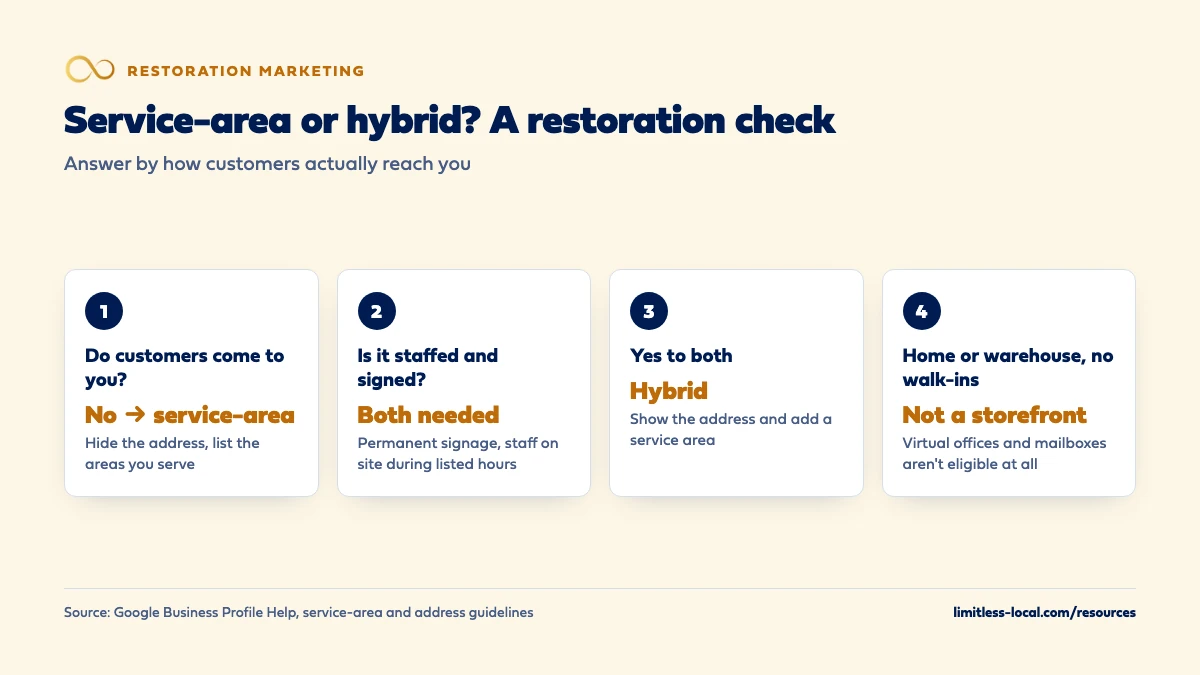
- You run it from home. Service-area business. Hide the address. Google’s guidelines use a plumber running a business from a residential address as the example of who should clear it.
- You have a warehouse or shop for trucks and equipment, but customers don’t come there. Service-area business. Signage on a warehouse doesn’t make it a storefront if nobody’s there to receive customers.
- You have a staffed office with your sign on the building, where customers do come in during set hours, maybe to sign paperwork, drop off documents or pick up cleaned contents. That can be a hybrid. Show the address and add a service area.
- You rent a mailbox or a virtual office. Neither is eligible as an address on Google at all.
The test isn’t whether you have a building. It’s whether customers can walk in and be served there during the hours you list. If you’re not sure, set up as a service-area business. It’s the safer choice for a business that does nearly all its work at the customer’s property.
What does Google require before I can show my address?
Google’s Guidelines for representing your business on Google set a clear bar for showing an address:
- The business should keep permanent, fixed signage with its name at the address.
- If you serve customers at your address and also set a service area, the location should be staffed by your team and able to receive customers during its stated hours.
- A rented mailing address you don’t operate from (a virtual office) isn’t eligible.
- An office at a co-working space only counts if it has clear signage, receives customers during business hours and is staffed by your people during those hours.
- P.O. boxes and mailboxes at remote locations aren’t acceptable.
If your setup doesn’t clearly meet that bar, don’t show the address. A profile at an address that doesn’t qualify puts the whole listing at risk, and with it every call Maps sends you.
What happens to my address when I hide it?
Your profile shows your service area instead of a street address. Google’s page Manage your business address says you should only hide the address if you’re a service-area business, and that if you hide it without entering a service area, Google picks a local area for you, which you can edit later.
To hide it, go to your Business Profile, choose Edit profile, then Location, and turn off Show business address to customers. Your address stays on the profile for verification, and your service area is still measured from where you’re based. It just isn’t shown to the public.
That’s often a plus for restoration owners. If you work from home, you don’t want your house on Maps with a pin homeowners can drive to at midnight.
Curious what your marketing is actually booking?
Get a free visibility audit — no obligation, no sales pitch.
Will hiding my address hurt my Maps ranking?
Google’s page Tips to improve your local ranking says local results are mainly based on relevance, distance and popularity, where distance is how far each business is from the person searching. Google doesn’t say hiding your address changes that. Your business is still based where it’s based.
What a service area doesn’t do is stretch that distance. Adding towns 40 minutes away tells homeowners you’ll go there; it doesn’t make you rank as if your shop were in those towns. Most restoration companies show up strongest near their base and weaker at the edges, whichever setting they use.
The things that do move rankings are the same either way: the right categories, a complete profile, steady reviews and a website that backs it all up. Optimizing a restoration company’s Google Business Profile covers those, and which Google categories a restoration company should pick goes deeper on the first one.
How should I set my service areas?
Google’s rules for service areas:
- You can set up to 20 service areas, using cities, postal codes or other areas.
- You can’t set a radius around your business. If you set one up that way in the past, you can’t edit it and need to switch to named areas.
- The overall area shouldn’t stretch farther than about two hours of driving time from where you’re based, though larger areas may suit some businesses.
- Be as specific and accurate as you can.
- Approved edits can take up to 48 hours to show.
For restoration, build the list from drive time, not from where you’d take a job if someone begged. Start with the towns your crews reach fastest at night, add the next ring out, and stop where your arrival time stops being honest. Twenty slots goes further with towns than with ZIP codes, so in most markets use town names and save ZIP codes for big cities you only partly cover.
Your ad targeting is a separate setting and can be tighter or wider. How tight to set your restoration ad service area covers the ads side.
Can I have a separate profile for each shop or branch?
Only if each one is a real, separate location. Google allows one service-area profile for a business without a storefront. If you have different locations, each with its own staff and its own service area, you’re allowed one profile for each.
What isn’t allowed is a second profile for the same business to cover more towns, or a profile at an address where nobody works. There should be only one profile per business, and duplicates can cause problems with how your information shows on Maps and Search.
If you’re opening a real second shop, give it its own crew, its own phone number and its own service area, with no overlap with the first. Marketing a second restoration location walks through setting it up.

How do I verify a restoration service-area business?
Often by video. Google’s page Verify your business with a video recording says it works for storefronts, service-area businesses and hybrids, and the video must be recorded live on a phone in one unbroken take. For a service-area business, it needs to show three things:
- Where you operate: street signs or landmarks at your business address. If you run the business from home, signs and landmarks in your immediate neighborhood work.
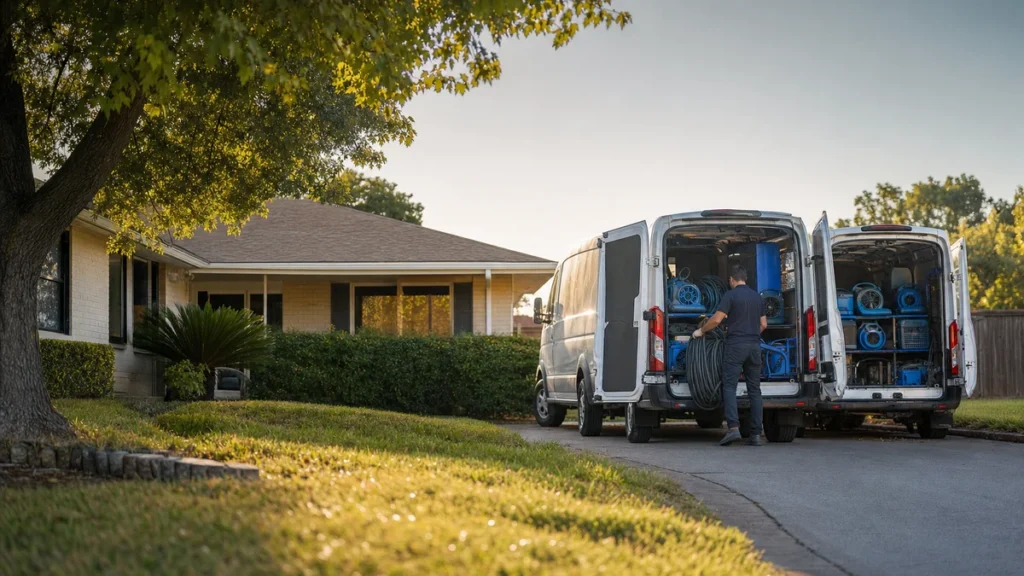
- That the business exists: your professional tools and equipment. For restoration that’s easy: dehumidifiers, air movers, extractors, moisture meters, branded shirts.
- That you manage it: something only you can do, like unlocking a van with your business branding, or a permit, invoice or utility bill that matches your profile name.
Plan the shot before you hit record: walk from the street sign to the van, open it, show the equipment, show the paperwork. A branded truck is one of the simplest proofs a restoration company has.
What hours should a restoration service-area business list?
Google asks for your regular customer-facing hours. For a restoration company with no walk-in office, those are the hours when the phone is answered and a crew can be sent.
If a real person answers and dispatches around the clock, Open 24 hours is the honest setting and it matters, because homeowners searching at night look for companies that are open. If nights go to voicemail, don’t list 24 hours. A homeowner who calls a “24-hour” company and reaches a recording will call the next one, and that missed call costs more than the listing gained. If you only take night calls for active water emergencies, say that in your business description and on your website.
Use special hours for holidays you’re closed, and update them before each holiday rather than after.
What should I check when I switch from showing an address to a service area?
Switching is a few clicks, but tidy up around it:
- Hide the address and add service areas in the same edit, so Google doesn’t pick an area for you.
- Expect a review. Profile changes usually show in about 10 minutes but can take up to 30 days if they’re held for review.
- Keep your name and phone the same on your website and directories. Your street address can come off pages where it was only there for show, but don’t let different versions float around.
- Update your website footer and contact page to list the towns you serve, not a street address customers can’t visit.
- Check your ads. If you run Local Services Ads through Google Ads, your business name, address and hours sync one way from your Business Profile, while ad service areas are set separately.
Keeping a restoration company’s name, address and phone consistent covers the directory side in detail.
Want to see where your company stands?
A free visibility audit shows where you show up on Google, Maps and AI answers, and what it's costing you in calls.
What's different about the service-area setting for restoration
The work always happens on site. Unlike a pool supply store or a showroom, restoration almost never serves customers at its own address, so the service-area setup is the natural fit.
Warehouses fool people. Many restoration companies have a real building full of equipment, with a sign on it. That still isn’t a storefront unless customers are received there during listed hours.
Nights matter more than in most trades. Your hours and your service area should match what you can do at night, when emergency water calls come in.
Storms pull you outward. After a big event you may work far outside your normal area. Don’t stretch your profile’s service area for a few weeks of storm work; use ads for that and keep the profile true to your everyday area.
A worked example: three restoration setups
These companies are made up to show how the rules apply.
Company A runs from the owner’s house, with two vans parked in the driveway and equipment in the garage. It’s a service-area business: hide the address, list the towns the crews reach fastest, and verify on video with neighborhood street signs, the vans and the equipment.
Company B leases a warehouse with a sign over the bay door. Crews load up there each morning, but no customer has ever walked in. Still a service-area business. The sign doesn’t change that.
Company C has a staffed front office in a small business park, open weekdays, where homeowners sign paperwork and pick up cleaned contents. That’s a hybrid: show the address, list weekday hours for the office and add a service area.
If you’d like this handled for you, Google Business Profile management is in every package. Essentials, at $3,500 a month, covers one location and syncs your name, address and phone across 50+ directories; Growth, at $4,500 a month, covers SEO for up to two locations, and Scale handles more.
Frequently asked questions
Can a restoration company list its home address on Google?
You can use it for verification, but don’t show it. A service-area business run from a residential address should clear the address from the profile.
Can I use a radius for my Google service area?
No. Google no longer lets you set a service area as a radius around your business. Use towns, ZIP codes or other named areas instead.
Do I need a separate profile for each town I serve?
No, and you shouldn’t make one. A service-area business gets one profile for the whole area it serves. Extra profiles are only for real locations with their own staff.
Will customers trust a profile with no address?
Most homeowners expect a restoration crew to come to them, so a missing address rarely puts them off. Reviews, job photos and a clear list of towns do more for trust than a street address.
Should my restoration website show my street address?
If customers don’t visit, list the towns you serve and a local phone number instead. Keep your business name and phone the same everywhere they appear.
Can I list towns more than two hours away?
The overall area shouldn’t be more than about two hours’ drive from your base, though larger areas may be appropriate for some businesses. For emergency work, a tighter area is usually more useful anyway.
Key takeaways
- Most restoration companies are service-area businesses: hide the address and list where you work.
- Show an address only for a signed, staffed location customers can visit during listed hours.
- A home, a warehouse with no walk-ins, a virtual office or a mailbox isn’t a storefront.
- List up to 20 towns or ZIP codes, built from drive time, within about two hours of your base.
- One profile per real location; never a second profile to reach more towns.
- List 24-hour hours only if a person really answers and dispatches at night.
Not sure what's working right now?
Start with a free visibility audit: rankings, Google profile, reviews and tracking, checked against your service area.
More in this section
- How should a restoration company market to commercial properties?
- How should a restoration company market a second location?
- How does a restoration company show up in near me searches?
- How should a restoration company market to real estate agents?
- Should a restoration company run Google Ads, LSAs or both?
Sources
- Manage your service areas for service-area & hybrid businesses — Google Business Profile Help
- Guidelines for representing your business on Google — Google Business Profile Help
- Manage your business address — Google Business Profile Help
- Tips to improve your local ranking on Google — Google Business Profile Help
- Verify your business with a video recording — Google Business Profile Help
- Local Services Ads transition to Performance Max campaigns with pay-per-lead goals — Google Ads Help