
How do I use remarketing for HVAC leads without wasting spend?
- How should an HVAC company set up remarketing so it books jobs, not just impressions?
- What is remarketing for an HVAC company?
- Which HVAC jobs is remarketing actually good for?
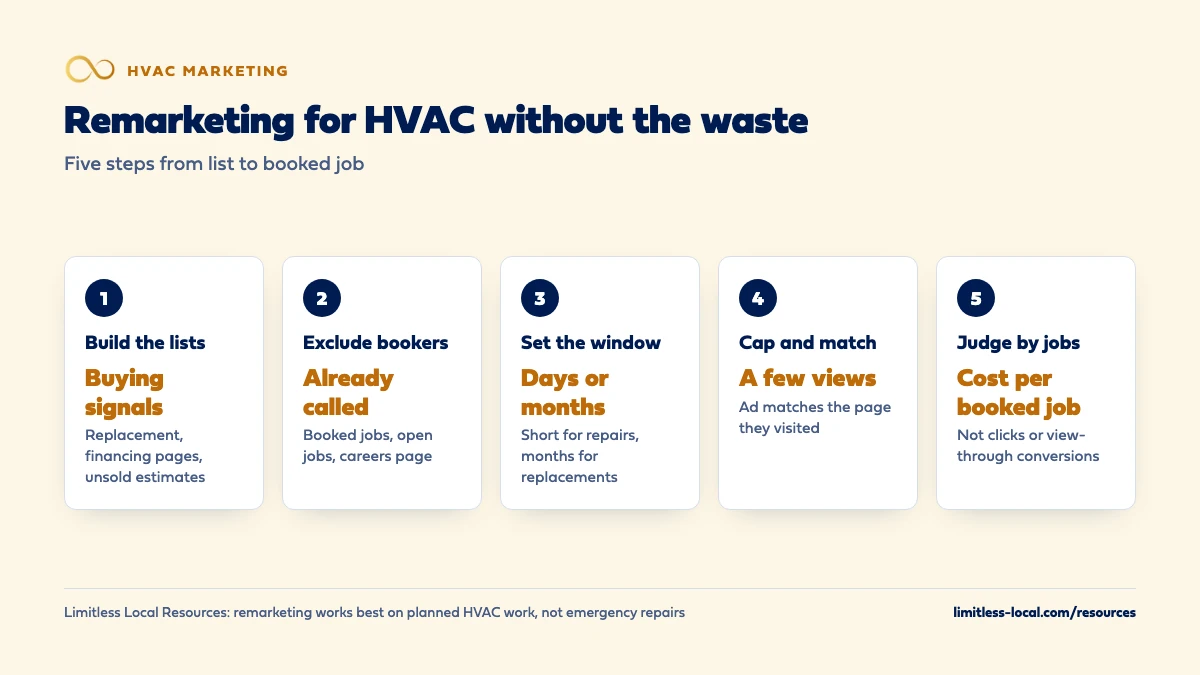
- Step 1: Who should go on my remarketing lists?
- Step 2: Who should I leave off my lists?
- Step 3: How long should someone stay on a remarketing list?
- Is my website busy enough to run remarketing?
- Step 4: How often should the same homeowner see my ads?
- Step 5: What should an HVAC remarketing ad say?
- Should I remarket on Google, Facebook or both?
- How much should an HVAC company spend on remarketing?
- How do I know remarketing is booking jobs and not just taking credit?
- When should an HVAC company skip remarketing?
- What's different about remarketing for HVAC companies
- A worked example: is remarketing paying for itself?
- Frequently asked questions
- Key takeaways
- More in this section
- Sources
The short version
- Remarket to planned work (replacements, heat pumps, tune-ups), not emergency repairs.
- Build lists from the pages that show buying interest, and exclude people who already booked.
- Set list length to the decision window: short for repairs, months for replacements.
- Cap frequency, keep the budget small, and judge it by booked jobs.
For HVAC owners who want to bring back the homeowners who looked at a replacement, a heat pump or a tune-up and left without calling.
Get a free visibility audit · Book a growth call
How should an HVAC company set up remarketing so it books jobs, not just impressions?
Use remarketing only on people who already showed real interest, like visitors to your replacement, heat pump or financing pages and past customers due for a tune-up, and leave out anyone who already called or booked. Match how long people stay on a list to how long the job takes to decide: days for a repair, months for a new system. Cap how often the same person sees your ads, judge the results by booked jobs instead of clicks, and skip remarketing until your site gets enough visitors to fill a list.
That last step is the one most remarketing skips: tying the ad back to a booked job. Meta remarketing is part of the Growth tier of our HVAC marketing packages, alongside Google Ads, Local Services Ads and call tracking that shows which ads became jobs; our local ads page covers how we run paid campaigns. For the wider picture, the HVAC lead generation guide covers every channel, and the HVAC marketing questions library goes question by question.
What is remarketing for an HVAC company?
Remarketing means showing ads to people who already interacted with your business: they visited your website, called, filled out a form, or hired you before. Instead of paying to reach strangers, you’re reminding someone who already knows your name.
Google now calls these lists “your data” segments. A small piece of code on your site adds visitors to a list based on rules you set, such as “visited the heat pump page,” and you choose how long each person stays on it (How your data segments work). Meta does the same thing with website custom audiences built from the Meta Pixel. Either way, you’re picking who sees the ad based on what they already did, which is what makes remarketing cheap to waste and cheap to get right.
Which HVAC jobs is remarketing actually good for?
Remarketing works best when the homeowner takes time to decide. That’s most of the high-ticket side of HVAC:
- System replacements. Nobody buys a new AC on the first page view. They compare quotes, talk to a spouse and look at financing.
- Heat pumps and upgrades. Same story, often with more research and more questions.
- Indoor air quality add-ons and other planned upgrades people browse but don’t need today.
- Tune-ups and maintenance plans. Past customers already trust you, and a reminder before the season is welcome.
It’s a poor fit for emergency repairs. Someone with no cooling on a hot afternoon calls whoever answers in the next ten minutes. By the time your remarketing ad finds them, the tech has already left their driveway. That’s the same reason Facebook ads work better for planned work than for emergency calls.
Step 1: Who should go on my remarketing lists?
Build lists from actions that show buying interest, not from everyone who ever landed on the site. Good starting lists for an HVAC company:
- Replacement and heat pump page visitors who didn’t call or submit a form.
- Financing page visitors. Someone reading your financing options is pricing out a system.
- People who started an estimate form and didn’t finish it.
- Unsold estimates. Homeowners who had a comfort advisor out and haven’t signed.
- Past customers who are due for a tune-up or whose system is getting old.
The last two come from your customer list, not your website. Google’s rules say you may only upload customer information you collected directly, from your own website, calls, jobs or other first-party contact, and your privacy policy has to say you share customer data with third parties to perform services for you (Customer Match policy). Bought lists are out.
A smaller HVAC account should know one more limit before it plans around a customer list on Google. Using Customer Match to target ads requires 90 days of Google Ads history and more than $50,000 in lifetime spend. Every account in good standing can still use those lists to exclude people and in observation mode. Meta’s customer list audiences are usually the simpler way to reach past customers.
Step 2: Who should I leave off my lists?
This is where most of the waste hides. Exclude:
- Anyone who already called, booked or converted. Paying to remind someone who’s already on your schedule is pure waste.
- Customers with an open job, so a homeowner you’re installing for this week doesn’t see your replacement ad.
- Careers page visitors. Job seekers aren’t buying a furnace.
- Current maintenance plan members, from any ad selling the plan.
- People outside your service area. Your location settings should match where your trucks actually go.
Set exclusions before the campaign goes live, not after you notice the waste. And keep the customer list fresh: an exclusion list from last spring doesn’t know who booked last week.
Step 3: How long should someone stay on a remarketing list?
Match the list length to how long the decision takes. Google’s default membership duration is 30 days, the maximum is 540 days, and Google’s own advice is that the duration should be similar to the length of your sales cycle. Each new visit resets the clock.
For HVAC, that usually looks like this:
- Repair pages: a few days at most. The need is urgent, and it’s solved fast, by you or someone else.
- Replacement, heat pump and financing pages: a few months. Replacement shoppers often get several quotes and wait for the right moment.
- Tune-up reminders: long enough to reach past customers before the next cooling or heating season.
A list that’s too long keeps paying to chase someone who bought from a competitor weeks ago. A list that’s too short drops the replacement shopper right when they’re ready to decide.
Curious what your marketing is actually booking?
Get a free visibility audit — no obligation, no sales pitch.
Is my website busy enough to run remarketing?
Maybe not yet. Google won’t serve remarketing ads on Search, the Display Network or YouTube until a list has at least 100 active visitors or users within the past thirty days, and a brand-new list can take 48 to 72 hours to fill. If only a handful of people visit your replacement page each month, that list may never get big enough to run.
Two practical moves for a smaller site:
- Install the Google tag and the Meta Pixel now, even if you won’t run remarketing for months. Meta’s website audiences start filling from the day you create them and don’t backfill earlier visitors, so create the audiences when you install the pixel (Create a website custom audience). Every week without them is a week of visitors you can’t reach later.
- Start with broader lists, such as all service page visitors, and split them by job type once there’s enough traffic.
If your site doesn’t get much traffic at all, the money usually does more good on the pages and ads that bring people in. Whether you need landing pages for Google Ads is a better place to start.
Step 4: How often should the same homeowner see my ads?
Less often than the platforms would happily charge you for. A replacement shopper seeing your ad a few times over a week or two is a reminder. Seeing it every time they open an app is how you become the company they’re annoyed with.
In Google Ads, you can set a frequency cap on Display and Video campaigns to limit how many times your ads appear to the same person; on Video campaigns you pick the window, per day, week or month (Use frequency capping). Demand Gen campaigns don’t support frequency capping, so check which campaign type you’re in before assuming a cap is on. On Display, you can only add the cap after the campaign is created, from its settings.
Start conservative, watch the booked jobs, and only loosen the cap if the list is large and the results hold up.
Step 5: What should an HVAC remarketing ad say?
Pick up where the visit left off. The ad should match the page that put someone on the list:
- Replacement page visitors: a clear next step, like a free in-home estimate, plus your financing options if you offer them.
- Financing page visitors: what monthly payments look like and how easy it is to apply.
- Unsold estimates: reviews from homeowners who had the same system installed, and a reason to call back this month.
- Past customers: a seasonal tune-up reminder or your maintenance plan.
Skip anything that sounds like “We saw you looking at…” That reads as creepy, not helpful. Make the call button and phone number obvious, and send clicks to the page that matches the ad, not your homepage. If replacements and repairs need different messages, marketing replacements differently from repairs covers the split.

Should I remarket on Google, Facebook or both?
Both platforms reach people who already know you, but in different moments:
- Google search remarketing lets you show up, or bid higher, when someone on your list searches again. A replacement shopper who comes back searching “heat pump installation” is about as warm as a lead gets.
- Google Display and YouTube put your ad in front of them while they read or watch something else.
- Facebook and Instagram reach them in their feed, which suits reviews, before-and-after photos and seasonal offers.
For most HVAC companies, start where your traffic comes from. If most visitors arrive from Google search, search remarketing is the obvious first test. If you already have a good customer list and photos of finished installs, Meta is often easier to get going.
How much should an HVAC company spend on remarketing?
Keep it a small slice of the total ad budget. Remarketing can’t spend much anyway: the list is only as big as the people who visited, and pushing more money at a small list just shows the same people more ads.
A sensible way to size it is to start small, run it for a full month, and then look at cost per booked job next to your other channels. If remarketing books replacement estimates cheaper than your search ads, give it a little more room. If it doesn’t, it was a cheap lesson. The full budget math for your main campaigns is in how much an HVAC company should spend on Google Ads.
How do I know remarketing is booking jobs and not just taking credit?
Remarketing has a reporting trap. The people on your lists already knew you, so some of them would have called anyway. Ad platforms will happily count those calls as theirs.
Three ways to keep it straight:
- Count booked jobs, not platform conversions. Give remarketing its own tracking number or tagged link, and make sure the lead source is filled in on every job in ServiceTitan, Housecall Pro or Jobber.
- Watch view-through numbers with a raised eyebrow. A conversion that happened after someone merely saw an ad is weak evidence on its own.
- Run a simple pause test. Turn remarketing off for a few weeks in a steady period and see whether replacement calls actually drop.
Tracking whether your marketing is paying off walks through the setup that makes this possible.
When should an HVAC company skip remarketing?
Hold off if any of these are true:
- Your site is too quiet to build a list that serves.
- Almost all your work is emergency repair, with few replacements or plans to sell.
- You can’t tell which calls and jobs came from which ads.
- Calls are going to voicemail. Remarketing just brings back more people to a phone nobody answers.
Each of those is something to fix first, and none of them is fixed by more ads. If you’re not sure where the leak is, figuring out whether it’s your ads, website or follow-up is the better next step.
Not sure which of these is costing you jobs?
A free visibility audit checks the Google profile, reviews, site and tracking, and shows what to fix first.
What's different about remarketing for HVAC companies
Two very different buying speeds. A no-cool call is decided in minutes; a system replacement can take weeks of quotes and financing talks. Remarketing belongs almost entirely to the slow side, so build lists around replacement, heat pump and financing pages.
Seasons set the calendar. Tune-up reminders to past customers do best just before the first heat wave or cold snap, while your schedule still has room. Once peak season fills the board, pull back so you’re not paying for calls you can’t run.
Unsold estimates are your warmest list. A homeowner who already had someone in their house and got a price is closer to buying than any website visitor. Keep that list current from your field software.
Maintenance plans renew. Members coming up for renewal and past customers with aging equipment are natural lists, as long as the data came from your own customers.
A worked example: is remarketing paying for itself?
These numbers are made up to show the math, not a benchmark for your market. Say you spend $600 in a month remarketing to replacement and financing page visitors. Your tracking shows 12 calls from those ads, and the office books 6 in-home replacement estimates from them.
That’s $600 divided by 6, or $100 per booked estimate. If your comfort advisor sells 2 of those 6, each sold system cost $300 in remarketing spend. On a replacement job, that’s usually a cost your margins can carry.
Now the reality check: if a pause test shows replacement calls barely drop when remarketing is off, some of those calls would have come anyway, and the real cost per job is higher than the platform says.
Frequently asked questions
Is remarketing the same as retargeting?
Yes. They’re two names for the same thing: showing ads to people who already visited your site, called or bought from you. Google now labels these lists “your data” segments.
Can I remarket to people who called but didn't book?
Yes, if you collected their details yourself on the call. Add them to a customer list from your field software and use it on Meta, or on Google once your account qualifies for Customer Match targeting.
Does remarketing work for emergency AC and furnace repair?
Rarely. Emergency customers book the first company that answers, usually within the hour, so a remarketing ad arrives too late. Spend on planned work instead.
What happens to my lists if I stop remarketing for a while?
Google keeps open lists collecting visitors, but a list you don’t use in any campaign for 540 days is closed automatically. You can reopen it at any time and it starts adding people again.
Do I need both the Google tag and the Meta Pixel?
Only if you plan to remarket on both platforms. Each one builds lists only from its own code, so install the one for each platform you’ll use, and do it early so the lists start filling.
Can I use a list of homeowners I bought from a data company?
Not on Google. Its Customer Match rules only allow customer information you collected directly from people who dealt with your business.
Key takeaways
- Remarketing fits planned HVAC work like replacements, heat pumps and tune-ups, not emergency repairs.
- Build lists from pages that show buying interest, and exclude anyone who already called or booked.
- Set list length to the decision window: days for repairs, months for replacements.
- Google needs at least 100 active users in the past thirty days before a list can serve, so install tracking early.
- Cap how often the same person sees your ads, and judge remarketing by booked jobs, with a pause test to check the credit.
Want a second set of eyes on your setup?
We'll look at how you show up locally and where calls are leaking, then send you a plain-English breakdown.
More in this section
- How do I avoid wasting money on shared HVAC leads?
- How can an HVAC company get more leads?
- How do I track whether my HVAC marketing is paying off?
- Which marketing channels give an HVAC company the best leads?
- How should an HVAC company manage leads and customer follow-ups?
Sources
- How your data segments work — Google Ads Help
- Customer Match policy — Advertising Policies Help
- Use frequency capping — Google Ads Help
- Create a website custom audience — Meta Business Help Center