
What content does my HVAC website need to attract leads?
- What should an HVAC company actually write on its website to bring in calls?
- What kinds of content actually bring HVAC leads in?
- What should each HVAC service page say?
- How do I write in the words homeowners actually search?
- What content proves to a homeowner that we're the real deal?
- How should I use reviews on my website?
- What should my city and service-area content say?
- Which homeowner questions should my content answer before they call?
- Should I put prices on my HVAC website?
- What content turns a visitor into a call?
- Does the same content help me show up in AI answers?
- Who should write the content, and can AI help?
- What's different about website content for HVAC companies
- A worked example: a first content plan for a small HVAC site
- Frequently asked questions
- Key takeaways
- More in this section
- Sources
The short version
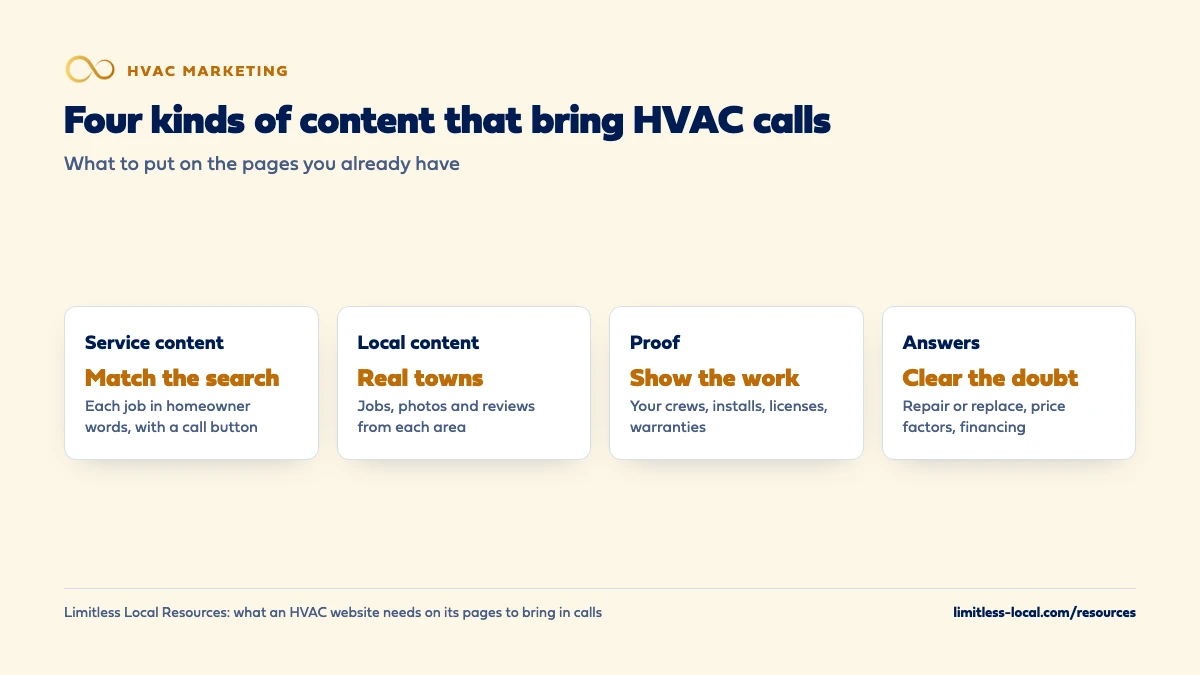
- Service content: each job described the way homeowners search for it.
- Local content: real jobs, real towns, not one page copied twenty times.
- Proof: reviews, photos of your crews and installs, licenses and warranties.
- Answers: repair or replace, price factors, financing, what a visit looks like.
For HVAC owners whose site has the right pages but still doesn’t bring in calls, and who want to know what to put on those pages.
Get a free visibility audit · Book a growth call
What should an HVAC company actually write on its website to bring in calls?
An HVAC website attracts leads with four kinds of content: service content written in the words homeowners search, local content that shows real work in the towns you serve, proof such as reviews, photos of your crews and finished installs, and answers to the questions homeowners ask before they call, like repair or replace, what affects the price and whether you offer financing. All of it should come from your own work rather than copied or mass-produced text. And every page needs an obvious way to call or book, because content that brings visitors in only counts when they pick up the phone.
That mix is what we build into HVAC websites: service pages, local pages and proof that come from your actual work, with call and booking buttons on every page. A themed website is $3,750, or $3,000 with any Limitless Engine package, with up to 25 pages; custom sites start at $5,000. You can see how we build them on our website page, and how the site fits the rest of your HVAC marketing on the industry page. The HVAC marketing guide covers every channel, and the HVAC marketing questions library goes one question at a time.
What kinds of content actually bring HVAC leads in?
Most HVAC sites have the right pages and the wrong words on them. The home page says “quality comfort solutions,” the AC repair page is three sentences long, and nothing on the site looks like it came from a real company with real trucks.
Content that brings in calls does four jobs:
- It matches the search. A homeowner types what’s wrong (“AC blowing warm air”) and lands on a page about exactly that.
- It shows you’re local. Real towns, real jobs, real crews.
- It proves you’re good. Reviews, photos, licenses, warranties.
- It answers the questions that stall a call. Cost, financing, timing, what happens on the visit.
If you’re still deciding which pages to have, start with what pages an HVAC company website should have. This page is about what goes on them.
What should each HVAC service page say?
A service page should read like a good CSR explaining the job on the phone. For AC repair, furnace repair, heat pumps, replacements and maintenance plans, each page should cover:
- The problems it fixes, in homeowner words: not cooling, short cycling, strange noises, a furnace that won’t light.
- What you do, step by step, from the diagnostic to the fix.
- Which systems and brands you work on, and any you don’t.
- How fast you can get there, including same-day and after-hours if you offer them.
- How pricing works, even if you don’t list prices: a flat diagnostic fee, upfront quotes, financing.
- Warranties on parts and labor.
- A call button and a booking option near the top and again at the bottom.
Write it once, for that one service. A page that tries to cover AC, furnaces and ductwork at once doesn’t answer anybody well. Getting HVAC service pages to rank for repair and install covers how to split repair and replacement content.
How do I write in the words homeowners actually search?
Your techs say “failed capacitor” or “condenser fan motor.” Homeowners type “AC fan not spinning” or “outside unit humming but not running.” Google’s SEO Starter Guide makes the same point: think about the words people might search for, because people who know a topic well search differently from people who are new to it. It also says Google’s language matching is good enough that you don’t need every variation spelled out.
So write the page in homeowner language first, then explain the technical cause. A few easy ways to find the words:
- Ask your CSRs what callers say in the first few seconds of a call.
- Read your call recordings or booking notes for a week.
- Look at the questions in your Google reviews and Google Business Profile messages.
What content proves to a homeowner that we're the real deal?
A homeowner choosing who to let into the house is looking for proof that you exist, you’re local and you do good work. The content that shows it:
- Photos of your own crews, trucks and installs. Not stock photos. A clean condenser on a new pad, a tidy attic install, your tech at the door.
- Short job stories. “Two-story home in Cedar Park, upstairs never cooled below 80, we found…” A few sentences, a photo, the town.
- Licenses, insurance and certifications, stated plainly.
- The warranties you actually offer, in writing.
- Your team. Names and faces of the people who’ll show up.
- How long you’ve been in business and who owns it.
Google’s guidance on helpful, people-first content asks whether content clearly shows first-hand expertise, the kind that comes from actually doing the work. An install photo with the town and the problem you solved does exactly that, and no competitor can copy it.
How should I use reviews on my website?
Use them where the decision happens. A review about a fast AC repair belongs on the AC repair page. A review about a smooth replacement and fair financing belongs on the replacement page. A wall of every review on one page helps less than three well-placed ones on each service page.
Keep it honest. The FTC’s final rule on fake reviews and testimonials prohibits creating, buying or selling fake reviews, including ones from people who never used the business, and offering incentives conditioned on a positive or negative review. It also bars presenting a review section as showing all or most reviews when negative ones have been suppressed.
In practice that means quoting real customers, with their first name and town if they’re fine with it, and linking to your Google reviews so homeowners can see the full picture. A 4.8 with a few honest complaints and good replies often reads as more trustworthy than a perfect wall of praise.
Curious what your marketing is actually booking?
Get a free visibility audit — no obligation, no sales pitch.
What should my city and service-area content say?
Only what’s true and specific to that town. A city page that swaps the town name into the same paragraph is exactly what Google’s spam policies describe as doorway abuse: pages targeted at specific regions or cities that funnel people to one page, or substantially similar pages built to rank for similar searches.
Good local content has things only you can say:
- Jobs you’ve done there, with photos.
- What’s common in that area: older homes with original ductwork, a newer subdivision with builder-grade systems, a town where heat pumps are common.
- How fast you can get there and which crew usually covers it.
- Reviews from customers in that town.
If you can’t say anything real about a town yet, it’s better to list it on your service-area page than to build a thin page for it. Building HVAC city pages without looking like spam walks through how.
Which homeowner questions should my content answer before they call?
The ones that make a homeowner hesitate. If your CSRs hear the same question every day, the answer belongs on your site. The usual list for HVAC:
- Should I repair this or replace it?
- What affects the price of a new system?
- Do you offer financing?
- What does a maintenance plan include, and is it worth it?
- Do you work nights and weekends, and does that cost more?
- What happens when your tech shows up?
- How long does a replacement take?
Answer each one on the page where it comes up: repair-or-replace on your replacement page, plan details on your maintenance page. Company-wide questions like hours and payment can go on one FAQ page. Whether your HVAC website needs an FAQ page covers how to split them.
Should I put prices on my HVAC website?
Put up what you can stand behind. Most HVAC companies can’t list a replacement price, because it depends on the home, the system and the ductwork. But almost every company can explain how pricing works, and that’s what homeowners are really after.
- Diagnostic or trip fee: if it’s flat, say so, and say whether it’s credited toward the repair.
- Repairs: say you quote upfront before any work starts, if you do.
- Replacements: explain what changes the price, such as system size, efficiency, ductwork and access, and that you give a written quote after an in-home visit.
- Financing: say you offer it and how to apply.
- Maintenance plans: list the price if it’s fixed.
Explaining how you price filters out shoppers who were never going to book and gives serious homeowners the confidence to call. It also saves your CSRs the same explanation over and over all summer.

What content turns a visitor into a call?
Content gets people to the page. A few plain elements get them to pick up the phone:
- Your phone number at the top of every page, tappable on mobile.
- A short line on what to do right now: “No cool? Call now, or book online for today.”
- Your hours, and what happens after hours.
- A short booking form: name, phone, address, what’s wrong.
- Financing mentioned near the replacement content, not buried in the footer.
- A clear next step at the end of every page.
None of this is complicated, but it’s where a lot of sites lose good visitors. What an HVAC website should include to turn visitors into calls covers the design side in more detail.
Does the same content help me show up in AI answers?
Yes. Google’s page on AI features and your website says that to be shown as a supporting link in AI Overviews or AI Mode, a page has to be indexed and eligible to show in Google Search with a snippet, and that there are no additional technical requirements. The same SEO basics, like helpful, people-first content and good internal links, still apply.
In practice, the content that wins a homeowner also gives an AI answer something to quote: a clear answer to “how much does an AC diagnostic cost with you,” a plain list of the towns you cover, a direct explanation of when repair stops making sense. Vague slogans give it nothing to work with.
Who should write the content, and can AI help?
The knowledge has to come from you and your team; the typing can come from anywhere. A good routine: the owner or lead tech records a short voice memo answering one question, and someone turns it into a page. The details in that memo, like the brands you see fail, the towns with old ductwork and the questions homeowners ask, are what make the page worth reading.
AI tools can help draft and tidy. Where they go wrong is volume: pages churned out on every topic, or rewrites of what others already said with nothing added. Twenty generic AI posts about “the benefits of HVAC maintenance” will do less than three pages built from what your techs saw last week.
Keep it current, too. Update pages when your services, hours, warranties or financing change. Whether your HVAC website needs a blog covers when ongoing articles start to make sense.
Want to see where your company stands?
A free visibility audit shows where you show up on Google, Maps and AI answers, and what it's costing you in calls.
What's different about website content for HVAC companies
Two kinds of visitor. Someone with a dead AC in July wants a phone number and a time slot, fast. Someone planning a replacement wants to read, compare and come back. Your repair pages should be short and call-first; your replacement pages can be longer, with financing, what affects the price and what the install day looks like.
The season changes what people read. Cooling content gets read in late spring and summer, heating content in fall. Refresh your AC pages, photos and offers before the first heat wave, and your furnace and heat pump pages before the first cold snap, not after.
Maintenance plans need their own case. A plan page has to explain what’s included, how many visits a year, and what members get, such as priority scheduling or repair discounts. It’s one of the few pages that sells a recurring relationship, so give it real detail.
A worked example: a first content plan for a small HVAC site
This plan is made up to show how the pieces fit, not a template every shop should copy. Say a four-truck HVAC company has a 10-page budget for new or rewritten pages, which is the size of the content sprint in our Essentials package. One way to spend it:
- 6 service pages: AC repair, AC replacement, furnace repair, furnace replacement, heat pumps and maintenance plans, each written from what customers actually say on the phone.
- Two local pages: the two towns where the company runs the most jobs, each with real job stories, photos and reviews from that town.
- One proof page: team, licenses, warranties and a set of install photos.
- One financing and pricing page: how quotes work, the diagnostic fee, and how to apply for financing.
That uses the full 10. After that, Essentials adds 2 blog posts a month, which is room to answer one repair question and one replacement question each month, built from what the techs are seeing that season.
Frequently asked questions
How long should an HVAC service page be?
Long enough to answer what a homeowner needs to call you, and no longer. There’s no magic word count: cover the problems, the fix, timing, pricing and warranty, then stop.
Can I use the manufacturer's product descriptions on my site?
You can mention the brands you install, but copying their text adds nothing only you could say. Write about how you install and service those systems instead.
Do stock photos hurt my HVAC website?
They don’t prove anything. Homeowners can tell a stock photo from your truck in their neighborhood, so swap them for real photos of your crews and installs as you take them.
Should every service page have the same layout?
A consistent layout is fine and makes the site easy to use. The words inside it should be different on every page, written for that one job.
How often should I add new content to my HVAC website?
Update service pages whenever your offer changes and refresh seasonal pages before each peak. New articles help once the core pages are solid, but publishing just to look fresh won’t help.
Do I need video on my HVAC website?
It isn’t required. A short clip of your tech explaining a common problem can work well on a service page, but good words and real photos come first.
Key takeaways
- Content that books calls matches the search, shows you’re local, proves your work and answers the questions that stall a call.
- Write service pages in homeowner words first, then explain the technical cause.
- Real photos, job stories and well-placed reviews prove what stock content can’t.
- City content needs real local detail, or it reads as a doorway page.
- Explain how you price, even if you can’t list a replacement price.
- Every page needs an obvious way to call or book.
Not sure what's working right now?
Start with a free visibility audit: rankings, Google profile, reviews and tracking, checked against your service area.
More in this section
- What should an HVAC website include to turn visitors into calls?
- How can an HVAC company get more leads?
- What pages should an HVAC company website have?
- Does SEO or website design matter more for HVAC leads?
- Which marketing channels give an HVAC company the best leads?
Sources
- SEO Starter Guide: The Basics — Google Search Central
- Creating Helpful, Reliable, People-First Content — Google Search Central
- Spam Policies for Google Web Search — Google Search Central
- AI Features and Your Website — Google Search Central
- Federal Trade Commission Announces Final Rule Banning Fake Reviews and Testimonials — Federal Trade Commission