
How do I build a pool company website that ranks in search?
- What's the right build order for a pool builder website that shows up on Google?
- What makes a pool company website rank in search?
- Step 1: Plan the pages before you design anything
- Step 2: Build one strong page for each pool type and service
- Step 3: Add pages for the towns you build in
- Step 4: Turn finished builds into project pages
- Step 5: Write titles and headings that say what each page is about
- Step 6: Make it fast and easy to use on a phone
- Step 7: Make requesting a consultation easy from every page
- Step 8: Keep your business details the same everywhere
- Step 9: Link your pages to each other
- Step 10: Launch it properly and keep it growing
- What's different about websites for pool builders
- A worked example: planning the pages for a pool builder site
- Frequently asked questions
- Key takeaways
- More in this section
- Sources
The short version
- Plan pages first: pool types and services, towns you build in, and project pages.
- Give every page a clear, unique title and heading that says what it's about.
- Make it fast, phone-friendly and easy to request a consultation from.
- Match your business details to your Google profile, submit the site and keep adding projects.
For pool builders planning a new website, or rebuilding an old one, who want it to show up when homeowners search for pools in their towns.
Get a free visibility audit · Book a growth call
What's the right build order for a pool builder website that shows up on Google?
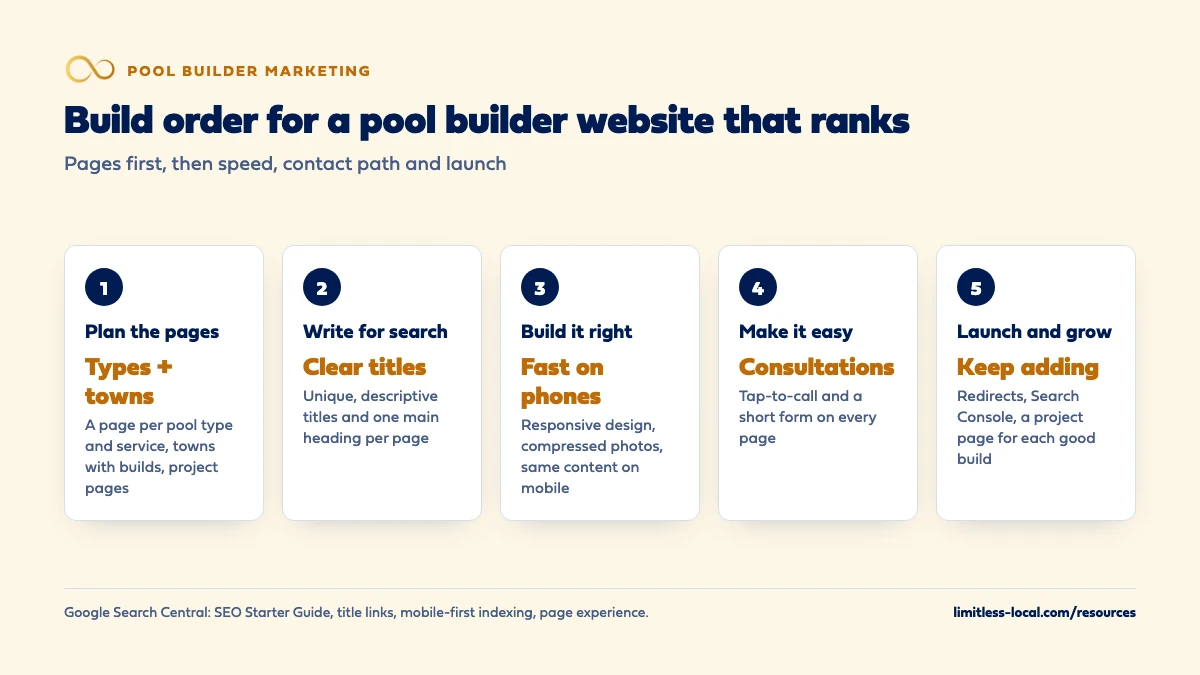
Plan the pages before the design: one strong page for each pool type and service you sell, a page for each town where you have real builds to show, and a project page for your best finished pools, each with clear titles, headings and photos. Build it to load fast and work well on a phone, make requesting a consultation easy from every page, and keep your business name, address and phone exactly the same as your Google Business Profile. Then link the pages together, submit the site in Search Console and keep adding project pages, because a site that ranks is one that keeps growing.
That build order is how we plan pool builder sites too. Our website builds start at $3,750 for a themed site of up to 25 pages ($3,000 with any Limitless Engine package), with custom sites from $5,000; themed sites take about 60 days, and every site goes from concept to launch in 100 days or less. The pool builder marketing page shows how the site fits with your Google profile and ads, and the pool builder marketing questions library covers the rest.
What makes a pool company website rank in search?
Three things, roughly in this order. Google has to be able to find and read your pages. Each page has to clearly match something homeowners search for, like a pool type, a service or a town. And the page has to be more useful than the other builders’ pages for that search, which for a pool builder mostly means real builds, real photos and clear answers.
Google’s SEO Starter Guide says creating content people find compelling and useful will likely influence your site’s presence in search results more than any of its other suggestions. A good-looking site with five thin pages won’t rank for much. A plain site with a strong page for every kind of pool you build, and photos of builds in each town, usually will.
One thing a website doesn’t control on its own is your spot on Google Maps. That comes mostly from your Google Business Profile and reviews, so build the site to support the profile, not replace it.
Step 1: Plan the pages before you design anything
Most pool websites start with a design and squeeze the content in later. Flip it. Write down every page the site needs first:
- Home page: who you are, what you build, where you build it.
- One page per pool type and service: fiberglass, gunite, vinyl, remodels, spas, outdoor living, whatever you sell and want more of.
- Town pages: for the areas where you have builds to show.
- A project gallery, plus individual pages for your best builds.
- About and credentials: your story, license, insurance and warranty.
- Process: how a build goes from consultation to first swim, with timelines and common questions.
- Contact: a consultation form, phone number and the areas you serve.
Give each page a short, descriptive web address with words that are useful to a visitor, so something like yoursite.com/fiberglass-pools/ beats a string of random numbers.
Step 2: Build one strong page for each pool type and service
These are the pages most likely to rank, because they match how buyers search once they’ve narrowed it down. A homeowner who’s decided on fiberglass wants to land on a page about fiberglass pools, not a general “our services” page.
Fill each page with things that are only true of that pool type: how you build it, how long it takes, what yards and budgets it suits, what’s included, and photos of ones you’ve built. If two pages would say the same thing with one word swapped, they should probably be one page. Whether a pool builder needs separate pages for each pool type goes deeper on when a type deserves its own page.
Step 3: Add pages for the towns you build in
Homeowners search “pool builder” plus their town, so town pages help you show up for those searches. But a town page only works if it says something real about building there: pools you’ve built nearby, local soil or permit quirks, HOA rules you deal with often, and how far your crews travel.
Start with the towns where you have the most builds and want the most work. A page for every town within an hour’s drive, each one a copy of the last with the name swapped, is the kind of thin page that won’t help and can hurt. For how many to build, see how many city pages a pool builder needs.
Step 4: Turn finished builds into project pages
Your builds are the best content you’ll ever have, and most pool sites waste them in a photo grid with no words. Give your best builds their own page with:
- The town and neighborhood (without the homeowner’s address).
- The pool type, size and features.
- What made the job interesting: a sloped yard, tight access, a tricky HOA.
- How long it took, from dig to first swim.
- A short quote from the homeowner, with their permission.
Put the photos right next to the text that describes them, since text near an image helps Google understand what the image is about, and give each one short, descriptive alt text. “Fiberglass pool with sun shelf in a sloped backyard” tells Google far more than a camera’s default file name.
Curious what your marketing is actually booking?
Get a free visibility audit — no obligation, no sales pitch.
Step 5: Write titles and headings that say what each page is about
The title of a page is often what Google shows as the headline in search results, so it’s worth getting right. Google’s guide to influencing title links recommends descriptive, concise titles, distinct for each page, and warns against keyword stuffing and repeated boilerplate text across pages.
For a pool builder, that means titles like “Fiberglass Pool Installation in [Town] | [Your Company]” on one page and “Pool Remodeling in [Town] | [Your Company]” on another, not “Pools | Pool Builder | Best Pools | Custom Pools” on all of them. Give each page one clear main heading near the top that matches the title. Writing website content for local keywords covers where the town and pool type belong on the page.
Step 6: Make it fast and easy to use on a phone
Most of your visitors will be on their phones, often standing in their own backyard. Google’s guide to mobile-first indexing says Google uses the mobile version of a site’s content for indexing and ranking. It recommends responsive design, where the same page adapts to any screen, and says the mobile site should have the same content as the desktop site.
Speed matters too. Google’s page on page experience says Core Web Vitals are used by its ranking systems, though good scores don’t guarantee your pages will rank at the top. For a pool site, the usual culprits are huge photo files, autoplay videos and heavy sliders. Compress photos, load the important content first, and test your key pages on a real phone over a cellular connection.
Step 7: Make requesting a consultation easy from every page
Ranking brings visitors. The site’s layout decides whether they become inquiries. On every page, a homeowner should be able to find:
- A tap-to-call phone number at the top.
- A short consultation form: name, phone, email, town and what they’re thinking about. Save the long questionnaire for after the first call.
- The towns you build in, so they know you’ll come to them.
- A clear next step at the end of every page, not just on the contact page.
Track every call and form so you know which pages bring inquiries. What a pool builder’s website forms and calls should include goes into the details.

Step 8: Keep your business details the same everywhere
Your business name, address and phone number should match exactly across your website, your Google Business Profile and your other listings. Put them in the site footer on every page, and link your website from your Google profile.
You can also add LocalBusiness structured data, a small block of code that describes your business. Google’s documentation on local business structured data says it can tell Google about details such as business hours. Use the same details as your Google profile, and test it with Google’s Rich Results Test before you rely on it.
Step 9: Link your pages to each other
Google mostly finds pages by following links from pages it already knows, and links tell visitors where to go next. Build those paths on purpose:
- Link each pool type page to the project pages that show that type.
- Link each town page to the builds in that town.
- Link project pages back to the pool type and the town.
- Use link text that says what’s on the other end, like “fiberglass pools we’ve built”, not “click here”.
A page with no links pointing to it is hard for Google and visitors to find, however good it is.
Step 10: Launch it properly and keep it growing
Launch day is when a lot of rankings get lost, especially on a redesign. Before you switch over:
- Redirect old pages to their new versions, so anything that ranked before keeps its place.
- Set up Search Console, submit a sitemap and check that your key pages get indexed.
- Search site:yourdomain.com on Google after a few days to see what’s showing.
Then be patient. Some changes take effect in a few hours and others can take several months, so wait at least a few weeks before you assess the effect. SEO typically takes 3-6 months to show meaningful organic growth. Keep adding a project page for each good build and updating your core pages each season; a site that keeps growing keeps ranking. How long a new pool builder website takes to rank covers the timeline.
Not sure which of these is costing you jobs?
A free visibility audit checks the Google profile, reviews, site and tracking, and shows what to fix first.
What's different about websites for pool builders
Photos do the selling. Pool buyers want to see work like what they’re picturing. A pool site with great photos and no words doesn’t rank; one with words and no photos doesn’t sell. You need both on the same page.
Buyers search by pool type. Fiberglass, gunite, vinyl and remodels are different searches with different buyers. Your site structure should follow that.
Long research means many visits. A homeowner may visit your site several times over months before calling. Process pages, timelines and project pages give them a reason to come back.
Seasons set the launch date. A site launched in fall or winter has time to settle into the rankings before spring searches pick up. Launching in the middle of peak season risks losing inquiries while it settles.
A worked example: planning the pages for a pool builder site
This plan is made up to show the method, not a template for every builder. Say a builder sells fiberglass pools, gunite pools, pool remodels, spas and outdoor living, and has builds to show in six towns. Their page plan:
- Five service and pool type pages, one for each thing they sell.
- Six town pages, one for each town with builds to show.
- Eight project pages for their best recent builds, plus a gallery page that links to them.
- A home page, about page, process page and contact page.
That’s 24 pages at launch, each with its own job. It fits within a themed site of up to 25 pages, with room to add more project pages over the first season. The builder adds one project page for each strong build, and a new town page only once they have builds there to show. A free visibility audit shows which searches your current site already shows up for, which helps decide where to start.
Frequently asked questions
Should I use a website builder or a custom site?
Either can rank if it lets you create separate pages, edit titles and headings, compress photos and load fast on a phone. Check those before you pick a platform.
Does my domain name need the word pool in it?
No. Keywords in a domain name have hardly any effect on Google rankings beyond appearing in breadcrumbs. Pick a name customers will remember.
Should I put prices on my pool website?
Price ranges or what drives the cost help buyers decide whether to call, and filter out people far below your work. A full price list usually isn’t needed.
Will a blog help my pool website rank?
Posts that answer buyer questions can help, especially for cost, timeline and comparison searches. Get the service, town and project pages right first. Whether blogging brings a pool builder real leads covers what to write.
Can I keep my old website address when I rebuild?
Yes, and you usually should. Keep the domain and redirect old page addresses to their new versions so you don’t lose what already ranks.
How many photos should each page have?
Enough to show the work clearly, with each photo near the text it relates to and a short description. Compress them so the page still loads fast on a phone.
Key takeaways
- Plan the pages before the design: a page for each pool type and service, towns with real builds, and project pages.
- Give every page a unique, descriptive title and one clear main heading.
- Google indexes and ranks the mobile version of your site, so build it fast and phone-friendly with the same content as desktop.
- Make requesting a consultation easy from every page, and match your business details to your Google profile.
- Launch with redirects and Search Console, then keep adding project pages; SEO typically takes 3-6 months to show meaningful growth.
Want a second set of eyes on your setup?
We'll look at how you show up locally and where calls are leaking, then send you a plain-English breakdown.
More in this section
- How long until a new pool builder website ranks in Google?
- How do I get my pool company to rank in Google Maps?
- How should a pool builder write website content for local keywords?
- Can a pool builder rank in Google Maps without a website?
- What keywords should a pool builder target?
Sources
- SEO Starter Guide: The Basics — Google Search Central
- Influencing Title Links in Google Search — Google Search Central
- Mobile site and mobile-first indexing best practices — Google Search Central
- Understanding page experience in Google Search results — Google Search Central
- Local business (LocalBusiness) structured data — Google Search Central