
What does GBP mean for an electrician, and how do I win more calls?
- What does a Google Business Profile do for my electrical business, and how do I turn it into more calls?
- What is a Google Business Profile, in plain terms?
- Why does the profile matter so much for an electrician's phone?
- Is my Google profile the same as Maps, my website or Local Services Ads?
- What decides whether my profile shows up at all?
- What makes a homeowner call me instead of the next electrician?
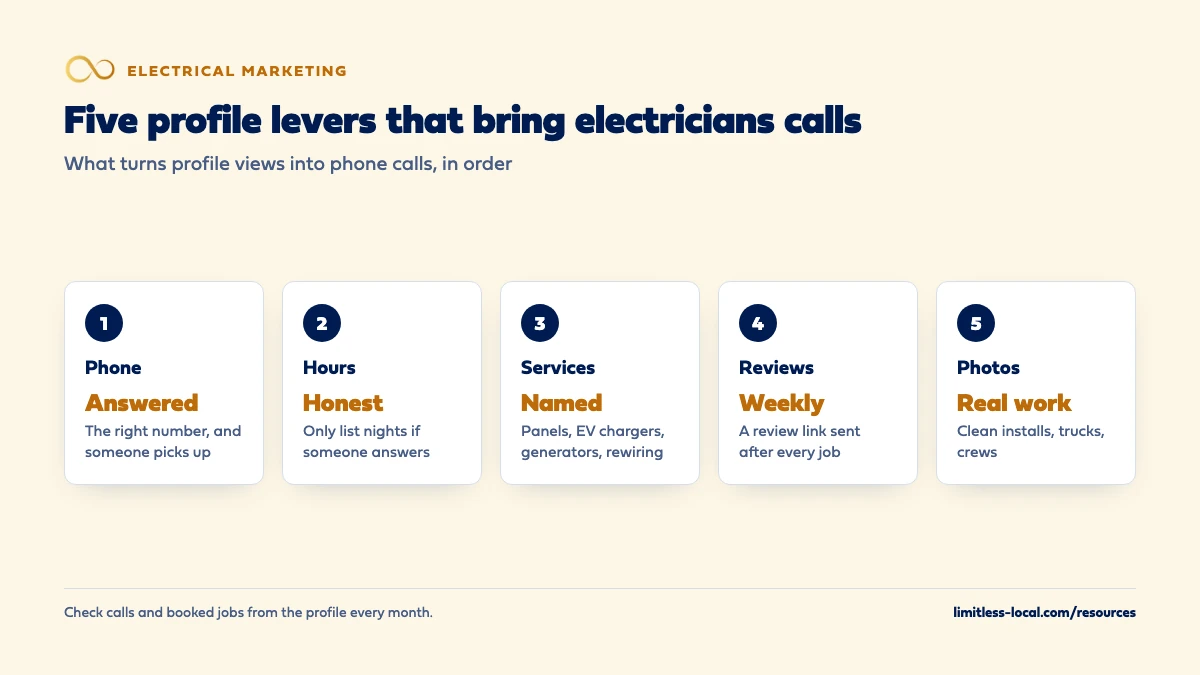
- Lever 1: Is the phone number right, and does someone answer it?
- Lever 2: Do your hours match when you really take calls?
- Lever 3: Does the profile name the electrical work you want?
- Lever 4: Are new reviews coming in every week?
- Lever 5: Do your photos show real electrical work?
- How do I know if my profile is bringing in calls?
- What should I leave alone on my profile?
- What's different about a Google profile for electricians
- A worked example: where a profile's calls leak
- Frequently asked questions
- Key takeaways
- More in this section
- Sources
The short version
- GBP = Google Business Profile: your free listing on Google Maps and Search.
- Ranking depends mainly on relevance, distance and popularity, including reviews.
- Calls come from a number someone answers, honest hours, named services, fresh reviews and real photos.
- Measure it monthly: profile calls matched to booked jobs, not just views.
For electrical contractors who keep hearing “GBP” and want to know what it is, why it matters, and which few things on it actually bring in calls.
Get a free visibility audit · Book a growth call
What does a Google Business Profile do for my electrical business, and how do I turn it into more calls?
GBP stands for Google Business Profile, the free listing that shows your electrical business on Google Maps and in local search results, with your phone number, hours, service area, reviews and photos. For most electricians it’s what a homeowner looks at right before calling, so it wins calls when it’s verified, complete, honest about when you answer, and full of recent reviews and photos of real work. Check its call numbers every month and fix whatever is leaking.
Your Google profile is one part of showing up locally, alongside your website, reviews and the 50+ directories that should list your business the same way. Our local SEO work covers profile management with weekly posts, listing cleanup, review response and review generation, with call tracking so you can see which calls turned into jobs. We don’t guarantee rankings, lead counts or revenue; nobody honestly can, because platforms change how they work. See how we work with electrical shops on our electrical contractor marketing page, or browse more electrical marketing questions.
What is a Google Business Profile, in plain terms?
GBP is short for Google Business Profile. It’s the listing that shows your business on Google Maps and in the local results on Google Search: your name, phone number, hours, service area, reviews, photos and the services you offer. When a homeowner searches “electrician near me” and sees a map with a short list of businesses under it, each of those is a Business Profile.
Google’s getting-started guide for Business Profile says you can manage how your business shows up on Maps and Search at no charge, and that a verified profile can help customers find you and build trust in your business. You need a Google Account to set one up, and you have to verify the profile before you can manage it.
For an electrician, think of it as a second front door. Plenty of homeowners never reach your website. They see your profile, check your stars, and tap call.
Why does the profile matter so much for an electrician's phone?
Electrical work is often urgent and local. Half the house just lost power, an outlet is scorched, the breaker won’t reset. The homeowner grabs a phone, searches, and calls one of the first few electricians they see. The profile is the whole sales pitch in that moment.
Even planned work runs through it. A homeowner pricing a panel upgrade or an EV charger install may look at your website later, but the first thing they compare is usually the map listing: who has recent reviews, who has photos of real panels, who looks open.
That’s why the profile wins or loses calls in two ways. First, it decides whether you show up at all. Second, once you show up, it decides whether the homeowner picks you or the electrician next to you. Most owners only think about the first one, and the second is often where the quicker calls are.
Is my Google profile the same as Maps, my website or Local Services Ads?
No, and mixing them up leads to wasted effort.
- Google Maps is where your profile appears. You don’t have a separate Maps listing to manage; the profile is the listing.
- Your website is a separate thing your profile links to. A good one backs up the profile, and Google pulls some business information from websites too.
- Local Services Ads are paid ads that sit above the map results. You pay per lead there. The profile itself is free, and there’s no way to buy a better spot in the regular map results.
The paid and free sides do help each other. Google’s page on reviews and ratings on Local Services Ads says those reviews are managed through your Business Profile, and that star ratings and review counts affect how you rank within the ads. If you’re weighing the paid side, how Google Local Services Ads work for electricians walks through it.
What decides whether my profile shows up at all?
Google’s guide to improving your local ranking says local results are mainly based on relevance, distance and popularity. In practice, for an electrical shop:
- Relevance is how well your profile matches the search. Complete, detailed information helps: the right category, the services you offer, accurate hours.
- Distance is how far you are from the person searching. You can’t change where you are, which is why the profile alone rarely wins you a town twenty miles away.
- Popularity (Google calls it prominence) is how well-known you are, including how many websites link to you and how many reviews you have. More reviews and positive ratings can help.
The same page says businesses with complete and accurate information are more likely to show up, and that verifying tells Google you’re authorized to represent the business. An unverified or half-filled profile starts behind.
What makes a homeowner call me instead of the next electrician?
Once you’re in the list, the homeowner is comparing three or four profiles in a few seconds. What they look at:
- Star rating and how recent the reviews are. A strong rating with reviews from last week beats a similar rating with nothing new since spring.
- Whether you look open. If your hours say closed and theirs say open, you lose the call.
- Photos of real work. Clean panel installs, neat EV charger runs, a tech in uniform at a real house. Stock photos tell them nothing.
- Whether you do their job. A services list that names panel upgrades, EV chargers, generators, rewiring and troubleshooting answers the question before they ask it.
- Review replies. Short, calm replies, especially to the odd bad review, show you pay attention.
None of these move your ranking much on day one. They change how many of the people who already see you pick up the phone.
Curious what your marketing is actually booking?
Get a free visibility audit — no obligation, no sales pitch.
Lever 1: Is the phone number right, and does someone answer it?
This sounds too basic to matter, but it’s where calls leak most. Check that the number on the profile rings a phone someone answers during the hours you list. Google’s help page on adding your phone number says adding it helps customers reach you directly and can improve your visibility, and that you can add up to 2 more numbers beyond the main one.
If you use a call tracking number, put it in the main slot and keep your regular business number as an additional number, so your listings still match. Then make sure every call actually gets answered. An emergency caller who hits voicemail calls the next electrician on the list.
Which Google Business Profile edits give an electrician calls fastest ranks the quick fixes if you only have an hour.
Lever 2: Do your hours match when you really take calls?
Your hours should tell the truth about when someone picks up. If you take emergency calls at night or on weekends and someone really answers, say so. If you don’t, don’t list it: a homeowner who calls at midnight because you said you were open, and gets nobody, is likely to leave a review about it.
Set special hours for holidays, and update them when a storm or a heat wave changes your schedule. A profile showing “closed” while you’re actually running calls is a quiet way to lose work.
Lever 3: Does the profile name the electrical work you want?
Relevance starts with your primary category, which should describe the whole business. Which Google Business Profile categories an electrician should choose covers that decision in detail.
Then fill in the services list with the jobs you want more of, in the words homeowners use: panel upgrades, EV charger installation, whole-home generators, rewiring, lighting, troubleshooting. Write the business description the same way, plainly, without stuffing town names into it.
Keep the business name exactly as it appears on your truck and paperwork. Google’s guidelines for representing your business say your name should reflect your real-world name, and that adding unnecessary information to it isn’t permitted and could get the profile suspended. “Best Electrician Near Me” doesn’t belong in the name field.

Lever 4: Are new reviews coming in every week?
Reviews feed both sides: they help your ranking and they help the homeowner choose. The trick is a steady flow, not a burst once a year.
Google’s page on creating a review link or QR code shows how to get a direct link to your review form. Put it in the text or email your office sends when the job closes, so the customer can leave a review in one tap. Ask every customer, and ask soon after the job, while the lights are back on and they’re glad you came.
Never offer a discount or a gift for a review. Google treats that as fake engagement and prohibits it. How to get more Google reviews for an electrical business sets out a routine your techs and office can stick to.
Lever 5: Do your photos show real electrical work?
Photos are one of the few things on the profile a homeowner looks at closely. Add a handful from real jobs every month or so:
- Finished panels, labeled and tidy.
- EV chargers and generators after install.
- Your trucks and your crew at work, faces turned away if they’d rather not be shown.
- Before-and-after shots of a messy panel or old wiring you replaced.
Skip stock photos and anything with a customer’s address showing. A few honest photos of clean work do more than a polished gallery that could be anyone’s.
How do I know if my profile is bringing in calls?
Open the performance view on your profile. Google’s page on Business Profile performance explains the numbers: views of your profile, the searches people used to find you, website clicks, messages and calls. The calls number counts taps on the call button, not answered calls or booked jobs. The searches report updates at the start of each month and can take up to 5 days to appear.
Check the same numbers each month and compare them with the same month last year, because electrical work has busy and slow stretches. Then match the calls to booked jobs in your field software. A tracking number on the profile makes that easy, since every call from it is tagged. Whether an electrical business needs call tracking numbers explains how to set that up without hurting your listings.
What should I leave alone on my profile?
- Your home address, if you work out of your house. Most electricians are service-area businesses, meaning they go to the customer, and Google’s overview for service businesses describes exactly that setup. Whether an electrical company should hide its address on Google covers the details.
- Fake reviews or review swaps with friends. They fall under the same fake-engagement rule as paid reviews.
- Constant edits. Changing the name, category or hours every week makes it impossible to tell what worked. Make one change, give it a few weeks, then judge it.
- A second profile for another town. The same guidelines say a service-area business should have one profile for its central office with a service area, and can’t list a virtual office unless it’s staffed during business hours.
Want to see where your company stands?
A free visibility audit shows where you show up on Google, Maps and AI answers, and what it's costing you in calls.
What's different about a Google profile for electricians
Emergencies decide fast. A homeowner with no power doesn’t read five websites. The profile, the stars and a phone that gets answered decide the call in under a minute.
Trust is about safety. Letting someone into the panel feels risky to homeowners. Reviews that mention a clean, safe, permitted job and photos of tidy work answer that worry.
Your job mix shows up in searches. Service calls, panel upgrades, EV chargers, generators and commercial work all get searched differently. A profile that names each one is relevant to more searches.
Most shops are service-area businesses. You go to the customer, so distance is measured from where your profile says you’re based. That’s why the profile alone rarely wins towns far from your base; service pages and ads help fill the gap.
A worked example: where a profile's calls leak
These numbers are made up to show the math, not a forecast for your business. Say an electrician’s profile gets 600 views a month and 18 taps on the call button.
- 6 of those calls go to voicemail, because the profile lists evening hours but the office closes earlier.
- 12 calls get answered, and 8 of them book.
The owner fixes the hours and forwards after-hours calls to the on-call tech’s phone. Next month, with the same 18 call taps, only 2 are missed. That’s 16 answered calls, and at the same booking rate (two in three) about 11 booked jobs.
That’s 3 more jobs a month without a single ranking change. At a made-up average ticket of $450, it’s $1,350 a month in work that was already calling.
Frequently asked questions
Does a Google Business Profile cost anything?
No. The profile is free to set up and manage. Ads that appear near it, like Local Services Ads, are paid separately.
Do I need a website to have a Google profile?
No, but it helps. A website gives homeowners somewhere to check your work and gives Google more information about your services.
How soon will I get more calls after fixing my profile?
Fixes to the phone number and hours can help with the people already seeing you right away. Ranking changes from reviews and services take longer and depend on the electricians around you.
Should I post updates on my profile?
Short posts about seasonal work, like generator checks before storm season, keep the profile looking active. They matter less than reviews, hours and an answered phone.
Can I let homeowners text me from the profile?
Google’s profile setup steps include adding text and WhatsApp messaging options. Only turn them on if someone will reply quickly during your listed hours.
Who should manage the profile, me or the office?
Keep ownership in your own Google Account, then add your office manager or an agency as a manager. That way you never lose control if someone leaves.
Key takeaways
- GBP means Google Business Profile, the free listing homeowners see on Maps and Search.
- It wins calls in two ways: showing up, and being the electrician the homeowner picks.
- The fastest gains come from an answered phone and honest hours, before any ranking change.
- Named services, a weekly flow of reviews and real job photos make you the obvious choice.
- Track profile calls monthly and match them to booked jobs in your field software.
Not sure what's working right now?
Start with a free visibility audit: rankings, Google profile, reviews and tracking, checked against your service area.
More in this section
- How do I attract better electrical clients and jobs?
- What should an electrician's website have to get more calls?
- How do electricians work out profit per job and customer value?
- Should an electrician add budget to LSAs, Google Ads, SEO or GBP?
- Which keywords should an electrician bid on in Google Ads?
Sources
- Get started with Google Business Profile — Google Business Profile Help
- Tips to improve your local ranking on Google — Google Business Profile Help
- 1. Add your phone number — Google Business Profile Help
- Create a Google link or QR code to request reviews — Google Business Profile Help
- Understand your Business Profile performance & insights — Google Business Profile Help
- Business Profile for service businesses overview — Google Business Profile Help
- Guidelines for representing your business on Google — Google Business Profile Help
- Reviews and Ratings on Local Services Ads — Local Services Help