
How should a restoration company market a second location?
- How do I set up local marketing for a second restoration office without hurting the first?
- Does a second restoration location need its own marketing at all?
- Step 1: Does my second office qualify for its own Google profile?
- Step 2: How do I set up the second Google Business Profile?
- Step 3: How do I split service areas between two offices?
- Step 4: What should the second location's page on my website say?
- Step 5: How do I get reviews for a new location with none?
- Step 6: How should I split Google Ads between two locations?
- What about Local Services Ads for a second location?
- Step 7: How do I track which location booked the job?
- What mistakes do restoration companies make with a second location?
- What's different about a second location for restoration
- A worked example: judging the second office by cost per booked job
- Frequently asked questions
- Key takeaways
- More in this section
- Sources
The short version
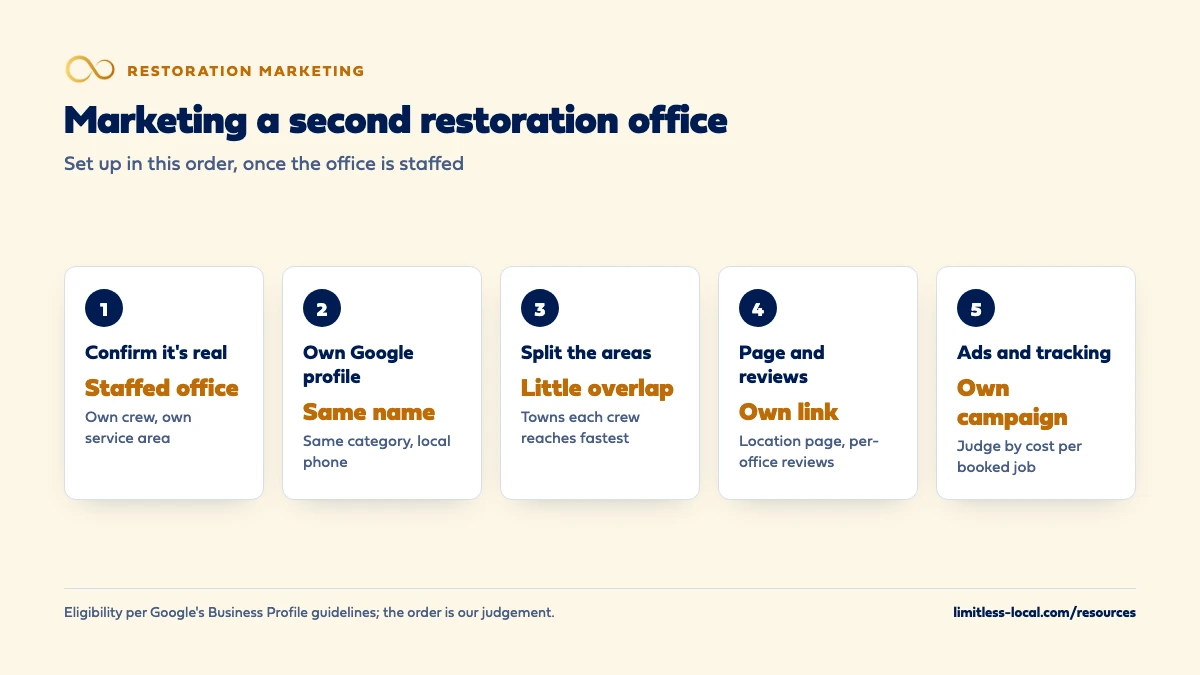
- Only list the second office on Google if it's staffed during business hours with its own crew and service area.
- Use the same name and category as the first profile, with its own local phone number and location page.
- Split service areas so each office covers towns its crew reaches fastest, with little overlap.
- Give the new office its own review link, ad campaign and tracking numbers, and judge it by cost per booked job.
For restoration owners opening a real, staffed second office who want both locations found on Google without one undercutting the other.
Get a free visibility audit · Book a growth call
How do I set up local marketing for a second restoration office without hurting the first?
Market a second restoration location as its own business on Google only if it’s a real office with its own staff and service area: Google allows one Business Profile per location in that case, with the same name and category as the first. Give it its own profile, phone number, location page, reviews and ad campaign targeted to the towns its crew can reach quickly, and keep the two service areas from overlapping. Then track calls and booked jobs separately, so you can judge the new office by what each job costs.
A second office is worth marketing when it puts a crew closer to more homeowners, and the measure is booked jobs at a cost that makes sense. We set up and manage multi-location Google profiles, location pages and ads through our local SEO service for restoration companies. The restoration marketing guide covers channels and budgets across the business, and the restoration marketing questions library takes the rest one question at a time.
Does a second restoration location need its own marketing at all?
Yes, if it’s a real second office with its own crew. A second location changes two things Google pays attention to. Google’s page Tips to improve your local ranking on Google says local results are mainly based on relevance, distance, and popularity, and that distance is how far each business is from the person searching. A homeowner with a flooded basement forty minutes from your first shop is far from that shop on Google’s map. An office near them, listed correctly, is close.
The second thing is the people. Restoration is answered at 2 a.m. by whoever can get a truck there. If the new office has its own techs and equipment, it can honestly promise a fast response in towns the first shop couldn’t reach quickly, and the marketing should say so.
What a second location is not: a way to look bigger. If you’re only adding towns you’ll serve from the first shop, you need service area and city pages, not a second office. Building restoration city pages covers that case. This page is for owners opening a real, staffed second office.
Step 1: Does my second office qualify for its own Google profile?
Check this before you spend a dollar. Google’s Guidelines for representing your business on Google say that if you have different locations for your service business, with separate service areas and separate staff at each location, you’re allowed one profile for each location. The same page says:
- Service-area businesses can’t list a “virtual” office unless that office is staffed during business hours.
- A rented mailing address you don’t operate from, which Google calls a virtual office, isn’t eligible.
- An office at a co-working space only counts if it has clear signage, receives customers during business hours and is staffed by your own people.
- P.O. boxes or mailboxes at remote locations aren’t acceptable addresses.
So the test is practical: is there a real place with your crew working out of it during your stated hours? A warehouse where two techs and a trailer of drying equipment start every day passes, in our judgement. A shared desk you visit once a month doesn’t. If the answer is no, don’t create the profile. A listing that breaks the guidelines puts it at risk, and in our judgement that risk can spill over to how you manage your first profile too.
Step 2: How do I set up the second Google Business Profile?
Create it as a new profile for the new address, not by editing the first one. Then get the basics right:
- Name: Google’s chain guidelines say all locations must have the same name unless the business’s real-world name consistently varies by location, and must have the same category if they provide the same service. Don’t add the town to the name unless that’s genuinely what’s on the sign.
- Category: the same primary category as the first location, if the work is the same. Choosing restoration Google categories covers which one.
- Phone and website: Google asks for a phone number that connects to your individual business location, or a website that represents that location. A local number for the new office and a location page on your site cover both.
- Hours: the hours that office is actually staffed. If the office isn’t open around the clock, don’t list it that way just because your phone line is.
Expect verification to take some effort. Google’s page Verify your business on Google says live video verification asks you to be at the business and show your location, your equipment or tools, and proof that you manage the place, such as keys to the facility. Do this once the office has signage and equipment in it, not before.
Step 3: How do I split service areas between two offices?
Draw them so each office covers the towns its own crew can reach fastest, and keep the overlap small. Google’s guidelines say the boundaries of a profile’s overall service area shouldn’t extend farther than about two hours of driving time from where the business is based, though larger areas may suit some businesses. Google’s page Manage your service areas says a service-area business can only have one profile for the whole area it serves, which is why the second profile depends on the second office being real.
In our judgement, a restoration service area should be smaller than the two-hour limit: it should match where you’d actually send a crew at night for an active leak. A practical method:
- List the towns each office can reach in under an hour.
- Give each contested town to the office that’s closer or has more equipment.
- Leave the far edges off both profiles if neither crew would really go.
Google’s ranking tips say distance is about the person searching, so in our judgement the service area isn’t a ranking lever. It tells customers where you’ll come. Optimizing your restoration Google profile covers the rest of the profile settings.
Curious what your marketing is actually booking?
Get a free visibility audit — no obligation, no sales pitch.
Step 4: What should the second location's page on my website say?
Build one location page for the new office and link the new profile to it. The page should say things only that office can say:
- The address, the local phone number and the hours it’s staffed.
- The towns it covers, matching the profile’s service area.
- Who runs it, how many trucks and what equipment work out of it, and how fast you can usually get to the main towns it serves.
- Photos of that office’s crew and equipment, with no homeowners’ faces or identifiable damaged homes.
- Links to your main water, fire, mold and sewage service pages, rather than a second copy of each.
Don’t duplicate your whole site for the second office. In our judgement, one strong location page plus a few honest city pages for towns that office serves heavily does more than a cloned set of service pages with a different town name. Pages that only swap the town name are the doorway-page problem the city pages guide explains.
Step 5: How do I get reviews for a new location with none?
Start asking from the first job that office runs. Google’s ranking tips say more reviews and positive ratings can help a business’s local ranking, and the new profile starts at zero while your first profile may have years of them. Reviews don’t transfer between profiles.
What helps, in our judgement:
- Ask for the right profile. Send customers of the new office the review link for the new profile. If your job software sends one link for every job, set it up per location.
- Ask at the right moment. After the dry-out is signed off, not while the floor is still up.
- Ask every customer. Don’t pick only the happy ones, and don’t offer anything in return for a review.
- Reply to every review from the new profile, so it looks active.
Expect the new profile to trail the first one for months. That’s normal. The Google profile guide covers how to ask after a water or fire job without crossing privacy lines.
Step 6: How should I split Google Ads between two locations?
Give each office its own campaign, or at least its own location targeting and budget, so you can see what each one books. With one campaign covering both areas, you can’t tell whether the new office is pulling its weight.
Google’s page About advanced location options says location targeting includes both people physically in your targeted locations and people who’ve shown interest in them by default, and that “Presence” targeting makes sense when you only want to reach people in specific locations. For emergency restoration, where the crew has to drive to the house, presence targeting is usually the safer choice, in our judgement. Google’s page Exclude ads from geographic locations lets you exclude areas inside a target, which helps keep the two campaigns from bidding against each other in the same towns.
Start the new office’s campaign small. It has no reviews, no history and a crew that’s still learning the area. Setting your ad service area goes deeper on radius and ZIP settings, and avoiding more leads than crews can handle covers pacing spend to capacity.

What about Local Services Ads for a second location?
Check what your account allows before you assume it covers the new office. Google’s Local Services Ads help page Edit your industries, service areas, and job types says to set the areas you serve by county, city or ZIP code and to update these settings if your business changes location or service offerings. Adding the new office’s towns to an existing account is the simple path, but whether a separate account or verification is needed for a second office isn’t something that page answers, so confirm it with Google support before you launch.
In our judgement, keep the service areas tight to where each crew can really respond, because a lead you can’t serve still costs you time, and a slow response can cost you a review.
Step 7: How do I track which location booked the job?
Give each office its own tracking numbers and tag every lead with a location. Without that, the new office’s first months are guesswork. CallRail’s help page Visitor tracking for multiple locations describes creating multiple website pools in the same company so you can track each location of a business, which suits a two-office restoration company with one website.
A simple setup, in our judgement:
- A separate tracking number on each Google profile and each location’s ads.
- Website visitors on each location page shown that office’s number.
- Every booked job in ServiceTitan, Housecall Pro, Jobber or your job software tagged with the office that ran it.
Then judge each office by what a booked job costs, not by calls. Tracking which marketing books jobs covers connecting a call to a booked job.
What mistakes do restoration companies make with a second location?
The ones we’d watch for, in our judgement:
- A profile for an office that isn’t really staffed. It breaks Google’s guidelines and can cost you the listing.
- Overlapping service areas. Both profiles claiming the same towns confuses customers and makes your own campaigns compete.
- One review link for both offices. The new profile stays empty while the old one fills up.
- Different names on each profile. Google’s chain guidelines ask for the same name across locations unless the real-world name differs.
- Cloning the website. A copied set of service pages with a new town name adds pages without adding anything true.
- No separate tracking. You can’t tell if the new office is worth what it costs.
- Marketing before the crew is ready. Calls the new office can’t answer quickly damage its first reviews.
Most of these are cheaper to avoid at setup than to fix later, which is why the steps above come before any ad spend.
Not sure which of these is costing you jobs?
A free visibility audit checks the Google profile, reviews, site and tracking, and shows what to fix first.
What's different about a second location for restoration
Response time is the product. A homeowner with water on the floor wants someone there soon. A second office earns its marketing by shortening the drive, so say how fast that office can reach its towns, and only claim what its crew can really do.
Equipment has to be there too. A second office with techs but no drying equipment is a dispatch point, not a location. Google’s video verification asks you to show equipment or tools at the business, and so will a property manager deciding whether to use you.
Storms hit both areas at once. A freeze or storm can flood both offices with calls the same night. Decide in advance which office covers which towns when one is overloaded, and pause the busier office’s ads before it takes jobs it can’t reach.
Commercial and insurance relationships cross areas. Property managers and adjusters may already know your first office. Tell them about the second one directly; a new profile won’t reach them on its own.
A worked example: judging the second office by cost per booked job
These numbers are made up to show the math, not a benchmark for your market. Say your first office’s Google Ads campaign spends $2,800 a month and books 14 jobs, so each booked job costs $2,800 ÷ 14, or $200.
You open a second office forty-five minutes away and give it its own campaign at $1,400 a month, targeting only its own towns. In its first full month it books 4 jobs, so each one costs $1,400 ÷ 4, or $350. Total ad spend is now $4,200.
That higher cost per job is expected early: the new profile has few reviews and the crew is new to the area. If it falls toward the first office’s number over the following months as reviews build, the office is earning its marketing. If it doesn’t, check the area, the response time and the follow-up before raising the budget. With one combined campaign, you’d only see the blended number and couldn’t tell either story.
On our side, Essentials ($3,500 a month) covers one location. Growth ($4,500 a month) covers SEO for up to two locations and Google Ads management up to $5,000 a month in ad spend. Ad spend is paid to Google separately. Scale is custom-priced for multi-location companies. We don’t guarantee rankings or lead counts, and nobody honestly can.
Frequently asked questions
Can I use the same phone number for both locations?
Google’s guidelines ask for a phone number that connects to the individual location, or a website that represents it. A local number for each office, routed to whoever answers, is the cleaner setup. Source: Google’s guidelines.
Should the second location have a different business name?
Not unless that’s how it’s really known. Google’s chain guidelines say all locations must share a name unless the real-world name consistently varies by location.
Will the new profile hurt my first location's ranking?
Google doesn’t say a second legitimate profile affects the first. In our judgement, the risk comes from overlapping service areas and sending all reviews to one profile, both of which you control.
Can I open a second location in a co-working space?
Only if it meets Google’s rule: clear signage, receiving customers during business hours and staffed by your own people. A desk you rent but don’t work from isn’t eligible.
How long before a new location's profile brings calls?
There’s no fixed timeline. Ads can bring calls within days of launch, while organic and Maps visibility typically ramp over months as reviews and history build. We don’t promise a date.
Do I need a separate website for the second location?
Usually not. One site with a location page per office, linked from each profile, keeps your history and links in one place, in our judgement.
Key takeaways
- A second Google profile is only allowed for a real, staffed office with its own service area and staff.
- Keep the same name and category on both profiles, with a local phone number and location page for each.
- Split service areas so each crew covers towns it reaches fastest, well inside Google’s two-hour limit.
- Send the new office’s customers its own review link from the first job.
- Run and track each office’s ads separately, and judge both by cost per booked job.
Want a second set of eyes on your setup?
We'll look at how you show up locally and where calls are leaking, then send you a plain-English breakdown.
More in this section
- How should a restoration company market to commercial properties?
- How should a restoration company market to real estate agents?
- What marketing does a brand-new restoration company need first?
- How should a restoration company handle marketing during storm season?
- How do I grow a restoration company past a plateau?
Sources
- Guidelines for representing your business on Google — Google Business Profile Help
- Tips to improve your local ranking on Google — Google Business Profile Help
- Manage your service areas for service-area & hybrid businesses — Google Business Profile Help
- Verify your business on Google — Google Business Profile Help
- About advanced location options — Google Ads Help
- Exclude ads from geographic locations — Google Ads Help
- Edit your industries, service areas, and job types — Local Services Help
- Visitor tracking for multiple locations — CallRail Help Center