
How does a restoration company show up in near me searches?
- How does a restoration company show up when homeowners search "water damage near me"?
- What happens when someone searches "water damage near me"?
- Step 1: Is your Google Business Profile verified and complete?
- Step 2: Is the profile set up as a service-area business?
- Step 3: Do your categories, services and name match how people search?
- Step 4: Are your hours and phone number ready for "open now" searches?
- Step 5: Are you earning reviews and adding real photos?
- Step 6: Does your website back up the profile?
- Why don't I show up for near me searches across my whole service area?
- Step 7: Cover the edges with Local Services Ads and search ads
- Step 8: How do I check where I show up?
- What's different about near me searches for restoration companies
- A worked example: where one company shows up
- Frequently asked questions
- Key takeaways
- More in this section
- Sources
The short version
- Near me searches are answered mostly from Google Business Profiles in Maps.
- Verify the profile, set a real service area, pick the right categories and list every service.
- Keep hours and phone accurate, and earn genuine reviews after every job.
- Distance is out of your hands; cover the far towns with ads.
For restoration owners who want to show up when a homeowner types “water damage near me” on a phone, across every town they serve.
Get a free visibility audit · Book a growth call
How does a restoration company show up when homeowners search "water damage near me"?
A restoration company shows up in near me searches mainly through a verified Google Business Profile set up as a service-area business, with the right categories, every service listed, accurate hours and a steady flow of genuine reviews. Google matches those searches to the searcher’s location, so you’ll show up most strongly near where your business is based, and a website with real service and town pages helps Google understand what you do and where. You can’t pay for a better local ranking, so towns at the edge of your area are usually covered with Local Services Ads or search ads.
Showing up in Maps, the regular results and AI answers is what our local SEO work is built around: profile cleanup and management, name, address and phone synced across 50+ directories, reviews, and the pages behind them. We won’t guarantee a map spot; nobody honestly can, because Google keeps its ranking details confidential and changes how it works. The restoration marketing page shows how it fits water, fire and mold companies, the restoration marketing guide covers every channel, and the restoration marketing library has more questions like this one.
What happens when someone searches "water damage near me"?
Google figures out where the person is and shows nearby businesses that match. At the top there are often paid listings, then the map results with a handful of local companies, then the regular website results. On a phone, the map results and their call buttons are usually what a homeowner taps first.
You don’t need the words “near me” anywhere on your profile or site for this to work. In a 2018 article, Google said it had noticed smartphone users dropping location words like ZIP codes and neighborhoods from local searches because they assumed the results would be relevant to where they were. A search for “water damage restoration” on a phone is treated much the same way.
Google’s local ranking help says local results are mainly based on relevance, distance and popularity, and that there’s no way to request or pay for a better local ranking. If a searcher doesn’t share where they are, Google uses what it knows about their location. Every step below works on relevance or popularity, because distance is the one you can’t change.
Step 1: Is your Google Business Profile verified and complete?
This comes first because near me searches lean so heavily on the map results. Verifying tells Google you’re authorized to represent the business, which makes the profile more likely to show up in search results, and businesses with complete and accurate info are more likely to show up in local results.
Google builds each profile from what you add, from your website, from licensed data and from what customers contribute. In its explanation of how it sources business info, Google gives the example of a salon showing up for “salons near me” or “salons open now” because the owner provided an address and hours. The same logic applies to a water damage search at midnight: the profile that’s complete and accurate is the one Google can confidently show.
If you haven’t claimed or verified your profile yet, do that before anything else on this page. For the full setup, see how to optimize a restoration company’s Google Business Profile.
Step 2: Is the profile set up as a service-area business?
Most restoration companies go to the customer, so they’re service-area businesses. Google’s service area help says that if you don’t serve customers at your business address, you should remove the address from the profile. Then set your service areas:
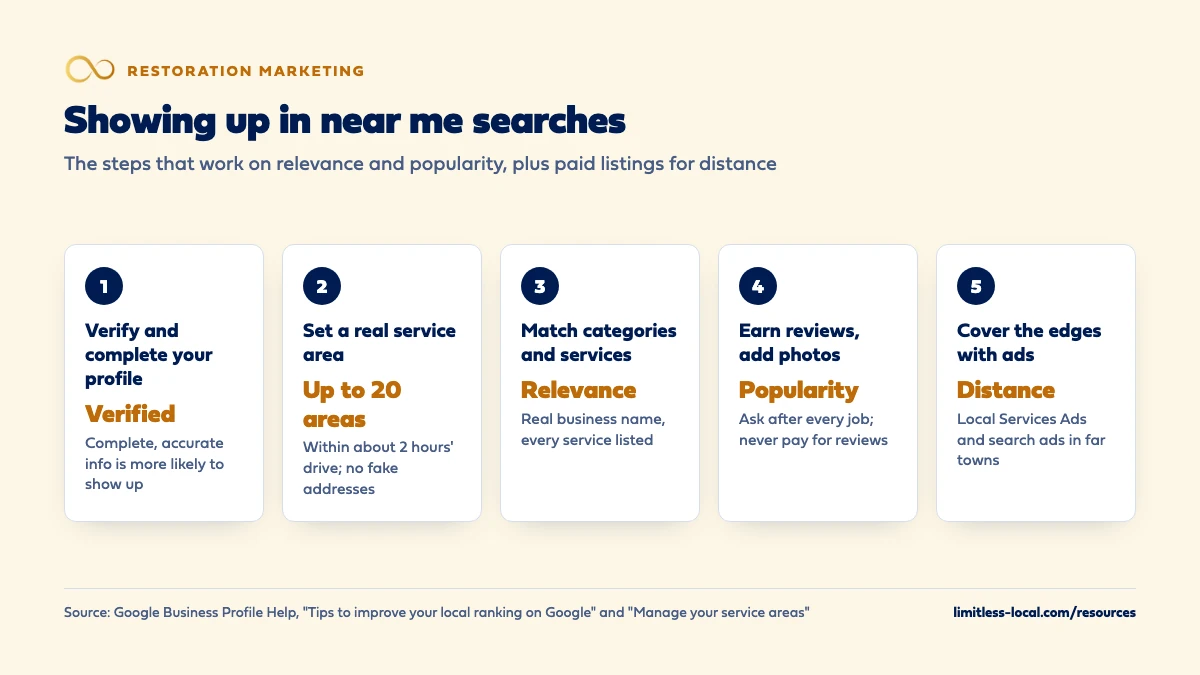
- You can set up to 20 service areas, by city, postal code or other area.
- The boundaries shouldn’t be more than about 2 hours of driving time from where your business is based.
- A service-area business can only have one profile for the whole area it serves.
Be specific. List the towns your crews really reach fast, not every town you’d take a job in. A service area doesn’t make you show up in a town far from your base; it tells homeowners where you work.
Step 3: Do your categories, services and name match how people search?
Relevance starts here. Pick a primary category that describes what your business is, and add only the few extra categories that describe your core work. Then list every service you actually do, such as water extraction, structural drying, fire and smoke cleanup, mold remediation and sewage cleanup, so the profile matches the many ways homeowners describe the problem.
Leave the business name alone. Google’s guidelines for representing your business say your name should match your real-world name, and including unnecessary information in it isn’t permitted and could get the profile suspended. Adding “Water Damage Near Me” or “24/7 Emergency” to the name is a shortcut that can cost you the whole profile.
The same guidelines say virtual offices aren’t eligible for a profile, and a service-area business can’t list a virtual office unless it’s staffed during business hours. Don’t try to plant a fake address in a town you want to show up in.
Curious what your marketing is actually booking?
Get a free visibility audit — no obligation, no sales pitch.
Step 4: Are your hours and phone number ready for "open now" searches?
Some emergency searches include “open now” or “24 hour”, and Google uses your listed hours to match those searches. So list the hours someone really answers. If that’s around the clock, say so. If it isn’t, don’t claim it, because a night caller who reaches voicemail calls the next company and rarely comes back.
Use a local phone number that rings through to a person, not a central call center line, whenever you can. Keep that number the same on your profile, your website and the directories that list you.
Small mismatches add up. A different phone number on an old directory listing or a website footer with last year’s hours makes Google less sure which details are right. How to keep a restoration company’s name, address and phone consistent covers the cleanup.
Step 5: Are you earning reviews and adding real photos?
Popularity is the factor you can grow every week. More reviews and positive ratings can help your local ranking, and so can links to your business from other websites.
- Ask after every finished job, when the drying is done and the equipment leaves.
- Reply to reviews, briefly and without private details about the job or the claim.
- Add photos of your crews, trucks and drying equipment, with no homeowners’ faces or addresses in frame.
Never offer a discount or a gift for a review, and never buy them. A steady trickle of genuine reviews from real jobs does more for near me searches than a burst followed by months of silence.
Step 6: Does your website back up the profile?
Your website is one of the places Google pulls business info from, so it should say the same things your profile says, in more detail:
- A page for each service, explaining the work, how fast you respond and what happens on a job.
- A page for each town you really work in and can describe in detail.
- The same business name, phone number and hours as the profile, on every page.
Don’t write “near me” over and over, and don’t paste a block of town names into the footer. Google’s spam policies list blocks of text naming the cities a page is trying to rank for as keyword stuffing. Real service and town pages do the job properly. How many service and city pages a restoration website needs helps you decide which to build.
Why don't I show up for near me searches across my whole service area?
Distance. Near me searches favor businesses close to the person searching, so your map results are usually strongest around your base and weaker at the edges of your service area. Adding towns to your service area doesn’t change that, and neither does a city page.
That’s normal, and every restoration company in your market lives with it. Two things help:
- Strengthen relevance and popularity so you hold on further out than competitors with thinner profiles.
- Use paid listings for the far towns, where the map results are hard to reach from your location.
What doesn’t help is a fake address. A profile at a virtual office or an unstaffed address isn’t eligible and can be suspended, which takes you out of near me searches everywhere, including your home town. If you’ve already dropped out, how to get a restoration company back into the Map Pack walks through the fixes.
Step 7: Cover the edges with Local Services Ads and search ads
Paid listings don’t depend on how close you are to the searcher in the same way, so they’re how restoration companies show up for near me searches in towns their profile can’t reach. Local Services Ads are available for water damage services in the US, show prominently when people search for the services you offer in the areas you’ve chosen, and charge only for leads related to your business. Search ads let you pick the exact searches and towns.
Set the targeting to the towns your crews reach fast, and the hours someone answers. A near me lead from a town two hours away isn’t a win if you can’t get a crew there in time. How to set up geo-targeting for restoration ads covers the settings.
Step 8: How do I check where I show up?
Two ways, and use both.
Search like a homeowner. When you or your crews are on jobs in different towns, search “water damage near me” and “water damage restoration” on a phone and note whether you appear in the map results. Results change with location, device and time, so check from several towns over a few weeks rather than once from the office.
Read the profile’s numbers. The Business Profile performance report shows the search terms people used to find your business, how many viewed your profile, and how many tapped the call button. Watch whether near me and service searches grow month to month, and compare profile calls with the jobs your office booked from them.
AI answers are a third place to show up, alongside Maps and the regular results. How restoration companies show up in AI search answers covers that side.
Not sure which of these is costing you jobs?
A free visibility audit checks the Google profile, reviews, site and tracking, and shows what to fix first.
What's different about near me searches for restoration companies
The search happens in a crisis. A homeowner with water on the floor taps the first company that looks credible and answers. Hours, reviews and a call button decide more than anything on your website.
Night searches matter. Burst pipes and backups don’t keep business hours, so accurate hours and an answered phone are part of showing up, not an afterthought.
Wide service areas are common. Restoration companies often drive farther than other trades, which makes the drop-off at the edges of the service area more noticeable and paid listings more useful there.
Photos need care. Job photos help, but water and fire jobs happen in people’s homes. Leave out faces, addresses and anything personal.
A worked example: where one company shows up
These details are made up to show the pattern, not a benchmark for your market. Say a restoration company is based in one town and serves five others, at different drive times. The owner searches “water damage near me” on a phone from a job in each town over a month:
- Home town and the town next door: the company appears in the map results almost every time.
- Two towns about half an hour out: it appears some of the time, depending on where in town the search happens.
- Two towns near the edge of the service area: it rarely appears in the map results, though its water damage page sometimes shows in the regular results.
The plan that follows: keep building reviews and photos to hold the middle towns, write a real town page for each of the half-hour towns, and run Local Services Ads and search ads in the two edge towns, during the hours the company answers. The edge towns are covered by paid listings because no profile change will move the business closer to them.
Frequently asked questions
Do I need the words "near me" on my website?
No. Google works out the searcher’s location on its own, so write real service and town pages instead of repeating “near me”. Stuffing the phrase in makes pages worse for homeowners.
Will adding more towns to my service area help me show up there?
Not by itself. The service area tells homeowners where you work, but distance from your business still shapes where you appear in the map results.
Can I open a second Google profile at another address to show up in more towns?
Only for a real, staffed location with its own team. Profiles at virtual offices or unstaffed addresses break Google’s guidelines and can be suspended.
Does a 24-hour listing help me show up at night?
Accurate hours help Google match “open now” searches. List around-the-clock hours only if someone really answers around the clock.
How long does it take to start showing up in near me searches?
Profile fixes can show up quickly, but building reviews and pages is a ramp. SEO typically takes 3-6 months to show meaningful organic growth, so use ads to cover calls while it builds.
What if a competitor shows up near me with a fake address?
If you believe a profile is inaccurate or shouldn’t be there, you can suggest an edit or flag it for removal on Google Maps. Report it once with the facts, then get back to improving your own profile.
Key takeaways
- Near me searches are answered mainly from Google Business Profiles, based on relevance, distance and popularity.
- Verify the profile, set a real service area, and keep categories, services, hours and phone accurate.
- Never add keywords to your business name or use a fake address to reach more towns.
- Reviews, photos and real service and town pages build relevance and popularity over time.
- Distance is out of your control, so cover the edge towns with Local Services Ads and search ads.
Want a second set of eyes on your setup?
We'll look at how you show up locally and where calls are leaking, then send you a plain-English breakdown.
More in this section
- How do restoration companies show up in AI search answers?
- How should a restoration company market to commercial properties?
- How should a restoration company market to real estate agents?
- How should a restoration company market a second location?
- What makes homeowners trust a restoration company they find online?
Sources
- Tips to improve your local ranking on Google — Google Business Profile Help
- Understand how Google sources & uses info in Business Profiles & local search results — Google Business Profile Help
- How 'Near Me' helps us find what we need, not just where to go — Think with Google
- Manage your service areas for service-area & hybrid businesses — Google Business Profile Help
- Guidelines for representing your business on Google — Google Business Profile Help
- Spam Policies for Google Web Search — Google Search Central
- Understand your Business Profile performance & insights — Google Business Profile Help
- Getting started with Local Services Ads (United States) — Google Local Services Help