
How can a water damage restoration firm get more live inbound calls?
- Where do more live water damage calls come from, and how do I get them answered?
- What counts as a live inbound call for a water damage company?
- Where do live water damage calls actually come from?
- How do I get more calls from my Google Business Profile?
- How do Local Services Ads turn into live calls?
- How do I set up Google search ads to ring the phone instead of sending clicks?
- What does my water damage page need so visitors call instead of leaving?
- Why do calls ring but never turn into live conversations?
- Should I list around-the-clock hours to get more calls?
- How do referral partners and past customers add live calls?
- How do I know which source sends live calls?
- What's different about live calls for water damage companies
- A worked example: more live calls without more ad spend
- Frequently asked questions
- Key takeaways
- More in this section
- Sources
The short version
- Live calls come from phone searches, so every channel needs a tap-to-call button.
- Your Google profile, Local Services Ads, search ads with call buttons and a water damage page do most of the work.
- Show your number only during hours someone really answers.
- Fix routing before you add spend: phone menus, voicemail and wrong numbers kill live calls.
- Track calls by source and mark which ones were answered and booked.
For restoration owners who want the phone to ring with real water damage calls, and want a person on the other end every time it does.
Get a free visibility audit · Book a growth call
Where do more live water damage calls come from, and how do I get them answered?
More live inbound calls come from putting a tap-to-call button in front of people searching for water damage help on their phones, then making sure every tap reaches a person who can send a crew. That means a complete Google Business Profile with the number you really answer, Local Services Ads and search ads with call buttons running only during hours you pick up, and a water damage page with the number at the top. Then count calls by source, because a channel that mostly sends forms, voicemails and missed calls isn’t sending live calls.
Getting more of those calls to ring, and knowing which source sent each one, is the work of our local ads and tracking. Every package includes call tracking with recording and source tagging, Google Ads management starts at Essentials, and Local Services Ads management starts at Growth. The restoration marketing page shows how it fits water, fire and mold companies, the restoration marketing guide covers every channel, and the rest of the restoration marketing questions go one question at a time.
What counts as a live inbound call for a water damage company?
A live inbound call is a homeowner, tenant or property manager on the phone with someone at your company who can say yes and send a truck. Not a voicemail. Not a web form that sits until morning. Not a call that rang out while your only tech was under a sink.
That matters more in water damage than in almost any other trade. Someone with water coming through the ceiling taps the first call button that looks local and trustworthy, and if nobody picks up, they tap the next one. Their voicemail is often a job that already went to someone else. So more live calls means two things:
- More taps. Showing up with a call button in more of the searches that matter, in the towns your trucks can reach fast.
- More of those taps answered. Making sure each call rings through to a person, at every hour you say you’re open.
The second is usually cheaper to fix, and how fast a restoration company needs to answer emergency calls goes deep on it.
Where do live water damage calls actually come from?
For most restoration companies, live calls come from a short list of places. Each one puts your number in front of someone at a different moment:
- Your Google Business Profile in Maps. The free one. Someone searches “water damage restoration” and taps call on a map listing.
- Local Services Ads. The listings at the very top of many water damage searches, with a call button and your reviews.
- Google search ads with a call button. Ads for the exact searches you pick, like burst pipe cleanup or water extraction, where a tap dials you.
- Your website. Mostly a backup channel: people who saw you somewhere else and check your site before they call.
- Referral partners. Plumbers, property managers and insurance agents who hand over your number.
- Past customers and people who know your name. They search your company by name or find the magnet on the fridge.
The first three are where most new emergency calls start, because they show up the moment someone has water on the floor and a phone in hand. So get the free channel right, add the paid ones, and make the website and partners back them up.
How do I get more calls from my Google Business Profile?
Your profile is often the busiest call source you have, and it costs nothing but time. What decides how many calls it sends:
- The number on it. Put the number that rings a person, not a back-office line. Google’s help page on adding your phone number says a phone number helps customers reach you directly and can improve your visibility, and you can add up to 2 more numbers besides your main one.
- Hours that match who answers. List around-the-clock hours only if a person really picks up around the clock.
- Categories and services. Pick the category and services that match water damage work, so you show up for those searches and not just general ones.
- Photos and reviews. Real photos of your trucks, crew and drying equipment, and a steady flow of new reviews you reply to.
How often you show up comes down to what Google’s local ranking tips call relevance, distance and popularity. You can work on relevance and popularity. Distance you can’t change, so expect plenty of calls from the towns near your address and fewer from the edges of your service area.
To see whether it’s working, open your profile’s performance report. The Calls number counts how many times someone tapped the call button on your profile. If views climb and calls don’t, the profile is seen but not chosen; photos, reviews and hours are the usual reasons.
How do Local Services Ads turn into live calls?
Local Services Ads put you at the top of many water damage searches with a call button, your rating and a Google Verified badge. You pay per lead, not per click.
The catch for live calls is what counts as a lead. Google’s page on how leads work lists an answered call, a missed call during your business hours where the caller stays on the line for more than 20 seconds, a voicemail, a text or email, and a booking request. So a call that rolls to voicemail during your listed hours can still be a charged lead, and it’s not a live call.
Answering also decides how often you show up. Google’s ad ranking page says missed calls may hurt your responsiveness, and lists your rating, number of reviews and average response time as part of profile quality. Answering more calls protects your ranking, which keeps more calls coming.
Two settings matter most for live calls:
- Job types. Keep water damage, and leave on only the other jobs you really want.
- Service area. Draw it around the towns a truck can reach quickly.
What each of those leads costs is covered in what a restoration lead costs on Local Services Ads.
Curious what your marketing is actually booking?
Get a free visibility audit — no obligation, no sales pitch.
How do I set up Google search ads to ring the phone instead of sending clicks?
A search ad without a call button sends people to your website and hopes they call from there. For water damage, add a call button and let them dial straight from the ad.
Google’s page on call assets covers how it works: the asset adds your phone number to your ads, people on a phone can tap to call, and a tap on the call button costs the same as a click on the headline. Three settings make the difference for live calls:
- Schedule the number. You can set the number to show only when your business can take calls. If nights aren’t covered yet, don’t show the number at night.
- Turn on call reporting. It uses a Google forwarding number so you can count calls from ads as conversions, which tells Google which searches lead to calls.
- Pick emergency searches. Water extraction, burst pipe, flooded basement and similar searches bring callers. Broad searches about mold, insurance or do-it-yourself drying mostly bring readers.
Check the search terms report every week for junk. Which Google Ads keywords a water damage company should use lists the searches that tend to bring real emergencies and the ones to block.
What does my water damage page need so visitors call instead of leaving?
Plenty of people check your website before they call. The page has one job: make calling feel safe and easy.
- The number at the top, as a tap-to-call link, and again lower down the page. Nobody should have to hunt for it on a phone.
- The hours you answer, in plain words. “We answer day and night” only if you do.
- The towns you cover, so a homeowner knows you’ll come to them.
- Proof a stressed person can check fast: real reviews, your own job photos and certifications your company really holds.
- A short form for people who can’t call right now, like a tenant at work, routed to a phone that gets checked.
Send water damage ads to the water damage page, not the homepage. A person who searched “burst pipe cleanup” wants to land on a page about exactly that.
The full checklist, from the top of the page to the footer, is in what turns restoration website visitors into calls.
Why do calls ring but never turn into live conversations?
This is where restoration companies lose calls they already paid for. Common reasons:
- A phone menu. “Press 1 for billing, press 2 for scheduling” is the last thing someone with water on the floor wants. If you use a menu, make the first option emergencies and keep it short. With Local Services Ads, the 20-second timer for a missed call starts once the caller presses a key, so a menu doesn’t hide missed calls from the bill.
- Ringing one cell phone. The owner is on a roof, in a crawlspace or asleep. Ring a group of phones, or forward unanswered calls to a second person.
- Voicemail as the night plan. Most emergency callers hang up and call the next company.
- Old numbers on a directory listing or truck wrap that nobody watches.
Pull a month of your call log and sort missed calls by hour. The pattern usually jumps out: lunch, evenings, weekends or storm days. Call missed callers back right away, since some are still deciding. Who should answer restoration calls after hours compares on-call rotations, answering services and other setups for the night shift.
Should I list around-the-clock hours to get more calls?
Only if somebody answers around the clock. Listing hours you can’t cover sends emergency callers to voicemail, and with Local Services Ads it can cost you twice: a missed call during your business hours can be charged, and missed calls may pull your ranking down.
If you can’t cover nights yet, there’s a middle path that still gets you more live calls:
- Set your profile hours to when someone really answers.
- Schedule ads and call buttons to those same hours.
- Turn on message leads so night callers can still reach you, and reply first thing in the morning.
- Add night coverage when the numbers say it’s worth it, starting with the nights after freezes and storms.
Once nights are covered, open the hours up everywhere at once: profile, ads, website and voicemail greeting.
How do referral partners and past customers add live calls?
Some of the best live calls don’t start with a search. A plumber hands the homeowner your number, a property manager calls you at midnight, or a past customer finds your magnet on the fridge. Someone they trust already picked you. To keep them coming:
- Answer partner calls every time, day or night. One slow response can end a referral relationship.
- Give partners one number that always reaches a person, and keep it the same.
- Leave something behind on every job, like a magnet or a sticker near the water heater, so past customers can find you again in a hurry.
- Mark referral calls in your job software, so you know which partners send booked work.
How do I know which source sends live calls?
Count calls by where they came from, and mark each one answered, missed or booked.
- Give each source its own tracking number: the Google profile, Local Services Ads, search ads, the website and each major referral partner. On the website, a script can swap the number based on how the visitor arrived.
- Record calls, so you can hear whether a call was a real water emergency, a price shopper or a wrong number.
- Mark outcomes in your job software (ServiceTitan, Housecall Pro, Jobber or whatever you run): answered or missed, booked or not, and the job value.
Then once a month, look at three numbers for each source: calls, answered calls and booked jobs. A source with plenty of calls and few answered ones has a routing problem. A source with answered calls and few bookings has a fit or a sales problem. Tracking which marketing brings booked restoration jobs covers the setup step by step.
Want to see where your company stands?
A free visibility audit shows where you show up on Google, Maps and AI answers, and what it's costing you in calls.
What's different about live calls for water damage companies
The call is the whole sale. In many trades a form fill or a quote request is a fine lead. In water damage, the homeowner wants a person on the phone now, and the company that answers usually gets the job.
Calls come in waves. A hard freeze or a big storm can bring more calls in one night than a quiet week. Plan who answers before the weather hits.
Night and weekend calls are normal. Pipes burst and toilets overflow at any hour, so restoration companies need a night plan that many trades can skip.
Distance cuts both ways. It shapes where you show up in Maps and how fast a crew gets there.
A worked example: more live calls without more ad spend
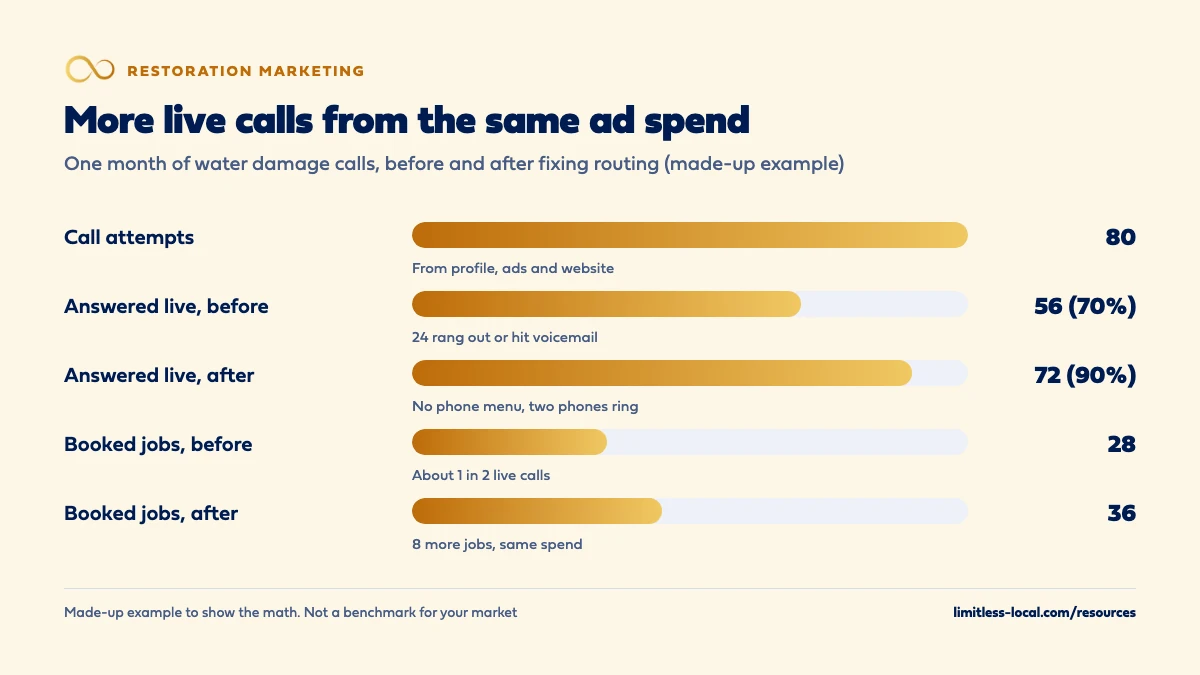
These numbers are made up to show the math, not a benchmark for your market. Say a water damage company gets 80 call attempts in a month from its profile, ads and website. It answers 70% of them live, which is 56 conversations, and 24 calls ring out or go to voicemail. About 1 in 2 live calls books, so that’s 28 jobs.
Now the company fixes routing: no phone menu, calls ring two phones, and someone covers lunch and evenings. The same 80 attempts, with 90% answered live, means 72 conversations. At the same 1 in 2 booking rate, that’s 36 jobs: 8 more booked jobs from the same ad spend.
Only then does it make sense to turn up the budget.
Frequently asked questions
Are form fills as good as live calls for water damage work?
Rarely. Someone with an active leak usually calls; a form often means they couldn’t reach anyone or aren’t in a hurry. Keep a short form for people who can’t talk right now, but route it to a phone that gets checked.
Do call-only ads work better than ads with a call button?
For most restoration companies, a regular search ad with a call asset does the same job: people on a phone can tap to call, and you can show the number only during hours you answer.
Will more reviews bring more live calls?
They help. Reviews count toward where you show up in Maps and Local Services Ads, and a stressed homeowner picking between three listings often taps the one with more recent reviews.
Is a phone menu ever a good idea for a restoration company?
Only a very short one with emergencies as the first option. Every extra step is a chance for an emergency caller to hang up and try someone else.
How many live calls should a water damage company get per month?
There’s no fair single number. It depends on your towns, your season, how many companies compete there and how much you spend. Track your own calls by source for a few months and set the goal from that.
Key takeaways
- Live water damage calls come mostly from your Google profile, Local Services Ads and search ads with a call button.
- Show your number only during hours a person answers, and match those hours everywhere.
- Phone menus, single cell phones and voicemail lose calls you already paid for.
- Fix routing before you add spend: answering more of the same calls is the cheapest growth.
- Track calls by source, and mark each one answered, missed or booked.
Not sure what's working right now?
Start with a free visibility audit: rankings, Google profile, reviews and tracking, checked against your service area.
More in this section
- How do I get more water damage leads for my restoration company?
- Which channel brings the best water, fire, or mold restoration leads?
- How should a restoration company get more customer referrals?
- How do restoration companies get insurance-related water damage jobs?
- How should a restoration company follow up on leads that don't book?
Sources
- 1. Add your phone number — Google Business Profile Help
- Tips to improve your local ranking on Google — Google Business Profile Help
- Understand your Business Profile performance & insights — Google Business Profile Help
- How leads work — Google Local Services Help
- About ad rankings — Google Local Services Help
- About call assets — Google Ads Help