
How much do competing pool builders spend on Google Ads?

- Can a pool builder find out what local competitors spend on Google Ads and Facebook?
- Can I find out exactly what a competitor spends on Google Ads?
- What does the Ads Transparency Center show about a rival's ads?
- What does the Meta Ad Library show about their Facebook and Instagram ads?
- What do auction insights tell me about competitors I'm up against?
- How can I estimate what the searches we both want cost?
- What does impression share lost to budget tell me?
- Why is a competitor's budget the wrong number to copy?
- What should I watch instead of their budget?
- When does a competitor's ad push actually matter to me?
- Does a big competitor budget mean I can't compete?
- What's different about competitor ad spend in pool construction
- A worked example: a rough estimate, and why it stays rough
- Frequently asked questions
- Key takeaways
- More in this section
- Sources
The short version
- No public tool shows a local competitor's Google Ads budget.
- Transparency tools show which ads they run, not what they spend.
- Auction insights shows how often rivals appear next to you in your own campaigns.
- Keyword Planner shows what the market costs; your budget comes from your own numbers.
For pool builders who keep seeing the same rivals at the top of Google and want to know what they’re up against before setting their own ad budget.
Get a free visibility audit · Book a growth call
Can a pool builder find out what local competitors spend on Google Ads and Facebook?
You can’t find out exactly, because no public tool shows what a local competitor spends on Google Ads. Google’s Ads Transparency Center and Meta’s Ad Library show which ads a business is running, not its budget. What you can measure is how often rivals show up next to you, through the auction insights report in your own Google Ads account, and roughly what it costs to show up for the searches you both want, through Keyword Planner. Use those to set your budget from your own numbers, not to copy someone else’s spend.
We don’t set a pool builder’s budget by guessing at a rival’s. We start from what a signed contract is worth to you and what the searches in your towns cost, and we recommend a budget after a quick audit; ad spend is paid directly to Google, apart from our fee. Our Google Ads and local ads work covers the campaigns, the auction data and the tracking from click to signed contract. See how it fits together on our pool builder marketing page, or browse the rest of the pool builder marketing questions.
Can I find out exactly what a competitor spends on Google Ads?
No. A pool builder’s Google Ads budget is between them, their agency if they have one, and Google. There’s no public report, no lookup and no setting that reveals it.
You’ll see tools and articles that put a dollar figure on a competitor’s ad spend. Those figures are estimates built from guesses stacked on guesses: a guess at which keywords they bid on, how often their ads show, how many people click and what each click costs. For a national brand with lots of data, the guesses may land close. For a pool builder bidding on a handful of searches in a few towns, they can be far off in either direction.
So treat any outside spend figure as a rough sketch at best. The good news is that you don’t need their exact number to make a good decision about yours.
What does the Ads Transparency Center show about a rival's ads?
Google’s announcement of the Ads Transparency Center describes it as a searchable hub of all ads served from verified advertisers, and lists what you can learn there: the ads an advertiser has run, which ads were shown in a certain region, and the last date an ad ran and its format. Budgets and spend aren’t on that list.
For a pool builder, that’s still useful. Search a competitor’s business name and you can see:
- Whether they advertise on Google at all.
- What their ads say: offers, financing mentions, pool types, design consultation pitches.
- Whether their ads have been running recently or went quiet months ago.
A builder with many current ads covering several pool types is probably spending steadily. A builder with two old ads probably isn’t. That’s as close to a budget reading as this tool gets.
What does the Meta Ad Library show about their Facebook and Instagram ads?
Much the same. Meta’s help page About the Meta Ad Library says the library contains all active ads shown across Meta technologies, and anyone can view and search it. For ordinary active ads, it shows the ad creative, the Page the ad ran from and the date the ad started running. Amount spent and impression ranges are only shown for ads about social issues, elections or politics, which a pool builder’s ads aren’t.
So you can see what a rival is running on Facebook and Instagram and how long each ad has been live, but not what they’re paying. An ad that’s been running for months is a decent sign it’s working well enough for them to keep paying for it.
What do auction insights tell me about competitors I'm up against?
This is the most useful competitor data you can get, and it lives in your own account. Google’s help page on auction insights says the report lets you compare your performance with other advertisers who are participating in the same auctions you are, which can help with decisions about bidding and budgeting. For Search campaigns it shows:
- Impression share: for other advertisers, their share of the auctions in which they were eligible to show.
- Overlap rate: how often their ad showed when yours did.
- Outranking share: how often your ad ranked higher than theirs, or showed when theirs didn’t.
- Position above rate: how often their ad showed above yours when both showed.
- Top of page rate and absolute top of the page rate: how often an ad showed above the unpaid results, and how often it was the very first ad.
Three limits to keep in mind. You only see rivals in auctions you entered, so you need a running Search campaign. The report doesn’t show insights when your impression share is under 10%. And a competitor’s impression share in your report can differ from what they see in their own, because their eligible auctions only partly overlap with yours.
Read it as a picture of presence, not spend. A rival with high impression share and a high top of page rate is showing often and near the top on your searches, which takes a budget and bids that keep up. How much that costs them, the report doesn’t say.
Curious what your marketing is actually booking?
Get a free visibility audit — no obligation, no sales pitch.
How can I estimate what the searches we both want cost?
Price the market instead of the competitor. Google’s Keyword Planner can do this. Its help page on Keyword Planner forecasts explains that forecasts take your bid, budget, seasonality and historical ad quality into account, and that historical metrics include average monthly searches, a competition level and a top of page bid range. The low end of that range approximates the 20th percentile and the high end approximates the 80th percentile of what advertisers have historically paid for a top of page bid, based on your location settings.
Put in the searches you care about, such as pool builder, custom pool, fiberglass pool installer and the like, set the location to the towns you really build in, and you’ll get a rough answer to the question that matters: what would it cost to show up for these searches most of the time? That’s a budget figure grounded in your market, which is more useful than a guess at one rival’s.
Two cautions: forecasts are less accurate if you’re targeting a small geographic area, and a brand-new account’s forecasts are based on averages for all advertisers until there’s enough data about your own ads.
What does impression share lost to budget tell me?
Once your ads are running, two columns tell you whether rivals are crowding you out. Google’s page Get impression share data defines them:
- Search lost IS (budget): the percentage of time your ads weren’t shown on the Search Network due to insufficient budget.
- Search lost IS (rank): the percentage of time your ads weren’t shown due to poor Ad Rank in the auction.
If you’re losing a lot to budget, your money runs out before the day’s searches do, and rivals pick up the rest. If you’re losing a lot to rank, rivals are outbidding you, outscoring you on ad quality, or both. Those two numbers point to different fixes: more budget or tighter targeting for the first, better ads, landing pages and bids for the second.
Why is a competitor's budget the wrong number to copy?
Because it was built on their business, not yours. A rival’s spend reflects their contract values, their close rate, their service area, how fast they follow up and how full their calendar is. A builder with high-end custom pools and a strong sales process can afford to pay far more per lead than a builder selling smaller fiberglass jobs. Matching their spend could bury you, and matching a rival who’s wasting money wastes yours too.
Set your number from the inside out: how many signed contracts you want, how many leads that takes at your close rate, and what you can afford to pay for each. What monthly ad spend gets a pool builder steady leads walks through that math. Then use what you learned about competitors to sanity-check it: if your budget can only buy a sliver of the searches a rival dominates, aim it at the towns or pool types where you can win.

What should I watch instead of their budget?
The things you can actually see, and act on:
- Their offers and messages. Financing pitches, free design consultations, pool types, timelines. If every rival says the same thing, there’s room for an ad that says something different and true about you.
- Their landing pages. Where do their ads send people, and how easy is it to request a consultation?
- Their towns and pool types. Which searches they show up for, and which they’ve left open.
- Your own impression share and position against them, month over month, in auction insights.
- Your own cost per signed contract. The only number that tells you whether your budget is right.
For a full, step-by-step look at how rivals get their leads, including their Google profile, reviews and website, see how to see what local competitors do to get their pool leads. Don’t click competitors’ ads to check on them. It costs them money, and it muddies your own picture of the market.
When does a competitor's ad push actually matter to me?
When it shows up in your numbers. Watch for:
- Your cost per click rising on the same keywords.
- A rival’s impression share or top of page rate climbing in your auction insights.
- Your search lost IS (rank) going up while your budget hasn’t changed.
- Fewer consultation requests from ads, with no change on your end.
If you see those, don’t start by raising bids across the board. Tighten the towns and searches you pay for, sharpen the ads and the landing page, and lift bids only on the searches that sign contracts. Better ad quality can win you position without paying more for every click, which what Quality Score means for a pool builder’s Google Ads explains. If the push comes from a new builder in your area, how to respond when a new pool competitor opens nearby covers the wider plan.
Does a big competitor budget mean I can't compete?
No. A rival with a bigger ad budget can buy more clicks, but clicks aren’t contracts. A smaller builder can win on the things a budget can’t buy: faster follow-up, stronger reviews, better photos of real local pools, a sharper consultation and a focus on the towns where it builds most.
Paid search is also only one of the places homeowners look. The map results, your Google profile, referrals and repeat customers don’t care how much a rival spends on ads. How a local pool builder can compete with national franchises covers the ways a smaller builder holds ground against much bigger budgets.
Want to see where your company stands?
A free visibility audit shows where you show up on Google, Maps and AI answers, and what it's costing you in calls.
What's different about competitor ad spend in pool construction
Rivals’ spend swings with the season. Many pool builders spend more in late winter and spring, when homeowners plan for summer, and pull back once their calendars fill. A competitor who seems to be everywhere in March may be nearly invisible in August, so check auction insights across the year, not once.
A full calendar changes behavior. A builder booked out for months has little reason to keep bidding hard. When a big rival goes quiet, that’s often a window for you, not a sign the searches dried up.
High contract values hide waste. One signed pool can cover a lot of ad spend, so some builders keep spending on campaigns that barely work. A rival’s steady presence doesn’t prove their ads pay off.
Few searches, few rivals. In many markets, only a handful of builders bid on pool construction searches. That makes auction insights unusually readable: you can often name every rival in the report.
A worked example: a rough estimate, and why it stays rough
These numbers are made up to show the math, not a benchmark for your market.
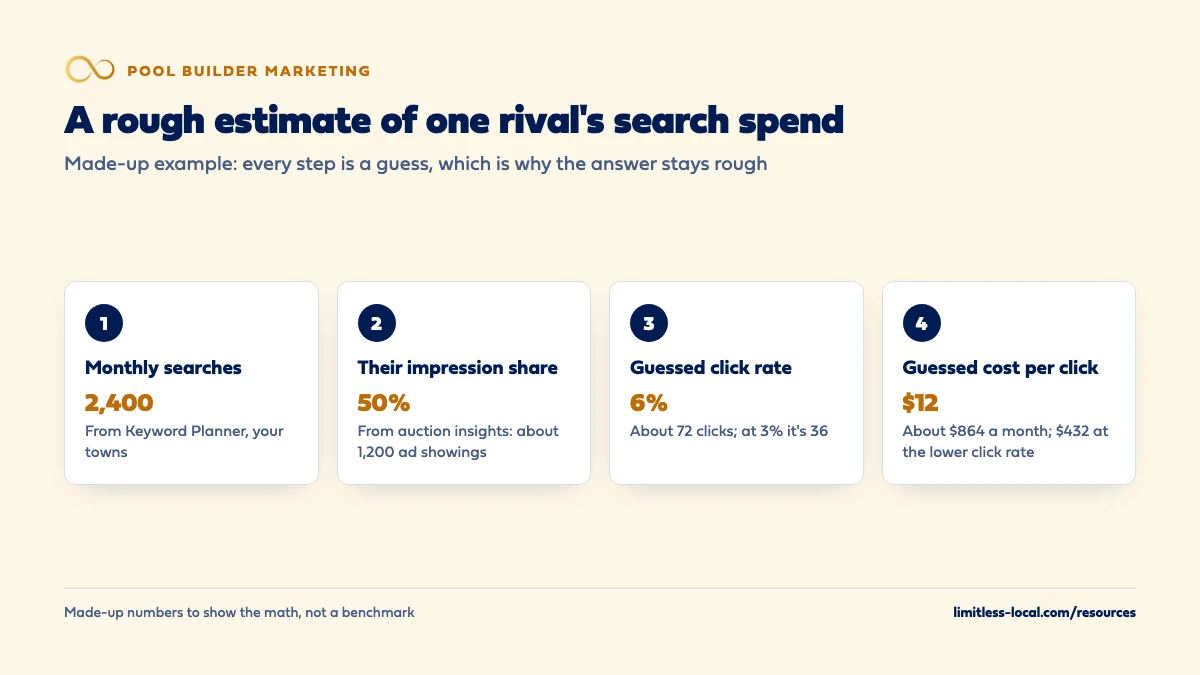
Say Keyword Planner shows about 2,400 searches a month for the pool construction searches you care about in your towns. Auction insights shows a rival with roughly 50% impression share on those searches. That’s about 1,200 times a month their ad shows.
Guess that 6% of people who see their ad click it: about 72 clicks. Say Keyword Planner’s bid range suggests clicks cost around $12. That puts their spend on these searches near $864 a month.
Now change one guess. If only 3% click, that’s 36 clicks and about $432. One input halved the answer, and every input here is a guess. They may also bid on searches and towns you don’t, or run other campaigns entirely. That’s why the estimate is a sketch of the market, not a number to plan around. Your own budget should come from your contract values and close rate.
Frequently asked questions
Can a tool tell me a competitor's exact Google Ads budget?
No. Outside tools can only estimate it from guessed keywords, impressions, clicks and click costs. For a local pool builder with a small set of searches, those estimates can be well off.
Can I see competitors in auction insights without running ads?
No. The report compares you with advertisers in the same auctions you entered, so you need an active Search campaign with enough activity. It also doesn’t show insights when your impression share is under 10%.
Should I bid on a competitor's business name?
It’s possible, but searches for a rival by name come from homeowners already looking for that builder, so they often cost a lot for little return. Protecting your own name in search is usually the better spend.
A competitor's ads show every time I search. Are they spending a fortune?
Not necessarily. What you see on your own phone isn’t a fair sample, and a builder with a narrow service area can show often on a modest budget. Auction insights gives a truer picture than your own searches.
How often should I check on competitors' ads?
A quick look each month in auction insights, and a deeper look at their ads and pages before each season, is plenty. Checking daily mostly adds worry, not information.
Key takeaways
- No public tool shows a local competitor’s Google Ads budget, and outside estimates are rough.
- The Ads Transparency Center and Meta Ad Library show which ads rivals run, not what they spend.
- Auction insights in your own account shows how often rivals appear next to and above you.
- Keyword Planner prices the searches you want in your towns, which is more useful than a guess at a rival’s budget.
- Set your budget from your contract values and close rate, then use competitor data to aim it.
Not sure what's working right now?
Start with a free visibility audit: rankings, Google profile, reviews and tracking, checked against your service area.
More in this section
- Are Google Ads worth it for pool builders?
- How should a pool builder structure Google Ads campaigns?
- How much should a pool builder spend on marketing?
- What does a pool builder budget beyond ad spend?
- How long do Google Ads take to bring a pool builder calls?
Sources
- Announcing the launch of the new Ads Transparency Center — Google
- About the Meta Ad Library — Meta Business Help Center
- Use auction insights to compare performance — Google Ads Help
- About Keyword Planner forecasts — Google Ads Help
- Get impression share data — Google Ads Help