
How do I get my restoration company back into the Map Pack?
- How do I get my restoration company's Google listing back into the Maps results after it dropped?
- Why did my restoration company drop out of the Map Pack?
- How do I tell if my restoration profile was suspended or just slipped?
- What gets restoration company profiles suspended?
- How do I appeal a suspended restoration profile?
- Could an edit I made have knocked me out?
- Did Google change my restoration profile without asking?
- Could a duplicate profile be hiding my restoration company?
- What if my reviews disappeared or stopped showing?
- What if nothing is wrong with my profile and I still dropped?
- How much does my website matter for getting back in?
- In what order should I work through all this?
- What's different when a restoration company drops out of Maps
- A worked example: a drop after a storm-season shortcut
- Frequently asked questions
- Key takeaways
- More in this section
- Sources
The short version
- Check status first: suspended, pending edit, Google update, duplicate or missing reviews.
- Fix the guideline problem before you appeal; Google says appeals can only be submitted once.
- Never open a new profile to replace a suspended one.
- If the profile is healthy, rebuild relevance and popularity; there's no switch.
A recovery checklist for restoration owners whose Google profile has dropped out of the Maps results, worked from the most likely cause to the least.
Get a free visibility audit · Book a growth call
How do I get my restoration company's Google listing back into the Maps results after it dropped?
First find out why you dropped: check whether the profile is suspended, whether a recent edit is pending or was rejected, whether Google changed your info, and whether a duplicate profile or missing reviews are involved. If the profile was suspended, fix what breaks Google’s guidelines, such as service words in the name or an address you don’t staff, and appeal once through the Business Profile appeals tool instead of opening a new profile. If nothing is wrong with the profile, the drop comes down to relevance, distance and popularity, which Google says decide local results, so the way back is a more complete profile, steady genuine reviews and a website that supports the work you want.
Working out why a profile dropped, and fixing it without making things worse, is part of the Google Business Profile management in our local SEO work for restoration companies. The restoration marketing guide explains what the map pack is and why so many emergency jobs start there; the rest of the restoration marketing questions library goes one question at a time.
Why did my restoration company drop out of the Map Pack?
Almost every drop falls into one of two groups, and the first job is to work out which one you’re in.
- Something happened to the profile. It was suspended or disabled, an edit is pending or wasn’t approved, Google changed your information, a duplicate profile is splitting or hiding you, or reviews disappeared.
- Nothing happened to the profile, but the results moved. Google says local results are mainly based on relevance, distance and popularity. A competitor got stronger, the searcher was somewhere else, or your profile simply matches the search less well than others do.
Rule out the first group before spending a dollar on the second. In our judgement, owners often skip straight to “we need more reviews” when the real cause is an edit made two weeks earlier. Source: Tips to improve your local ranking on Google.
How do I tell if my restoration profile was suspended or just slipped?
Sign in to your Business Profile and open the Business Profile appeals tool. If there’s a decision against the profile, the tool shows the date, the reason, a link to the policy Google says you broke, and whether you can appeal. Google says that when a profile is removed, the public can’t go to it and the owner and managers can’t act on it.
A quick outside check helps too, in our view: search your exact business name on Maps from a phone that isn’t signed in to your account. If the profile appears for its name but not for “water damage restoration” in your own town, it isn’t suspended; it’s ranking lower, and you’re in the second group. If it doesn’t appear even for its name, start with the suspension and duplicate checks below. Sources: Fix suspended or disabled profiles and Appeal Business Profile content & profile restrictions.
What gets restoration company profiles suspended?
Google says it may suspend or disable profiles that don’t follow its guidelines. In our judgement, the ones most likely to catch a restoration company map to these rules:
- Extra words in the name. Google says the name should match your real-world name and that adding unnecessary information to it isn’t permitted and could get the profile suspended. “Water Damage Restoration” or a city tacked onto the name is the classic case.
- An office you don’t staff. A rented mailbox or virtual office isn’t eligible, and a service-area business can’t list a virtual office unless it’s staffed during business hours. Storm-season “offices” in the next county are where this bites.
- A shown address with no storefront. If customers don’t come to you, Google says to hide your address and set a service area.
- More than one profile for one business, such as a separate profile for mold or for each city. That’s covered under duplicates below.
A call-tracking number on the profile is its own question, covered in whether call tracking hurts rankings. Sources: Fix suspended or disabled profiles and Guidelines for representing your business on Google.
How do I appeal a suspended restoration profile?
Fix the problem first, then appeal. Google’s own checklist starts with making sure the profile follows all the guidelines. Then:
- Open the appeals tool, confirm the right Google Account and select the profile.
- Select the decision you want to appeal.
- Attach evidence. Google lists official business registration, a business license, tax certificates and utility bills, and says the business name and address on them should match the profile.
- Explain in the text box why the profile should be reinstated, then submit.
Two rules matter more than the rest. Appeals can only be submitted once, so don’t send a half-finished one. And don’t create a new Business Profile for the same business. Google says decisions on appeals can take up to 5 business days and arrive by email. If an appeal is denied, Google may do an additional review where you can add evidence you didn’t include the first time. Sources: Fix suspended or disabled profiles and Appeal Business Profile content & profile restrictions.
Could an edit I made have knocked me out?
Yes, and it’s one of the most common causes. Edits to a verified profile are reviewed before they go live. Google says that usually takes up to 10 minutes but can take up to 30 days, and the edit shows as Accepted, Pending or Not approved.
Look at what changed in the weeks before the drop. A new primary category, a widened service area, a name change after a rebrand or a moved pin are all candidates. If an edit was rejected, Google says you might be able to appeal it. If it went through and calls fell, consider putting it back the way it was. On categories specifically, picking your Google categories covers what each one should be. Source: Understand what happens to your Business Profile edits.
Curious what your marketing is actually booking?
Get a free visibility audit — no obligation, no sales pitch.
Did Google change my restoration profile without asking?
It may have. Google gathers business information from other sources, such as user reports and licensed content, and may update your profile if those sources say your info is wrong or outdated. In the profile editor, information Google changed shows in blue, with a notification at the top of the page.
Some suggested edits come with an email or in-product notice and a 4-day window to accept or reject; if you don’t respond, Google may publish the change when other public information, such as your website, supports it. If your hours flipped to closed, your category changed or your pin moved, correct it and keep an eye on notifications. Source: Understand Google updates on your Business Profile.
Could a duplicate profile be hiding my restoration company?
Google allows one profile per business. It says that if a profile is considered a duplicate, it won’t show on Search or Maps, and it names a few reasons profiles get marked as duplicates, including multiple profiles for the same business that offer different services. That’s the trap for restoration companies that set up a second profile for mold or fire work: Google’s instruction is to list those services on your one profile instead.
What to do depends on the duplicate. If you created one by mistake, you can remove it without affecting your verified profile, but removing it deletes its content and managers, so pick the right one. If two profiles for your business exist on Maps, you can ask Google to merge them; Google says merged profiles combine their reviews, though replies may be lost. If an old owner, employee or agency still controls the verified profile, you can request ownership. Source: Resolve duplicate profiles & ownership issues.
What if my reviews disappeared or stopped showing?
Google says reviews are usually removed for policy violations like spam or inappropriate content, and that reviews removed for policy violations won’t be restored. New reviews can also take a few days to appear while they’re checked, and reviews from merged profiles can take a few days to show.
Watch for something more serious. Google says that if a business owner violated its Fake Engagement policy, it may restrict the profile, for example blocking new reviews for a set time, unpublishing existing ones or showing a warning that fake reviews were removed. It emails the owner first. In our judgement, a review drive with a gift card or money off the invoice is the restoration version of this risk. Rebuilding after a review drop is covered in recovering when reviews drop. Sources: About missing or delayed reviews and Business Profile restrictions for policy violations.
What if nothing is wrong with my profile and I still dropped?
Then you’re back to Google’s three factors. Relevance is how well your profile matches the search, so complete, detailed information helps. Distance is how far you are from the searcher, and if they don’t share a location, Google uses what it knows about it. Popularity is how well-known you are, based partly on how many websites link to you and how many reviews you have; Google says more reviews and positive ratings can help.
Distance explains a lot of restoration drops, in our judgement. A homeowner searching from across town sees a different map pack than you do in your office, so check from where your customers are, not only where you are. If a new competitor opened close to the neighborhoods you serve, holding your spot against a new competitor covers the response. Google is clear that there’s no way to request or pay for a better local ranking. Source: Tips to improve your local ranking on Google.
How much does my website matter for getting back in?
More than most owners expect. Google says links to your business from other websites are part of popularity, and that it can detect category information from your website and from mentions of your business across the web. It also says that when a suggested edit goes unanswered, it may publish it if other public information, such as your website, supports it.
So your site is a tiebreaker on what your business is. In our judgement, a restoration company whose website says water, fire and mold, with a page for each, gives Google a clear match for those searches. Fix contradictions first: the same name, phone and service list on the site as on the profile. Sources: Tips to improve your local ranking on Google, Guidelines for representing your business on Google and Understand Google updates on your Business Profile.
In what order should I work through all this?
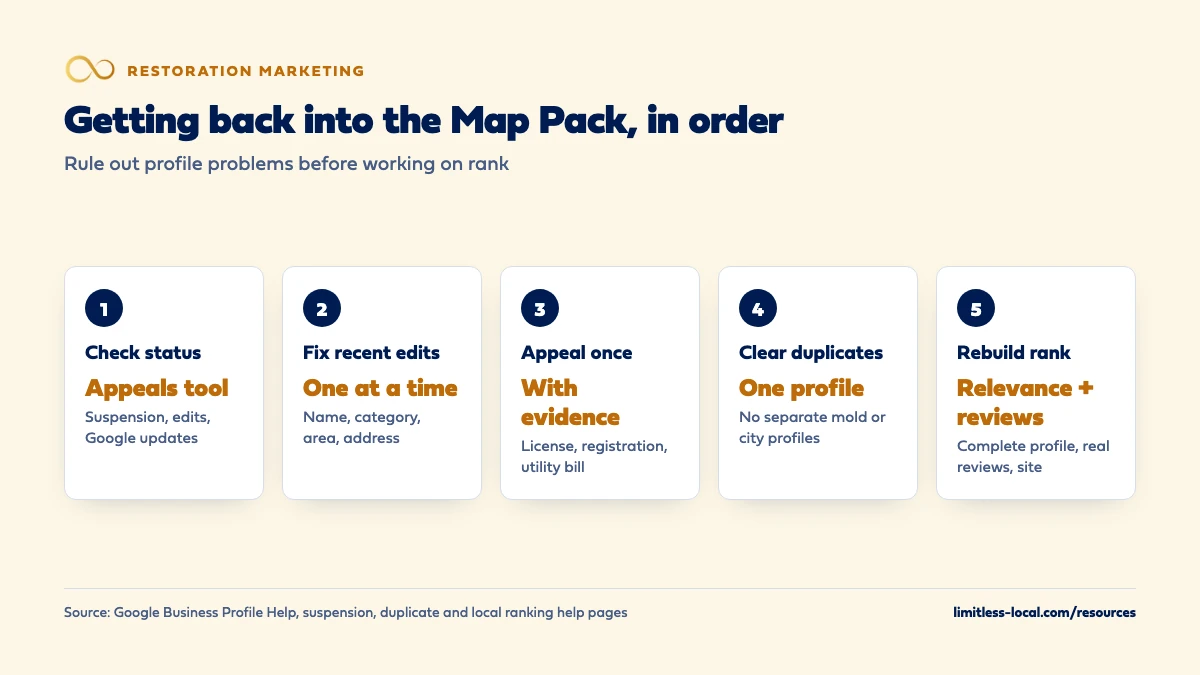
- Check the status. Appeals tool, edit status and blue Google updates.
- Undo or fix recent edits. Especially name, category, address and service area.
- Fix guideline problems, then appeal once with evidence if you were suspended.
- Clear up duplicates and ownership, including old agency or employee logins.
- Check reviews for removals or restrictions.
- Rebuild relevance and popularity: complete services, steady genuine reviews, real job photos, and a website that matches.
Change one thing at a time where you can, so you know what worked. While the profile recovers, emergency calls don’t have to stop: paid placements are a separate system, and Google Ads, LSAs or both covers the choice. That’s our suggestion for keeping the phone ringing, not a fix for the profile.
Not sure which of these is costing you jobs?
A free visibility audit checks the Google profile, reviews, site and tracking, and shows what to fix first.
What's different when a restoration company drops out of Maps
The cost of a drop is immediate. Restoration searches happen in an emergency, so a week out of the map pack is a week of burst-pipe calls going elsewhere. That’s why we’d run the status checks the same day you notice, not wait to see if it comes back.
Storms tempt shortcuts. Widening the service area across three counties, adding a city to the name or listing a temporary office during a storm are the moves most likely to bring a suspension, in our view, right when you can least afford one.
Multi-service companies split themselves. Separate profiles or websites for water, fire and mold can look like duplicates. One profile with a full services list is what Google’s guidelines describe.
A worked example: a drop after a storm-season shortcut
This is an illustration with made-up details, not a real client. Say a restoration company had been in the map pack in its home town for years. During a busy freeze, the owner changed the profile name to add “Emergency Water Damage”, widened the service area into two neighboring counties, and set up a second profile at a rented mailbox in the next town. Within weeks, the main profile stopped showing for anything but its name, and the second one disappeared.
The recovery: the owner checks the appeals tool and finds a suspension citing the name rule. The name goes back to the real business name on the vans and invoices, the service area shrinks back to the towns the crew covers at night, and the mailbox profile is removed. Then one appeal goes in, with a business license and a utility bill that match the profile’s name and address.
Once reinstated, the measure is booked jobs from profile calls, compared with the same month a year earlier, not a ranking promise. Google Business Profile management, including this kind of cleanup, is part of our Essentials package at $3,500 a month, and we tell owners plainly that SEO work typically takes 3-6 months to show meaningful growth.
Frequently asked questions
Should I delete my profile and start a new one?
No. Google says not to create a new Business Profile for the same business; appeal instead. A new profile for the same business can be treated as a duplicate and won’t show on Search or Maps. Source: Fix suspended or disabled profiles.
Can I appeal a suspension more than once?
Each appeal can only be submitted once, so include your evidence the first time. If it’s denied, Google may do an additional review where you can add new evidence. Source: Fix suspended or disabled profiles.
Can I open an office in the next town to get into its map pack?
Only if it’s a real location with its own staff and service area. Google says a rented mailbox or unstaffed virtual office isn’t eligible, and service-area businesses get one profile for the central office. Source: Guidelines for representing your business on Google.
Can someone outside my company change my restoration profile?
People can suggest edits. Google says it notifies you about certain suggested edits, but it may publish others, or apply some without prior review when needed to meet its policies. Check for blue updates in the editor. Source: Understand Google updates on your Business Profile.
How long does it take to get back in after a fix?
Google doesn’t give a timeline for ranking recovery. It says edits usually review within 10 minutes but can take up to 30 days, and appeal decisions can take up to 5 business days. Sources: Understand what happens to your Business Profile edits and Appeal Business Profile content & profile restrictions.
Key takeaways
- Work out whether the profile has a problem or the results moved before changing anything.
- The appeals tool shows any decision against the profile, with the reason and the policy.
- Fix the guideline problem, then appeal once with matching evidence; never open a new profile.
- Recent edits, Google updates, duplicates and removed reviews are common, fixable causes.
- If the profile is healthy, rebuild relevance and popularity and judge recovery by booked jobs.
Want a second set of eyes on your setup?
We'll look at how you show up locally and where calls are leaking, then send you a plain-English breakdown.
More in this section
- How do I hold my Map Pack spot against a new restoration competitor?
- How does a restoration company recover when its reviews drop?
- How should a restoration company market to real estate agents?
- How should a restoration company market to commercial properties?
- How should a restoration company build city pages that rank?
Sources
- Tips to improve your local ranking on Google — Google Business Profile Help
- Guidelines for representing your business on Google — Google Business Profile Help
- Fix suspended or disabled profiles — Google Business Profile Help
- Appeal Business Profile content & profile restrictions — Google Business Profile Help
- Understand what happens to your Business Profile edits — Google Business Profile Help
- Understand Google updates on your Business Profile — Google Business Profile Help
- Resolve duplicate profiles & ownership issues — Google Business Profile Help
- About missing or delayed reviews — Google Business Profile Help