
What should a restoration Google Ads landing page include?
- What makes a good landing page for restoration Google Ads?
- How is a Google Ads landing page different from my service page?
- What should someone see before they scroll?
- Do I need a separate landing page for each type of job?
- Should the page push a phone call, a form or both?
- What proof should a restoration landing page show?
- What should the landing page say about insurance?
- How fast does a restoration landing page need to load?
- What should I leave off a restoration landing page?
- How should the phone number on the page be tracked?
- Does a better landing page lower what I pay for clicks?
- What's different about landing pages for restoration companies
- A worked example: what the page changes in cost per call
- Frequently asked questions
- Key takeaways
- More in this section
- Sources
The short version
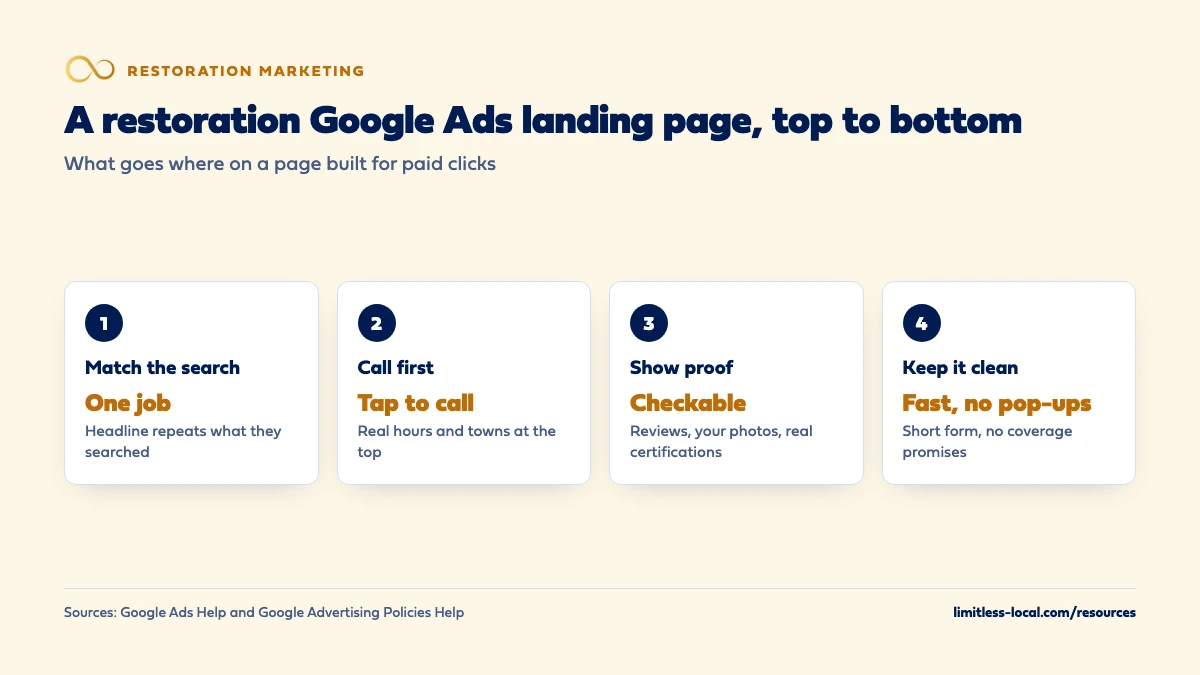
- One page per job you advertise, with a headline that repeats what they searched for.
- A tap-to-call button, your real answering hours and your service area at the top.
- Proof that can be checked: reviews, your own job photos, certifications your firm holds.
- A short form as backup, a general line on insurance, and nothing that slows or blocks the page.
For restoration owners paying for Google search ads who want each click to land on a page built to get the phone ringing.
Get a free visibility audit · Book a growth call
What makes a good landing page for restoration Google Ads?
A restoration Google Ads landing page should match the exact job the person searched for, such as water extraction, sewage cleanup or mold removal, and put a tap-to-call button, the hours you really answer and the towns you serve at the top. Below that, it needs proof a stressed homeowner can check (real reviews, your own job photos, certifications your firm actually holds), a short form for people who can’t call, and a plain line on how you work with insurance without promising coverage. Leave off pop-ups, full menus and anything that slows the page on a phone, since Google’s own policy can disapprove pages that are slow or hard to use.
Building paid-traffic pages that match each ad group is part of how we run Google Ads and websites for restoration companies, with call tracking so each page is judged on calls and booked jobs. The restoration marketing guide covers what a converting restoration website needs overall, and the restoration marketing questions library takes the rest one question at a time.
How is a Google Ads landing page different from my service page?
A service page has to serve everyone who finds it: people comparing companies, people reading about the process, people from Maps and from a referral. A paid landing page has one job: take the person who just clicked an ad for one kind of loss and get them on the phone. Google puts it simply in its own advice: when someone clicks your ad, they expect a page that’s relevant to what they saw, and if they don’t immediately find it, they’re more likely to leave.
Google’s mobile landing page advice makes the same point with an example: an ad for one product should go straight to that product’s page, not a general page or the homepage, which forces people to start their search over. For a restoration company, in our judgement, that means an ad about sewage backup cleanup goes to a sewage page, not your homepage and not a page that lists every service you do. An existing service page can work if it’s built this way. Sources: Optimize your ads and landing pages and 5 things to consider when optimizing your mobile landing page.
What should someone see before they scroll?
Google advises putting important information toward the top of the page so visitors don’t have to scroll to see it, and making it quick and easy to do what you want them to do, including calling your phone number. On a phone, the top of a restoration landing page is small, so in our judgement it should hold only this:
- A headline that repeats the job they searched for: water extraction, flooded basement cleanup, sewage cleanup.
- A large tap-to-call button with the number written out, so it works even if the button doesn’t.
- When you answer: “we answer around the clock” only if someone really does.
- Where you go: the towns or county you serve, in a line.
- One line of proof: your Google rating if it’s strong, or a certification your firm holds.
Everything else, from the process to insurance to photos, goes below. Source: Optimize your ads and landing pages.
Do I need a separate landing page for each type of job?
For each type of job you advertise separately, yes. Google says to choose a landing page that closely matches your ad and keywords, because that match feeds both ad relevance and landing page experience. It also says your page should mirror the call to action in your ad. In restoration terms: if the ad says call now for emergency water removal, the page should make calling the obvious next step.
In our judgement, most restoration companies need four pages at most to start: emergency water, sewage, mold and fire and smoke, each tied to its own ad group or campaign. Mold and fire behave differently from water, with planned inspections, longer jobs and different searchers, which is why giving mold its own campaign often makes sense, and the keyword groups in which water damage keywords to target map neatly onto these pages. Source: Optimize your ads and landing pages.
Should the page push a phone call, a form or both?
A call first, with a short form or text option as backup. Someone with water spreading across the floor wants a person, and Google’s mobile advice notes that forms are inconvenient on mobile and can cause visitors to leave before they act. But not everyone can talk: a tenant at work, someone calling at midnight who doesn’t want to wake the house, a property manager on a site walk.
In our judgement, a restoration landing page should have:
- A call button at the top and repeated further down the page.
- A short form below it, asking for name, phone, address or ZIP and what happened, and nothing else.
- A clear line about what happens next: “We call you back within minutes” only if you actually do.
A form nobody answers until morning is a slow lead, not a backup. How fast you need to answer emergency calls covers the coverage side. Source: 5 things to consider when optimizing your mobile landing page.
Curious what your marketing is actually booking?
Get a free visibility audit — no obligation, no sales pitch.
What proof should a restoration landing page show?
Google suggests adding reviews that show real opinions from other customers, and being clear about your service and what it does. In our judgement, the proof that matters on a restoration page is the proof a stressed homeowner can check:
- Real reviews that mention the job type on the page, with your Google rating if it’s strong.
- Your own job photos: crews, equipment set up, a dried-out room. Never a photo that shows a customer’s home in a way they could be identified by.
- Certifications your firm actually holds. The IICRC describes its Certified Firms as following established best practices and employing properly trained technicians; only claim the status if your firm has it.
- Licenses and insurance, where your state requires them, stated plainly.
Be exact here. Google’s Misrepresentation policy doesn’t allow misleading statements about your identity, affiliations or qualifications. A logo you’re not entitled to use is a policy problem as well as an honesty one. Sources: Optimize your ads and landing pages, IICRC Certified Firms and Misrepresentation.
What should the landing page say about insurance?
Enough to answer the first worry, and no promises. Most people with water on the floor are wondering whether insurance will pay, and in our judgement a short, general line helps them call: that you work with insurance companies, document the damage and can explain the process, if all of that is true.
What the page must not do is promise an outcome. Google’s Misrepresentation policy covers unreliable claims, including claims that entice people with an improbable result as the likely outcome, and it doesn’t allow promising services that aren’t available or easily found from the page. “Insurance covers it” or “no cost to you” are claims you can’t know are true before you’ve seen the policy. In our judgement, leave coverage to the insurer and the policyholder. Whether your website should explain insurance claims covers what a fuller page can safely say. Source: Misrepresentation.
How fast does a restoration landing page need to load?
Fast on a phone with a weak signal, because that’s where many emergency clicks happen. Google’s mobile advice says prospects will wait only seconds for mobile pages to load before going elsewhere, suggests its free PageSpeed Insights tool to check, and suggests reducing image sizes, shortening videos and removing features that don’t add value.
Speed can also become a policy issue. Google’s Destination experience policy lists websites that don’t load quickly on most popular browsers and devices among the examples that can lead to disapproval. In our judgement, the usual culprits on restoration sites are large before-and-after galleries, autoplay video at the top and heavy chat widgets. Put photos lower down, compress them, and test the page on your own phone, outside the office Wi-Fi. Sources: 5 things to consider when optimizing your mobile landing page and Destination experience.
What should I leave off a restoration landing page?
Anything that gets between the click and the call. Google’s Destination experience policy can disapprove pages with pop-ups or interstitials that interfere with seeing the content, pages that interfere with the back button, and pages that auto-redirect. Its mobile advice also warns that full-size pop-ups and live chat boxes covering the page disrupt the visit. In our judgement, also leave off:
- Services you’re not advertising on that page, beyond a short line that you do them.
- A full menu that leads people away to your blog or careers page.
- Offers you won’t honor. Google doesn’t allow promising services or offers in the ad that are unavailable or hard to find on the page.
- Fear-driven copy about mold or contamination that a source doesn’t back.
- Stock photos that don’t look like your crews or your area.
If your page has these and the phone still isn’t ringing, clicks but no calls walks through the diagnosis. Sources: Destination experience, 5 things to consider when optimizing your mobile landing page and Misrepresentation.
How should the phone number on the page be tracked?
So that every ad call can be traced to the campaign and keyword behind it. Google Ads can track calls to a number on your website by showing a Google forwarding number, which replaces your number for people who clicked an ad, and counting calls that last at least the minimum length you set. Clicks on a number on your mobile site can also be tracked, but Google says that method counts the click, not the call itself.
Google also lets you import call conversions from another system, such as a CRM, so you can count only calls that led to a sale and include what they were worth. In our judgement, that’s where restoration tracking should end up: Google learning from booked jobs, not from every call that passes a minimum length. On the ad side, Google says putting a phone number in ad text may get the ad disapproved; use a call asset, which you can set to show only when you can accept calls. Tracking which marketing books restoration jobs covers the setup. Sources: About phone call conversion tracking and About call assets.
Does a better landing page lower what I pay for clicks?
Not in a way Google promises. Landing page experience, how relevant and useful your page is to people who click, is one of the three parts of Quality Score, along with expected clickthrough rate and ad relevance. Google rates each part as above average, average or below average against other advertisers whose ads showed for the exact same search over the last 90 days, and shows Quality Score on a scale of 1 to 10 for each keyword.
Google is also clear that Quality Score is a diagnostic tool, not an input in the ad auction and not a number to chase. In our judgement, use it as a warning light: a “below average” landing page experience on your core water keywords means the page doesn’t match what people searched for. The real test is the one you can count: calls per click and booked jobs per call. Source: About Quality Score for Search campaigns.
Want to see where your company stands?
A free visibility audit shows where you show up on Google, Maps and AI answers, and what it's costing you in calls.
What's different about landing pages for restoration companies
The visitor is often mid-emergency. In our judgement, a restoration landing page is read in seconds by someone standing in water, so the phone number and the job name matter more than design.
Night clicks are normal. Whatever the page says about hours and response times has to be true at 3 a.m., or the page is making a promise your phone can’t keep.
Insurance is on every visitor’s mind. Say how you work with insurers in general terms and never promise coverage.
Privacy matters in your photos. In our judgement, show crews and equipment, not a customer’s recognizable home or belongings.
One company, several loss types. Water, sewage, mold and fire each deserve their own page, because the person searching and the job are different.
A worked example: what the page changes in cost per call
These numbers are made up to show the math, not a benchmark or a forecast for any market. Say your water damage campaign spends $2,000 in a month and gets 200 clicks. The ad, keywords and budget stay the same; only the landing page changes.
- Old page (homepage, phone number in the footer): 8% of clicks become calls, so 16 calls, or $125 per call.
- New page (sewage and water headline, call button at the top, short form): 12% of clicks become calls, so 24 calls, or about $83 per call.
Same spend, same clicks, and each call costs about a third less, because more of the people you already paid for picked up the phone. Whether those calls become booked jobs depends on how they’re answered, which is why the next number to watch is booked jobs per call.
On our side, the Essentials package ($3,500 a month) includes one landing page alongside Google Ads management up to $2,500 a month in ad spend, plus call, web and form tracking. Growth ($4,500 a month) raises the ad spend covered to $5,000. Ad spend is paid to Google separately. A free visibility audit can show where your current ads send people.
Frequently asked questions
Should the landing page show prices?
In our judgement, usually not for emergency water work, because the price depends on the loss and often on the insurer. If you do show a price, Google’s Misrepresentation policy requires the full cost the customer will bear to be clear.
Is a chat widget a good idea on a landing page?
Only if it doesn’t cover the page and someone answers it. Google’s mobile advice warns that live chat boxes appearing over the page can disrupt the visit, and its policy can disapprove pop-ups that block the content.
Do I need a different landing page for each town?
Not for Google Ads in most cases, since location targeting handles the towns. In our judgement, a town-specific page is worth it only when the page can say something true and specific about that town, such as a nearby crew.
How do I know if my landing page is the problem?
Compare calls per click on that page against your other pages, and check its landing page experience status in Google Ads. In our judgement, if the clicks are relevant and the calls aren’t coming, the page is the first suspect.
Can I use before-and-after photos?
Yes, if they’re your own work and the customer can’t be identified from them. In our judgement, keep them below the call button and compress them so they don’t slow the page.
Key takeaways
- Send each ad group to a page about that one job, with a headline that repeats the search.
- Put a tap-to-call button, your real hours and your service area at the top of the page.
- Show proof people can check, and never claim a certification or affiliation you don’t hold.
- Say how you work with insurance in general terms; never promise coverage or no cost.
- Keep the page fast and free of pop-ups, and track calls through to booked jobs.
Not sure what's working right now?
Start with a free visibility audit: rankings, Google profile, reviews and tracking, checked against your service area.
More in this section
- Should a restoration company run Google Ads, LSAs or both?
- How should a restoration company run Google Ads for fire damage?
- What negative keywords should restoration Google Ads use?
- How do I optimize my restoration company's Google Business Profile?
- How should a restoration company build city pages that rank?
Sources
- Optimize your ads and landing pages — Google Ads Help
- About Quality Score for Search campaigns — Google Ads Help
- Destination experience — Google Advertising Policies Help
- Misrepresentation — Google Advertising Policies Help
- About phone call conversion tracking — Google Ads Help
- About call assets — Google Ads Help
- 5 things to consider when optimizing your mobile landing page — Google Ads (Google Business resources)
- IICRC Certified Firms — IICRC